

For a related production step, use the screen direction and the shot ledger.
For readable discoveries, use the eyeline match workflow and insert-shot prop review. For a research-model long-take pilot, use the Helios video and continuity guide.
For a scene designed to remain continuous, use the one-shot film and continuous-scene guide with its original camera reveal study.
For a two-person exchange, use the LongCat Video and Avatar dialogue workflow. It separates model routes, visual speaker assignment and audio modes, with a free local tool for preparing equal-length dialogue tracks.
For a suspense assignment, use the horror reveal study and scene brief. For the promotional cut, use the movie-trailer workflow and original teaser edit.
Plan deliberate visual imbalance with the Dutch angle guide, or budget sustained continuation with the Stable Video Infinity workflow planner.
Turn one dramatic decision into a short episode
An AI short drama is a narrative scene assembled with generated visual material, performance or audio, and an edit. Start with a character who wants something, a piece of information that changes the situation and a decision that creates the next question. A pile of cinematic shots does not become an episode until those beats connect.
This guide works through The Last Key, an original fictional two-character practice scene. It uses one room, one key and a withheld explanation. The downloadable packet is a production plan, not a generated film. You can rehearse it, replace its planned timing and use the shot and continuity notes to review your own takes.
Write a scene that can be understood without a synopsis
Nora believes Eli checked an empty room. Eli produces a key. Nora decides they should return together; Eli reveals that he never said the room belonged to them. The scene changes the audience’s understanding while leaving a specific question for the next episode: whose room is it?
The dialogue gives each speaker a different job. Nora challenges and commits; Eli offers evidence and withholds context. Avoid giving both speakers long explanations of a world the audience has not yet seen. Let a visible object carry information that would otherwise require another paragraph of narration.
Nora: You said the room was empty.
Eli: It was, until I found this.
Nora: Then we go back together.
Eli: I never said it was our room.
The original practice script includes actions, character placement and proposed shot allocations. Read the lines aloud before choosing generation lengths. The 30-second target is an editorial plan, not a measured performance or a promise that a model will fit the scene into one request.
Break the episode into six inspectable shots
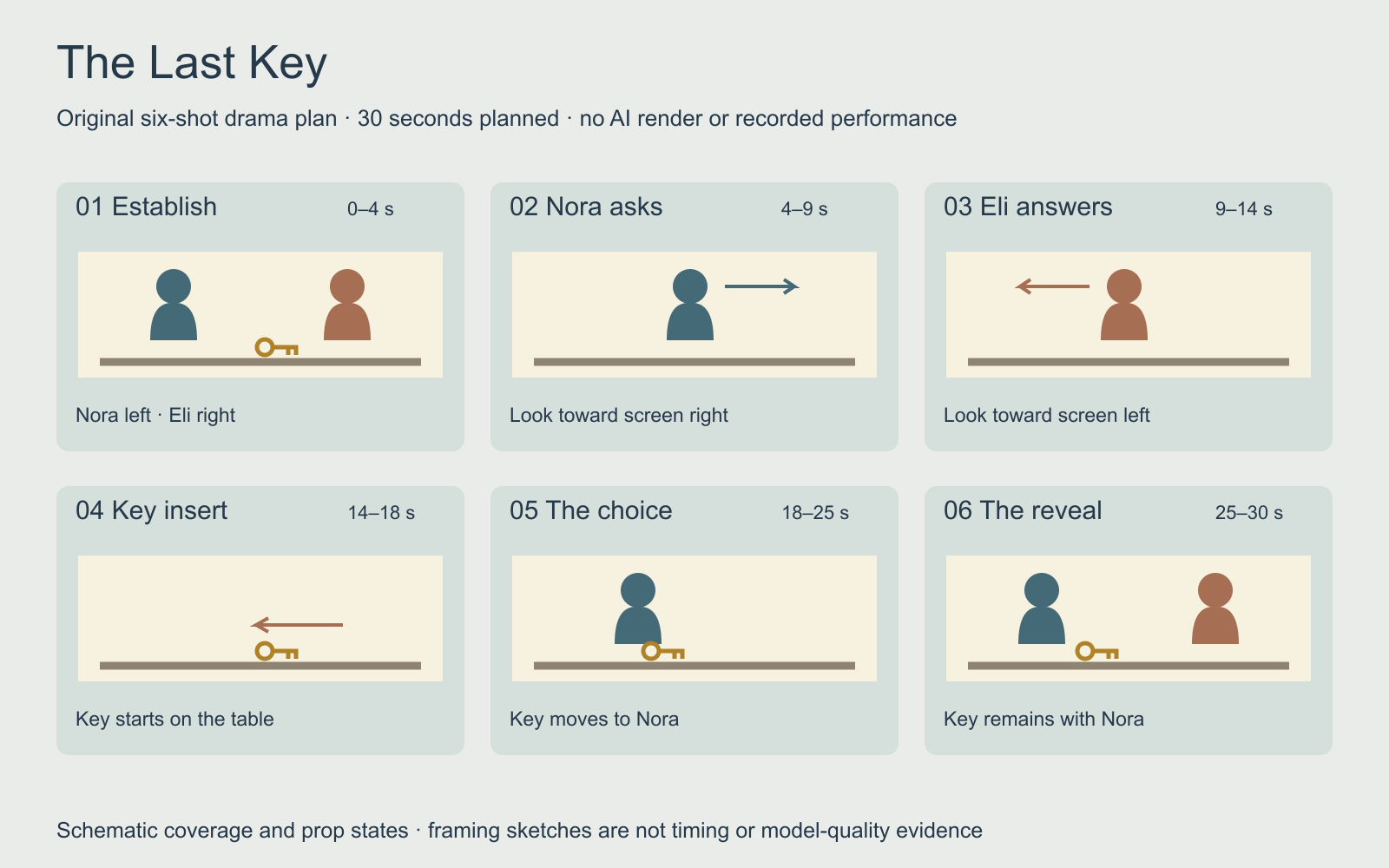
| Shot | Planned range | Job in the scene | Acceptance question |
|---|---|---|---|
| Master | 0–4 seconds | Establish the room and positions | Can the viewer locate both people and the key |
| Nora | 4–9 seconds | Ask the challenge | Does the line finish before the cut |
| Eli | 9–14 seconds | Introduce the evidence | Does the reverse preserve his eyeline |
| Insert | 14–18 seconds | Move the key toward Nora | Is there one key with a continuous action |
| Nora reaction | 18–25 seconds | Make the decision | Does she take the key with the planned hand |
| Return to master | 25–30 seconds | Reveal the new problem | Does the key remain with Nora |
Use the filled planning ledger with blank result columns to replace those allocations with actual take durations. The intended range and actual duration belong in different fields. If the final line needs longer, move the cut or shorten a pause rather than hiding the last word under an abrupt ending.
Keep character identity separate from character state
Identity includes the face and recognizable appearance. State includes the blue jacket, rust shirt, closed red notebook, brass key and who holds it after the insert. A take can preserve a face while changing the hand, clothing or object ownership. Review both layers against the accepted previous shot.
Prepare reference views for each fictional adult character and a room master before motion. Choose one side of the conversation axis and record the intended look direction for each close view. The multi-shot cinema guide contains an original axis diagram and a separate visual-only prompt exercise for practicing those cuts.
For a recurring series, keep a short state record at each episode ending. Nora exits this episode with the key; the notebook remains closed by Eli. Starting the next episode with Eli holding the same key needs a visible transfer or a deliberate story explanation. A shared character name is insufficient continuity direction.
Choose how the dialogue performance will be made
Decide whether the selected operation generates native dialogue, uses a supplied performance or animates a finished speech track. Those paths accept different inputs. Preserve speaker attribution, exact words, pronunciation and pauses in the brief, then inspect the real return for missing lines, swapped speakers and unexpected speech.
Runway’s official multi-character dialogue tutorial describes separate performance videos for each character and a compositing workflow around Act-Two’s single-character input. That is a specific performance-driven route, not evidence that every video model can direct two speakers in one request. We did not execute that workflow for this guide.
Record a rehearsal before producing the entire episode. Check whether the listener has enough time to react and whether the reveal is audible without captions. Add music after the dialogue works. For object sounds, use the sound-effects timing exercise to practice identifying a visible contact and matching its onset.
Build the film scene by scene in Clout
In Clout AI Cinema, start a film, set its aspect ratio and choose a shared visual style. Add scene direction, duration and camera movement for each planned shot. The Assets panel can provide a generated visual reference to select as a scene’s starting frame. Review that reference before making its motion take.
Generate a small pilot first: the master, one speaker view and its reverse. Inspect whether the cast, room and object state remain usable together. Then continue with the insert and reveal. Arrange accepted scenes in the storyboard and export when they are ready. Check the actual operation and displayed credit quote before submitting generation.
This plan does not assume automatic dialogue editing, a guaranteed face lock or a complete episode from one click. If the chosen scene operation cannot supply the required spoken performance, make the sound separately and assemble it in an editor. The project plan still gives each piece an explicit place and acceptance requirement.
Review the episode as a story and as an export
Watch the assembled sequence at normal speed. Identify the moment you understand the challenge, see the evidence and hear the reveal. Then inspect the cuts for eyeline jumps, object changes, duplicated actions and a reaction arriving before its cause. Keep rejected takes with a reason so a revision addresses a concrete defect.
Create captions from the accepted dialogue and align them to the actual final edit. Rehearsal timing and written shot allocations are not caption timings. Inspect the exported picture dimensions, duration and sound, and watch once with captions hidden to check whether the scene itself communicates the intended turn.
For the next episode, change the dramatic problem while preserving the accepted cast and state. Keep the answer to this episode’s question in the next outline. The result is a repeatable production process for an AI drama series, with each new scene earning its place through a specific action or reveal.


