

What Helios AI video refers to here
This guide covers Helios, the research video generation project linked from the official project page and PKU-YuanGroup repository. The name also appears in unrelated products and hardware searches. Use those official project destinations when you mean this video model.
The authors describe a 14B model with text-to-video, image-to-video and video-to-video tasks and minute-scale generation. Their March 2026 paper reports 19.5 FPS on a single NVIDIA H100. That is a reported result for its setup, not a promise for your laptop, hosted queue or total production time. This guide is current public-source research, not a claim of a new October launch or a tested speed comparison.
Choose the model and input route explicitly
| Choice | Documented distinction | Record for your pilot |
|---|---|---|
| Helios Base | Repository positions it toward quality | Exact checkpoint and inference setup |
| Helios Mid | Intermediate distillation checkpoint | Why this intermediate route is required |
| Helios Distilled | Repository positions it toward efficiency | Exact checkpoint and inference setup |
| T2V I2V or V2V | Different conditioning inputs | Prompt and owned reference roles |
The repository warns that Mid may not meet expected quality and notes limitations in image/video conditioning relative to text conditioning. Keep the current official instructions with the chosen checkpoint. Do not combine settings from a tutorial, another model and a different runtime into an assumed working recipe.
We have not installed Helios, downloaded its weights or generated a paid or local model result for this article. Follow the current repository environment and licensing guidance if you choose to run it. The production packet below is deliberately a planning record rather than an executable inference configuration.
Separate output frame rate from generation throughput
Output frame rate describes how frames are played. Inference throughput describes how quickly a particular system produces them. Queue time, initialization, transfers and export can add to the time a creator waits. Keep these measures separate when evaluating a long-video workflow.
For illustration, a 24-second deliverable played at 24 fps contains 576 displayed frames. That arithmetic does not predict how long Helios will take to produce it. It also does not specify the model's accepted frame counts or runtime configuration. Use the settings supported by your selected implementation and record the actual output metadata.
Time your own complete pilot from submission or local start to a usable file if turnaround matters. State the boundaries of that measurement. A warm inference pass and a fresh machine with downloads included answer different production questions.
Plan a continuous action that earns its duration
Our original Lantern Walk brief follows a fictional maintenance robot carrying an amber lantern along one corridor. The action is simple: walk, pause at a blue door, turn the lantern toward its number plate and settle. The lantern has one teal handle and a single pale front panel. Those details become continuity anchors.
The target is a continuous 24-second scene, divided into four planned six-second review windows. This is an editorial exercise, not a tested Helios duration setting. If the selected operation requires another duration, adapt the plan rather than treating these numbers as accepted API parameters.
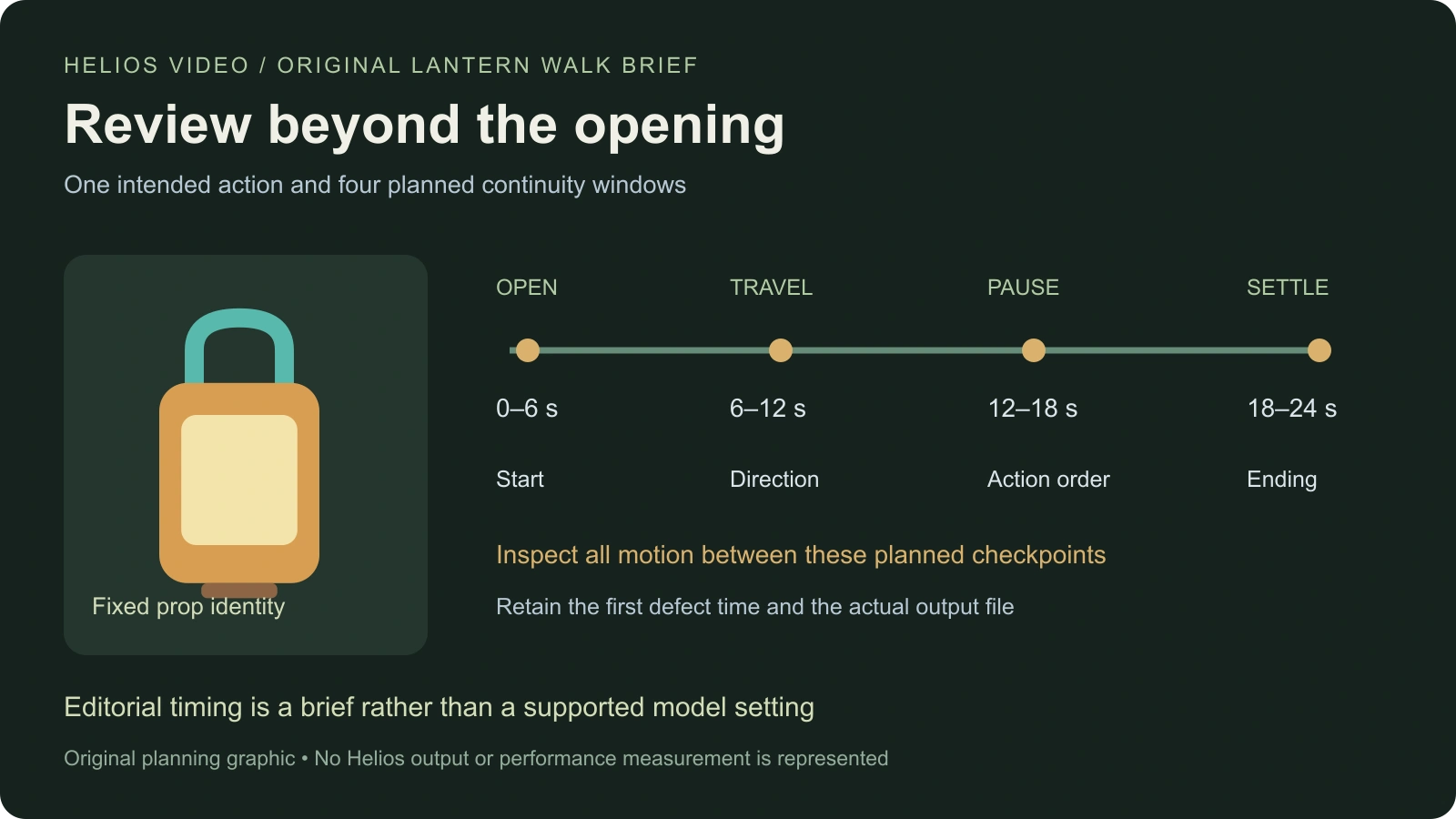
The timeline and lantern are original authored graphics. They show intended events, not extracted frames or generated output. A long-video claim requires review of the actual returned sequence; a planning diagram cannot demonstrate temporal consistency.
Assign opening interior and ending checks
| Planned window | Intended event | What to inspect in your real take |
|---|---|---|
| 0–6 seconds | Robot and lantern establish the corridor | Identity handle panel and starting location |
| 6–12 seconds | Travel continues toward the blue door | Walking direction and stable corridor geography |
| 12–18 seconds | Pause and illuminate the number plate | Action order prop grip and legible target |
| 18–24 seconds | Settle into the ending | No unexplained reset repeated event or abrupt finish |
Check the complete video at normal speed before relying on isolated frames. A contact sheet can expose changes in the lantern, but it can miss a sudden jump between sampled moments. Retain the timestamp of the first defect and inspect the surrounding frames and motion.
Use the same acceptance criteria for a short pilot and its longer revision. If the opening succeeds while the ending changes the prop or repeats the pause, record the partial success accurately. More elapsed footage does not automatically create more accepted story material.
Write a prompt that describes one readable event
An original maintenance robot carries an amber lantern with one teal handle and a pale front panel along a quiet archive corridor. The camera follows the same continuous walk. At the blue door the robot pauses, turns the lantern toward the number plate and settles. Preserve the lantern design, corridor layout and direction of travel through the ending.
This is an original creative brief, not a tested prompt. When using an owned image or video reference, state what that reference supplies and avoid asking for contradictory starts. Keep the source file and accepted wording beside the resulting take so you can distinguish input changes from output changes.
Use a simple static or restrained camera plan for the first review. Add complex choreography only after the basic action is usable. A quieter pilot makes it easier to locate whether a failure begins with a prop change, camera jump, repeated action or missing ending.
Choose a long take or an assembled scene deliberately
One model output and one finished scene are different production units. A scene may use a long take, separate short clips or an assembled continuous appearance. Decide which deliverable you need before treating duration as the main success measure.
For a camera-led discovery, use the one-shot film guide and its original continuous-camera reference. For an exchange between characters, the multi-shot workflow can provide clearer coverage. If a small label must be read, plan an insert shot instead of expecting the whole long take to explain it.
Clout is a separate creative platform. You can develop cast references and scene plans in Clout AI Cinema and evaluate its currently supported generation operations. This article does not establish that Helios is available inside Clout or that it outperforms another provider.
Keep a reproducible continuity record
Download the Lantern Walk production brief and blank continuity review ledger. Record the model, checkpoint, runtime, input route, source references, requested settings and actual output. Keep unsuccessful attempts and the reason they were rejected.
For speed comparisons, retain the hardware and measurement boundaries. For creative comparisons, retain the brief and accepted-file criteria. Do not use a paper's throughput result as the denominator for your actual production cost, and do not call a take consistent until you have inspected it through the ending.
The useful next step is a small complete pilot with inspectable output. Expand its duration or complexity only when the existing result satisfies the intended scene. For more planning methods, use the AI short drama guide and contact-sheet review workflow.


