For a separate context-image and simulated-world research direction, see the Mundo customized world model guide and original native proxy study.
What AnyGameRenderer is
AnyGameRenderer is a video-to-video research release for turning coarse game recordings into styled rendered video. The October 22 paper describes a MiniMax-H3 Ref2VA LoRA and evaluates how well entities retain their positions, timing and count. That makes it relevant to game footage and trailer production where a good-looking frame is insufficient if characters disappear or multiply.
The delivered artifact is rendered video. It does not by itself create an interactive game, engine logic, collision system or playable build. This guide supplies an original proxy-input exercise and identity ledger. We inspected official sources but did not install the runtime, download weights or run inference.
Watch the original proxy-count input
Watch this clip and view its details
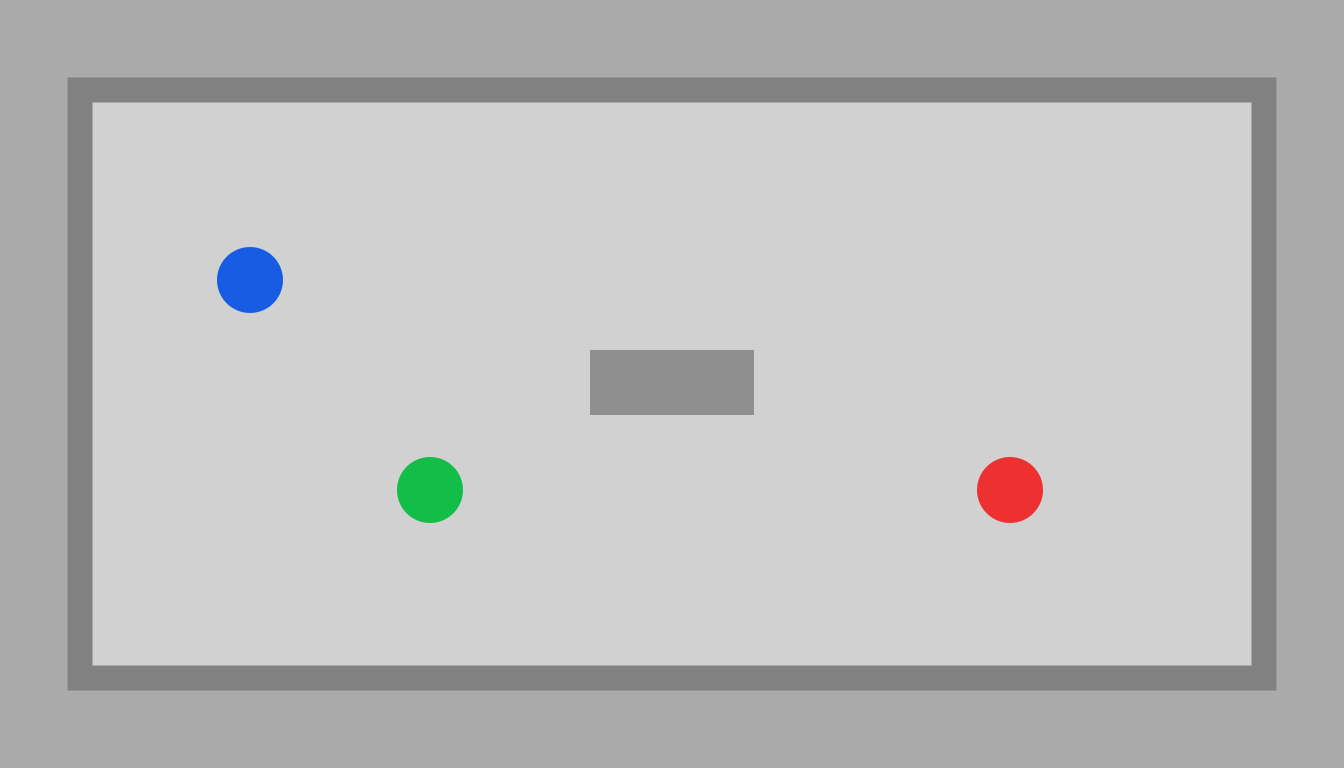
Open the standalone original input study for native playback and its source guide. The clean MP4 contains pale-grey geometry and flat blue, red and green proxies with no HUD, labels or effects. It is an authored two-dimensional fixture rather than footage from a shipped game or a model output.
Blue and red entities persist throughout. One green entity is present through frame 41 and disappears at frame 42. A different green entity appears at frame 83. The intended count therefore changes from three to two and back to three. The two green appearances share a class color but have separate IDs in the ledger; they are not claimed to be the same individual.
Use the per-frame ledger to define success
| Frames | Expected count | Identity event |
|---|---|---|
| 0–41 | 3 | blue-1 red-1 and green-1 |
| 42–82 | 2 | green-1 is absent |
| 83–123 | 3 | green-2 appears while persistent IDs remain |
The source geometry ledger records each present entity's authored bounding extents on every frame. It describes our known input geometry, not a detector's predictions or an evaluation of generated output. The scoped encoded-file report separately checks duration, dimensions and selected decoded color-presence boundaries.
If you run a permitted pilot, compare the complete returned video with that record. Inspect the count-change frames and neighboring frames, then inspect the persistent blue and red tracks. A correct total count can still hide an identity substitution or a changed path. Save notes for those failure types separately.
Prepare a clip for the current reference route
The official README recommends 1344×768 at 24 fps and describes pale geometry with saturated proxy colors, no HUD, text or effects. Its trained length is 124 frames, with input length handled in a specific frame pattern. Our source has exactly 124 frames at 24 fps, approximately 5.167 seconds. These file properties do not prove that every wrapper accepts it.
Keep the original recording before resizing or cropping. If a crop removes an entity, the model cannot be evaluated against the unmodified scene count without accounting for that change. Retain the frame-zero image and source coordinates beside your exact submitted file so the later comparison uses the same view.
Map classes and appearance before building a caption
The current repository provides a spec-to-caption workflow and a caption-writing resource. Follow its current schema for the exact release. Our short Three Two Three creative brief is an original production note, not a validated spec or executable request.
For a possible fictional arena treatment, map blue to a courier, red to an archive sentry and green to a helper class. Preserve the recorded paths and count changes. Describe the grey arena's intended materials and lighting without adding decorative crowds. The disappearing green-1 and arriving green-2 are deliberate events, not defects to be filled in with extra figures.
Keep style requirements subordinate to entity requirements when evaluating this pilot. A rich background or a new costume can make it harder to see a count error. Start with a readable visual treatment, then add complexity only after the complete returned clip preserves the required events.
Keep the adapter base runtime and terms together
The official model card identifies a 2.4 GB LoRA and separate base components rather than a self-contained small model. It places the adapter under the MiniMax-H3 Community License. Read the linked terms for the adapter and base before downloading or using them; a code repository license is not interchangeable with weight permissions.
The reference README also lists substantial GPU, system-memory and disk requirements. Treat its hardware and runtime figures as the authors' guidance for that implementation, not a speed or compatibility result established on our machine. A named model in a provider catalog does not prove that the provider exposes this exact adapter and caption path.
Read the reported benchmark at its actual scope
The paper reports temporal match improving from 50.9 percent to 62.9 percent against its zero-shot base across 59 held-out cases with 753 annotated entities. These are attributed research results under the paper's protocol, not a guarantee that every input entity stays correct in a production clip. They are not Clout measurements or an accepted-output rate for our fixture.
The project page shows several game genres and input forms. Use those demonstrations to understand the intended domain, then design your own review around the events that matter. We have not reproduced the authors' benchmark, run a live demo or compared a generated result with the supplied ledger.
Review audio and final delivery separately
Our source is silent. A future request for footsteps or ambience is a separate requirement. Inspect the actual returned tracks and listen through the complete file before describing it as sound-ready. Record the requested duration and the measured output duration separately as well.
Download the proxy MP4, source frame zero and blank pilot review sheet. Actual output, charge, turnaround and acceptance remain empty until a real permitted run is reviewed. For broader promotional assembly, use the AI game-trailer workflow. For a separate structural-rendering release, see SolarRenderer.
Clout AI Cinema provides a separate route for original scene and character development through its currently supported operations. This guide does not establish an AnyGameRenderer integration in Clout. Keep the creative plan, the rendering route and the actual delivery artifact explicit.