

For a separate structure-conditioned release with a downloadable original source clip, see the SolarRenderer workflow guide.
What FastH3 Omni is
FastH3 Omni is a reference-guided video-and-audio release announced on October 20, 2026 by the FastVideo team and Nuva Lab. Their release describes a distilled MiniMax H3 model that uses prompt, image, video and audio references. This guide covers that release rather than treating every older FastH3 checkpoint as the same package.
The broader Hailuo and MiniMax H3 guide covers the app and parent-model context. Here the practical question is narrower: which FastH3 runtime and reference arrangement should your pilot use? We checked public release and model documentation; we did not install a runtime, download weights or execute an inference benchmark.
Choose a runtime before choosing model files
| Route | Current official entry point | Keep together |
|---|---|---|
| Server BF16 release | FastVideo-FastH3-Omni-8-Step-V1 model card | Checkpoint and matching UniServe deployment instructions |
| Native ComfyUI package | FastH3-Omni-Comfy model card | Diffusion model text encoder video VAE and audio VAE |
| Local FastVideo OmniRef | Current local inference guide | Device profile compatible precision and required components |
The BF16 release card points server deployments toward UniServe and local Blackwell setups toward its matching QAD variant. A model name alone is not a complete runtime specification. Keep the exact repository or export, recipe and device context in your record.
The native ComfyUI card lists BF16 and INT8 diffusion choices with separate encoder and video/audio VAE components. Follow that card for placement and compatibility. Do not assume that a file prepared for one route can simply replace a differently formatted component in another.
Separate reported serving speed from your local pilot
FastVideo reports 5.6–11.9 times lower end-to-end latency across 27 matched workloads on eight GB200 GPUs, comparing full serving recipes. That is the authors' scoped result, not a measurement performed by Clout and not a universal consumer-device speed claim. A local install, a warm server request and a hosted queue have different turnaround boundaries.
If speed matters, record your actual hardware, runtime, reference mix, output settings and timing boundaries. Keep initialization and transfer costs visible where they affect the production decision. A faster request that produces an unusable character or incomplete soundtrack is still a rejected deliverable.
The release distinguishes numerical variants and device recipes. Treat a change of precision, decoder or offload policy as a new configuration to review. The local recipe is useful precisely because hardware and component choices matter; it should not be replaced with a generic “runs anywhere” assumption.
Assign a role to every reference
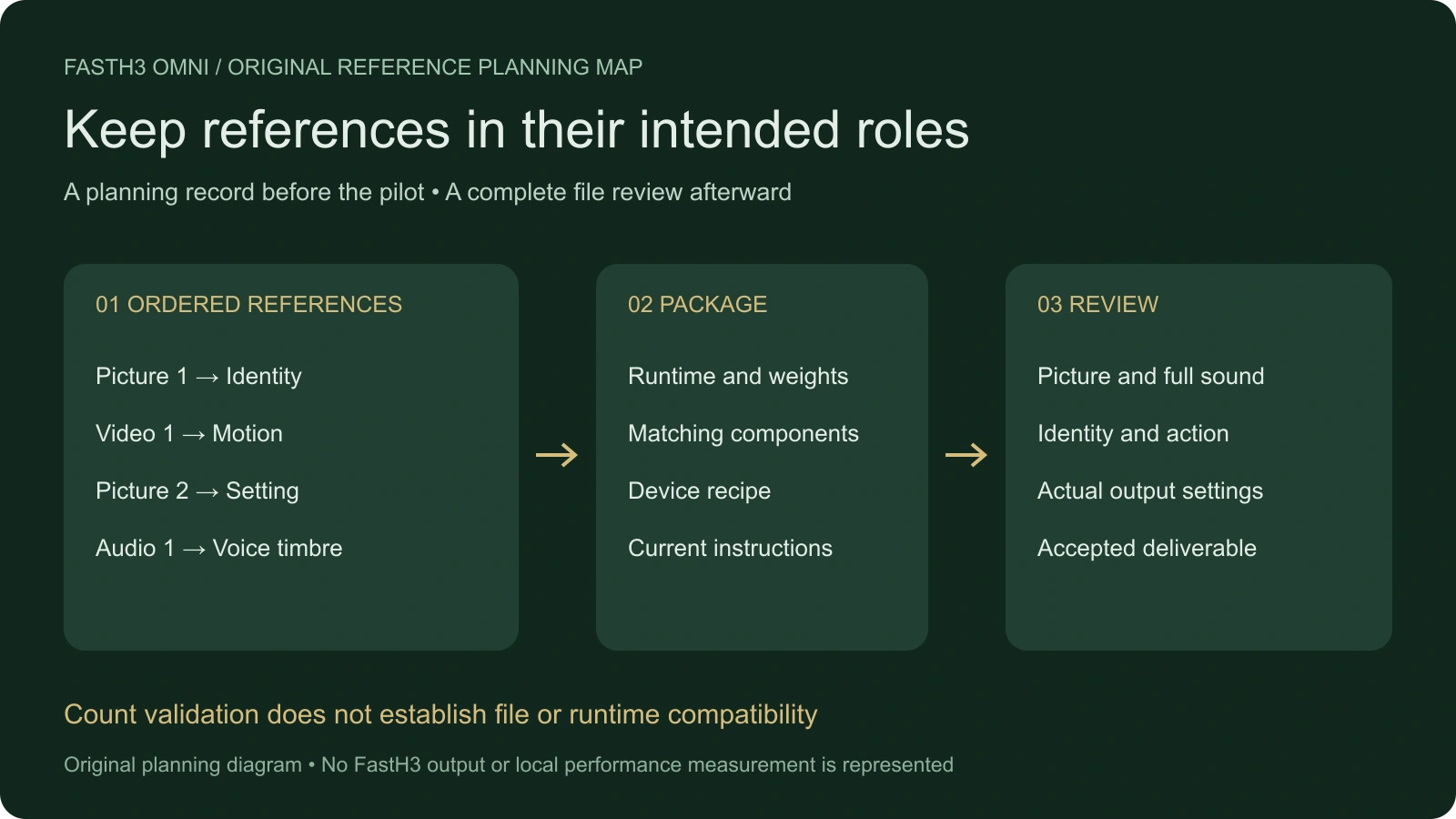
Our original pilot is Lantern Handoff. One fictional archive clerk lifts an amber lantern, turns toward a colleague and says, “Check the log before you move it.” The short line and single prop action give the pilot a specific picture-and-sound acceptance target. This is an untested creative brief, not a demonstrated FastH3 output.
An accepted portrait can specify identity. A room image can establish the environment. An owned movement clip can provide a motion reference, while an approved voice recording can supply a timbre reference where the selected route supports it. Keep those roles distinct instead of treating every source as interchangeable visual inspiration.
The diagram is original authored planning artwork. It does not depict a submitted request or a model result. Use your own accepted source assets and the current runtime instructions for the actual input mapping.
Use the local reference-order planner
The tool above preserves the order you enter and numbers each reference type independently. For example, an image, a video and another image become Picture 1, Video 1 and Picture 2 while retaining their global sequence. Labels and roles remain editable planning notes.
The current local OmniRef guide documents up to nine images, three videos and three audio clips, with twelve references in total. Those are the count checks applied here. The planner requires at least one reference for this reference-order exercise; it does not define every possible text-only operation.
A count-valid plan is not a validated model request. The tool does not read media, inspect duration or codecs, confirm rights, check GPU memory or verify that your installed runtime accepts the arrangement. No files are uploaded and no model call occurs. Exported JSON is explicitly a planning record with empty actual-output and acceptance fields.
Keep clip requests distinct from measured output
The local guide lists frame choices of 124, 243 and 362 for its five-, ten- and fifteen-second modes at 24 fps with stereo audio. Follow the recipe's actual frame contract rather than substituting a generic seconds-times-fps calculation. The planner does not choose or rewrite those inference settings.
After a real run, inspect the actual file's duration, picture dimensions and audio tracks. A requested length and the delivered container metadata answer different questions. The video-and-audio track inspection workflow helps distinguish a playable picture file from the soundtrack you intended to receive.
Play the complete file with sound. Confirm the words, voice assignment, prop interaction and ending. An audio track can exist while containing the wrong words or a truncated line, so metadata is only one part of acceptance.
Prepare the original Lantern Handoff brief
Use the accepted original clerk and archive references. The clerk lifts one amber lantern by its teal handle, turns toward the agreed colleague position and says the complete line, “Check the log before you move it.” Keep the lantern's single pale front panel and the room layout consistent. End with a readable hold after the sentence.
Map this creative brief to the current prompt syntax for your chosen runtime. It is not a copied API payload or an installation command. Begin with the smallest reference set that expresses the identity, movement and voice you actually need, then inspect the full returned take before adding more complexity.
If the scene needs a listener response, use the reaction-shot workflow. If separate views carry one action, use the action-continuity study. A multimodal generation route does not remove the need to make those scene and editing decisions.
Record rejected attempts and accepted work
Download the Lantern Handoff pilot brief and blank pilot ledger. Record the exact model package, runtime, reference order and settings beside each actual output. Retain rejected attempts and their first visible or audible defect.
Use cost and timing figures from your actual route. Open weights do not establish free hosted inference, unlimited usage or a particular hardware budget. This guide does not reproduce another provider's promotional “unlimited” framing as a tested production claim.
Clout is a separate creative platform. You can develop original cast references and scene plans in Clout AI Cinema and use its currently supported visual operations. This article does not establish a FastH3 integration in Clout. Choose the route for the work you need and review the file you will publish.


