

For supporting coverage that leaves and returns to the main action, use the cutaway-shot study. For a sharp tonal contradiction, use the smash-cut workflow.
What a reaction shot means in film
A reaction shot shows a subject responding to another action or line. Filmmakers Academy's glossary defines it through that response. The subject's face, posture, attention or next action can make a change in understanding visible. A close view of someone merely looking attractive does not supply a complete dramatic reason for the cut.
For an AI drama, plan the listener as well as the speaker. The important information may be what a character understands while someone else talks. This guide works through an original archive scene and a generated still illustration. It is a production-planning exercise, not a recorded acting performance or an AI video benchmark.
Give the response a specific trigger
Our fictional clerk Mina expects a routine parcel pickup. Her unseen colleague says, “That parcel was marked delivered yesterday.” Mina notices the parcel and its teal signal, recognizes a discrepancy, then decides to check the log. The response has a job: change the scene from routine work to a question that needs an answer.
Keep three states separate. Before the line, Mina expects an ordinary task. The line and parcel create the trigger. Afterward, her attention and small shift in expression should make the changed understanding readable. A big surprised face is not automatically a better response than a restrained one.
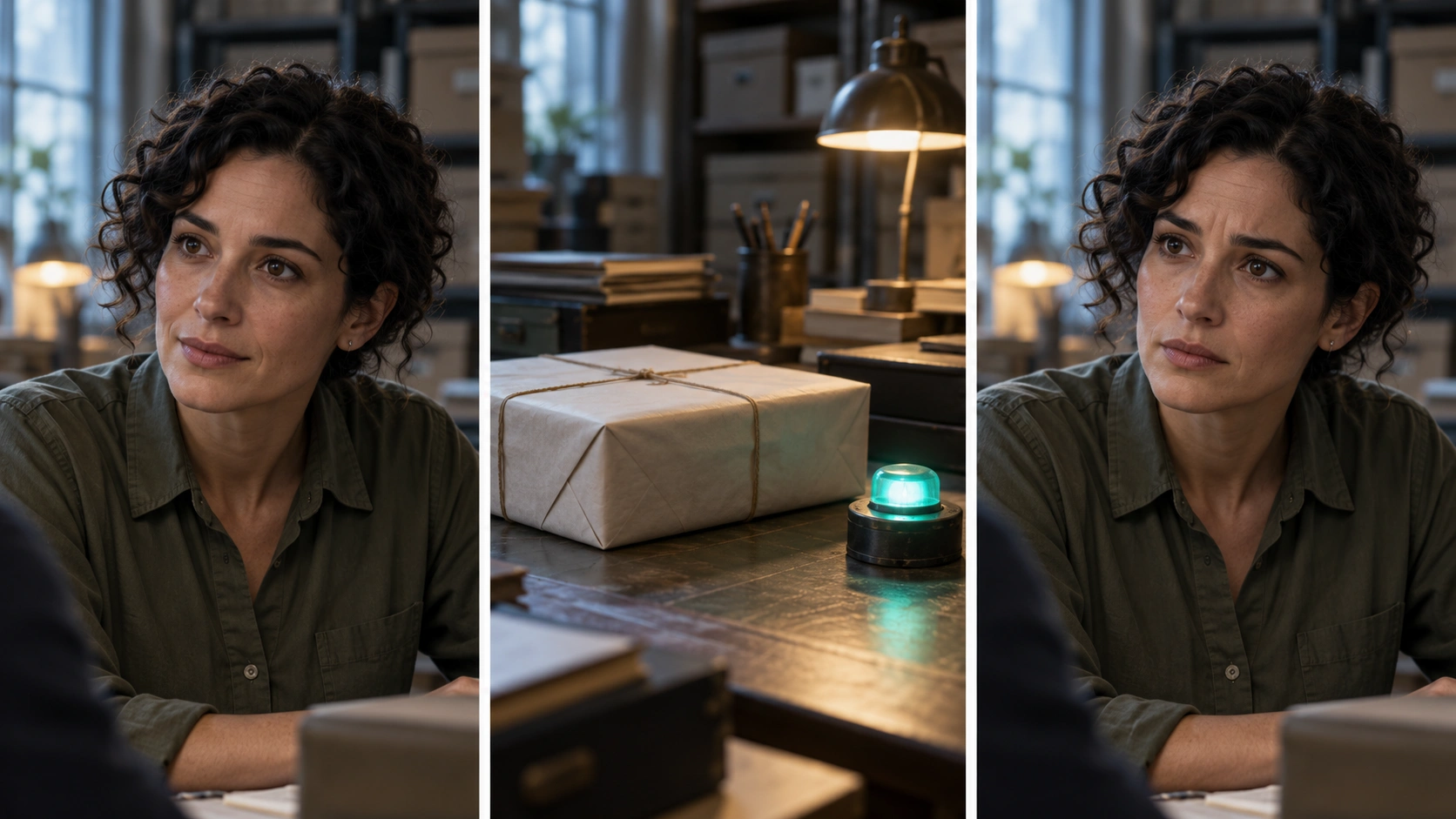
This original illustration was generated with the built-in image-generation tool. Its three panels show a listening view, a trigger detail and a proposed response. The face and setting are fictional. It is a still reference, not consecutive extracted frames, a completed scene or FastH3 output.
Plan the change before choosing the expression
| Beat | Mina scene | Acceptance question |
|---|---|---|
| Before | Routine pickup and attentive listening | Is the starting belief understandable |
| Trigger | Delivery line and parcel detail | Has the viewer received the relevant information |
| Response | Restrained concern and renewed attention | Does the behavior fit the specific discovery |
| Next decision | Check the log | Does the response lead somewhere in the scene |
Write the change in a sentence before adding emotional adjectives. “She realizes the record and object disagree” gives the shot a more useful target than “make her intensely cinematic.” Keep the original wording and accepted reference beside the take so a later review can explain what succeeds or fails.
Different characters may respond differently to the same information. Choose the response for this character and scene. Avoid treating a single facial pose as a universal label for fear, guilt or recognition. Judge the sequence and the character's next behavior.
Reaction shot versus close-up reverse shot and eyeline match
| Term | What it describes | How it can apply here |
|---|---|---|
| Reaction shot | A response to a dramatic event | Mina recognizes the discrepancy |
| Close-up | Framing scale | A tighter view makes a small change inspectable |
| Reverse shot | Another side of an established exchange | Coverage returns from colleague to listener |
| Eyeline match | A look connected to its target | Mina's attention connects to the parcel |
A shot can do several jobs at once. Adobe's shot-and-angle overview discusses reactions as opportunities to reveal character information beyond the speaker. Decide whether the scene needs that response, a readable object detail or wider spatial context.
Use the eyeline workflow for the look-to-parcel relationship, the insert-shot guide for the detail and the multi-shot plan for the surrounding exchange. This page focuses on the response beat inside that coverage.
Prepare listener coverage as its own AI shot brief
Identity and setting — Keep the accepted fictional adult clerk, short dark curls, olive work shirt and archive lighting. Preserve the chosen partner position and the room layout. Use the reference controls actually supported by the selected operation.
Starting behavior — Mina listens with an ordinary attentive posture. She is not speaking. Leave useful picture before the recognition so the editor can choose when the response begins relative to the complete line.
Response and ending — After the information lands, a small pause and a restrained change in attention suggest the discrepancy. Hold a usable ending before a separate decision or movement. This is an original creative direction, not a tested timing command or a guarantee that a generator will produce the intended performance.
Start with a quiet camera when the response itself matters. A dramatic camera move, extra prop action and exaggerated face change can compete for attention. Add complexity only when you can still understand the character's changing knowledge.
Choose where the line and picture should separate
The response may begin while the colleague's line continues. Retain the complete recording and choose the picture cut from the actual performance. If the viewer sees the concern before the important words arrive, decide whether that early knowledge is intentional.
The J-cut and L-cut guide demonstrates sound leads and tails with an audible comparison. A listener can provide coverage under another speaker's words, but shifting a visible speaker's audio away from their mouth movements introduces a different problem.
Try a direct cut and a short overlap using the same accepted material. Watch the sequence at normal speed before inspecting isolated frames. If the response feels unmotivated, check whether the trigger was clear before asking for a stronger expression.
Review the response as part of the scene
- Trigger — The viewer hears or sees the information the response depends on.
- Character — Identity, wardrobe and scene geography remain consistent.
- Behavior — The response fits the intended change rather than a generic emotion prompt.
- Timing — The edit preserves complete words and gives the beat useful space.
- Next action — The scene progresses after the response instead of repeating the same information.
Record the first moment that fails and the reason. A changed face, wrong look direction and premature response require different revisions. Keep accepted takes and references so you can revise one failed beat without rebuilding the whole conversation.
A comprehension check with another viewer can help: ask what changed for Mina without first explaining the scene. No such audience study was run for this article. The illustration establishes the proposed plan, not a measured emotional effect.
Download the original reaction coverage packet
Use the Marked Delivered scene brief and blank reaction review sheet for your actual takes. The original illustration prompt documents the generated still reference and its intended composition.
Develop original cast references and scene plans in Clout AI Cinema, then choose the currently supported operation for each visual or performance task. Review the actual export before treating a response as accepted. For a full episode, place this beat inside the AI short-drama workflow.


