

What an insert shot does
An insert shot gives a detail its own view inside a scene. A card, switch, phone message, key or small action can carry information that a master shot cannot make readable. Filmmakers Academy's glossary describes inserts as close views of details, commonly objects. The purpose in our exercise is precise: let the viewer read a destination before the character acts on it.
For an AI film, creating a tighter image is only part of the work. The prop must remain the same prop when the edit returns to the wider view. This guide works through an original blue card marked ROOM 8 and provides a brief and review sheet for your own scene. The examples are authored graphics, not claimed model results.
Choose the detail that changes the scene
In The Blue Card, a courier robot notices a card on a desk. The master establishes the robot, desk and card. The insert reveals ROOM 8 inside the blue border. The return shot motivates the courier's next decision. If the audience can already read the destination comfortably in the master, test whether the extra cut earns its place.
Write the insert's job in a sentence: the viewer must discover the room number. Avoid starting with a list of decorative lens adjectives. A polished card that says ROOM 3 fails this brief. A perfectly preserved card that passes too quickly to read also fails.
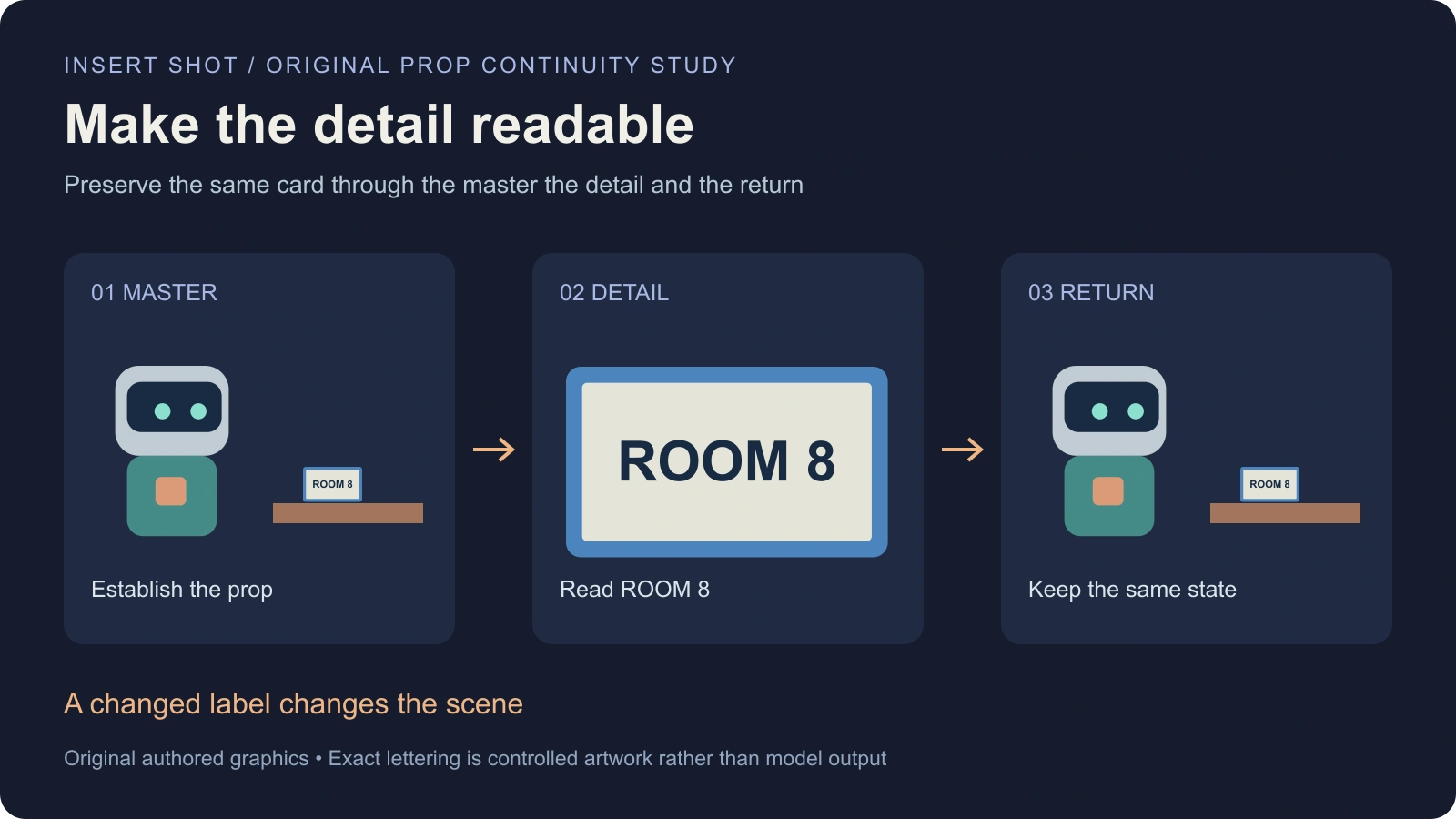
The diagram deliberately changes shot scale while keeping the card border and lettering consistent. It is a schematic editorial study, not a camera render or evidence that a generative system can preserve text. The exact label is authored in the artwork so the continuity requirement can be inspected directly.
Insert versus close-up cutaway and B-roll
| Term | Main distinction | Example in this exercise |
|---|---|---|
| Insert | Specific scene detail receives its own view | ROOM 8 card becomes readable |
| Close-up | Describes a tight framing scale | Robot face or card fills the view |
| Cutaway | Moves attention away from the immediate main action | A separate archive corridor view |
| B-roll | Supporting footage used around the main material | Additional desk and archive coverage |
These labels can overlap in practical production language. State what the shot must communicate instead of assuming the term alone supplies a complete brief. Descript's insert-shot guide discusses using details to direct attention and support an edit. Our production packet narrows that idea to a single prop with exact information.
An insert can also serve as the target of an eyeline match. In that case, review both the readability of the card and whether it plausibly follows the character's look. A prop shot can satisfy one requirement while failing the other.
Build a prop reference that survives the change in scale
Approve the card's border color, corner shape, lettering, orientation and relationship to the desk. Keep one reference as the source of truth. If the wider shot already contains an accepted object, preserve that image alongside any separate clean prop art.
Use a card large enough for the planned framing without relying on invented details during enlargement. If the story depends on exact text, prepare that lettering as a controlled graphic. Treat background generation and final text assembly as separate steps when the selected workflow cannot preserve the label reliably.
For a product scene, replace ROOM 8 with the approved variant, packaging or instruction. Preserve the features that affect the viewer's understanding. Do not let an insert silently change the number of buttons, cap shape or product color simply because the new image looks more attractive.
Write separate master detail and return briefs
Master — An original courier robot stands at the left of an archive desk. A blue-bordered card lies on the desk at a fixed angle. Establish both the character and the card without requiring the audience to read the small lettering yet.
Detail — Frame the accepted card tightly enough to read ROOM 8. Keep its border, corner shape and orientation. Preserve the desk material and lighting direction. Keep hands out unless a hand action is part of the accepted source; introducing fingers adds another continuity problem to review.
Return — Reuse the established robot and desk arrangement. Keep the card in the same state unless a planned action moves it. The character's decision follows the newly revealed information. These briefs describe creative intent and need adaptation to the actual operation's supported inputs.
Use Clout AI Cinema for the scene plan and Image & Video for supported visual work. Check reference support and the current quote before submitting. An authored prompt does not establish that any model will reproduce exact geometry, typography or a matched return view.
Review the cut in and the cut out
| Boundary | Keep track of | Reject when |
|---|---|---|
| Master to insert | Card identity and intended detail | The destination or prop changes |
| Inside insert | Lettering orientation and reading time | Text mutates or cannot be read |
| Insert to return | Object state and surrounding action | The card jumps or an unplanned action has occurred |
| Final delivery | Crop size and export clarity | The intended detail disappears at viewing size |
Watch the three shots in sequence before approving them separately. A large card can hide a bad transition by occupying the full frame, but the return can expose an impossible hand position or object move. Record the first visible problem and its location so the next revision has a specific purpose.
If the insert covers a trim in the main action, check that the remaining movement and sound still form a plausible event. A detail shot is not an automatic continuity repair. Preserve source handles and review the return action instead of assuming the audience will miss a jump.
Use timing to serve comprehension
Read the label at the actual delivery size. A desktop preview can make a card seem clearer than it will be in a vertical phone crop. Check the area occupied by the label, the contrast and whether overlays or captions cover it.
Start with an editorial timing target, then replace it with a decision based on the actual assembled scene. The download intentionally leaves accepted duration blank. There is no universal one-second or two-second rule for every detail, language, font and dramatic pace.
For spoken scenes, listen through the cut. Dialogue may continue over the detail, but the complete word and room tone still need to work. Keep intentional sound transitions distinct from accidental clipping. The audio ducking guide addresses level changes when a detail also introduces an important sound cue.
Download the original insert packet
The ROOM 8 insert brief lists the three views, exact prop requirements and review criteria. The blank insert review sheet records the accepted source, detail take, text decision and outgoing continuity. It contains no invented job ID or successful-output score.
Use the short drama workflow to place the detail inside a dramatic turn and the contact-sheet guide to compare candidate prop frames. For an extended generated take, the Helios long-video planning guide focuses on checking the beginning, interior and ending rather than assuming an accepted opening remains correct throughout.


