

For performance-driven conversations, use the Runway Act-Two dialogue and compositing guide.
For a two-character action assignment, use the fight-scene blocking and causal-order guide. For brightness variation after an export, use the local deflicker preview and review workflow.
Plan a connected sequence rather than unrelated clips
Multi-shot AI video generation creates or assembles several shots into a sequence with cuts. The production challenge is preserving what should continue across those cuts: the character, location, action, prop state and screen direction. A model can return multiple shots while still changing the story’s physical facts.
Choose a small sequence with a clear beginning and ending. This guide supplies an original four-shot visual brief and a cut-review ledger. It also uses a dialogue-axis sketch to show why a reverse view needs spatial direction. These are authored planning references, not generated footage or a quality comparison.
Choose between a combined request and separate scene takes
A combined multi-shot operation can plan several cuts inside one returned video. Separate scene generation gives each shot its own input and replacement decision before assembly. Both can be useful. Choose based on how much control the sequence needs, what the selected interface accepts and what must remain editable afterward.
| Production path | Useful starting task | What to inspect |
|---|---|---|
| Automatic multi-shot plan | Explore a short visual sequence | Actual order, cuts and added events |
| Per-shot direction in one request | Request a specific progression | Whether every requested beat is represented |
| Separate scene takes and an edit | Replace one failed performance or prop action | Continuity at each assembly boundary |
Runway’s official Multi-Shot Video help describes Auto and Custom modes, an optional starting image and a maximum of five shots. It requires credits; supported controls and the selected settings must be checked before submission. This guide does not establish that every model or API shares those controls.
Higgsfield’s official short-film pipeline connects storyboarding, character identity, shot generation and audio. Treat provider continuity claims as capabilities to test in the actual output. The existing Cinema Studio guide covers that product-specific route; this page owns the broader sequence-planning task.
Assign one change to each shot
The original exercise is The Unsent Letter. A fictional adult courier notices a cream envelope, approaches the table, opens it and silently reacts. The courier wears a blue coat and begins with a brass key in the right hand. Each shot changes one part of the scene while the remaining facts continue.
- Wide view: the courier notices the envelope on the table
- Medium view: the courier approaches from screen left
- Insert: the left hand opens the envelope while the right retains the key
- Close view: the courier reads silently and looks toward screen right
The downloadable visual prompt brief records the shared room, lighting, props and ending. Its 12-second total is an editorial target, not a tested model duration. Translate the prose into the actual interface’s supported shot and duration controls. It is not a ready-to-submit API payload.
Keep a common continuity block and a local action for each shot. Avoid repeating a whole plot in every field or adding a different costume adjective on each line. If a prop must change state, say where that change occurs and what the following shot inherits.
Use screen direction to make the reverse understandable
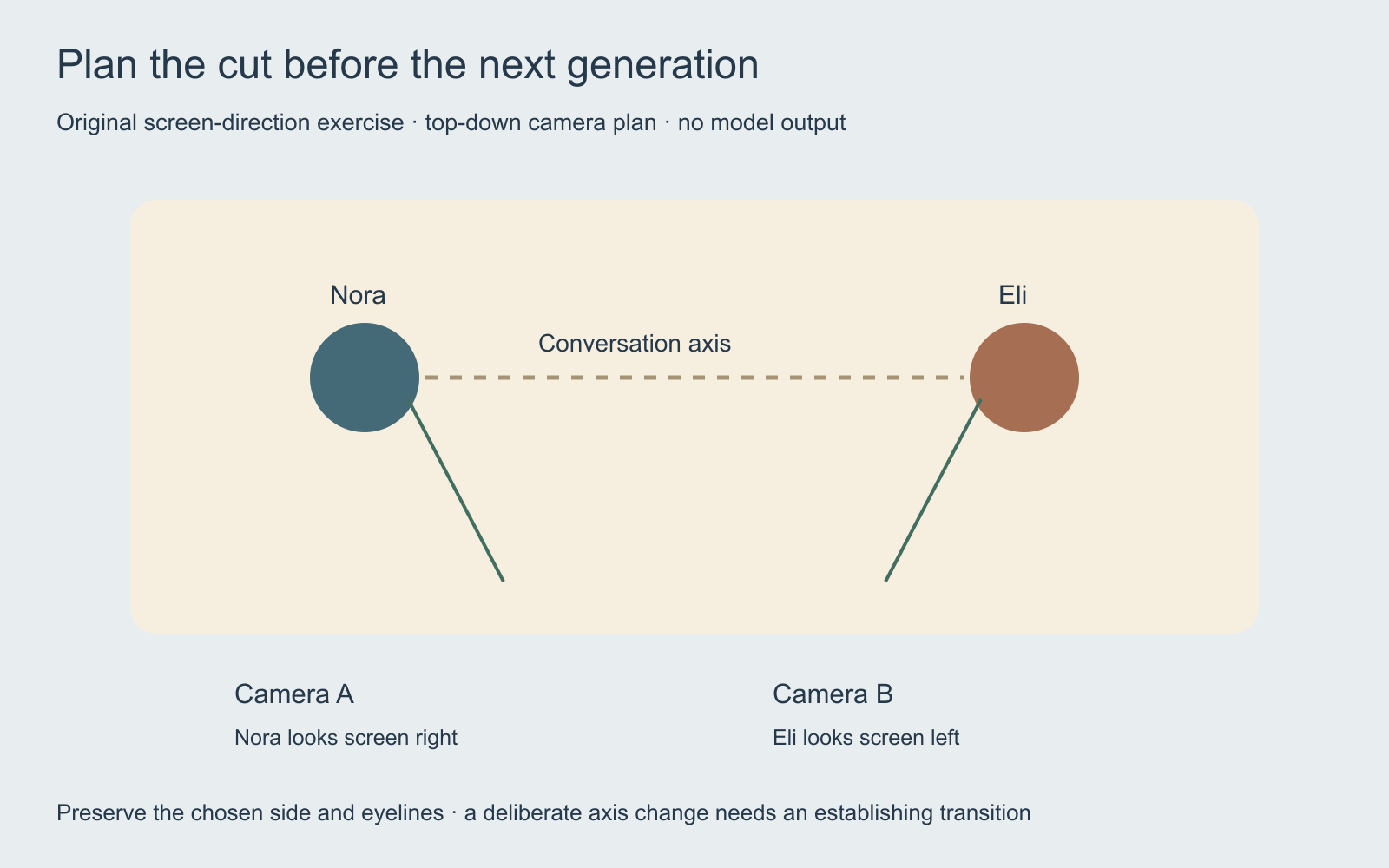
In this sketch, Nora and Eli face each other across a table. Keeping the selected cameras on one side of their conversation axis supports the planned complementary eyelines: Nora looks screen right and Eli looks screen left. Record those intentions in the shot brief instead of requesting only a cinematic reverse angle.
A deliberate axis change can be a creative choice. Establish the new relationship through an understandable transition and review the actual cut. An accidental reversal can make both people appear to look away from each other or make the next movement seem to change direction. The short-drama production packet applies the sketch to an original two-speaker scene.
Inspect the first frame before extending the motion
Approve the opening composition and reference assets before creating a long sequence. Check who is present, their positions, the prop count, available space for movement and the intended aspect ratio. Motion cannot be assumed to repair an opening image that assigns the key to the wrong hand.
For separate shots, inspect the end state of the previous take before directing the next. A carried last frame can be useful for continuous action, but a new angle may need a separately reviewed reference rather than an accidental camera teleport. Compare the new view against the room plan and accepted character references.
In Clout AI Cinema, scenes have their own direction and camera movement within a film project. Generate or select a starting reference, review each scene, arrange accepted takes in the storyboard and export the ready sequence. Inspect the displayed credit quote for the actual request. This does not establish that Clout exposes Runway’s Multi-Shot app.
Find the real cuts and record the returned state
After generation, identify the actual cut points rather than assuming the requested shot durations were followed. Record what occurs in each returned segment. A four-part prompt may produce a merged action, reordered insert or extra scene. Decide whether the returned sequence still communicates the intended event before accepting it.
The blank cut-review ledger records source references, actual start and end times, character match, prop state, screen direction and rejection reason. For The Unsent Letter, inspect the key-hand assignment and whether the envelope is already open before its opening insert. Those are specific observable facts, separate from whether you like the visual style.
Review sound as a separate layer. A visual-only result may need a soundtrack; a native-audio result may contain unrequested speech. Listen across the cut for interrupted words, room-tone jumps and an effect continuing into an unrelated shot. Use the Foley workflow guide for a focused sound-graph review.
Replace the failed beat and preserve the accepted sequence
If one shot changes the prop or character, preserve the accepted surrounding takes and identify the smallest production unit the tool lets you replace. That may be a scene, an edited segment or a whole combined output. Record the replacement boundary so the next review covers both adjacent cuts.
Finish with a normal-speed watch of the exported sequence and a separate inspection of its dimensions, duration and audio. Keep the requested plan, accepted references and actual files together. Multi-shot generation is useful when the connected scene survives that review, not merely when the returned file contains several cuts.


