

For a complementary production step, use our Foley spotting and original timing exercise
Build a Foley workflow around the actual connected clip
A HunyuanVideo-Foley ComfyUI workflow combines the model, a community integration, a graph, source picture and a running environment. Before testing sound, identify which clip actually reaches the generator. A visible loader or compiler can sit in the canvas without feeding the operation you are about to run.
Tencent’s research repository describes video-conditioned Foley generation and lists ComfyUI integrations as community contributions. This guide examines the if-ai integration. Its graph observations are tied to a recorded revision; no nodes were installed, weights downloaded or GPU inference performed for this guide.
Inspect the published example before changing a wire
Our review of the pinned example JSON found 18 nodes and 18 links. The generic structural audit found no broken graph references. Separately, tracing the advanced generator’s inputs found its optional compiled-model input unconnected. These observations answer different questions: references can be internally consistent while an optional branch is unused.
| Connection being reviewed | Published graph observation | Next review action |
|---|---|---|
| Generator video input | LoadVideo node 1 through a reroute | Inspect that loaded clip and its accepted trim |
| Generator fps input | GetVideoComponents node 21 through a reroute | Compare its timing with the same source picture |
| Generator images input | No link | Do not assume another image loader supplies it |
| Generator compiled_model input | No link | Decide whether the compile branch is intended for this run |
The separate VHS loader branch does not reach the generator’s connected video or images inputs in this revision. Choose the intended source explicitly when adapting the graph. Changing a filename on a disconnected branch does not establish that the generator processes that file.
Compare the published and proposed compile connections
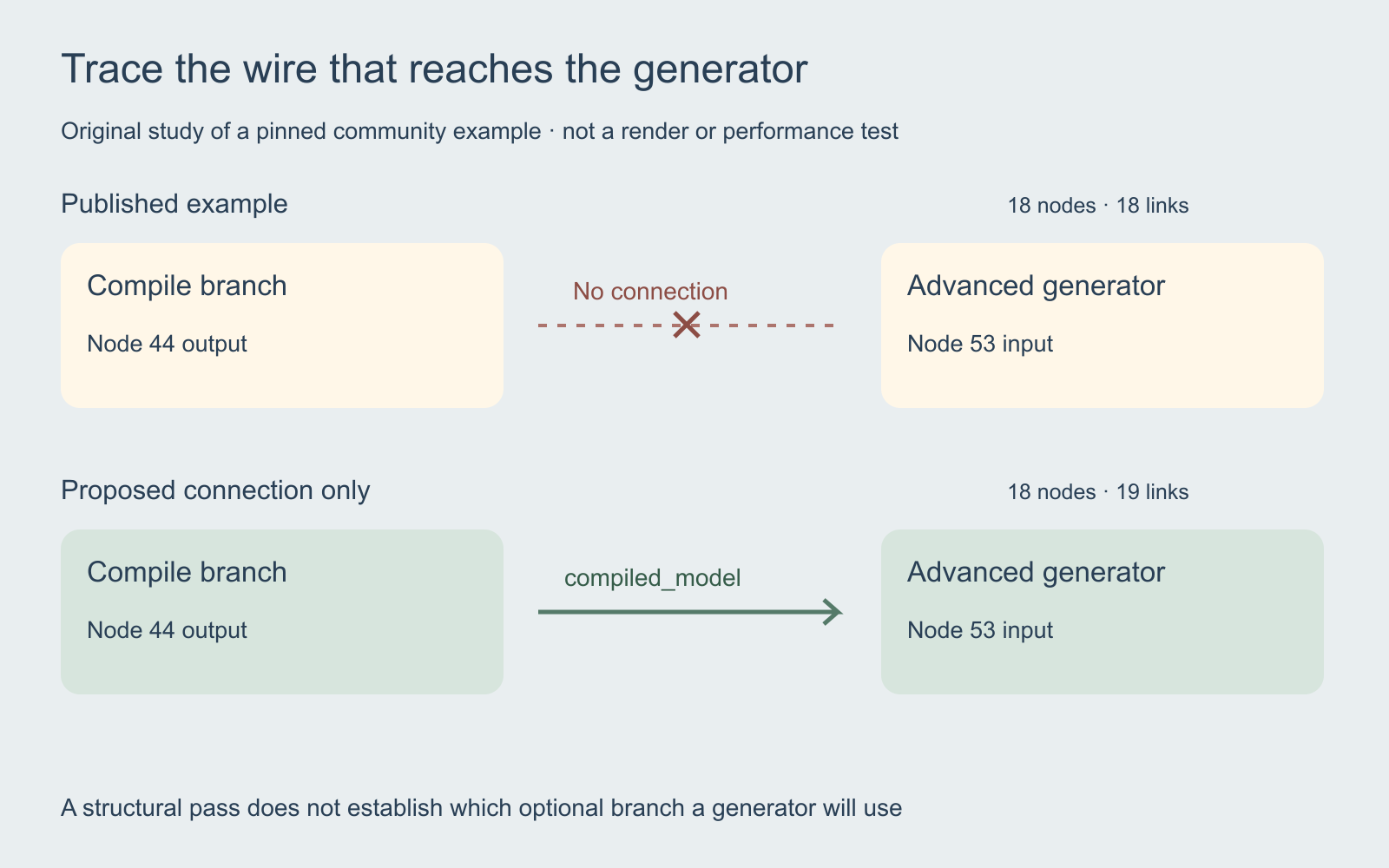
The compile node is 44 and the advanced generator is 53. The published branch report records no compiled source. In an in-memory copy, we added a connection from node 44 output slot 0 to node 53 input slot 2, with reciprocal references. The proposed branch report records 18 nodes and 19 links and identifies the compile node as the source.
This is a proposed connection, not a tested fix or a complete replacement workflow. A correct tuple reference does not validate installed socket contracts, model compatibility or execution. Keep the original export and save an edited copy under a different name before testing the intended branch in your own environment.
Understand the fallback before calling the graph broken
The pinned node implementation accepts an optional compiled-model input. When supplied, it uses that model information. Without it, the advanced generator clears its stored model state and calls the base generation path, which can attempt loading models separately. Therefore the missing optional wire alone does not prove rendering is impossible. It also does not establish that visible compile settings affect the generator.
Record the path you intended to test. If comparing compiled and fallback behavior, preserve the source picture, prompt and selected settings between runs and inspect actual logs. Only a completed measurement in the recorded environment can support a speed or memory claim. The graph reports here provide no such measurement.
Trace your export with the read-only branch script
The original Python branch-review script reads a UI workflow export and follows tuple-style links through reroute nodes. It prints the advanced generator’s video, images, fps and compiled-model sources. It uses the Python standard library, does not import the integration or execute a graph, and makes no network requests.
python3 hunyuan-branch-review.py your-workflow.jsonUse an export up to 1 MB with at most 1000 nodes and 5000 links. This narrow tracer is not a schema validator: run the local generic workflow checker for duplicate IDs and broken reciprocal references first. Both tools leave installed-node behavior, port types, checkpoints and execution for separate inspection. API prompt JSON is outside this tracer’s supported format.
Separate a returned placeholder from generated sound
Read the status alongside every returned asset. The integration’s exit helper can return a one-sample silent waveform when its silent-audio option is enabled. The generation code uses the helper for disabled and failed operations. That placeholder is not a full-duration successful soundtrack.
Inspect the actual audio duration and listen before accepting a take. Preserve any error text and the affected run. A preview, an audio-shaped object or a file path is insufficient evidence of an accepted Foley generation. In a dialogue scene, restore the spoken track before deciding whether the effect leaves enough space for the line.
Test one scene cue before a full drama sequence
Choose one short accepted shot: a character closes a notebook, looks toward the door and pauses. Give the notebook contact a cue ID. Specify the material, distance and desired tail, then listen for extra contacts or voices. Keep the room bed, dialogue and music on separate tracks so one effect can be revised without rebuilding the scene.
Compare the sound against the picture that actually entered the graph. Inspect its onset and ending across the next cut, then return to normal-speed playback. The original sound-sync study demonstrates a deliberately delayed effect using authored reference audio. It is useful for practicing review, but is not a HunyuanVideo-Foley output.
Keep an environment and acceptance record for each run
Use the blank connection-review ledger to record the graph revision, source branch, intended change, installed-node inventory, environment, status and inspected output. Keep unsuccessful attempts and rejection reasons alongside accepted takes. The ledger contains no invented GPU timings or quality scores.
Follow the integration’s current installation instructions for the Python environment that runs ComfyUI, and check the exact model’s applicable terms before production use. For a new Clout project, explore AI Cinema or Image and Video and inspect the available operation and quote. This guide does not establish a HunyuanVideo-Foley integration inside Clout.


