For a separate text-to-video experiment, inspect the SANA Video guide and profile checker before choosing a checkpoint or starting-image assumption.
For a related model publication with a different checkpoint and launcher setup, inspect the Agnes video repository audit and pilot guide.
What daVinci-MagiHuman provides
daVinci-MagiHuman is an open human-centric audio-video generation project from SII-GAIR and Sand.ai. Its research paper describes a single-stream model that jointly generates picture and sound, with multilingual spoken generation. The useful production question is whether the selected route returns the intended person, complete line and coherent performance.
Start at the official project repository and its linked model collection. A project page, a community wrapper and a local runtime can expose different operations. Keep the exact implementation and revision in the record instead of treating every interface with the same model name as equivalent.
This guide checks public documentation and source files and supplies original preparation materials. We did not install the runtime, download weights, run a model request or reproduce its speed and quality benchmarks. The fictional projectionist still below was generated with the built-in image tool and is not a MagiHuman output.
Inspect the original projectionist reference
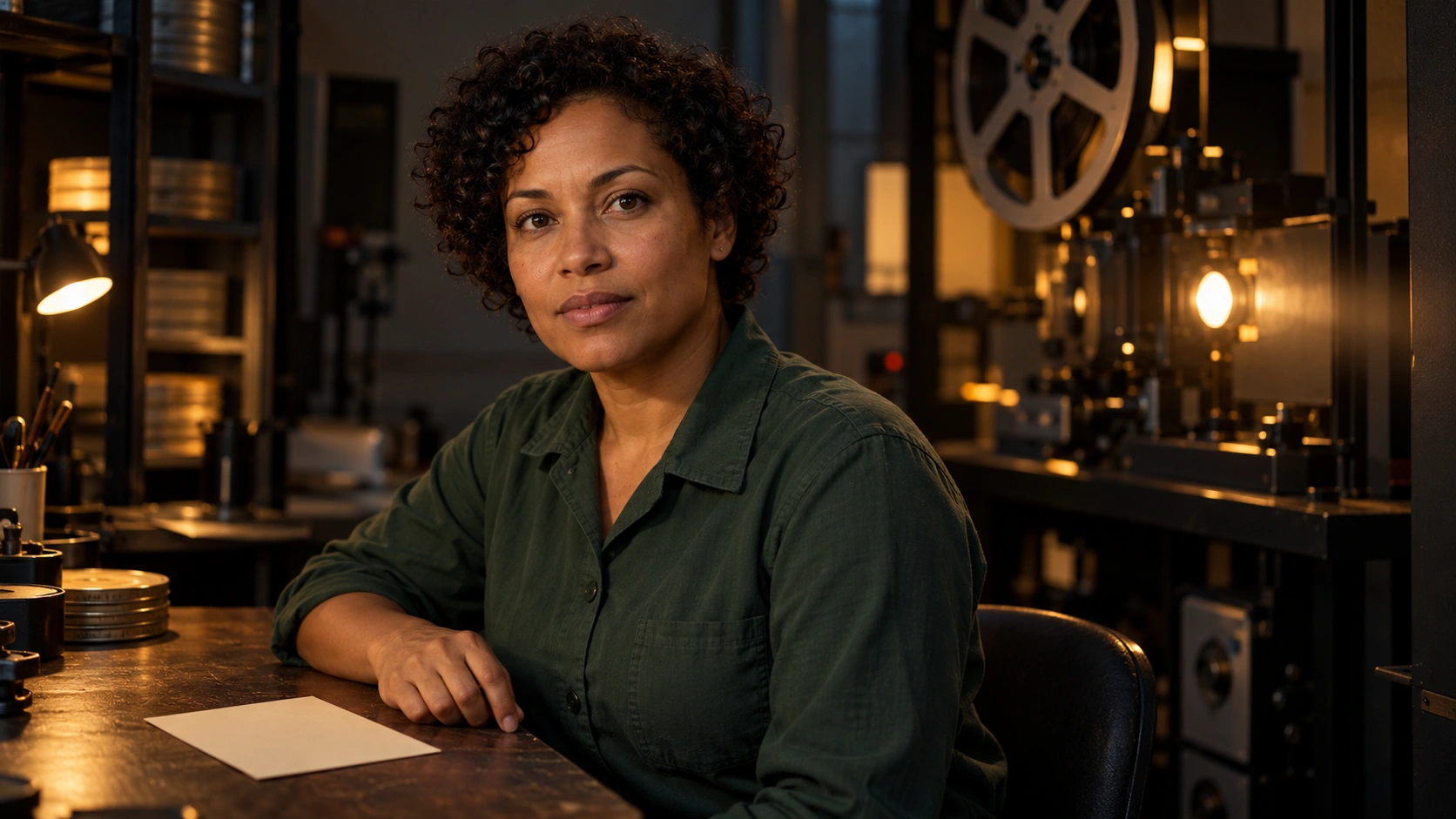
Our original Projection Booth brief centers on one adult projectionist in a green work shirt, seated beside a blank cream program card. Her face and lips are visible, her mouth begins relaxed, and the composition gives a restrained performance room to read. The planned spoken line is: The last screening starts at nine.
Download the original reference PNG, exact image-generation prompt and provenance record. This reference is preparation material. It has not been submitted to MagiHuman and does not demonstrate identity or dialogue preservation by that model.
Choose the input mode and matching configuration
The current official entry source selects text-to-video when no image path is supplied and text-and-image-to-video when an image path is present. Its prompt is required. An optional reference image changes the conditioning route; it does not prove that every requested detail will survive a generation.
| Route | Official example | Configuration distinction |
|---|---|---|
| Base generation | example/base | Base checkpoint and its evaluation settings |
| Distilled generation | example/distill | Distilled checkpoint and eight-step configuration |
| 540p refinement | example/sr_540p | Matching super-resolution model and refinement settings |
| 1080p refinement | example/sr_1080p | Its own super-resolution model and dependencies |
The base configuration and distilled configuration have different checkpoint and inference settings. The 1080p configuration additionally identifies a super-resolution stage. Keep the selected stack together rather than substituting similarly named files.
The model card and repository are different snapshots. At this check, the model card showed a PyTorch 2.9 setup while the repository README used 2.10. Follow the instructions and examples for the same selected revision rather than mixing those installation snippets.
Follow the current setup instructions for the actual GPU environment. A published H100 timing is a result for its stated configuration, not a promise for a consumer GPU or an untested wrapper. Record loading, compilation, generation and finishing separately when evaluating a production route.
Separate performance dialogue and background sound
The official enhanced-prompt design describes an English main paragraph, a structured Dialogue section and a Background Sound section. Its guidance favors controlled avatar-style performance, with detailed facial and vocal direction rather than large physical travel.
For our projectionist, write the emotional change in order: an attentive opening, a small preparatory breath, the complete approved line and a readable closing hold. Keep the torso and camera calm for the pilot. If the story requires a dramatic walk or a separate listener's reaction, plan that as another shot instead of loading every task into the first dialogue test.
Keep the words approved before rewriting performance directions. A more elaborate description should not quietly change nine to ten, add an invented sentence or turn a restrained question into an unrelated monologue. Separate what must be spoken from how you want it performed.
Use the free local performance-brief checker
Open Edit the performance brief in the tool above. Its original example contains a 162-word main paragraph, a five-word character description, the approved line, a language selection and a quiet projector-hum direction. Download the example structured brief to inspect the same default outside the tool.
The checker enforces its 150-to-200-word paragraph range, five-word description, selected language and exact repeated dialogue line. It keeps the section headers separate and quotes the dialogue for the exported text. An empty background field uses the documented absence phrase. Combined input is limited to 20000 characters.
These are local preparation checks. The tool does not detect whether prose is English, write a better performance, call prompt enhancement, upload the reference or validate a live model request. Read the resulting text before using it in the selected implementation. A template passing its checks does not establish a successful generation.
Review every word in the actual returned take
Watch and listen to the complete saved file. Compare the spoken line with the approved text, including the final word and any small word that changes meaning. Record omissions, additions, repetitions and an incomplete ending separately from picture defects. A pleasing face does not compensate for the wrong sentence.
Inspect the face, hair, shirt, visible hand and background throughout the performance. Look for identity drift, unstable mouth movement, unwanted body travel or a change to the blank card. Compare the opening and ending with the supplied reference, then inspect the intervening action. Keep the first concrete failure and its time.
Check the actual sound track and its relationship to the picture. A file can contain audio while still missing the intended voice or background. A clearly spoken line can still be unsuitable for the character. Keep intelligibility, timing and creative acceptance as separate observations.
Finish the scene after accepting the performance
For background continuity, use the room-tone guide and WAV boundary checker. For a sound connection across a picture change, use the sound-bridge study. For local queue management in another interface, use the Wan2GP and WanGP workflow and verify the actual model route it exposes.
The blank take-review sheet records the real reference, prompt version, configuration, approved and actual words, face, motion, sound and acceptance. The Projection Booth scene brief preserves the original exercise and its scope.
Develop original references and scene material in Clout AI Cinema or Image and Video. This guide does not establish MagiHuman hosting inside Clout. For a longer scene, connect the accepted line to the short-drama shot plan and review the complete assembled sequence.