

For web caption delivery, use the local SRT-to-VTT converter. For text rendered into the picture, use the burned-subtitle delivery comparison.
For a complementary production step, use our ADR cue planning and count-in tool
Start with the scene and the language deliverable
An AI video dubbing workflow should end with an understandable scene in the intended language, not simply another file with a different voice. Name the source version, target audience, language and required delivery before choosing a provider. Decide whether you need a translated recording, a caption track, changed mouth movement or a complete assembled master.
For a short drama, preserve the meaning of the exchange and the moment when each character reacts. A line can be fluent in isolation and still reveal information too early, run across a cut or be assigned to the wrong speaker. Review the actual translated performance against the accepted picture rather than approving only a transcript.
This guide includes an original two-line editorial exercise and a free source-to-target SRT timing review. It contains no generated or recorded speech. For a specific provider's model and revision controls, use the separate ElevenLabs dubbing guide. For a whole localized ad, including visible copy and destination, use the ad localization workflow.
Separate dubbing captions and visual lip sync
| Production task | Artifact to review | What it does not prove by itself |
|---|---|---|
| Translate the spoken performance | Returned target-language recording | Correct visible text or matching mouth movement |
| Translate captions | Target words and subtitle cue timing | The words or timing of the actual recording |
| Adapt visible mouth movement | Returned picture with the intended speech | A correct translation or a complete final mix |
| Assemble a language master | Original picture, accepted sound and intended captions | Approval to publish every language version |
An AI dubbing and video translator product may combine several operations. Check which outputs it actually returns and which remain editable. Keep these acceptance decisions separate even when one interface performs several stages. A translated subtitle file is not a recording, and a synchronized-looking face is not evidence that the words are right.
ElevenLabs' current documentation distinguishes its dubbed audio from the returned video preview and recommends assembling the accepted sound with the original picture for production. App and API revision controls differ. Check the selected route before promising a transcript-editing or regeneration process.
YouTube's automatic dubbing help describes language availability for individual videos, a manual publication review option and experimental lip-sync access for selected channels and qualifying content. These are documented capabilities, not verified availability for your account. Review each actual language track before release.
Preserve the source performance and speaker map
Keep the original picture and sound unchanged. Record the source transcript, names, numbers and terms that need special attention. For multiple speakers, write down who says each line and which visual person should speak. A subtitle cue ID is a text-file label, not a reliable speaker identity.
Use recordings and visual references you are permitted to process. Preserve approved speech as its own version before trying a new delivery or translation. If the source wording changes later, identify the recordings, captions and assembled masters that depend on it rather than silently treating them as current.
Our original scene review brief uses two simple lines: “Keep the door closed” and “I will be right back.” The Spanish editorial candidates are “Mantén la puerta cerrada” and “Volveré enseguida.” They are editable writing samples, not provider outputs or certified regional translations. Have a suitable language reviewer check meaning and tone for the intended audience.
Review the translated performance before its timing
Listen to the complete returned recording. Confirm that it preserves the intended meaning, speaker assignment, names, emotion and ending. For a drama scene, ask whether the listener's reaction still makes sense after the translated sentence. A natural-sounding voice can still change a threat into a request or omit the word that makes the reveal work.
Keep linguistic revision separate from timing revision. Shortening a line to fit a cut can change its meaning; slowing a delivery can alter the performance. Record the reason for each change with the accepted source. Review the revised recording again rather than assuming that a small text edit leaves everything else intact.
For a new narration rather than source-performance dubbing, use the narration workflow to organize permitted voice input, accepted words and returned speech. Do not infer the quality of a translated performance from the length of its written sentence.
Compare source and target SRT tracks locally
The tool above reads two SRT text tracks in your browser. It accepts up to 200 cues and 96,000 characters per track, with positive unique integer cue IDs and comma-millisecond timing in HH:MM:SS,mmm form. It reports timing changes for matched IDs, unmatched IDs and overlapping cue pairs within each track.
Paste the accepted source SRT and the current target SRT, then select Compare cue timing. Positive start or end shifts mean the target cue is later; negative values mean it is earlier. The results describe caption timing only. They do not locate speech in audio, compare a cut list, detect a language or judge meaning.
If the target was resegmented or renumbered, the ID mapping may no longer represent corresponding lines. Inspect the text and restore a deliberate mapping before interpreting timing differences. A missing ID match does not prove that words are missing from the recording. Keep the original exports; do not renumber cues merely to make a report look clean.
Inspect the original timing exercise
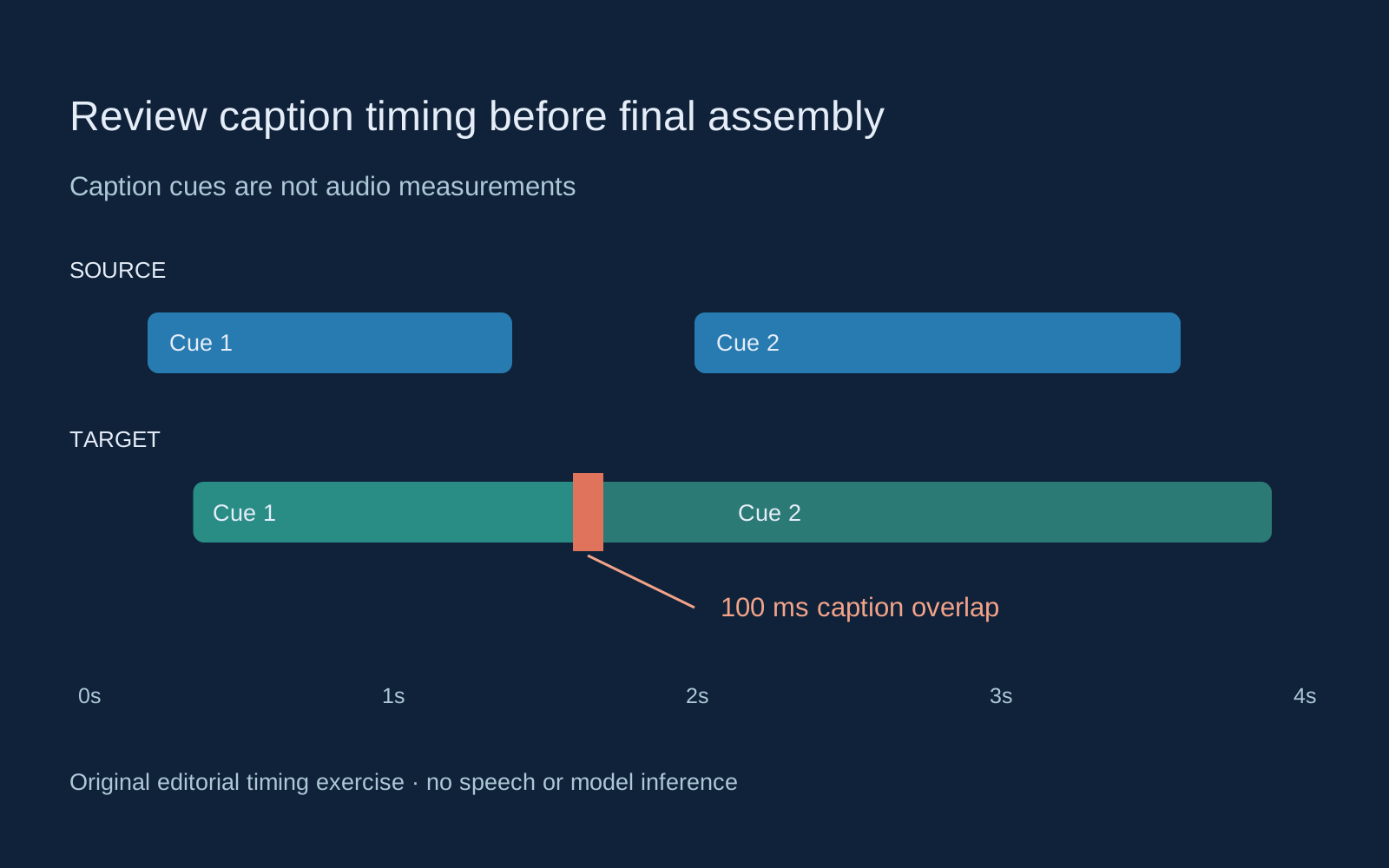
Select Load original cue exercise. The source has two cues and zero overlapping pairs. Target cue 1 starts 150 milliseconds later and ends 300 milliseconds later than its source match. Target cue 2 starts 400 milliseconds earlier and ends 300 milliseconds later. The target captions overlap by 100 milliseconds.
That overlap was deliberately authored into the example. It does not measure overlapping voices or prove an error in a translation. Compare the subtitle display and actual audio against the scene before deciding whether the cue boundaries should change. Two captions can overlap for editorial reasons, while two adjacent captions can accompany speech that overlaps.
Download the source SRT, target SRT and scoped example report. The tool counts all overlapping pairs, including nested cues, while retaining only the first 25 overlap examples per track in the report. Its table shows the first 25 matches; the full text report includes all matched cues.
Edit a timing or cue ID and compare again to see the effect. Unsupported timing, duplicate IDs, missing text and oversized input produce an error rather than a repaired track. The tool does not export a rewritten SRT. Keep language and timing edits in your approved caption editor and preserve that version for the next comparison.
Check dialogue against cuts and reactions
Place the accepted recording with the original picture in an editor. Review the complete first line, pause, response and final syllable. A timing report can direct attention to a changed caption boundary, but the actual cut determines whether the scene communicates its intended beat.
If the second line begins earlier, listen for a deliberate interruption rather than assuming an overlap is a defect. If the first line ends later, check whether the next shot reveals information before the words establish it. If a title or product detail appears during speech, judge whether the viewer has time to understand both.
For a changed speaking face, treat visual lip sync as a separate reviewed operation. The MuseTalk dialogue guide and LatentSync timing exercise cover different existing-picture paths. Their examples do not establish that a text-file timing match produces a correct performance.
Listen to the assembled mix and inspect the picture
When music masks accepted dialogue, use the audio ducking guide and local music-bed tool. It applies reviewed activity intervals to a separate bed while keeping speech acceptance and final mix review separate.
Review speech, music, effects and room tone in the final version. Confirm that expected sound is present and that the ending is not clipped. A provider's description of background preservation is not a substitute for listening to the file you will deliver. Keep the accepted recording separately so the assembly can be checked against it.
Compare the picture with the source master. Check dimensions, frame rate, crop, opening and closing frames and any deliberate visual changes. If the workflow changed mouth movement, preserve that processed picture as a distinct version rather than confusing it with the untouched original.
The local MP4 track inspector can report declared picture and sound tracks in a separate file review. Track presence does not establish audible dialogue, mix quality or synchronization. Use it to answer a container question, then return to listening and watching.
Approve a language version before expanding the batch
The blank language review ledger records source, target locale, route, transcript, recording, captions, timing, picture, mix and final master. Record the actual reviewer and accepted file version. Leave unobserved values empty rather than inventing a translation score or speech-duration estimate.
Finish one short scene in one target language before scaling the workflow. Preserve accepted inputs and observed problems so a later episode can reuse a working process. Compare the total cost of accepted and rejected attempts against accepted deliverables only after you have a clear acceptance rule.
Use the AI short drama workflow to plan the story and the multi-shot guide to inspect coverage. Explore Clout Image & Video for character visuals and supported lip-sync operations. This guide does not establish an automatic translation, provider dubbing connection or multilingual publishing service in Clout.


