

Start with the output you need from ElevenLabs dubbing
For a provider-independent handoff, use the AI video dubbing workflow and source-to-target SRT timing review. It compares caption timing locally while keeping actual speech and picture review separate.
ElevenLabs dubbing can be part of a localized video workflow, but the useful production question is what must be delivered at the end. An audio track, a reviewable video and an accepted master are different artifacts. Identify the original picture, required language, intended speaker and final delivery requirements before choosing an operation.
ElevenLabs’ official overview, checked October 22, 2026, distinguishes v2 Alpha Automatic Dubbing from the older maintenance-mode v1 Studio. It calls returned video a preview, recommends original-picture assembly and restricts API transcript editing and regeneration to Enterprise. App controls differ. These are documentation statements, not an account test.
Build an original spoken-copy assignment
For a new voice track rather than source-audio dubbing, use the Eleven v4 voice comparison guide to preserve words, settings and returned-file decisions.
The example begins with an original sage-planter illustration and a short editorial line: “Room for a little green.” It is an unexecuted production concept. No voice was cloned, no dubbing request was sent and no paid media was generated for this guide.
The editorial script worksheet separates the source words, target-language candidate, exact names, speaker and review decision. Its Spanish and French example phrases are editable editorial samples, not certified dialect translations or provider outputs.
A real assignment needs an accepted source performance and the rights to use it. Name the speaker, intended delivery and words that must remain exact. For a multi-speaker scene, preserve an inspectable mapping between speaker, line and returned segment so a review does not silently accept a reassigned voice.
Keep an audio review and a picture review separate
Listen to the complete returned speech against the accepted words. Check the product name, numbers, omitted phrases, added words, speaker assignment and final syllable. A plausible voice at the beginning does not establish that the whole line is correct.
Review timing against the picture separately. A line can be translated correctly and still run over a cut, cover a product reveal or end after the CTA disappears. If a change is needed, preserve the accepted source and record the reason before requesting another candidate.
Do not assume that audio translation changes visible text, an interface screenshot or mouth movement. Those are distinct production requirements. The ad localization workflow covers the full visible-and-spoken asset and includes a local text-fit preview.
Keep the original picture master in the assembly
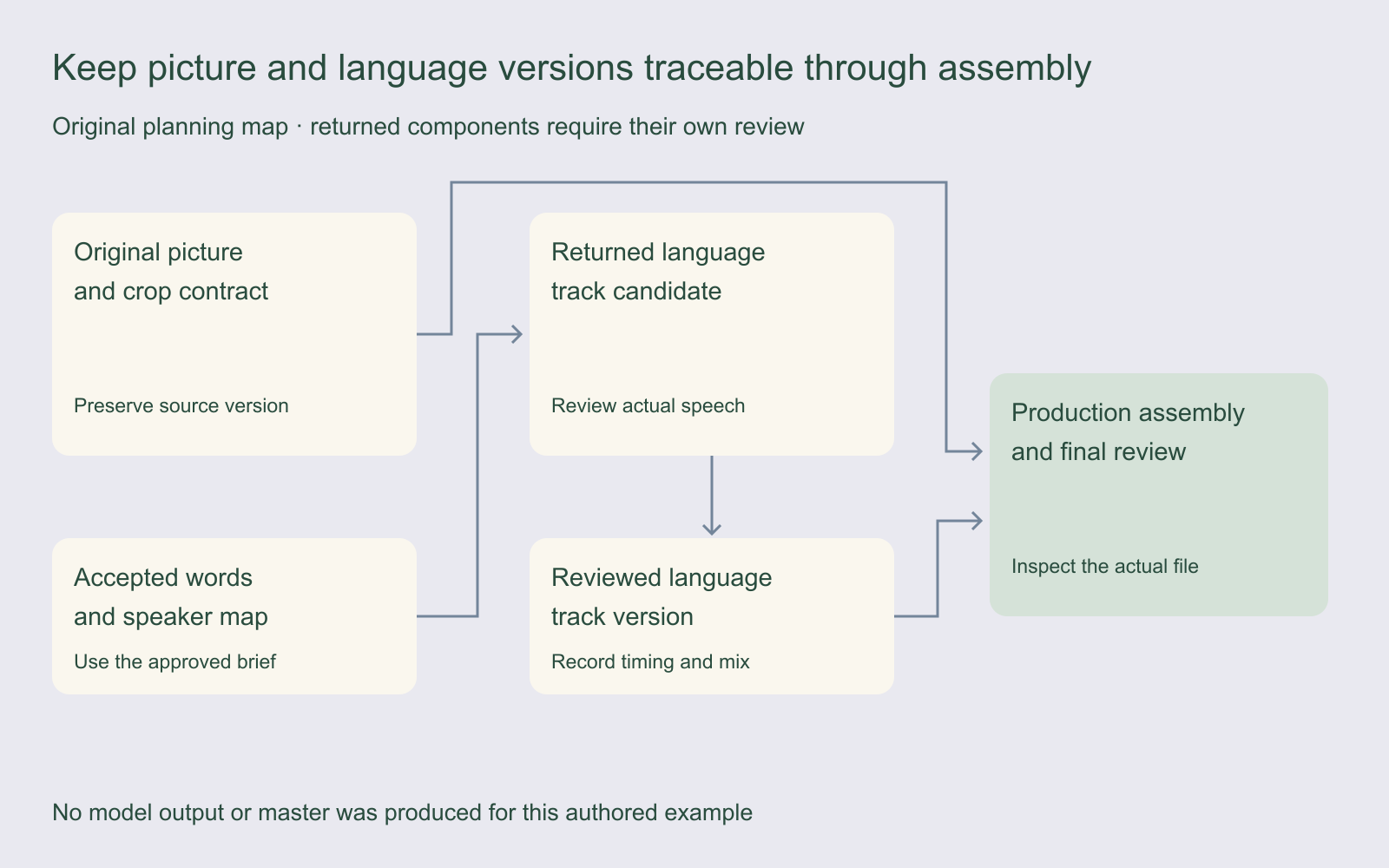
Preserve the source picture before any processing. Record its dimensions, frame rate, duration, crop and the destination’s delivery requirements. Keep the accepted language track as a separate versioned asset rather than overwriting the source file during an experiment.
When assembling a production deliverable, compare the output with the original picture and the accepted audio. Check the first frame, last frame, scene transitions, exact product detail and intended duration. A file that opens successfully is not evidence that it retained the picture requirements.
For the original planter concept, the production plan would keep the same accepted visual identity while reviewing the spoken and visible lines separately. The illustration is a reference for that plan, not a video source or an evaluated dubbing result.
Review the final mix instead of assuming sound survived
Listen to speech, music, effects and room tone together in the final assembled version. Confirm that each expected element is present, intelligible and correctly timed. Check the actual channel layout that the destination requires instead of inferring it from the source filename.
Watch for an abrupt start, a clipped ending, a sudden level change or a different background between segments. Record the observed defect and the exact file version. A useful revision request names the problem and the accepted base rather than asking broadly for a better dub.
The dubbing review ledger keeps the source, returned track, transcript decision, timing review, mix review, assembled master and final acceptance in separate fields. It is a manual worksheet, not an export from ElevenLabs or Clout.
Check app and API requirements before planning revisions
Select the actual model and route before promising an editing process to the team. The same product name can cover an app workflow and an API with different controls. Check the current documentation and the actual account for the operation you need; a general feature announcement is not a verified entitlement.
Record the displayed quote, selected model, source duration, target locale and revision controls before starting a real job. Keep charges for rejected attempts in a production ledger if you later calculate cost per accepted asset. This guide does not quote a current credit rate or claim a paid test.
For a target language, verify the exact supported language or dialect tag in the selected route. A locale label in an editorial worksheet is not a tested API parameter. Preserve the human review of the actual returned wording even when a tag is accepted.
Use a short acceptance pass before a large batch
| Check | Compare against | Record |
|---|---|---|
| Words and speaker | Accepted transcript and speaker map | Observed differences and decision |
| Timing | Picture cues and required ending | Late, missing or overlapping moments |
| Picture | Original master and crop contract | Actual dimensions and visible changes |
| Mix | Expected speech, music and effects | Missing elements or channel mismatch |
| Visible copy | Approved localized text | Readability and destination preview |
| Final delivery | Accepted component versions | Master file, reviewer and destination |
Start with an assignment small enough to inspect in full. A short pilot can expose a pronunciation, timing or assembly problem before it is repeated across a larger set. This is a proposed review method, not an acceptance-rate or speed benchmark.
After a source edit, revisit the language tracks and assembled assets that depend on it. Preserve the previous accepted version so a reviewer can understand what changed and why an earlier decision no longer applies.
Choose the next creative task without conflating providers
Explore Clout Marketing Studio or Image and Video for their current creative operations. This guide does not establish an ElevenLabs Dubbing connection or equivalent automatic multilingual mastering in Clout. Inspect the actual operation and quote in the workflow you choose.
Use the creative brief builder for the next assignment, and the Runway Ads guide when evaluating a separate connected publishing product. Keep the accepted words, original picture and actual returned files traceable through the final decision.


