

What Runway Ads is documented to do
Runway’s September 30, 2026 announcement describes Runway Ads as a workflow that generates branded image and video variants, publishes approved creative to Meta, Google and TikTok, reads platform results and prepares subsequent variants. It lists brand inputs, localization, format adaptation, approval settings and budget controls. These are publisher descriptions checked October 22, not an independent account or performance test.
This guide focuses on how to evaluate that connected workflow and prepare an inspectable pilot. It does not establish your account’s access, current price or connected permissions. A video-generation model, an ad-creative workspace and a live publishing system have different responsibilities. Identify the actual product and operation before assuming one can do the work of another.
Separate the creative job from the publishing job
| Stage | Input to identify | Evidence to preserve |
|---|---|---|
| Creative preparation | Accepted brief, product source and exact copy | Versions and source roles |
| Asset production | Specific image or video assignment | Returned file and observed defects |
| Approval | Actual candidate and delivery requirements | Reviewer decision and accepted version |
| Publishing | Accepted file, destination and campaign scope | Delivered ad ID and active settings |
| Performance review | Mature report with a defined result | Window, spend, attribution and next hypothesis |
This is an original evaluation framework, not a screenshot of a provider’s interface. A candidate can be a good image without being the approved ad for a particular destination. An approved creative can also exist without a campaign being live. Preserve those states as separate decisions.
The distinction matters when a team says “generate the next batch.” Specify whether that means draft concepts, accepted exports or ads delivered in an account. Each answer needs different evidence and a different owner.
Prepare a small original lamp campaign

The example uses a fictional amber desk lamp with a curved shade, straight stem and oval base. The source illustration defines only a visual concept. It provides no tested brightness, efficiency, electrical safety or material-performance facts. The pilot brief excludes those claims.
Prepare two creative directions: a wider desk arrangement and a closer look at the lamp’s silhouette. Keep the concept name, factual exclusions and intended destination fixed. This is an unexecuted assignment; no ads, paid renders or campaign outcomes were produced for the guide.
Use the portable pilot brief as a starting document, then replace its concept illustration and open decisions with your real accepted sources. The creative brief builder can organize the objective, audience, message, source facts and deliverable contract.
Make source roles and exact copy explicit
For another market, use the multilingual ad localization workflow to review visible copy and layout, and the ElevenLabs dubbing guide for the separate language-track and picture-master handoff.
Name which file controls product identity and which reference controls mood or composition. A lighting example should not silently change the lamp’s handle, shade or base. A convenient generated candidate should not replace the accepted product source merely because it is newer.
Record the exact approved words separately from the scene idea. If the concept asks for warmth and a calm desk, that is visual direction. It is not permission to claim a particular color temperature or improved productivity. Review the candidate’s actual copy rather than assuming the brief prevents every invented statement.
For a real brand, keep a versioned set of approved logos, product assets, permitted copy and destination requirements. Give reviewers enough context to reject a visually attractive asset that does not match the product.
Use a versioned approval ledger
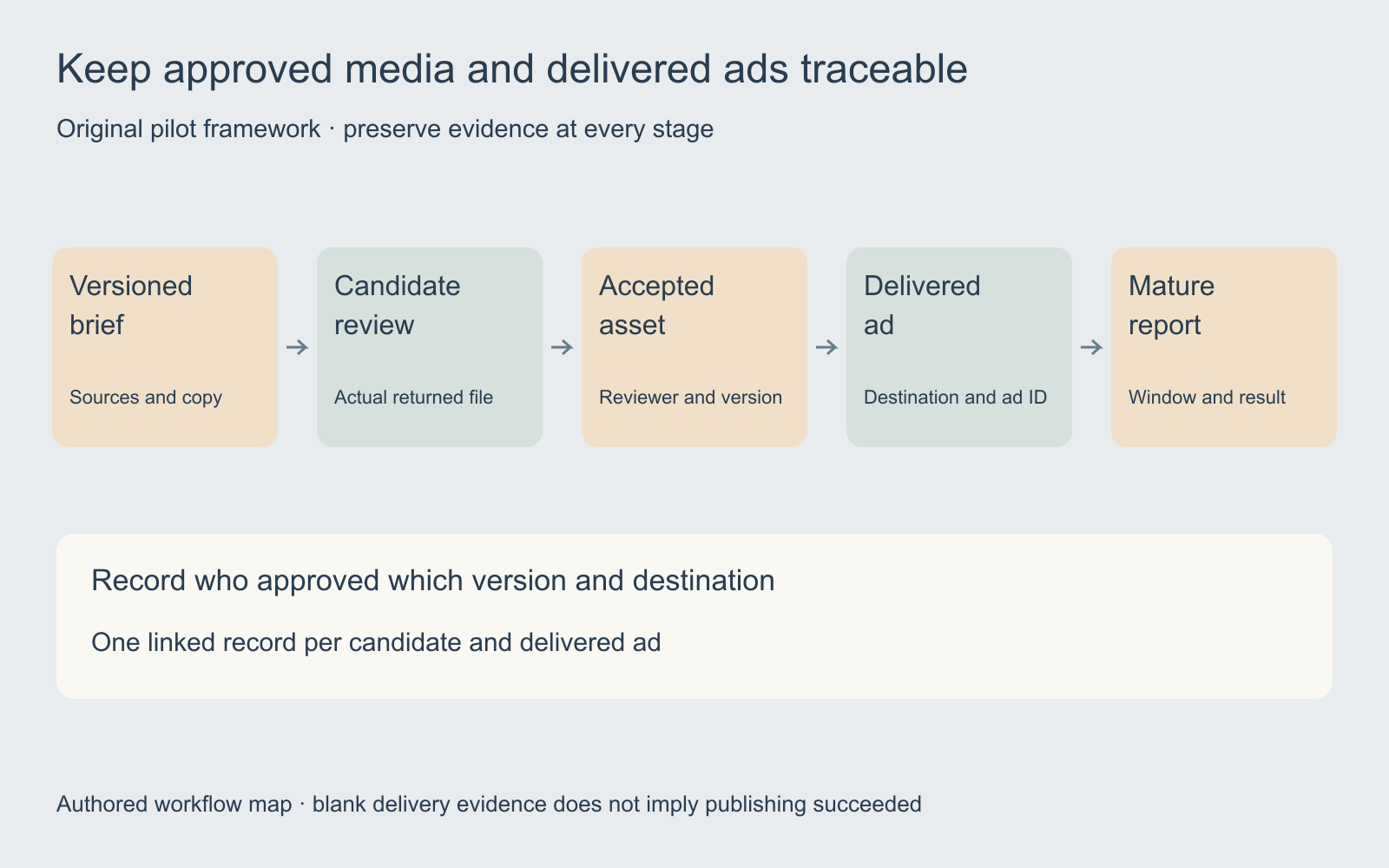
Assign each candidate a stable asset ID and version. Record the source versions, intended crop, factual copy, observed defects, reviewer and decision. When the source changes, revisit dependent approvals. A previous decision about one file should not silently authorize a different version.
The pilot ledger includes separate fields for the accepted asset, publishing scope, delivered ad ID, report window and next hypothesis. Fill those fields from actual evidence. A blank ad ID means delivery has not been recorded, not that publishing probably worked.
For a more detailed dependency example, use the creative-board planning guide. Its local planner illustrates how reopening a source affects downstream work; it is not a Runway or ad-platform connection.
Evaluate publishing controls in the actual account
Before using a connected publishing workflow, identify the destination account, campaign, reviewer and allowed action. Check the actual controls available to that account. Preserve what was selected and what was delivered rather than relying on a general product announcement.
Runway says human approval is enabled by default and that teams can configure automated publishing by campaign or variant type. That documented default is not proof of the current setting in a particular account. Check the selected workflow before relying on it.
A narrow pilot can reveal whether the team can trace an accepted file into the intended destination with the expected crop, text and link. It does not require accepting every generated variant or treating publishing success as evidence of business performance.
Measure production quality before media outcomes
Keep attempts and rejected takes in the production record. Measure time from an accepted brief to an accepted export, including editing and review. Count cost per accepted asset using the work actually consumed by the pilot, not the number of returned files.
Watch complete clips and inspect exact text, product shape, voice and crop. Review each localized version with the language and destination in mind. A technically playable file can still be the wrong creative for the brief.
A side-by-side sheet can help compare still candidates. The contact sheet maker arranges owned images locally; it does not evaluate a complete video, approve an ad or establish rights to the inputs.
Keep platform feedback from becoming a premature winner claim
Record the attribution window, result definition, report maturity and delivered spend for each ad. A variant that earned more spend did not necessarily receive the same audience or conditions as another. A result difference can be useful evidence for the next hypothesis without proving a creative caused the improvement.
Separate a production improvement from a campaign outcome. Producing more accepted assets per hour and lowering cost per purchase are different measurements. A provider’s own success story cannot establish either result for your account.
For manually entered two-window arithmetic, use the creative fatigue comparison tool. It makes exposure, click response and result cost visible without connecting an account or inferring a platform status. Use the UGC campaign testing guide when you need a controlled variant plan.
Choose Clout for the production task you actually need
Explore Clout Marketing Studio for its current product-led creative workflows. For supported individual image and video work, use Image and Video. Check the actual operation, supported inputs and quote before production.
This guide does not establish a Runway Ads connection, automatic campaign buyer, account-connected feedback loop or equivalent publishing system in Clout. Carry the accepted brief, owned sources and review criteria into the workflow you choose. Keep generation, approval, delivery and outcome evidence linked but distinct.


