

What a creative brief generator should produce
A creative brief generator turns project decisions into a document that another person can act on. A useful result names the audience, objective, main message, approved facts, visual direction, deliverables and review owner. It also exposes the decisions still missing. Filling a page with fluent language is less useful than making those decisions visible.
This page includes a free local builder and an original cobalt carafe concept. The builder arranges your supplied text into a brief and an AI handoff prompt. It does not call a language model, upload references, create images or check claims. Use the guide to decide what belongs in the brief before you pass it to a designer, creative agent or production team.
Asana’s creative-brief guide includes objectives, audience, messaging, assets, stakeholders, budget, timing and distribution. Adobe’s brief-writing guidance also calls for specific deliverable formats, sizes and responsibilities. The original workflow below applies those broad planning principles to image-led campaigns; it is not an Asana or Adobe product integration.
Choose a brief template or an AI creative brief generator
| Method | Useful for | What still needs a decision |
|---|---|---|
| Local template builder | Organizing facts and listing open fields | Strategy, evidence and creative direction |
| AI drafting service | Proposing wording or directions from a reviewed brief | Factual accuracy, scope and execution permissions |
| Human creative review | Choosing the direction and resolving tradeoffs | Actual production and inspection of returned work |
An AI creative brief generator may propose language, but it cannot learn an unstated business objective from a product name alone. Give it evidence, source roles and limits. Ask it to identify omissions before it expands the concept. Read the returned wording for claims, extra deliverables and dates you never supplied.
The local builder deliberately leaves missing text as “Not supplied.” It labels its output a draft, even when every required text field is filled. A filled source field proves only that someone entered text, not that a claim is supported or an asset is permissioned.
Start with one objective and one audience
Write the change you want the work to create. “Make a beautiful campaign” gives a designer an aesthetic task without a purpose. “Show one coordinated tabletop color story through three concept images” is a smaller assignment that a reviewer can compare with the deliverables.
Describe the audience through the decision they face. For the original carafe concept, the audience is home shoppers exploring a blue tabletop palette. That is enough to explain why color, silhouette and the surrounding table matter. It does not justify adding a durability promise or claiming a particular capacity.
A business metric can sit alongside the creative objective when the team has one. Keep its baseline, measurement window and owner separate. Neither a template nor a proposed image demonstrates that a campaign increased conversion or sales.
Separate approved facts from visual ideas

Use the carafe source illustration to follow the example. Its cobalt body, narrow neck and curved handle are visual anchors. The illustration provides no tested material, capacity, temperature or durability evidence. The brief says this explicitly so an attractive scene does not turn into an invented product promise.
For a real campaign, attach actual approved sources in the production system you choose. Name the file and version, the approved facts it supports and the role it plays. A mood image can guide lighting without becoming the product reference. An exploratory render can suggest a composition without replacing the accepted shape.
Record exact copy where exactness matters. A model or designer should not have to guess the product name, offer terms or destination. If those details are still undecided, list the open decision and its owner before work begins.
Give every deliverable its own specification
The example requests one square hero image and two portrait detail images. The quantity is three requested assets, not three completed outputs. Each row has a name, quantity and specification. Add rows when the work needs different crops or file requirements; remove rows that do not belong in the assignment.
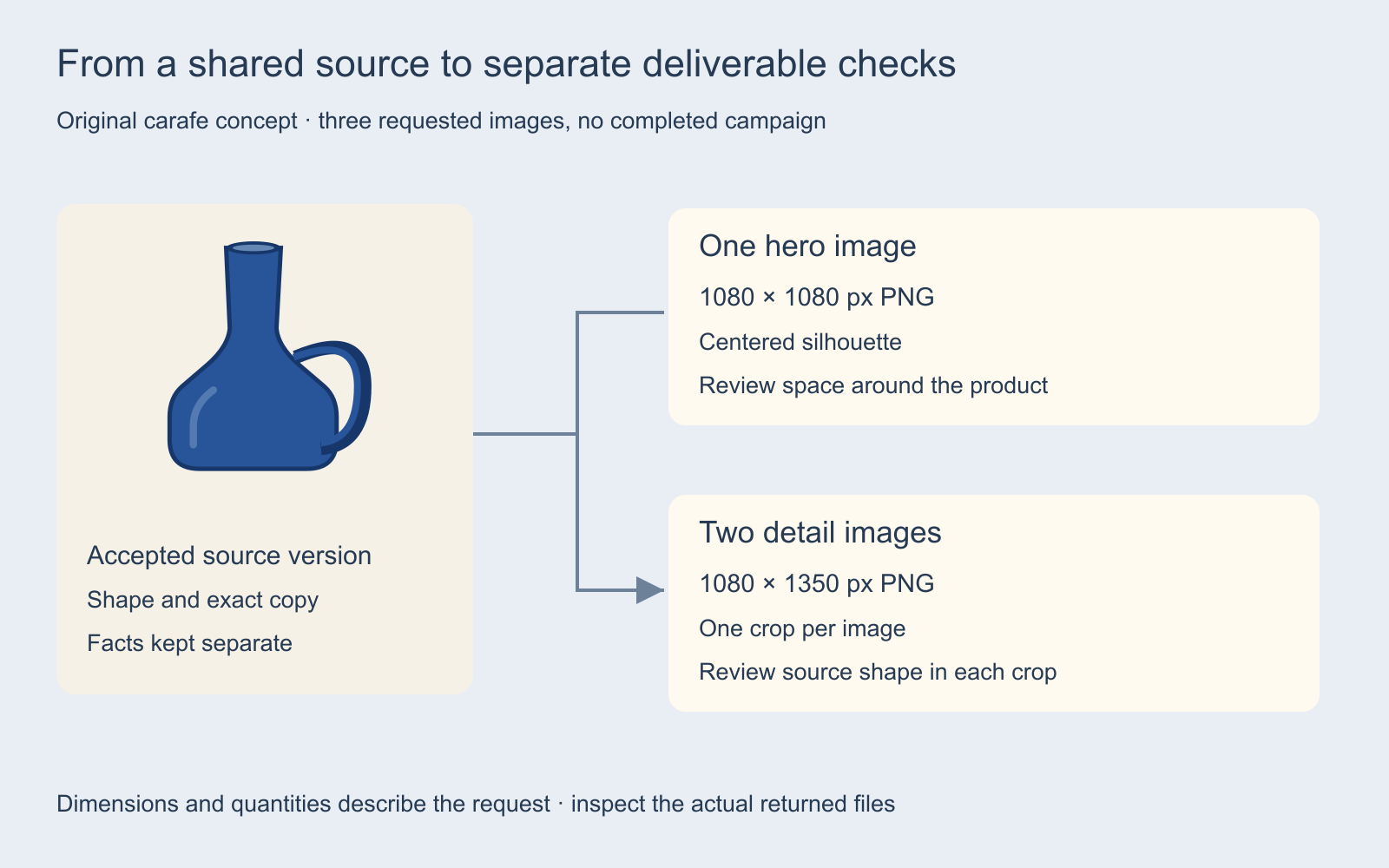
Write dimensions, file format, safe area and destination where relevant. “Social assets” leaves room for incompatible interpretations. “1080 × 1350 px PNG with one crop per image” is more inspectable, but the reviewer still needs to check whether that specification fits the actual placement.
For a creative design brief generator used for print, specify physical size, resolution, color requirements, bleed, trim and the printer’s delivery contract. For a website, describe the responsive context, text requirements and behavior. Do not copy the carafe’s image dimensions into a different production job just because they are prefilled.
Use the AI handoff prompt as a reviewed starting point
Select “AI handoff prompt” in the builder to wrap the current brief with instructions to identify missing decisions and propose a direction. The prompt asks for a plan before production and keeps supplied facts separate from illustrative ideas. It does not submit the text to another service or guarantee that a service will follow it.
Review the exact text before reusing it. Remove private details that the chosen destination does not need, attach only the sources you intend to use there, and check the service’s current controls. Keep a human decision between a proposed direction and paid generation or publication.
Original carafe direction: use a quiet daylight tabletop setting and a warm ivory backdrop. Preserve the cobalt silhouette, narrow neck and single curved handle. Propose one square hero and two separate portrait detail compositions. Do not add capacity, durability or performance claims. Identify missing timing and source decisions before production.
This is an unexecuted creative assignment. No AI-generated campaign, accuracy comparison or acceptance rate is presented here. For coordinating multiple returned assets, the creative-board guide explains how source changes affect dependent approvals.
Review the brief before reviewing the images
A brief needs a named reviewer, a workable delivery date, an agreed budget and permissioned sources. The builder counts open text fields, while timing remains explicitly open when it is blank. It does not decide whether the budget is adequate, whether a review owner has agreed, or whether the supplied facts are true.
Use the review checklist to record an owner, evidence, status and next action for each decision. The blank creative-brief template includes a budget and rights section for a fuller handoff. The completed carafe example keeps the fictional concept and its open date clear.
After the brief is accepted, compare the actual returned assets with it. Check the complete silhouette and handle, exact text, required crop, output dimensions and source version. A correct file size does not establish correct product identity. A pleasing composition does not establish that the business objective was met.
Keep campaign briefs and UGC shot briefs distinct
This page owns the general campaign and design-brief workflow: objective, audience, message, evidence and deliverable contract. If the assignment needs spoken script beats, creator instructions and a shot-by-shot sequence, use the UGC content brief template. Link it to the accepted campaign brief so the creator does not receive a conflicting source of truth.
For several still candidates, use the contact sheet maker to arrange permissioned images for visual review. It helps compare candidates but does not approve them. Keep the current accepted brief and source versions alongside the sheet.
Carry the accepted brief into a Clout workflow
Explore Clout Marketing Studio for current product-led creative workflows, or Image and Video for supported individual operations. Choose the actual operation, inputs and quote shown in the selected workflow. This page does not establish an automatic brief importer or promise that the generated assets will meet every requirement without review.
Use one accepted brief to keep the creative direction, required evidence and delivery contract aligned. When the source, message or requested crop changes, update the brief and tell the people reviewing affected assets. That makes the next revision a specific production task instead of another round of vague instructions.


