What Luma creative agents are for
Luma Agents is a creative workflow built around projects, references and multiple deliverables. Luma’s official introduction describes boards that hold assets, versions and explorations, with an agent directing image, video and audio work through conversation. It also describes manual access to individual models through the board interface.
The useful decision is whether that project workflow matches your task. A single image request, a coordinated launch campaign and a change to existing footage require different inputs and review standards. This guide focuses on the creative board and the decisions between stages. For the video-model family itself, use the Luma Ray guide.
Define the deliverables before asking the agent to execute
Start with the creative brief generator and campaign template when the objective, audience, approved facts and deliverable contract still need to be written.
Write what must be delivered, where it will be used and which facts must remain exact. A campaign brief might call for an accepted product still, two short clips, a voiceover and an end card. Each needs its own source, framing and acceptance check. A polished overall concept does not establish that every required asset is ready.
Luma’s official FAQ describes a brief, plan, generate and refine workflow, including parallel generation and optional model selection through conversation or the toolbar. Treat that as the documented product flow, not a measured guarantee of campaign quality, timing or product preservation.
Assign a role to every reference on the board
A reference can define product identity, composition, material, color, motion or a mood. Name that role explicitly. An attractive lighting reference should not silently replace the actual product shape. A draft candidate should not become the master source simply because it is the newest item on the board.
Keep the accepted reference and its version distinct from exploratory work. For a character project, use the character reference-sheet guide to make the intended identity inspectable. For product work, preserve the actual label, silhouette, included items and approved factual copy alongside the visual reference.
Use the original lantern campaign to plan dependencies
The example begins with an original jade lantern illustration: a rounded rectangular body, a brass handle and a pale front window. It is authored artwork, not a Luma generation or a product-preservation benchmark. Its job is to give the plan concrete anchors that can be named and checked.
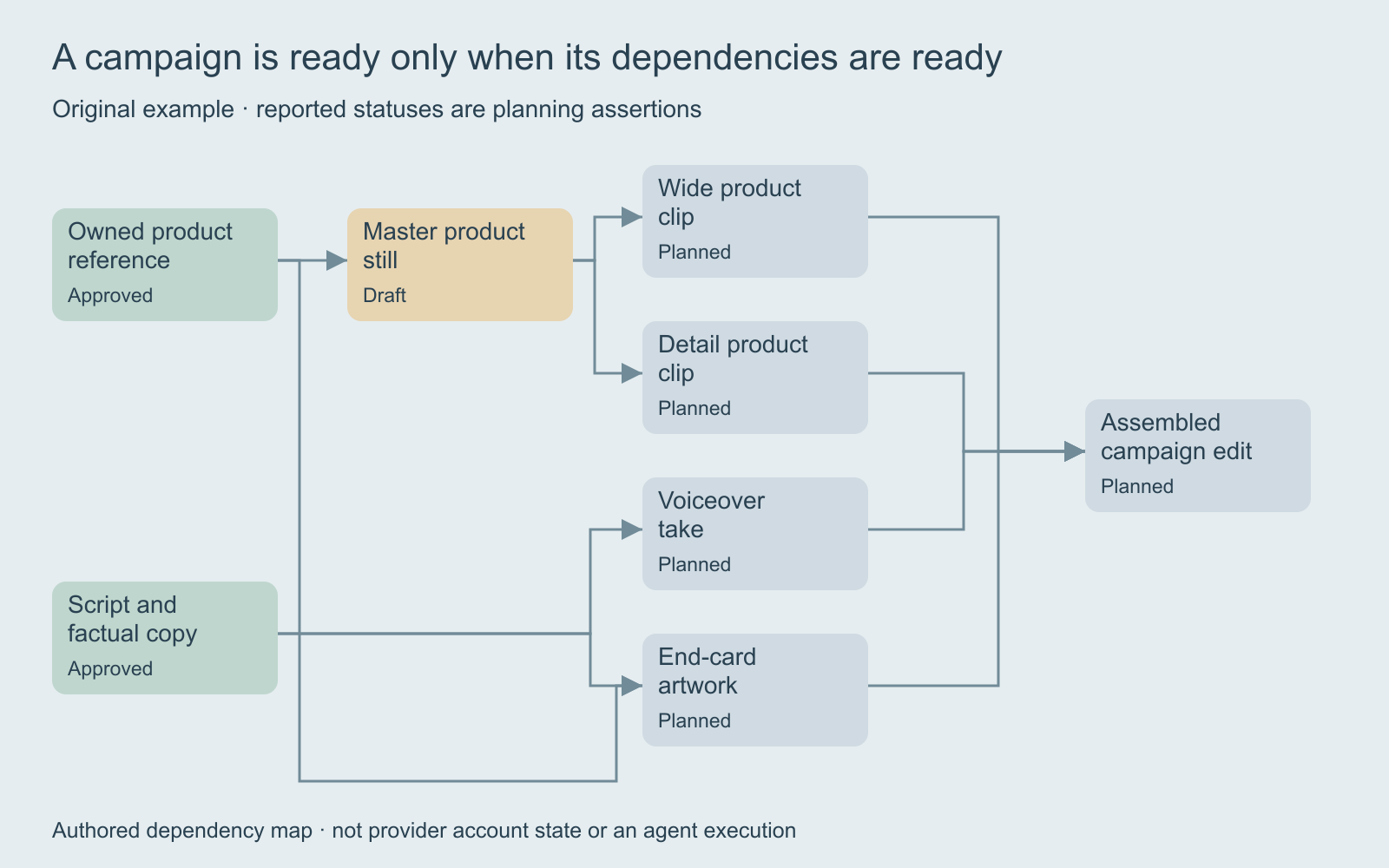
The campaign’s wide and detail clips both depend on an accepted master still. The voiceover depends on factual script approval. The end card depends on both the product reference and the approved copy. The assembled edit depends on the accepted clips, voiceover and end card. This is an editorial example of dependencies, not a claim that Luma imposes this exact sequence.
The original lantern source and portable campaign brief make the example inspectable. Replace them with your own approved assets and requirements before running a production project.
Use the local planner to distinguish ready blocked and approved
The planner above starts with the product reference and script reported as approved. The master still is a draft ready for review. The voiceover and end card can proceed in this example, while the wide and detail clips wait for the master. Nothing is generated when a status changes.
Try marking the wide clip approved while its master is still a draft. The planner flags an approval that needs review, and the assembled edit remains blocked. Now approve the master and observe how the dependent work changes. Reopen the product reference and the affected downstream approvals need review again.
The planner evaluates the whole prerequisite chain. An approved child with an open parent does not become a valid shortcut for its descendants. Unrelated work can remain approved: reopening the product reference does not automatically invalidate a voiceover that depends only on the script. These rules belong to the original local example; they do not read a provider account or determine whether an image actually passed inspection.
Separate creative exploration from approved production
Let exploratory branches answer a specific question, such as a different setting, camera intention or visual tone. Keep those branches separate from the master reference used for dependent jobs. Otherwise a promising experiment can quietly change the product or character across the rest of the campaign.
Name the accepted base and the one requested change when refining a candidate. If a source version changes, review downstream work against the new version instead of assuming approval carries over. Preserve both the previous accepted output and the current candidate so a team can explain what changed.
Original lantern campaign brief: preserve the jade rectangular lantern body, brass handle and pale front window. First propose a master still for approval on a simple shelf. After that approval, prepare separate wide and detail clip candidates with restrained camera movement. Keep the factual script and end-card copy separate. Present returned assets for review before assembling a final edit.
This is an unexecuted brief, not a tested prompt or an instruction that automatically pauses a provider’s agent. Use the controls and review process actually available in the selected service. Confirm its current supported operations and quote before starting generation.
Give each deliverable its own acceptance checks
| Deliverable | Compare with | Accept after checking |
|---|---|---|
| Master still | Approved product source | Shape, materials, label and framing |
| Wide clip | Accepted master and motion brief | Whole-take continuity and useful composition |
| Detail clip | Product reference and selected feature | Local shape, text and material behavior |
| Voiceover | Approved factual script | Actual spoken wording and intelligibility |
| End card | Approved copy and destination | Exact text, contrast and safe crop |
| Assembled edit | Accepted component versions | Timing, sound, continuity and destination fit |
Use the free contact sheet maker to compare still candidates and readable labels. It does not review a complete video, verify spoken words or make an acceptance decision. Watch each clip and listen to the actual audio before approving those components.
The creative-board review ledger records asset IDs, source versions, dependency versions and observed defects. It is a manual worksheet, not an account export or an automatic quality score.
Keep the creative app and developer API as separate routes
A board-based creative workflow and an API integration have different setup and execution contracts. This page does not connect an account, submit provider requests or transfer project state. If your task is changing an existing Ray integration, start with Luma’s official migration documentation and the exact notice for your account.
Do not infer model access, account limits or billing from a workflow illustration. Check the actual route and current quote. Keep the returned asset and request identifier where the selected service provides them, then review the output independently of whether the request completed successfully.
Choose Clout workflows from the actual creative job
Explore Clout Marketing Studio for its current product-led creative workflows or Image and Video for supported individual operations. This guide does not establish a Luma Agents connection, board importer or equivalent automatic project execution in Clout.
Carry the same owned sources, required deliverables and acceptance standards into the workflow you choose. For a product placement detail, use the product-shadow guide. For organizing still-image review, use the contact-sheet review guide. Approve the actual result at each stage rather than treating a workflow plan as a finished campaign.