

Choose the shadow that makes your product sit in the scene
An AI shadow generator adds a shadow to an existing subject so a cutout can belong to a surface or setting. Begin with the intended placement: a bottle standing on a tabletop, a package lying flat or a deliberately floating object. Those are different visual jobs. A dark blur under every product will not make all three read correctly.
This guide covers adding a new shadow. If the problem is an unwanted shadow already recorded in a photograph, use the photo shadow remover guide. Removing a live layer effect, brightening a dark region and rebuilding a covered texture are different operations from generating a new cast shadow.
Use the free light-position lab to explain the direction
The original lab above places one point light beside a vertical post on a flat floor. The dashed top ray meets the floor beyond the post when the light is above it. A left-side light sends that ray toward the right. Raise the light and the projected shadow becomes shorter; raise the post and it becomes longer.
The default setup uses a light height of 340 units, a post height of 180 and a horizontal distance of 240. Its shadow extends 270 units along the floor. Switch the light to the right and the endpoint mirrors. These are known geometry inputs, not a lighting estimate extracted from a photograph. The diagram rescales to keep the setup visible.
If the light is at or below the top of the post, the lab stops reporting a finite endpoint for that top ray. It does not pretend the scene has no shadow. The model is a two-dimensional cross-section with a point light; it does not compute soft edges, multiple lights, reflections, occlusion around a product or the shape of a real three-dimensional object.
Separate contact cast and decorative drop shadows
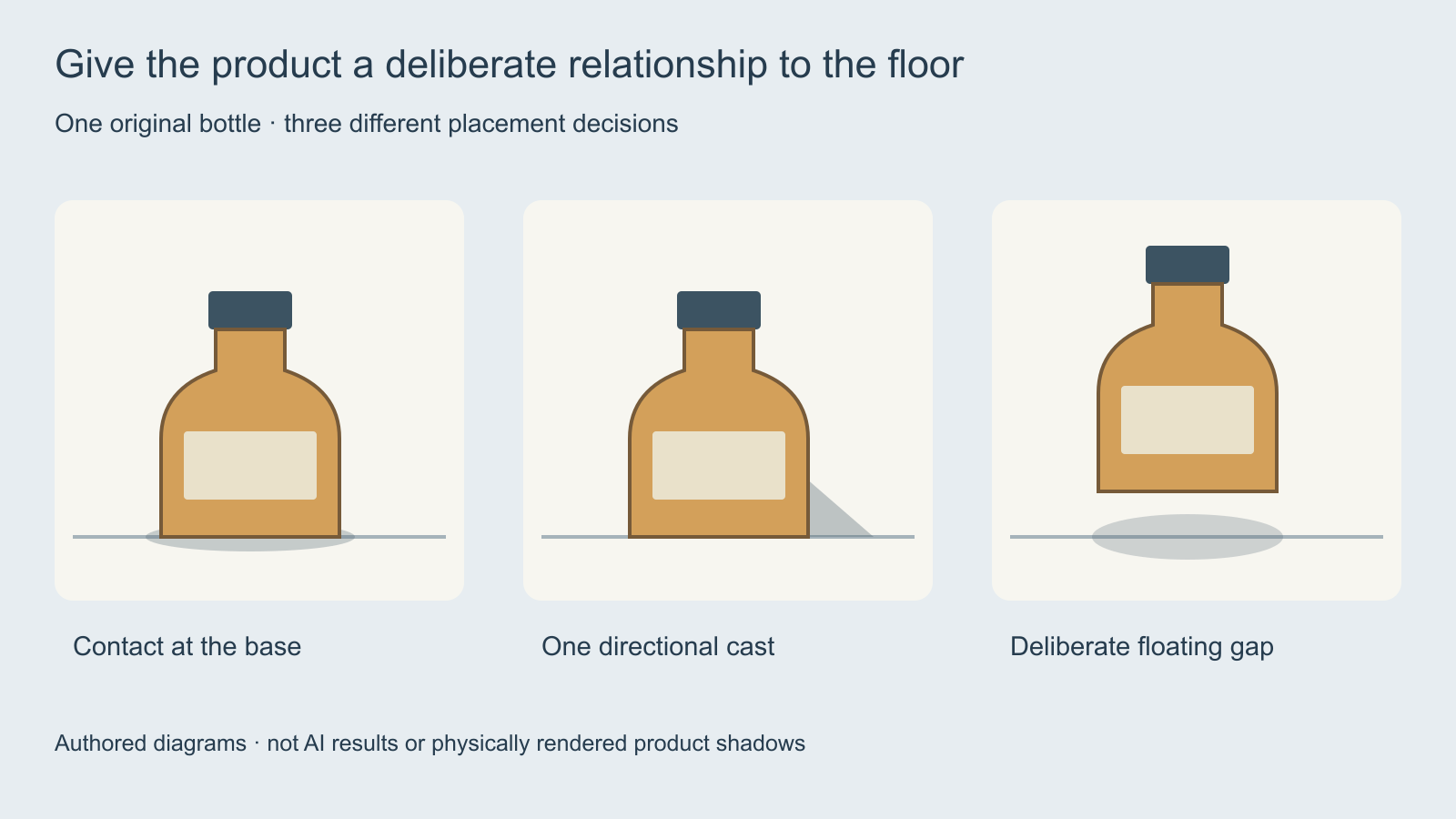
| Shadow role | What it communicates | What to review |
|---|---|---|
| Contact region | Where the object meets the surface | A plausible connection at the intended base |
| Cast shadow | Light direction and the subject’s relationship to the floor | Direction, shape and perspective |
| Floating shadow | A deliberate gap above a surface | Whether the subject is meant to float |
| Decorative drop shadow | Separation in a graphic composition | Whether a graphic effect suits the intended image |
A graphic drop shadow can be appropriate for a cutout collage. A product scene often needs a more specific relationship between the base, surface and light. State which result you want rather than asking a tool to make an arbitrary shadow realistic.
Prepare the product and the surface before generating
Use an owned or approved product source with a clean readable silhouette. Preserve the actual product variant, label and orientation. Choose a background that leaves enough room for the proposed shadow. A hard shadow clipped by the frame can communicate a different lighting setup from the one you intended.
Inspect existing shadows before adding another one. A source photograph can already contain a cast shadow, while a generated background can include its own lighting cues. Decide which shadow belongs in the finished composition and remove or reconcile conflicting layers in the actual editor. Keep the untouched original available for comparison.
Understand the documented AI shadow workflow
Photoroom’s current help guide separates Presets from Advanced controls. Its presets include None, Soft, Hard and Floating; presets do not use AI credits. Advanced controls use AI credits and are currently described as web-only. Verify the actual account’s access and current quote rather than interpreting that credit distinction as a universal free-plan promise.
Its documented controls distinguish edge hardness, intensity, direction, spread and product orientation. Use those as separate review decisions: a darker shadow does not automatically have a harder edge, and a longer shadow does not automatically put the product on the correct surface. This guide describes public documentation; it does not report a paid generation test or a quality ranking.
Check the API contract separately from the web interface
The official Photoroom API documentation identifies a newer shadow model with the header pr-ai-shadows-model-version: 2026-04-15 and shadow.mode set to ai.auto-with-overrides. It documents overrides for softness, intensity, spread, direction and subject pose. Check that contract for the selected API rather than copying a web-interface label into a request.
Keep the complete submitted request, service, model version and returned candidate in your own production record. The light-position lab is not an API payload builder and does not validate those provider parameters. A valid request can still return a visually unsuitable candidate, so inspect the actual output against your product reference.
Write one controlled product-shadow request
Use the approved amber bottle source on a pale tabletop. Preserve the bottle silhouette, cap and label area. Add one restrained cast shadow extending toward the right, consistent with a light from the left. Keep the bottle seated at its base and retain the existing composition. Reject a detached bottle, duplicate shadow, changed label or altered product shape.
This is an unexecuted brief, not proof that a selected service will preserve every feature. Adapt it to the inputs and controls that service actually supports. The original product-shadow brief includes fields for source role, surface, desired placement and observed defects.
Review the whole product rather than the shadow alone
Check the base connection, shadow direction, edge behavior and room around the product. Then compare the cap, proportions, label and material with the approved original. A coherent shadow cannot compensate for a changed product. Record an accepted candidate only after both the lighting and identity checks pass.
Arrange the candidates in the free contact sheet maker for a shared review. Open the selected original at full size before delivery. The shadow review ledger separates placement defects from product changes and the final decision.
Choose a creative workflow from the actual task
Clout Image and Video offers current image and creative operations to evaluate for your next scene. Check supported references, editing controls and the quote before generating. This guide does not establish a dedicated shadow model, automatic cutout recovery or a Photoroom API integration in Clout.
For a change to the lighting across a subject and scene, use the AI relighting guide. For a returned-image production budget, use the Muse Image limits guide. Keep source preservation, generation and acceptance review as explicit steps in the actual project.


