Is Reve AI image generation still available
If you are looking for the Reve AI image generator, start with its current service status. Reve’s official asset-download notice says new image and video creation is unavailable after September 27, 2026. It gives October 31, 2026 as the deadline for downloading existing assets. This guide was checked October 22, 2026; those dates describe a transition window, not a continuing generation offer.
Existing tutorials can still help explain a past creative technique, but their screenshots do not prove that a new generation can run today. Treat preserving your work and choosing a new production workflow as two separate tasks. A replacement service cannot restore a missing source file just because it can create a visually similar image.
Preserve the generated library and the source library separately
The official notice says the archive includes generated images and videos but excludes uploaded images and references. Follow the current official web and mobile instructions for the account you actually use. Keep the deadline in view rather than assuming an expired link can be replaced indefinitely.
Build a second inventory for the material you supplied: original photographs, product artwork, character references and any locally saved project notes. Search the places where you originally stored those files. An exported final image and its original input are different assets. Record a source as missing until you have located and opened it; do not mark it recovered because its filename appears in a list.
| Asset class | What to preserve | What to verify |
|---|---|---|
| Generated still | The actual accepted image file | It opens and has the dimensions needed for its destination |
| Generated video | The actual selected clip | It plays through with its expected picture and sound |
| Uploaded reference | The original source from your own storage | It is the intended version and you have permission to reuse it |
| Production notes | Prompt, crop, revision notes and accepted take | They identify the image or clip they describe |
| Finished deliverable | The edited or published master | The project has enough material for a future revision |
Use an original project inventory before choosing an alternative
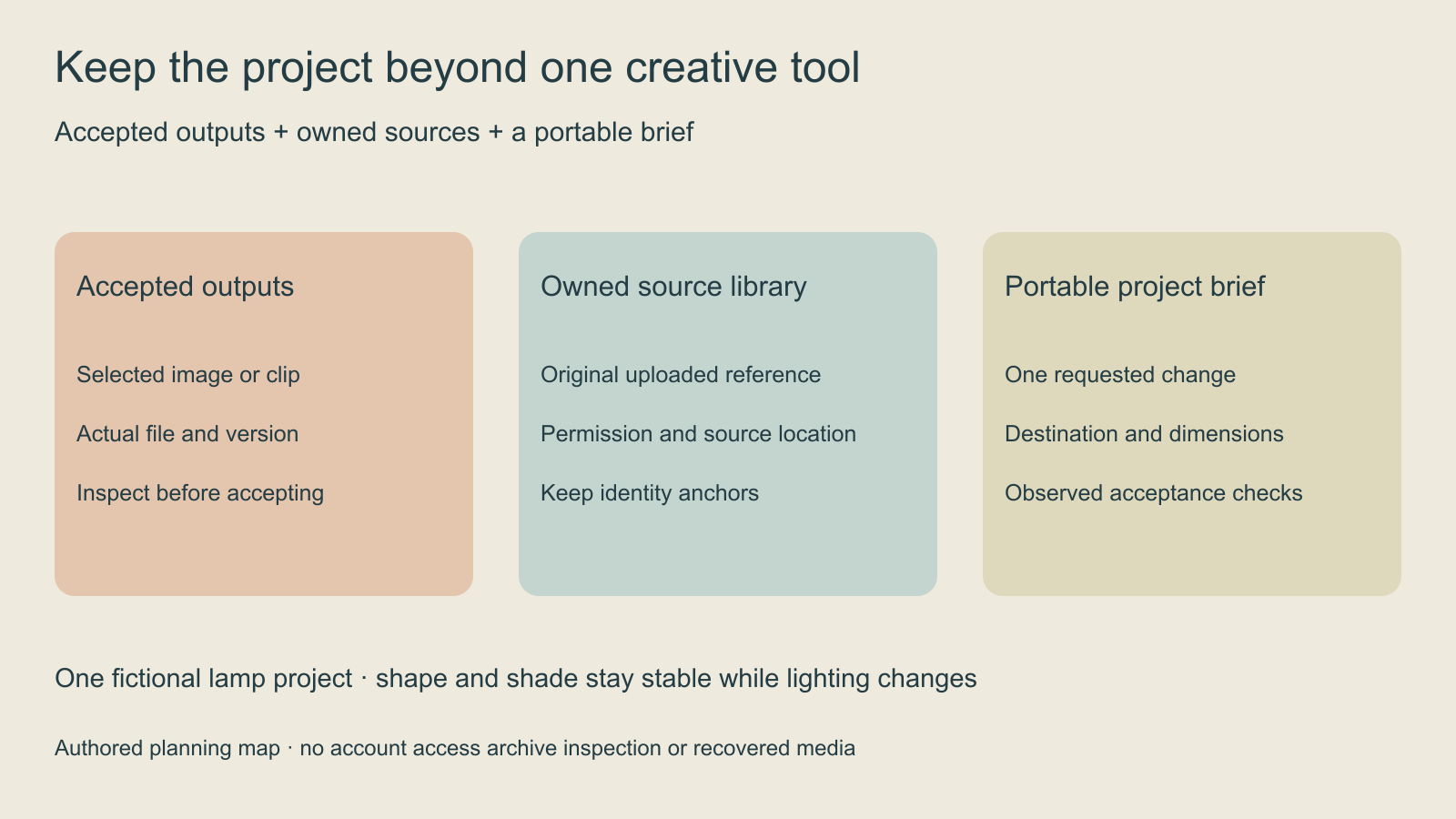
Use the blank project inventory to give each asset a stable project ID, role and actual storage location. Keep the accepted output separate from rejected candidates. Add an observed verification result only after inspecting the file. The worksheet is a plain CSV; it does not read an archive, connect an account or discover missing media.
For example, an original editorial project might contain a terracotta desk lamp, a cream shade and a dark teal background. The accepted image defines the arrangement, while an owned product reference defines the lamp’s actual shape. A new lighting request should preserve the lamp and shade while changing the environment. That brief can be written independently of the interface used to create the first version.
Our sample brief uses this fictional lamp concept to show the difference between identity, composition and a requested change. It is not a Reve output or a demonstration that another model reproduces Reve. Replace its anchors with your actual project facts rather than pasting an unrelated example into a production job.
Choose a Reve AI alternative by the job you need to finish
A useful alternative is a workflow that supports your next task with inputs you actually possess. Make a short list of required operations before comparing product names. Do you need a new image from text, an edit based on an owned reference, a recurring character, a product variation or motion from an accepted still? Those jobs have different acceptance criteria.
| Your next job | Input to bring | Acceptance check |
|---|---|---|
| New standalone concept | A precise scene brief and output destination | Subject, composition and usable framing |
| Reference-led revision | An owned source and the exact requested change | Preserved identity and no unintended changes |
| Recurring character | Accepted character views with clear reference roles | Face, silhouette and wardrobe continuity |
| Product visual | Approved product facts and reference artwork | Correct variant, shape, label and included items |
| Image-to-video stage | An accepted still and a bounded action | Temporal consistency and a usable ending |
Clout Image and Video is one route to evaluate for a new creative project. Check the currently available operation, supported inputs and quote before running it. This guide does not establish a Reve project importer, equivalent editing controls or the ability to reproduce a historical result exactly. Keep your preserved source files outside any single creative account.
For identity preparation, use the character reference-sheet guide. For another documented image workflow, see the Bria Fibo guide. For service and quota planning, see the Muse Image limits guide. These explain different decisions; they are not a tested quality ranking of replacement services.
Write a portable brief that survives a tool change
Start with the scene’s purpose and intended destination. Then list the anchors that must remain stable, the references that define them and one requested change. Name visual defects that would make a candidate unusable. This gives you a review contract even when another tool uses different parameter names or supports a different number of references.
The portable project brief includes fields for the accepted base, source locations, required dimensions, requested change, selected service and actual result. It is a human-readable worksheet rather than an API payload. Do not assume it transfers proprietary project state, masks, conversational history or hidden generation settings.
Original lamp concept: a terracotta desk lamp with a cream conical shade on a pale desk against a dark teal wall. Keep the lamp silhouette, shade and subject placement stable. Change only the surrounding light to a soft evening mood. Leave a clear upper-right area for separately typeset editorial copy. Reject a changed lamp shape, extra lamp, altered shade or unreadable generated lettering.
That is an unexecuted creative brief. It specifies what to inspect without claiming a model will obey every instruction. If the selected workflow cannot accept the required source, choose a different operation or redesign the task before spending time on repeated attempts.
Test one representative project before moving the whole workflow
Arrange existing candidates in the free contact sheet maker to compare full frames and label review notes. Keep the accepted originals separately; a sheet is only a visual index.
Choose a small project that includes your most important constraint. Keep the original source and accepted base available during review. Record the service, actual submitted inputs, returned candidate and defects observed at full size. A pleasing thumbnail can hide label errors, changed anatomy or an unusable crop.
For a product series, test whether the actual item remains recognizable across the required views. For a character series, compare identity anchors across accepted frames. For a video stage, watch the complete clip. Accept or reject the output against the task rather than interpreting a familiar interface as proof of continuity.
Save the new accepted result, brief and review decision together. A move is ready when the necessary sources are preserved and a representative task works for your intended use. An account signup, a feature checklist or a copied prompt alone does not establish that result.
Review this guide against the current date
The October 31 deadline above is the date stated in the official notice checked October 22. If you read this after that window, check Reve’s current support notice rather than assuming export access remains open. This page cannot inspect an account or recover assets. Its inventory and brief remain useful for planning with files you already possess.