Choose the Ray operation before writing the prompt
Luma Ray is a video-model family. A text-to-video request, an image-led shot, a modification of existing footage and a reframe have different inputs and acceptance criteria. Start with the operation that solves the production problem rather than treating the model name as a complete brief.
The current official Ray page presents Ray3.2, multi-keyframe direction with up to sixteen keyframes, Modify Video V2 and Reframe. Its Modify description specifies up to twenty seconds at 1080p. That limit should not be generalized to every text- or image-to-video request. Verify the exact mode, duration, output options and current quote in the product or API you select.
Separate keyframes from a finished motion path
Keyframes describe desired states at chosen moments. They give the generation more direction, but they are not proof that every frame between those states will preserve a product or follow physically correct motion. A useful first test has a small number of coherent states and one visible change.
| Planning state | Original paper-bird example | Review question |
|---|---|---|
| Opening | A folded bird rests on a simple surface | Does the shape match the approved source |
| Middle | One wing opens slightly | Do the folds remain connected |
| Ending | The wing returns toward the opening pose | Is the final bird still recognizable |
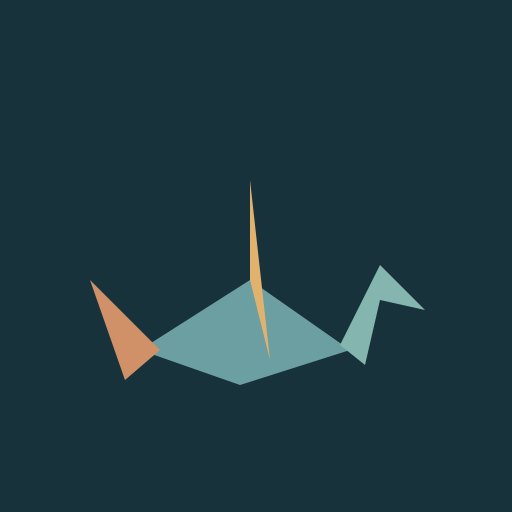
Download the original paper-bird planning reference and blank Ray shot review sheet. The image is code-authored illustration, not a photograph or Ray output. The three hero states explain a brief; they are not an API upload bundle, an exact timing prescription or a demonstrated model result.
Use one deliberate movement in the first brief
A single locked-camera view of the approved original paper bird on a quiet dark tabletop. Keep the teal body, ochre wing and geometric folds recognizable. One wing opens gently, pauses and returns toward its original pose. Preserve the table position, background and light direction. No new objects, letters, camera move or scene cut. End with a clear stable view of the same bird.
This is an authored, untested production brief. Apply supported duration and keyframe controls separately in the actual interface. If the chosen workflow accepts only an opening image, do not assume that supplying several references elsewhere gives them endpoint or timing roles.
Inspect the full movement, not only the attractive opening still. Paper folds can split, an extra wing can appear or the beak can change during a turn. If the geometry fails, reduce the movement and compare the next approved test with the same original reference.
Distinguish Modify Video from Reframe
A modification changes content or appearance within existing footage. A reframe adapts the composition around a shot. If the job is changing a background, wardrobe or product variant, name that intended change and the details that must remain stable. If the job is a new aspect ratio, first decide whether a crop already solves it.
The video expansion guide explains why generating scenery around the frame differs from adding time. Neither a wider canvas nor an altered background establishes that a real event was filmed in that new environment. Keep an untouched master when the source has documentary or product-evidence value.
Check output format before commissioning a final take
Luma’s Ray page documents native HDR generation and sixteen-bit EXR export with an ACES2065-1 color space. Those options belong to a finishing workflow as well as a generation decision. Confirm that your editor, grading pipeline and intended delivery support the chosen output; a social preview and a compositing sequence serve different jobs.
Ask for a representative test file before committing a whole production batch. Check dimensions, frame rate, color interpretation, alpha expectations where relevant and the actual media you receive. This guide does not claim an EXR inspection, color-accuracy measurement or a tested Ray export.
Keep release history and present access distinct
Luma’s Ray3.2 release announcement is dated June 9, 2026. It describes multi-keyframe controls and API access. This is an established release, not a newly announced October launch. A search for Ray 3 may lead to older examples, so record the selected version rather than inferring its behavior from a family name.
Do not treat a promotional demonstration as a preservation guarantee. Review your own source, accepted request and exported result together. When comparing providers, keep the input mode and settings explicit. A different wrapper can expose a different subset of the model’s controls.
Use Clout alternatives with a clear model boundary
The Clout first-party image/video catalog checked for this guide does not list Luma Ray. The Clout Image and Video Studio is an alternative source-creation workflow, not a Ray endpoint. Choose an available model, inspect its supported references and current credit quote, then review the returned file.
For finishing an accepted take, the frame interpolation guide explains inserting estimated frames between existing ones. That process differs from directing a new scene with keyframes. The generation timing guide helps follow one request through queue, processing and delivery without assuming a browser timeout means the backend failed.