What frame interpolation changes
Frame interpolation estimates images between existing video frames. It can increase the displayed frame rate or support a slower playback decision. It does not recover a real camera exposure that was never recorded, and it does not fix every motion or identity error in an AI-generated source.
A higher frame-rate label alone does not establish new motion detail. A conversion can repeat source images, blend them or estimate intermediate movement. Compare the actual frames and playback rather than assuming every higher-fps export uses the same process.
Compare repetition blending and estimated motion
| Method | How to read the result | Common review concern |
|---|---|---|
| Repetition | An existing image occupies another frame slot | Visible stepping during movement |
| Blending | Nearby source images are mixed | Ghosted edges or two partial subjects |
| Motion estimation | An intermediate image is synthesized from inferred movement | Warping where visibility or shape changes |
The official FFmpeg filter documentation distinguishes duplication, blending and motion-compensated interpolation in minterpolate. Its conventional motion processing is not the same model as a learned AI interpolator. The distinction matters when evaluating what a demonstration actually proves.
Inspect the original occlusion study
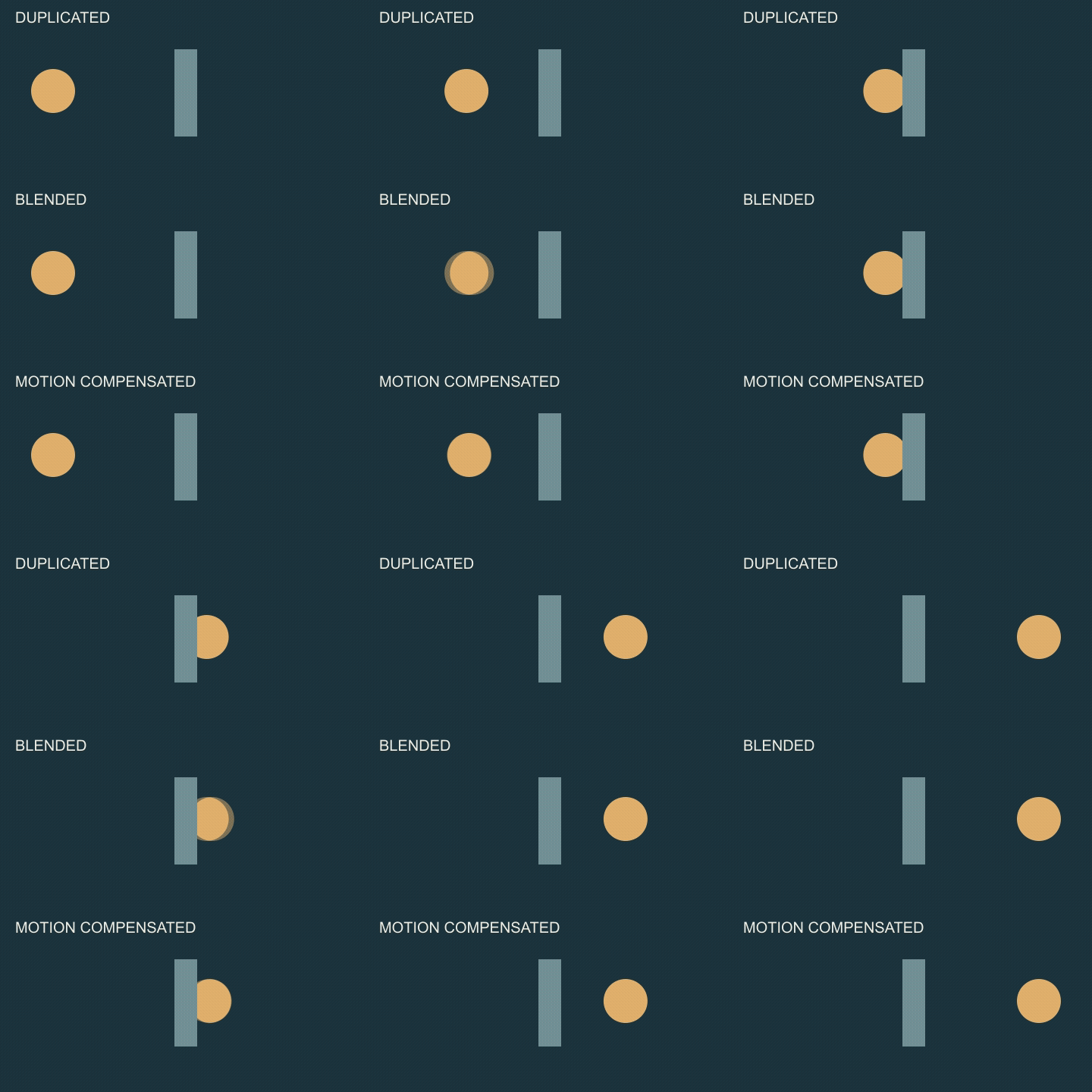
Open the original animated interpolation comparison. The source is a code-authored circle moving behind a stationary post, with forty-eight source frames at twelve fps. Each lane is converted to twenty-four fps through a different FFmpeg mode: duplication, blending or motion compensation. All three outputs use the same four-second review window.
The end of the source is padded before processing and the outputs are trimmed to the shared window. That prevents different filter lookahead requirements from producing different review lengths. The result is a synthetic teaching study, not recorded footage, a RIFE output or a quality ranking of commercial products.
The static checkpoint below shows the same output frame index across all three methods.

Watch the circle as it meets and leaves the post. Compare whether its silhouette stays readable and whether the hidden part appears to leak through the obstacle. A visually smoother path can coexist with a wrong edge. The intentional reset at the end of this short study is not a seamless-loop example.
Keep frame rate and playback speed separate
For a hypothetical four-second source with forty-eight frame slots at twelve fps, a twenty-four-fps delivery over the same four seconds has ninety-six frame slots. The extra slots do not automatically make the action last longer. Slowing the action is a separate timing decision.
If you want half-speed playback, decide the desired duration and audio treatment before selecting a method. The slow-motion guide covers retiming an existing clip with an actual edited example. An interpolation comparison should keep playback duration consistent when the question is how intermediate motion looks.
Understand what an AI interpolator adds
The official RIFE repository describes a learned video frame interpolation model and support for arbitrary timesteps between a pair of images. Its published performance examples depend on particular hardware and conditions. Do not generalize a research timing claim to every source resolution, wrapper or hosted queue.
Use the exact implementation and model version when recording a test. A product can combine interpolation with enhancement, denoising or resizing, which makes it harder to isolate the cause of a change. Keep an untouched source and disable unrelated operations where the selected workflow permits it.
Test difficult boundaries before a full export
Choose a short representative section containing the real challenge: a hand crossing a face, thin product edges, a fast turn, a foreground object or a cut. Inspect the frames immediately before and after the difficult event. Review at normal playback speed too; not every visible still-frame difference is equally distracting in motion.
A cut is not ordinary object movement. Process separate shots deliberately and check how the selected tool handles scene boundaries. Watch for invented shapes, ghosted text, unstable mouths and motion that changes direction unexpectedly. If the source already contains a wrong product label or a changing face, interpolation is not evidence that those facts have been repaired.
Download the blank interpolation review sheet to record source rate, target rate, duration, method, model version and observed artifacts. Keep the result tied to its source segment instead of making a universal best-model claim from one attractive sample.
Choose source generation and finishing independently
The checked Clout first-party image/video catalog does not establish a dedicated frame-interpolation operation. The Clout Image and Video Studio is linked for creating source visuals through available models, not as a hosted RIFE service or the FFmpeg processing shown here.
For directing desired states before generation, see the Luma Ray workflow guide. For repeated playback after editing, use the loop guide and sequence calculator. Keyframe direction, frame interpolation and loop editing operate at different stages; choose the one that addresses the problem you can actually observe.