

What creative fatigue detection can and cannot tell you
Creative fatigue detection starts with a narrower question than “Should I replace this ad?” Compare the same creative across understandable windows, inspect exposure and response, and check whether the business result actually weakened. A falling result can have several explanations. A local metric comparison can make the arithmetic clear without proving which explanation caused it.
The free creative fatigue detection tool above accepts manually entered counts and spend. It calculates frequency, link CTR, CPM, cost per link click and cost per result. It does not connect to an account, inspect an image, predict a winner or reproduce a platform delivery status. Its two examples are invented teaching data, not Clout campaign results.
Keep Meta delivery status separate from local calculations
Meta’s official creative-fatigue documentation, read October 22, 2026, says its recommendations consider exposure history and cost per result relative to past ads. The feature has single-creative eligibility limits and exclusions. The documented exposure context can include other campaigns from the same Page. This page does not give a universal frequency cutoff, and a two-window calculator cannot recreate that broader platform history.
Read the actual status and its supporting information in the selected platform. Keep that observation separate from a worksheet’s directional summary. A person checking a box in this tool confirms only their own assessment of the comparison context; it does not import an account’s history or verify the statement.
Start with the same creative and a comparable measurement contract
Identify the asset and version before copying numbers. A file with a new opening, changed product claim or different crop is a different creative for this review. Record the audience, placement, objective and dates so a later reader can tell what changed between windows.
Use the same currency, result definition and attribution setting. A purchase, lead and landing-page view are different denominators. A period that is still collecting delayed results should not be treated as mature simply because it ended yesterday. The tool cannot check those facts, so its context checks begin unconfirmed.
Use reach for the complete window you intend to compare. If one person appears in two daily groups, adding the daily unique-person counts counts that person twice. Record the window-level denominator rather than manufacturing one by summing overlapping groups.
Read five measures together
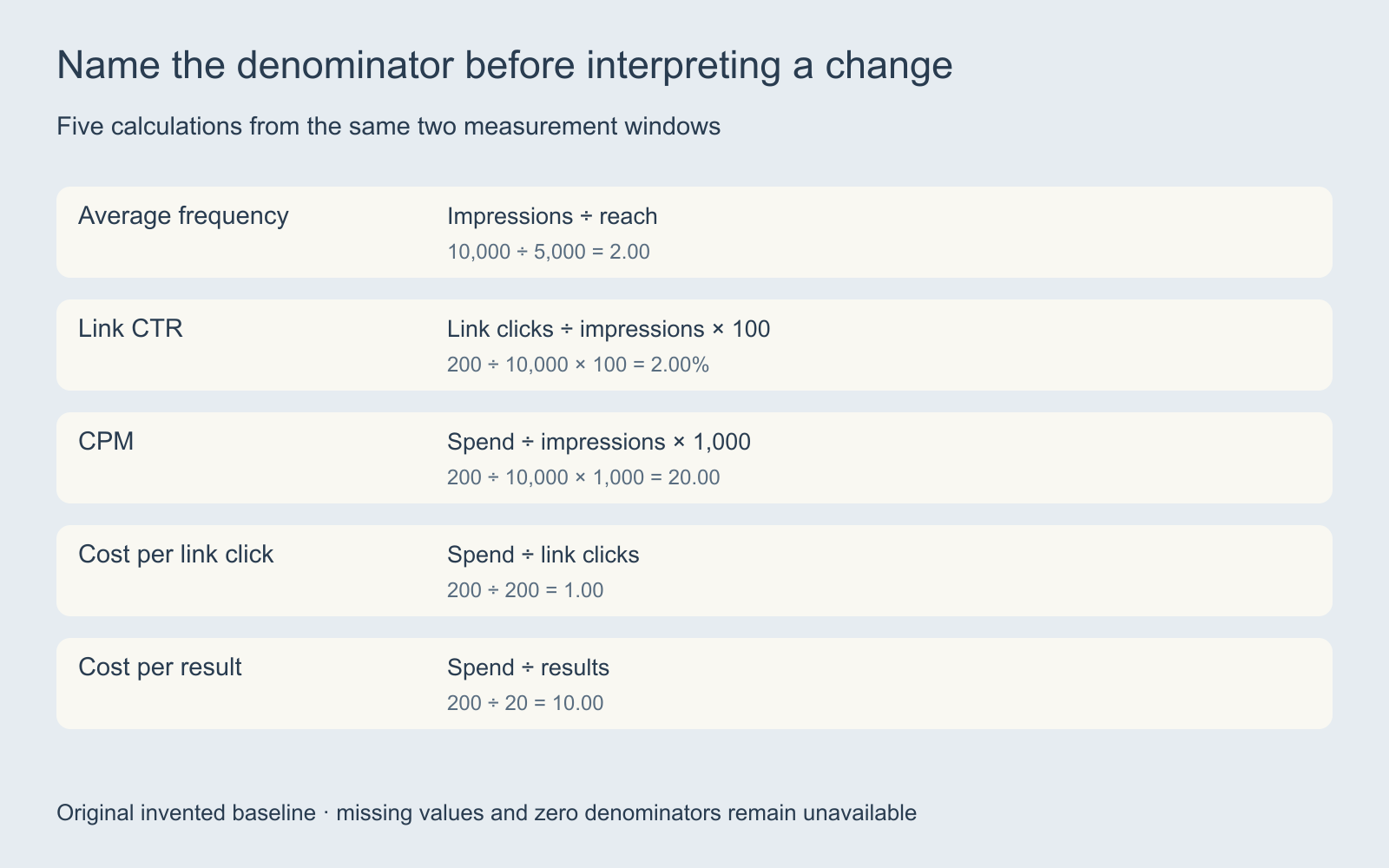
| Measure | Calculation | Question to review |
|---|---|---|
| Average frequency | Impressions ÷ reach | Did reported exposure per reached person change |
| Link CTR | Link clicks ÷ impressions × 100 | Did the measured click response change |
| CPM | Spend ÷ impressions × 1,000 | Did the cost of delivered impressions change |
| Cost per link click | Spend ÷ link clicks | What did the measured click cost |
| Cost per result | Spend ÷ results | What did the defined business result cost |
Use link clicks consistently; do not substitute all interactions in one window. The calculator does not label results divided by clicks as a conversion rate, because an attributed result does not necessarily belong to the counted click cohort. Inspect the actual result definition before making a conversion claim.
Work through the exposure and response example
The baseline has 10,000 impressions, 5,000 reach, 200 link clicks, 20 results and 200 currency units of spend. Frequency is 2, link CTR is 2%, CPM is 20 and cost per result is 10. These are deliberately simple invented numbers.
The comparison window has 12,000 impressions, 4,000 reach, 120 clicks, 10 results and 240 units of spend. Frequency rises to 3 while CTR falls to 1%. CPM stays at 20, click cost rises from 1 to 2 and result cost rises from 10 to 24.
After the three context checks are confirmed, the tool describes that direction: exposure rose while click response fell and result cost rose. It does not say creative fatigue is proven. Different audience mix, delivery conditions, message relevance, destination behavior or reporting can still matter.
A CTR move from 2% to 1% is a one-percentage-point decline and a 50% relative decline. The table shows both absolute and relative change so those statements cannot be confused. It does not run a statistical significance test or treat any tiny directional move as decisive evidence.
Compare a second explanation for higher result cost
Select “Higher impression-cost example.” It holds impressions, reach, clicks and results at the baseline values while spend rises from 200 to 400 units. CTR and frequency stay unchanged; CPM rises from 20 to 40 and cost per result rises from 10 to 20.
This invented case shows why a more expensive result alone does not identify a weaker creative response. The observed impression cost changed. The calculator does not infer why it changed or recommend a bid, budget or audience action. Review the source report before choosing the next test.
Switching examples resets the context checks. Treat that as a reminder to reassess the comparison rather than carrying an earlier assumption into a different dataset.
Keep unknown values and observed zeros different
Leave a value blank when it is unknown. Enter zero only when zero was observed. A comparison with no results has no defined cost per result; displaying zero cost would reverse its meaning. The tool shows “Unavailable” when a required input or valid denominator is absent.
A baseline of zero also makes relative percentage change undefined. A later nonzero CTR is not a finite percentage increase from zero. The absolute change can still be shown when both rates are defined. Reach greater than impressions, fractional counts and invalid values produce input errors instead of plausible-looking rates.
The invented sample windows preserve the example counts. Use the review worksheet to record actual source reports, asset versions, dates, definitions and unresolved explanations. The files are editorial worksheets, not exports from Meta or Clout.
Turn a concern into a controlled creative assignment
Separate the observed problem from the proposed remedy. “CTR fell in the comparison window” is an observation. “Test a clearer opening demonstration with the same factual body” is a proposed creative task. Neither statement proves the other.
Choose the variable the next asset should explore and preserve the accepted sources, offer and exact copy. The creative brief builder helps write that assignment. The UGC campaign testing guide covers controlled variant design and production-versus-media ledgers.
For a proposed replacement, review the actual product shape, spoken claim, text and crop. More variants can repeat the same error if the source brief was wrong. A comparison tool should help make the next decision explicit, not encourage indiscriminate regeneration.
Choose generation and publishing capabilities separately
Explore Clout Marketing Studio for current product-led creative work and Image and Video for supported individual operations. Check the selected workflow’s inputs and quote. This local page does not establish an account-connected fatigue detector or automatic ad publishing in Clout.
For a newer generation-and-publishing product, read the Runway Ads workflow guide. Keep its documented capabilities distinct from measured results in your own account. Preserve the link from the approved source to the production variant, delivered ad and report window so future comparisons remain interpretable.


