

Wan 2.2 Animate is a character-animation workflow for a job that begins with a performance: you have a person moving in a video and a character image you want to use. It is different from asking a text-to-video model to invent the whole scene.
The useful decision is whether to animate the character from that performance or replace the performer inside the existing scene. This guide separates those jobs, explains the documented ComfyUI workflow and supplies original shot briefs and a blank review worksheet. For the wider model family, use the Wan video overview; for animating a finished still, use the Wan image-to-video guide.
Choose character animation or replacement first
The official Wan repository identifies Animate-14B as a character animation and replacement model that takes a video and character image. The research team's project page describes animating the image from a performer's movement and expression, or integrating the character into the performance scene. These are documented capabilities, not a guarantee that a particular clip will preserve every detail.
| Job | What the performance supplies | What to review |
|---|---|---|
| Animation | Movement and expression for the reference character | Character identity, body proportions and action |
| Replacement | A performance within a scene where the character should appear | Character boundaries, scene interaction and environment continuity |
| Image to video | No driving performance is required for the basic job | Whether generated motion suits the approved starting composition |
Use animation when the movement is the valuable reference. Use replacement when the performer must be changed within the recorded setting. A face-only edit is a narrower job: see the video face swap guide if the body and outfit should remain the target footage's own.
Prepare a reference character with readable anatomy
For a first test, choose one original fictional adult character with a clear face, simple wardrobe and separated limbs. Keep the reference at full resolution. A cropped shoe or hidden wrist leaves the production brief harder to evaluate even before motion begins.
Our original artwork shows a fictional creator with curly dark hair, a cobalt sweatshirt, terracotta trousers and ivory shoes. It is a still reference for preparation, not a Wan render. The full-body framing makes the outfit, limbs and grounded stance visible.
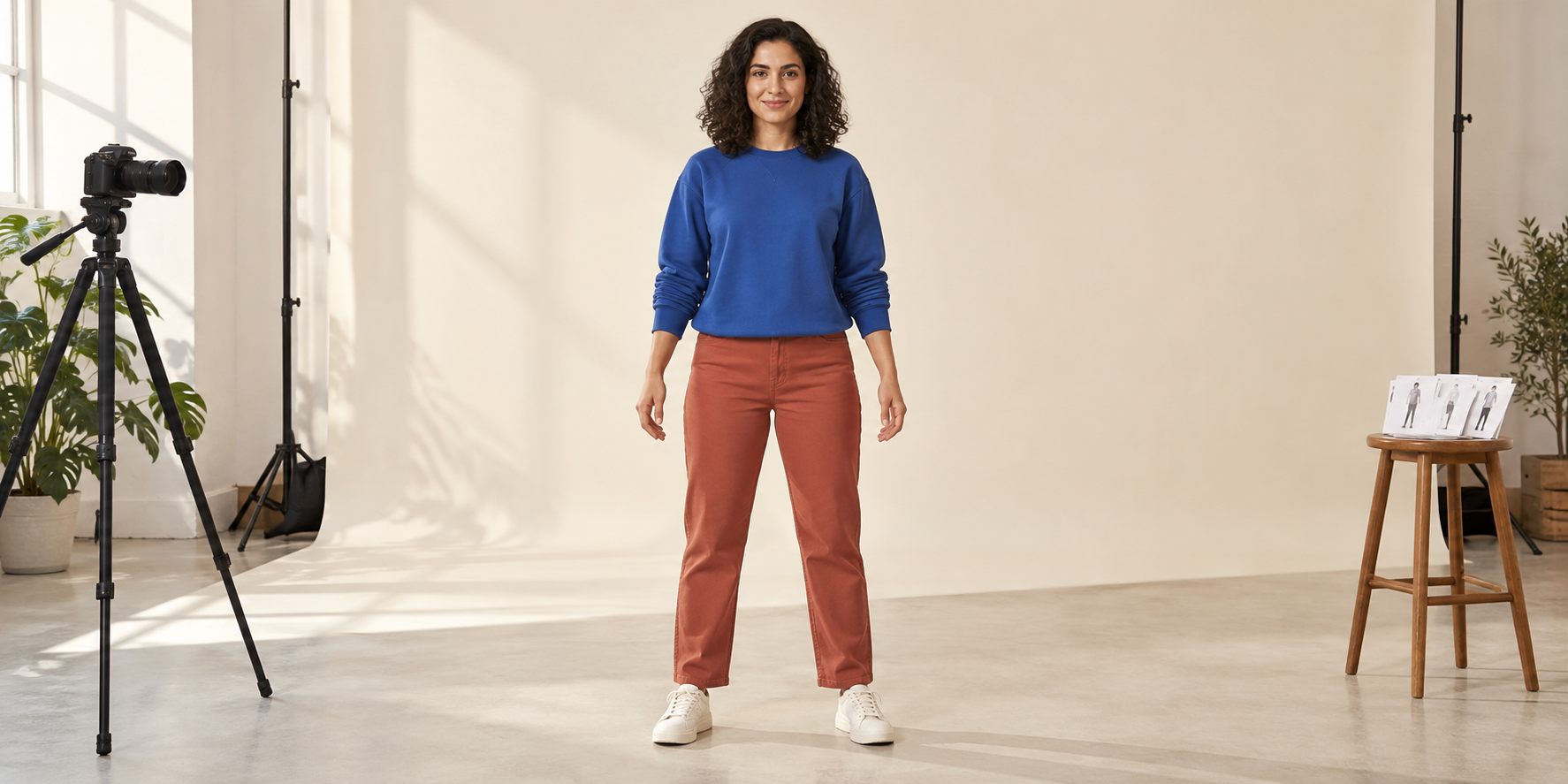
Download the full-resolution character reference. Supply your own permitted driving performance. This image does not provide a pose-control video or prove that a specific preprocessing configuration will accept its stance.
Keep the face, hair, wardrobe and footwear written as a short identity baseline. If you change the reference halfway through a test, record that change instead of attributing the difference to a model setting. The consistent creator workflow helps organize approved references.
Record a driving performance that answers one question
Start with a short, single-person performance and a steady camera. Make the face readable and keep the action within the frame. Use your own performance or footage you are permitted to process. A crowded dance or fast sequence with several cuts creates multiple failure causes at once.
For our first brief, the performer stands, makes a small wave with one hand and returns to the starting stance. It tests the shoulder, elbow, wrist and fingers without requiring furniture contact or an extreme turn. A second brief can introduce a small weight shift after that simpler action is acceptable.
- Write the action and the detail it should test.
- Keep head, hands and feet visible where the action needs them.
- Record a short stable shot with one main performer.
- Inspect the original performance for cuts, occlusion and motion blur.
- Save the reference image and driving clip together with the selected mode.
A five-second rehearsal is an editorial starting point, not a universal Wan limit. Make the input short enough that you can inspect every important moment. For replacement, choose a scene where the character does not need to pass behind complicated foreground objects during the first test.
Inspect preprocessing before spending time on the render
The official preprocessing guide separates animation and replacement. Animation produces face and pose videos; replacement adds background and mask videos. It recommends reviewing retargeting results and warns about body-proportion mismatch. Its simplified mask extraction is designed for single-person footage.
Those intermediate materials are a diagnostic opportunity. Check that the pose follows the intended performer and that the face track belongs to the same person throughout. In a replacement job, inspect whether the character mask includes the area that must be regenerated while keeping the surrounding scene usable.
| Material | Practical check | Reason to stop and revise |
|---|---|---|
| Pose sequence | Follow the limbs through the whole gesture | A wrist jumps to a different person or limb |
| Face sequence | Check the face during turns and recovery | The selected face disappears or switches |
| Replacement mask | Review the changing silhouette and boundaries | Important body areas are excluded or background objects are swallowed |
| Background sequence | Compare the retained environment with the original | A scene interaction cannot be preserved by the selected preparation |
A larger mask is not automatically a better mask. The official guide describes a tradeoff between generation room and retained background. Review the boundary around hair, sleeves, hands and shoes, then choose a revision that addresses the visible problem. Do not hide a failed preprocessing result behind a more elaborate prompt.
Use the documented ComfyUI Move and Mix workflow
The official ComfyUI tutorial calls animation Move and replacement Mix. It provides a workflow template, model links and input instructions. It lists both an original BF16 weight and a Kijai scaled FP8 option; choose the model expected by the downloaded workflow.
Load the template, verify model paths and add your reference image and driving video. For Mix, inspect its person-selection preparation. The tutorial explains switching to Move by disconnecting the background-video and character-mask inputs from the sampling subgraph. Its documented output dimensions must be multiples of 16.
If nodes are missing, check the ComfyUI version and startup import failures against the tutorial before replacing the graph. Keep the initial run small enough for your available memory. Save the template version, selected weights and exported workflow with the test, so a later run has a clear baseline.
A search for Kijai Wan Animate may refer to that scaled model option or a different community graph. Similar names do not prove interchangeable nodes or weights. Use the instructions belonging to the exact graph you loaded. This article has not installed ComfyUI or run a Wan inference benchmark.
Plan three tests with original shot briefs
Download the three original Wan Animate shot briefs. These are production instructions for recording a performance and reviewing a result, not model-generated motion files.
Small wave for animation
Use the cobalt-shirt character with a front-facing performer. Raise one hand, pause briefly and lower it. Keep the camera still. Review the hand through the action and confirm the character's wardrobe remains consistent.
Weight shift for body continuity
Record a modest shift from one foot to the other with both shoes visible. Keep the arms relaxed. Review the pelvis, trouser silhouette and foot contact. This is a specific anatomy check rather than a dance-quality score.
Simple scene replacement
Use one standing performer beside a plain wall with no foreground objects crossing the body. Make a small head turn and return. Review the character's boundaries and compare the wall and floor around the edited silhouette. Add complex interactions only after this simpler scene is useful.
Run each brief as a separate question. Changing the character, motion, background and mode together makes failures difficult to interpret. Keep both accepted and rejected outputs with their settings.
Can Wan Animate be used for free or in a Hugging Face Space
The official repository links model weights, inference code and a Hugging Face Space. A linked demo is an access route to check, not a promise of a current free allowance, available queue or production export. We could not verify the Space's current account conditions for this guide.
For local use, check compatible hardware, software and model terms before investing time in setup. Downloadable code and weights do not remove compute, storage or preparation costs. For a hosted interface, verify the exact model and mode, credits, duration and download conditions in that account.
Keep access evidence separate from quality evidence. A free preview can help answer a small question, but it does not establish long-clip performance or unlimited use. The same principle applies to a Wan Animate app: identify the operation behind the product name before treating its interface as equivalent to the official pipeline.
Review the exported clip against the original brief
Download the blank Wan Animate review worksheet. It covers the opening, action peak, recovery, ending and full playback. All observation and decision fields are empty.
Watch the full export, then pause on important contacts and turns. Review identity, outfit, limb continuity and the requested action. For replacement, also inspect the boundary with the environment. A clean opening frame does not settle whether the foot slides or the background changes later.
If the performance is wrong in the intermediate pose sequence, revise preparation. If the pose is useful but the character deforms during contact, simplify that shot and inspect proportions. If the whole clip is acceptable but the delivery file is too small, review export settings before repeating the model operation.
Create the recurring character behind your motion series
Clout lets you build an original AI creator and generate coordinated reference photos and video scenes around that identity. Approve the look first, then choose the production method for each motion brief. This is a creator workflow, not a claim that Clout exposes the native Wan Animate preprocessing graph.
Keep a three-shot series recognizable: introduction, small gesture and reaction. Save the approved references and compare the identity across the sequence before adding captions or publishing. Continue with the character swap guide for replacement decisions and the camera movement guide for restrained shot direction.


