

For a held moment with a changing viewpoint, use the dedicated bullet time AI guide with creator briefs and an editable orbit plan.
To keep a creator framed or attach an effect to a moving face, use the head tracking video guide for crop boundaries, tracking outputs and a review sheet.
For a multi-mode travel campaign brief, read the RSW AI Studio guide with an original creator reference and a blank review sheet.
Comparing a named video platform? Use the Makefilm AI guide for a three-scene creator test and a blank campaign comparison sheet.
‘Make it cinematic’ leaves nearly every camera decision to the model. If you want a product reveal, a recognizable creator or a clean close-up, describe what the camera does and what the viewer should see at the end.
A good shot brief makes movement serve the content. A quiet talking scene might need a locked camera. A fashion reveal might need a gradual pullback. A dramatic orbit can be visually appealing while making the face or product harder to keep consistent.
Starting from reference footage? Use the video to prompt guide to record the observed action and distinguish camera motion from subject movement before writing a new shot brief.
For a sports setting, compare the original basketball court images and approve the location direction before adding motion.
Separate camera movement from subject movement
Runway's image-to-video guide distinguishes motion direction from the visual information in the starting image. Its Gen-4 guide recommends clear positive instructions and discusses camera motion terminology. The examples here are original editorial prompts to test with your chosen model.
Write the camera instruction separately from the action: ‘The camera slowly moves forward while the creator lifts the cup once.’ Avoid a sentence that simultaneously asks the person to run, spin, talk and reveal a product while the camera circles them.
| Move | What changes | Useful creator scene |
|---|---|---|
| Locked camera | The frame stays fixed while the subject moves | A short line delivered to camera |
| Dolly in | The camera moves toward the subject | A gradual product or expression reveal |
| Dolly out | The camera moves away to reveal context | A full outfit or room reveal |
| Pan | The camera turns horizontally from one view to another | Moving attention between two objects |
| Tracking | The camera follows a moving subject | A simple walking scene |
| Orbit | The camera moves around the subject | A controlled partial-angle fashion shot |
A zoom changes framing through lens behavior; a dolly changes camera position and perspective. Models may interpret these differently, so name the intended move and describe the visible outcome instead of relying on the label alone.
Use this three-part shot brief
The camera [one move and speed] while the creator [one action]. The shot ends with [specific framing or reveal].
For continuity, add only the details that matter: identity reference, the garment, the product and the lighting. Use the same approved first frame across motion tests. Otherwise you will not know whether the improvement came from the prompt or a different starting image.
Six camera prompts to test
Locked camera for a calm presenter
Locked-off medium shot. The creator looks at the lens and gives one small welcoming smile. Natural breathing and a subtle blink. The framing stays stable throughout.
Choose a first frame with relaxed shoulders and enough space above the head. Add speech through the appropriate audio or lip-sync workflow rather than assuming a visual prompt will create an exact spoken sentence.
Slow dolly in for a product moment
The camera moves slowly forward from a medium shot toward the creator holding the amber bottle at chest height. The creator keeps the bottle steady. The shot ends with the face and bottle both clearly visible.
Keep the label readable in the first frame if it matters. A camera move cannot make an incorrect product label accurate.
Pullback for a full outfit reveal
The camera gradually moves backward from a waist-up view to a full-length view of the creator in a cobalt suit. The creator remains standing in one place. The shot ends with shoes and head inside the frame.
Use a reference that establishes the full outfit when possible. Asking a model to reveal clothing absent from the source gives it additional details to invent.
Tracking for a relaxed walk
The camera tracks alongside the creator walking slowly on a garden path. The creator takes a few relaxed steps and looks ahead. The medium framing stays at eye level.
Begin with a simple path and limited movement. Check foot contact, arm motion and whether the face stays recognizable.
Partial orbit for a fashion detail
The camera follows a slow shallow arc around the standing creator, moving from a front view to a slight three-quarter view. The creator holds a relaxed pose. The jacket and face remain the main focus.
A small arc asks for fewer unseen details than a complete revolution. Expand the movement only after the smaller test works.
Pan for a tabletop reveal
The camera pans slowly right across a tabletop from a folded linen towel to a ceramic cup. The objects remain stationary. The shot ends centered on the cup in warm window light.
This is useful when the product story matters more than a visible presenter. It also provides a simpler way to test a camera direction.
Drone shot AI prompts for creator scenes
A drone shot AI brief asks for the appearance of an aerial camera move. It can establish a setting, reveal a landscape around a creator or follow a subject from above. It does not document a real flight or prove that a generated location matches a property. Start by deciding what the audience should learn from the wider view: where the story takes place, how the creator fits into the setting or what lies beyond the opening frame.
Higgsfield's FPV Drone motion page describes fast first-person movement through dynamic paths and tight spaces. That is one visual treatment, not a requirement for every aerial scene. A calm upward reveal has a different job from an immersive forward flight. The original briefs below deliberately isolate one path so you can review the result.
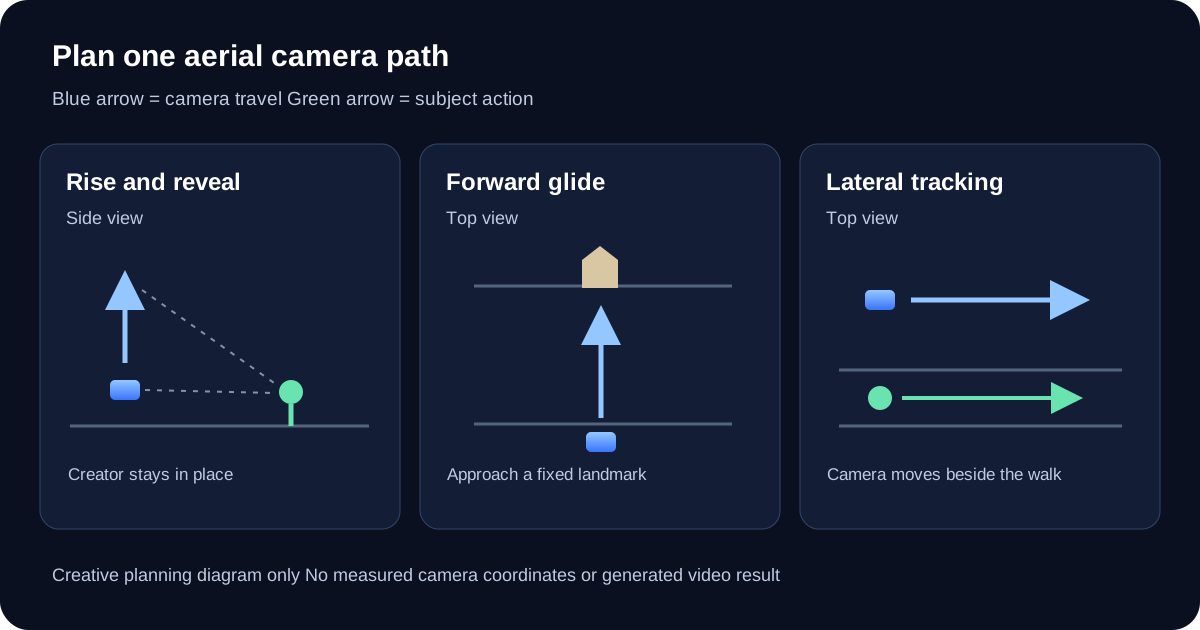
Original camera-path planning diagram rather than frames from a generated video
Download the camera-path diagramRise to reveal a creator setting
One continuous shot begins with the creator standing beside a quiet garden path. The camera rises gradually while tilting down enough to keep the creator inside the frame. The creator stays in place. The view widens to reveal the surrounding planted courtyard, ending with the path and creator clearly located within the setting. Smooth movement at a steady pace.
Prepare a reference with visible ground and enough surrounding context. If the original is a tight portrait, the model must invent most of the courtyard. A wider first frame reduces that missing information. Review the path, planters and creator at the opening, middle and end; a beautiful final image does not prove that the scene remained stable during the rise.
Forward glide for a faceless establishing shot
The aerial camera glides slowly forward above an open fictional coastal meadow toward a small cream-colored cabin. The horizon stays level. The cabin grows gradually larger as the camera approaches. Grass moves lightly in the breeze. One continuous wide shot ends with the cabin and its front path visible.
This brief creates a setting for a story without requiring a recognizable face. Keep the route open for the first attempt. Passing through windows, branches or doorways introduces occlusion and asks the model to resolve surfaces it may not understand. For an actual property or destination campaign, use approved location references and check visible features against them instead of treating the imagined cabin as factual footage.
Lateral aerial tracking for a walking scene
A slightly elevated camera tracks slowly parallel to the creator walking along a straight garden path. The creator takes relaxed steps in one direction. Camera height and distance stay steady, with the path visible beneath the feet. The shot ends before the creator reaches the turn. The horizon remains level throughout.
Camera travel and walking are separate actions. Keep them aligned with one simple route rather than combining a chase, full orbit and steep dive. In a distant aerial frame the face may be too small to establish identity; use a separate closer shot when recognition matters. Review foot contact, stride continuity, body proportions and whether the camera actually moves beside the subject.
Review the aerial path before adding speed
Compare three moments in the export: the initial composition, the middle of the move and the intended ending. Then watch the complete clip. Check whether the camera follows the requested direction, whether the horizon rolls unexpectedly and whether foreground objects change shape. Pay attention to the cabin roof, path boundaries and planter positions, since stable landmarks make unintended geometry changes easier to notice.
A zoom enlarges the frame differently from a camera moving through space. In a forward glide, nearby objects and distant scenery should have a believable relationship as the viewpoint changes. If the result simply magnifies a flat image, record that observed behavior and revise the brief or starting composition. If the scene starts cutting, reduce the number of events and make the intended ending simpler before increasing speed.
Download the three aerial briefs and blank review log. Save your reference, model label, duration, aspect ratio, prompt and observations for each attempt. These are original creative briefs, not a measured benchmark or a promise of exact camera coordinates. Use the aerial shot to establish the world, then cut to a closer creator moment using the same wardrobe and location direction.
Diagnose motion problems before adding more instructions
| Failure | Next test |
|---|---|
| The camera cuts to another scene | Reduce the action count and ask for one continuous shot |
| The creator changes appearance | Use the same approved identity reference and reduce the movement |
| A stationary object starts moving | Describe the object as stationary and remove contradictory motion cues |
| The camera move feels too fast | Specify a gradual move with a clear end frame |
| The frame drifts during a talking scene | Use a locked framing brief with only minimal subject motion |
Keep a shot log with the first frame, prompt, model, duration and accepted result. Compare attempts side by side. Do not mix several successful instructions into a new prompt without retesting; a combination may behave differently from each separate shot.
Build the creator before planning the camera
Create your character in Clout, approve the photos that define the look, and generate videos around that recognizable identity. Plan one useful motion for each asset: a product moment, a wardrobe reveal or a short scene. Build your creator and first video with a clear shot brief.


