

If you are searching for an AI video change character workflow, first decide which part of the source must survive. A character swap can mean several different edits. Replacing a face, replacing the full body inside an existing scene and animating a new character with somebody's movement are different jobs. Choosing the wrong operation often produces an attractive result that does not preserve the part of the video you needed.
For a creator campaign, begin with the desired final scene: does the location stay, does the costume change, and does the new character follow the original performance? Write those decisions before selecting a tool.
Choose replacement or animation
| Operation | What changes | What to review |
|---|---|---|
| Face swap | Primarily facial identity | Face alignment and consistency across angles |
| Character replacement | The person or character within a source scene | Body, clothing, scene boundaries and occlusion |
| Motion transfer | A reference character follows a driving performance | Pose, timing and proportion compatibility |
| New scene generation | A new shot around an identity reference | Whether it satisfies the brief rather than matching the source exactly |
The official Wan2.2 repository documents Wan-Animate for character animation and replacement. Its preprocessing guide separates the workflows. Use the instructions for the selected version instead of combining settings from unrelated tutorials.
This guide was refreshed against official documentation on October 2, 2026. Its reference image and downloadable briefs are original planning assets, not rendered replacement results. For installation and the model-specific workflow, continue with the Wan Animate guide.
Select a source that gives you a useful first test
Choose a single performer in a simple setting. The first test should expose one challenge you can diagnose: a modest turn, a hand crossing the torso or a simple wave. Keep the camera still and the subject visible. Establish a baseline before trying a walk, a crowded scene or a prop interaction.
| Source detail | Good first test | Harder case to postpone |
|---|---|---|
| People | One clearly visible performer | Several crossing subjects |
| Movement | A modest turn or simple wave | Fast spinning or a sudden fall |
| Contact | Hands clear of the body | Hands gripping a detailed product |
| Framing | Required limbs stay visible | Feet or hands leave the frame |
| Environment | Stable lighting and a still camera | Moving shadows and rapid camera motion |
A harder source is not automatically impossible. It needs a different review and may require additional preparation. The table is a selection aid, not a measured model capability score. Keep the original source available so you can inspect what the replacement changed.
Prepare a short source clip that exposes the real challenge
Use footage you own or have permission to edit. Choose one visible subject, limited camera movement and a simple action for the first trial. A two-person fight with heavy motion blur and repeated occlusion makes it difficult to tell whether the reference, mask or source movement caused a failure.
Begin with a short performance such as turning toward the camera and lifting one hand. Keep a copy of the original file. Inspect the exact downloaded source instead of a tiny social preview; compression can hide details that the replacement workflow needs.
Make the target character reference useful
Show the face and body parts the output will need. A headshot is weak evidence for an outfit and full-body movement. Keep the silhouette clear, avoid cropped feet for a walking shot, and use a pose compatible with the intended performance.
Replace the single adult performer with the approved original robot character. Preserve the cafe setting and camera framing. Match the performer's simple wave while keeping the robot's orange shell, blue eyes and compact proportions stable. Do not add another subject or change the background furniture.
This is an editorial brief, not a universal tool syntax. Supply the source video and character image through the selected operation's documented input slots. A written request to preserve the background is not proof that the exported background stays unchanged.
Use the original robot reference and two briefs
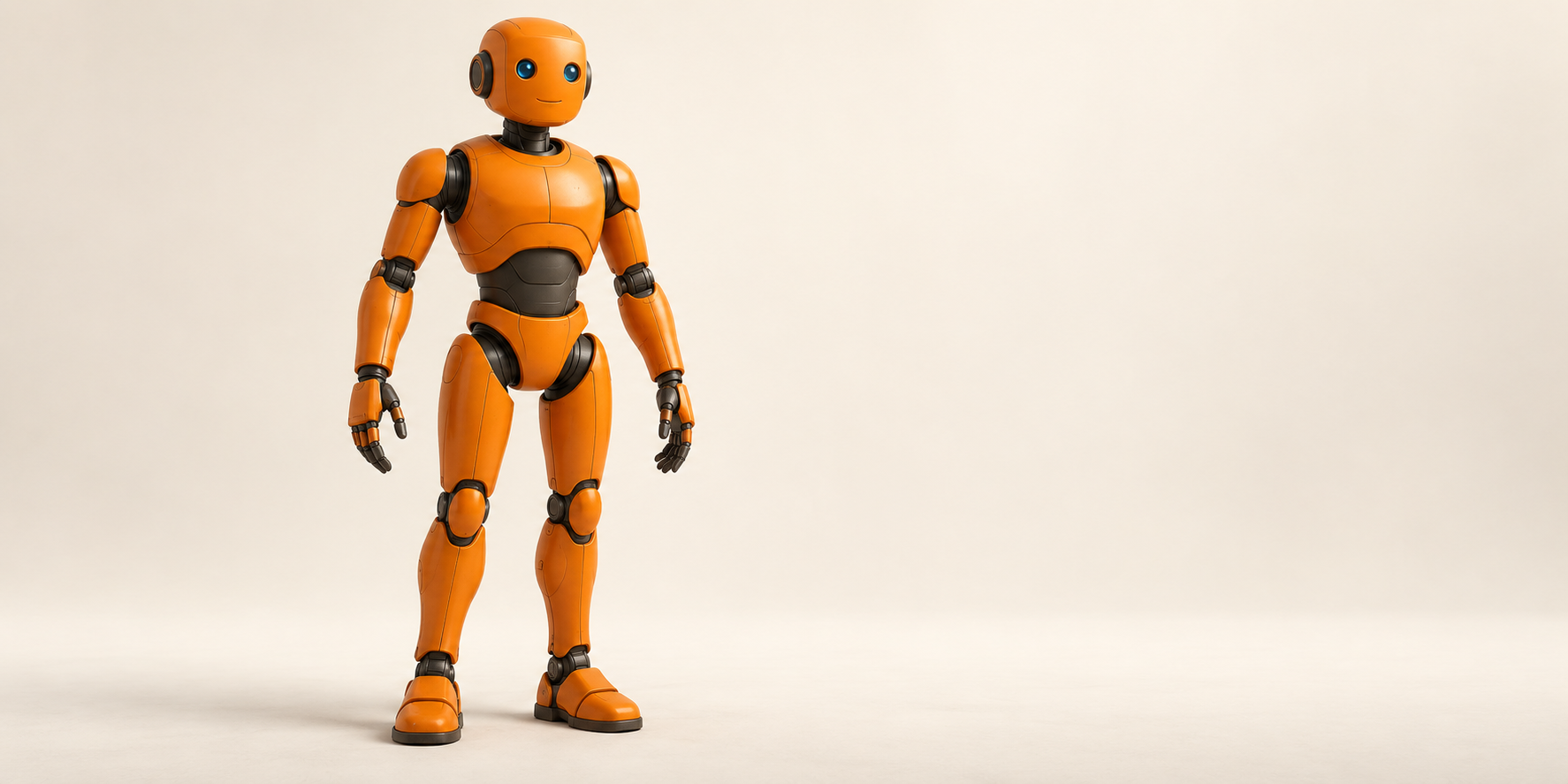
Download the native robot reference and download two original replacement briefs. These are untested examples. They do not show that a replacement render passed the review or that every implementation accepts this file without preparation.
First brief: replace a single standing performer with the orange robot while preserving the plain room and the timing of one wave. Approve the head, torso and proportions before adding a more complex action. Inspect the robot's feet and floor contact at the start and end.
Second brief: keep the same approved character and try a modest turn. Review the silhouette and the hand as it crosses the body. If that transition fails, return to the wave baseline and change one input. Do not add a prop, camera move and outfit change in the same correction attempt.
Understand masks and preprocessing
A replacement workflow may need a subject mask, pose information or other prepared inputs. Follow the official preprocessing steps for that implementation. Check the prepared files before paying for a long render; an incorrect subject boundary can propagate through the whole clip.
Watch hands passing in front of the face, hair touching a shoulder, and props crossing the body. Those transitions reveal whether the replacement respects foreground and background relationships. A mask that looks fine on the first frame can fail when the subject turns.
In the documented Wan-Animate preprocessing pipeline, animation produces src_face.mp4 and src_pose.mp4; replacement adds src_bg.mp4 and src_mask.mp4. Its bundled mask extraction is intended for a single person. For replacement, a larger mask gives the generated character more room but can affect more background; a tighter mask preserves more scenery but can constrain a different silhouette. Inspect those intermediate files before rendering.
Review the result in motion
- Opening: compare identity, costume and proportions with the target reference.
- Movement: inspect joints, foot contact and the timing of the action.
- Occlusion: check when a hand, prop or another object crosses the character.
- Boundaries: watch hair, clothing edges and the floor shadow.
- Ending: verify the character remains stable through the final frame.
Then watch the whole result at normal speed. Inspecting still frames alone misses flicker, sliding feet and identity changes. Compare it with the source side by side where possible, especially if preserving the original scene was the main requirement.
| Failure | Next controlled test |
|---|---|
| Identity drifts during a turn | Try a clearer reference and a simpler angle change |
| Background changes | Verify replacement mode and prepared mask inputs |
| Body proportions break | Choose a reference better matched to the driving pose |
| Prop contact looks wrong | Reduce the interaction or use a simpler source performance |
| Edges flicker | Inspect the source quality and masks across the affected frames |
Can you replace a character in video offline
The query “replace any character in any video with AI offline” combines a valid production route with an overbroad promise. The official Wan-Animate repository supplies inference and preprocessing code, but that does not establish success on every source clip or compatibility with every laptop. Check the exact implementation, weights, supporting assets and hardware before scheduling a job.
Prepare the model and dependencies while online if downloads are required. Then confirm whether inference and preprocessing use local files or call a hosted service. A workflow running inside a local editor can still depend on a remote endpoint. In this guide, offline readiness is something to verify in your actual setup, not a result we have tested.
| Readiness check | Evidence to keep |
|---|---|
| Selected implementation | Version or commit and chosen replacement mode |
| Required assets | Downloaded model and preprocessing assets with their local paths |
| Hardware | Actual device and settings used for your short test |
| Network dependence | Whether the selected operation needs a remote service after setup |
| Output | Complete exported file and observations from the motion review |
Do not borrow memory requirements from a different model in the same family. The repository includes multiple operations and model sizes. A statement about a smaller image-to-video model is not evidence for the replacement model you selected. Use the Wan Animate workflow guide to investigate the specific route.
What no login and unlimited claims leave out
Searches for “AI video change character unlimited no login required” are asking about access as well as the edit. A hosted service may offer previews, queues, paid exports or temporary allowances. Check whether the actual result can be downloaded at the required size and used for your project before treating a free preview as a finished asset.
Local inference may avoid a provider's per-job credit balance, but it still uses hardware, storage, setup time and processing time. That is not unlimited capacity. A no-login interface also does not establish that it keeps footage on your device. Identify the processing route before uploading source material.
Keep access questions separate from quality questions. First confirm how the job runs and what the terms allow. Then test the source and review the output. An easy signup process cannot repair a bad mask, missing feet or mismatched proportions.
Record a full motion review before the next attempt
Download the blank replacement review sheet. Its observation and decision fields are empty. Record the source, reference, mode and settings you actually used. No success rate, processing time or result is prefilled.
Compare the opening, the action transition and the final frame with the source. Watch the whole sequence at normal speed after frame inspection. A convincing isolated image can hide flicker, sliding feet or a character change halfway through the turn.
For the robot wave example, the practical checks are the orange shell, blue eyes, body proportions, hand shape, timing and contact shadow. If the background changes, inspect the selected mode and masks. If the pose breaks, inspect the source and reference relationship. Change one variable so the next result tells you something useful.
Create the character before scaling the campaign
Use Clout to build your recognizable AI creator and produce approved photo and video assets around that identity. A dedicated replacement workflow is a separate production choice. Keep identity approval, shot generation and existing-footage replacement clear in your plan so you select the correct tool for each step.


