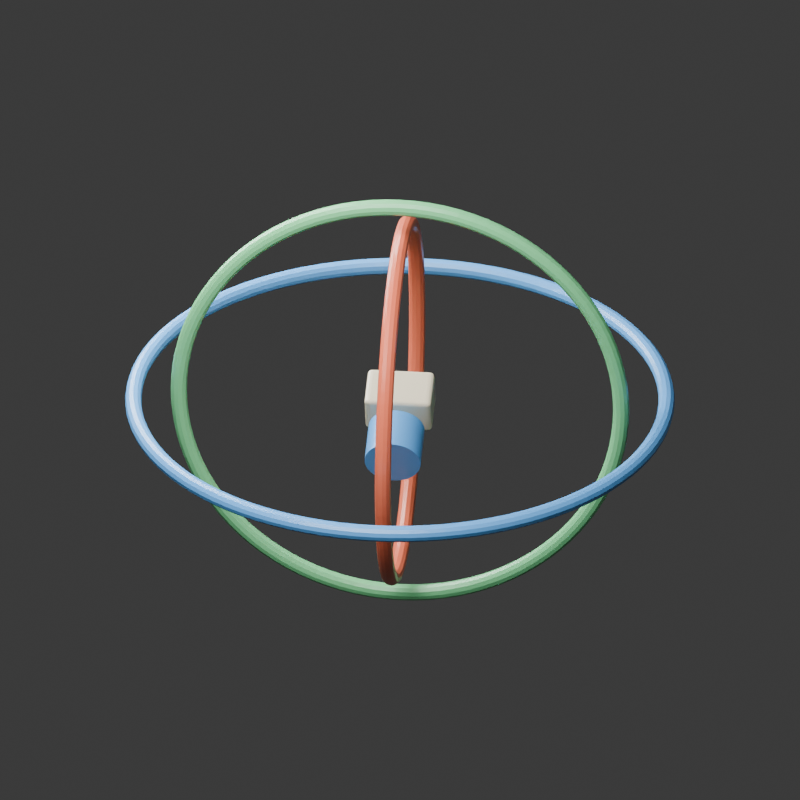
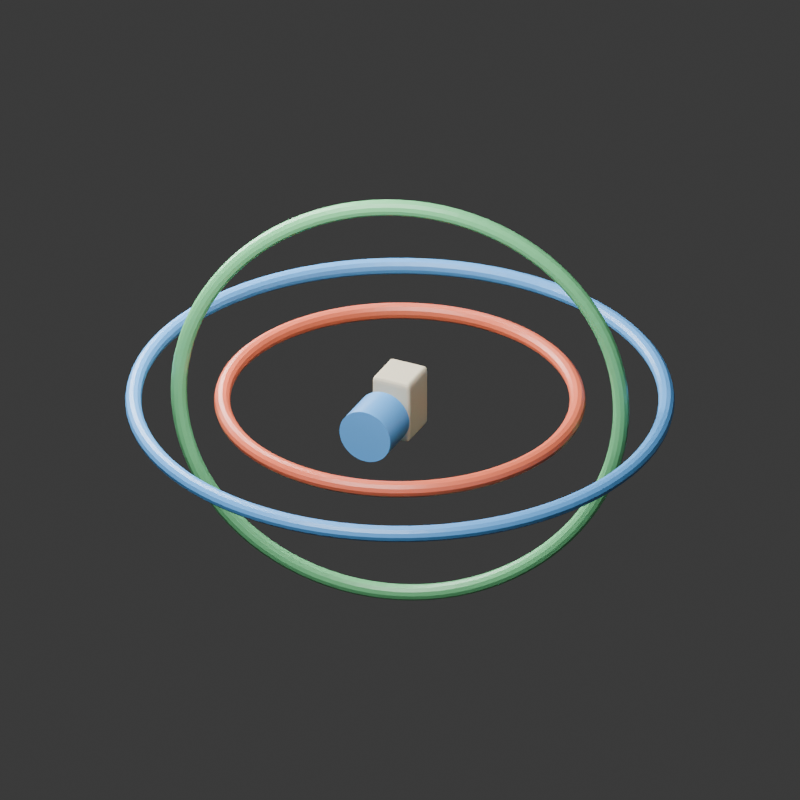
Gimbal lock happens when two rotational axes in an Euler hierarchy align and two channels stop providing independent directions of instantaneous rotation. The camera or object still has an orientation. The problem is how that orientation is controlled and represented, which can produce an awkward animated path near the singularity.
This guide focuses on XYZ Euler rotation for a virtual camera and original three-ring rig. Use the free axis lab to inspect the middle angle, then download the matrix, quaternion and axis diagram for a specific pose. The diagrams and Blender renders are original geometry studies, not physical stabilizer tests or AI-generated camera footage.
See gimbal lock at the middle angle
- Leave Inner X at the fixed 20 degrees and Outer Z at 30 degrees. Start with Middle Y at 75 degrees.
- Look at the coral inner X direction and dashed blue outer Z direction. These are three-dimensional vectors projected into a flat illustration.
- Select Set exact lock angle to put the middle angle at 90 degrees. The inner and outer vectors become anti-parallel in this convention.
- Read Axis volume and Inner and outer dot. At the lock pose the volume approaches zero and the dot approaches minus one.
- Download the rotation JSON and axis SVG to keep the exact pose with the animation review. Move the slider past 90 degrees to see the axes separate again.
Anti-parallel vectors lie on the same line while pointing in opposite directions. At this positive 90-degree middle angle, adding ten degrees to X produces the same orientation as subtracting ten degrees from Z. The lab compares those two outcomes numerically. It does not claim that adding the same positive angle to both channels has the same result.
Compare the independent axes before and at lock
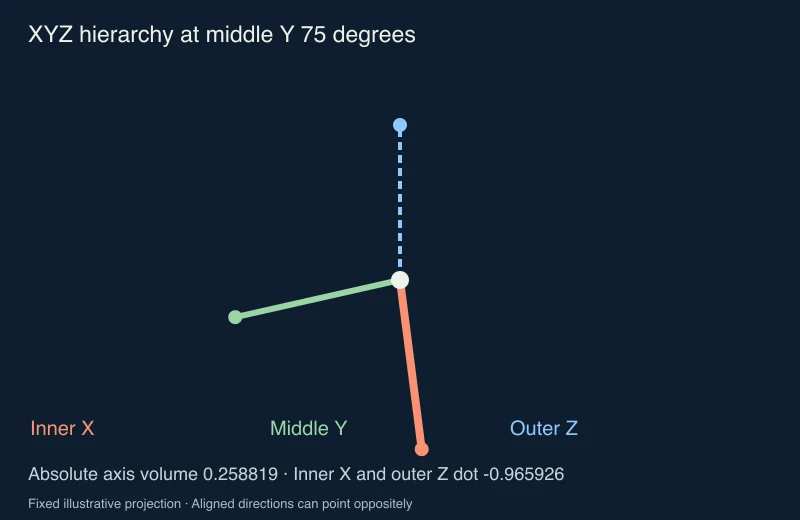
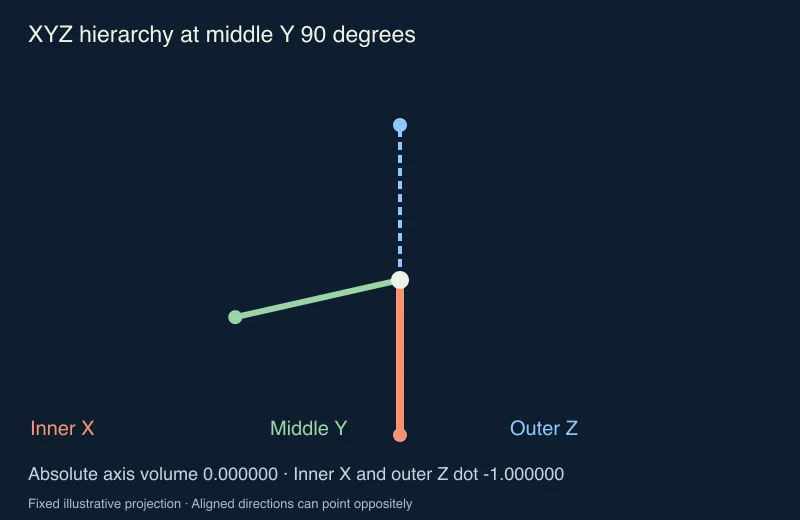
The axis volume is the absolute scalar triple product of the three unit direction vectors. For this XYZ hierarchy it equals the absolute value of the cosine of the middle Y angle. It is one at zero degrees, about 0.258819 at 75 degrees and numerically zero at 90 degrees. It measures independence of the channel directions, not the volume of the camera or rings.
The diagram uses a fixed illustrative projection rather than a photograph. A pair of lines appearing close in a flat drawing is not sufficient evidence of gimbal lock. The vector dot product and scalar triple product provide the three-dimensional check. Floating-point calculations can leave a tiny residual instead of an exact zero.
Inspect the original nested Blender rig
The blue outer ring rotates around Z. Its child is the green middle ring rotating around Y, and the innermost coral ring rotates around X. A simple camera-shaped object is attached to the inner ring. In the open render Y is zero; in the locked render Y is 90 degrees. X remains 20 and Z remains 30.
Download the open native render, locked native render and original Blender project. The saved project opens at frame 1. Frame 49 sets the middle ring to the lock pose. These endpoints demonstrate the geometry; no constant-speed motion or physical collision result is asserted.
We compared the lab’s matrices and WXYZ quaternions against Blender’s native XYZ calculations at middle angles of 0, 75, 90 and 105 degrees. The native measurements record those poses. Agreement checks the chosen convention and implementation, not whether an unrelated imported rig uses the same rotation order.
Find the cause before repairing a camera animation
| Observed problem | Inspect first | Useful next action |
|---|---|---|
| A camera swings unexpectedly near a steep tilt | Rotation mode, axis order and middle channel around the affected frames | Review the gimbal axes and the complete interpolated path |
| Euler values jump while the image barely changes | Equivalent angle representations and curve continuity | Review neighboring keys and equivalent Euler solutions |
| A full turn becomes a short rotation | Whether the representation and keys preserve the intended turns | Add intermediate orientations and validate the turn direction |
| An imported camera differs from its source | Hierarchy, local versus world space, order and export settings | Compare evaluated transforms at matching frames |
| An AI clip bends the product or drifts in perspective | The returned frames and supported camera controls | Review the generated shot rather than assuming an Euler singularity caused it |
Save a copy of the animation before changing its rotation representation. Identify a small interval around the problem and retain both endpoint orientations. Inspect the path between them, including the horizon and the position of a recognizable subject. Matching the first and final frame does not prove that the intervening movement is correct.
Choose a rotation order or quaternion path deliberately
Blender’s rotation modes reference explains Euler hierarchies and the singularity associated with the middle axis. Its rotation-mode API list identifies the available orders. Changing the order can place the vulnerable middle channel away from the movement your shot needs, but every Euler order retains a singular configuration.
For example, a scene that requires a large pitch movement may benefit from an order or parent rig chosen around that action. Choose based on the actual local channels and the evaluated result. Changing a mode or reusing the same three numeric values in another order does not guarantee the same pose or animation.
A quaternion represents orientation without the Euler coordinate singularity. It does not automatically preserve an authored multi-turn animation or fix every interpolation issue. A single orientation also cannot distinguish zero turns from a completed full turn. Keep intermediate keys where turn count and direction matter, then inspect the rendered path. The lab exports the quaternion for the current pose; it does not convert or repair a full animation.
Apply the diagnosis to an AI cinema workflow
Use a native camera rig when you need repeatable geometry for a shot reference. Define an opening view, a meaningful intermediate view and an ending view. Record which subject stays readable, whether the horizon tilts and whether the move passes over or around the subject. A brief such as “orbit the box while keeping the front label readable” contains more observable constraints than “cinematic camera”.
If you provide references to an AI workflow, keep those authored views separate from generated frames. Inspect label visibility, object shape, horizon continuity and the complete move. A text prompt mentioning quaternions does not establish that a hosted video model exposes quaternion controls or follows a supplied camera trajectory.
For related planning, use the camera tracking guide and multi-shot workflow. Create supported original scenes in Clout Image and Video and judge the returned file against the shot brief. For a product label that must remain readable, the LongCat literal-text workflow provides a separate preflight for exact lettering.
For focus-related changes rather than rotation, compare the lens breathing framing guide.
Reproduce the geometry and keep a review record
The geometry source supplies the matrix, quaternion and axis SVG. The native Blender builder creates the original rings and endpoint renders. The asset builder combines those original renders and makes the downloadable diagrams with Bun and Sharp. Keep companion files together and use a new output directory.
Record the application version, object, hierarchy, rotation order, frame range and intended motion. Compare the evaluated transform and the rendered view after a change. That record makes a specific camera fix reproducible and prevents a visually plausible still from being treated as proof that an entire animation was repaired.