

Also evaluating Zirva AI for product images, video, avatars or visual workflows? Read the Zirva AI review and pricing comparison for its current public plans and an original product pilot.
Sume AI and Sume Labs are names you may encounter while researching Sume's creative tools and developer software. This guide covers the service at sume.com and its sumelabs Open CLI repository. It compares those entry points with Clout for creator campaigns, product content and AI filmmaking.
Clout publishes this comparison as a competing platform. We checked current public product pages, pricing and documentation on October 23, 2026. No Sume account was connected, no CLI was installed and no paid generation or quality benchmark was run. The original job-review materials below are planning aids rather than completed model results.
What is Sume AI and how does Sume Labs relate
Sume's About page describes an AI creative team for ads, with research, remaking, editing, posting and results workflows. It also describes manual media creation in Studio. The public Studio navigation includes image, video, audio, music, swapping, lip-sync, language swap, captions and AI influencer routes.
The official Open CLI repository is under sumelabs and credits Sume Labs in its license notice. That identifies the name used here; account access still needs verification.
If you searched for Sume Labs to find the product or code, use those official destinations. Clout is a separate creative platform; this article is a buying and workflow guide, not Sume's account, support or API console.
Choose the Sume surface you actually need
| Surface | Public description | What to establish in a pilot |
|---|---|---|
| Studio and creative team | Manual media creation and an advertised ads workflow | Required inputs, available operation and usable campaign output |
| MCP | Generation through a connected AI assistant | Chosen workspace, price preview and returned asset |
| Current web API docs | Model requests become jobs at the documented API host | Endpoint, key scope, quote and terminal result |
| Open CLI repository | A documented terminal route for the Open API | Current host and release before using its examples |
The distinction matters when evaluating a tool. An assistant returning a link is not the same task as a developer receiving a job envelope, and neither proves that a finished campaign is ready to post. Keep the interface, selected model and actual deliverable in your review record.
Sume AI pricing and representative model rates
The current public pricing page advertises no subscription, top-ups starting at $5 and a 365-day top-up lifetime. It describes provider pricing with zero markup. These are Sume's published terms and positioning, not an independently reconciled provider-price audit.
These sample dollar rates were displayed on October 23, 2026. Settings and units are part of each price; the table is not a fixed cost for a complete ad or film.
| Model | Displayed setting | Listed rate |
|---|---|---|
| Seedance 2.5 | 480p video | $0.1028 per second |
| Kling Video v3 Pro | 1080p video with audio off | $0.112 per second |
| Nano Banana 2.1 | 1K image | $0.0336 per image |
| ChatGPT Image 2 | 1K image with low quality selected | $0.006 per image |
Use the current quote for the exact model, length, resolution, audio and input conditions you intend to run. Do not use an older guide's margin formula as a substitute for today's price. Check the surface and date of the source before combining information from a product page, API documentation and a repository.
A published rate is only one part of the project decision. Include failed creative attempts, successful outputs that do not meet the brief, and the editing needed to finish the asset. Review Clout's plan and workflow quote separately; its credits are not Sume dollar balances.
What Sume MCP does
The official Sume MCP page describes generating through a connected assistant. It says runs charge the workspace selected at sign-in, generation tools can preview dollar prices without running a job, and results return as file links. Inspect the selected workspace and estimate before approving a request.
A connection test and a creative acceptance test answer different questions. First establish that the assistant can use the intended account and operation. Then review the complete returned asset against your own brief. For a character video, inspect the face, wardrobe, product interaction and ending rather than approving a result from its thumbnail.
Clout MCP is an alternative route for Clout's supported creator, image, video, marketing, faceless and cinema work. Compare the operation you need and the file you can actually inspect. Using the same protocol does not make two catalogues, account balances or generation settings equivalent.
Keep API hosts and documentation surfaces distinct
The current Sume web API overview identifies api.sume.com, image and video generation endpoints, and asynchronous jobs. It describes submitting a request, polling until terminal state or using a webhook, and retrieving result artifacts.
The Open CLI host table identifies api.open.sume.com and distinguishes api.sume.com. This is documentation, not a key-portability test. Follow the current instructions for your chosen surface.
Before using an integration example, record its source URL, version, API host and key scope. Do not paste a key into an unrelated host merely because both examples mention Sume. If an official entry point redirects or its docs change, verify the current setup before submitting a paid job. This guide does not provide a universal copy-and-paste API request.
Review the job as well as the media
A job acknowledgment is evidence that a request was accepted, not that the output passed creative review. Keep your original reference and brief beside the job record. Read the terminal result and inspect the actual downloaded picture, sound and duration.
The CLI README documents estimates, a spend cap, idempotent submissions and jobs continuing after the wait stops. We did not execute a recovery test. Follow the current instructions before resubmitting.
For your own review process, separate four observations: the intended request, its quoted cost, its terminal status and the accepted file. Record a failure reason or a missing artifact explicitly. A completed job with an unusable face, incorrect product or unreadable ending still needs a creative decision.
Sume versus Clout for creator campaigns and cinema
| Work you need | Sume route to evaluate | Clout route to evaluate | Review the result for |
|---|---|---|---|
| Product campaign imagery | Selected Studio or creative-team operation | Marketing Studio | Correct variant, framing and approved message |
| A recurring original creator | Selected influencer or reference workflow | AI Influencer | Identity and wardrobe across accepted assets |
| Images or short video clips | Studio, MCP or the documented API route | Image & Video | Required input support and complete output file |
| A scene-by-scene film | Selected generation and editing workflow | AI Cinema | Storyboard, cast references, action and sequence continuity |
| Creation from an assistant | Sume MCP | Clout MCP | Intended operation, quote and usable returned media |
Evaluate Sume when its documented ads, Studio or developer workflow fits the operation you need. Evaluate Clout when you want to develop an original creator, product campaign or film storyboard through its supported studios. The table maps useful entry points; it is not an exclusive-feature inventory or a measured quality ranking.
Use an original request-to-file review pilot
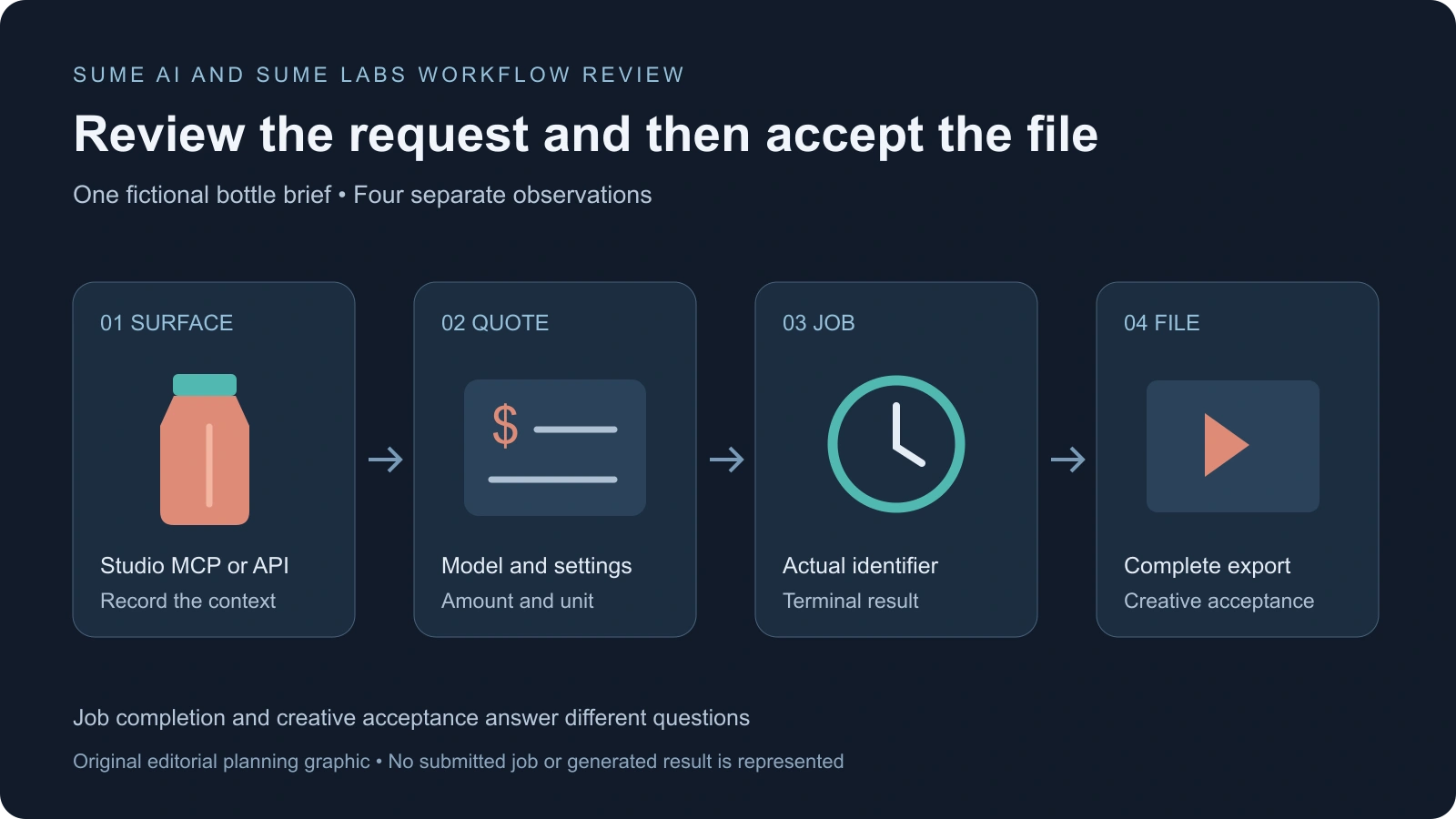
Our original pilot uses a fictional coral bottle with a teal cap and one vertical grip ridge. The first task is a product reference image. The second is a short turn or reveal using the approved reference where supported. A third review checks that the final delivered file matches the accepted take.
Download the original pilot brief, blank request-to-file ledger and illustrative record template. The JSON is a review record, not an executable API payload. It has no live key, completed job ID, provider quote or generated output.
- Name the surface — Record Studio, MCP or the documented developer route, including the source and account context you verified.
- Freeze the brief — Keep the same owned reference and required product details for each comparison.
- Record the quote — Preserve model, settings, billing unit and amount before approving paid work.
- Keep the job record — Record the actual identifier and terminal result when the workflow exposes them. Leave unavailable fields empty.
- Accept the file separately — Inspect the body, cap, ridge, action, sound and ending in the delivered export.
For an AI drama, adapt the short drama brief and multi-shot coverage workflow. A product pilot does not prove dialogue continuity or recurring-character reliability; design the pilot around the work you will publish.
Compare total accepted work before choosing an alternative
Use the ledger to retain rejected attempts and manual finishing time. If an image is accepted but its video continuation changes the cap, record that as a separate failure. Do not let one attractive frame stand in for an entire content set.
For an illustrative comparison, suppose two attempts create one usable product clip. Record both attempts and their actual charges, then add the editing time required to deliver it. Those hypothetical counts are not a Sume or Clout benchmark. If nothing meets the brief, report zero accepted deliverables and the spend rather than inventing a successful-unit price.
Start a Clout pilot in Marketing Studio for product content, AI Influencer for an original creator or AI Cinema for a storyboard-led film. If you are also evaluating Sunra, its separate comparison guide distinguishes that platform's web, MCP and API routes.


