

Also evaluating Sume? Read our Sume AI and Sume Labs comparison for its Studio, MCP, API and current price distinctions.
Sunra AI is a creative platform at sunra.ai with a browser workspace, an assistant connection through MCP and a developer API. If you are comparing Sunra with Clout, start by choosing how you want to work: inside a visual project, from an AI assistant or through your own application.
This review is published by Clout, a competing platform. We checked Sunra's public product pages, MCP information, developer site and visible pricing controls on October 23, 2026. We did not connect an account, run a paid generation or benchmark the two products. The original handoff plan and downloads below help you design your own pilot.
What Sunra AI does
Sunra's official homepage presents an agent-led workspace for images, video, music and 3D, with Assets, Design, Flow, Timeline and 3D views. Its descriptions include editable design work, a canvas for generation references, timeline assembly and staging generated 3D models.
That is broader than a single video model. Choose the actual creation or editing operation, its accepted references and the delivery file you need. A model name on a catalogue does not establish whether a particular image, clip or project will meet your brief. For account access or support, use Sunra's own site; Clout is a separate service.
Choose between Sunra web MCP and API
| Route | Publicly described entry point | Useful pilot question |
|---|---|---|
| Web studio | Sunra's browser workspace and project views | Can you keep references, variations and the assembled work organized |
| MCP | Sunra tools from a connected AI assistant | Can the assistant quote, create and return the result you intended |
| Developer API | Sunra's SDK and model endpoints | Can your application submit, track and retrieve the required output |
The route changes the work around a generation. A browser pilot should inspect project organization and editing. An assistant pilot should inspect the requested operation and the approved cost. An application pilot should inspect job state and the returned file. Use the route you actually intend to operate rather than treating a successful example in one surface as proof of the others.
Sunra AI pricing and credit selections
The table records the public Sunra pricing page with Monthly and Annual inspected on October 23, 2026. Pro and Creator have adjustable credit selectors; these are the displayed 3,500- and 17,000-credit selections in US dollars.
| Plan selection | Monthly billing | Displayed annual-billed monthly equivalent | Credits per month |
|---|---|---|---|
| Basic | $12 | $9 | 1,200 |
| Pro | $29 | $17 | 3,500 |
| Creator | $125 | $63 | 17,000 |
The annual view says it is billed for 12 months. An annual-billed monthly equivalent is not a month-to-month price. Confirm the current offer, selector, checkout total, taxes and renewal terms before purchasing. Changing a credit selection can change the amount displayed.
Sunra's pricing FAQ says plan credits refresh each billing cycle and do not roll over. It distinguishes generation quotes from token-metered agent work. Track both in a project estimate.
Compare the current Clout plan and workflow quote separately. A Sunra credit and a Clout credit are different units; the larger number alone does not establish a lower cost.
How Sunra MCP fits an assistant workflow
The official Sunra MCP page describes creating image, video, audio and 3D assets from an AI assistant. It says MCP uses the same account credits as the web app, supports estimates before generation and returns result links into a Sunra project. Its setup uses account authorization rather than requiring a pasted API key.
Use the current instructions for your selected client on that official page. Before authorizing a generation, check the operation, input references and estimate. Afterwards, open the returned asset and inspect the complete file. A connected tool or completed job status is not, by itself, a usable campaign deliverable.
Clout also has an MCP workflow for its supported creator, image, video, marketing, faceless and cinema operations. Compare the specific task you need, not merely whether both products use the same protocol. This guide does not claim that their tools, model catalogues or billing systems are interchangeable.
What the Sunra API route adds
The Sunra developer platform presents a shared SDK and usage-based access to model endpoints. Its JavaScript example uses @sunra/client and sunra.subscribe. Follow the current developer documentation for the endpoint and modality you actually need.
For an integration pilot, preserve the submitted input, selected model, request or job identifier, terminal state and returned asset location. Check a failure as well as a success. Decide how your application distinguishes a retry from a new request before scaling paid jobs. These are review requirements, not a claim that a particular deduplication option exists in every endpoint.
Do not assume that web-plan allowances, MCP account credits and API billing have identical purchase terms. Verify the balance and charging basis in the surface you will use. Our research confirms the advertised routes; it does not test an SDK installation, account migration or billing reconciliation.
Sunra versus Clout for real creator work
| Your deliverable | Sunra route to evaluate | Clout route to evaluate | Acceptance check |
|---|---|---|---|
| A visual project with mixed assets | Web workspace and its project views | Image & Video and the relevant studio | Required references and usable returned files |
| A recurring fictional creator | Selected reference and generation workflow | AI Influencer | Identity, wardrobe and product interaction across assets |
| A product campaign | Chosen design and media operations | Marketing Studio | Correct product variant and supported campaign template |
| A scene-by-scene film | Selected creation and assembly route | AI Cinema | Cast references, action, continuity and finished sequence |
| Creation inside an assistant | Sunra MCP | Clout MCP | Quoted operation and complete exported result |
Evaluate Sunra when its mixed-media workspace, assistant connection or developer route matches the project you need to run. Evaluate Clout when your starting point is an original creator, a product campaign or a film storyboard. This is a comparison of relevant entry points, not an exclusive-feature inventory or a measured quality winner.
Use an original handoff pilot before scaling
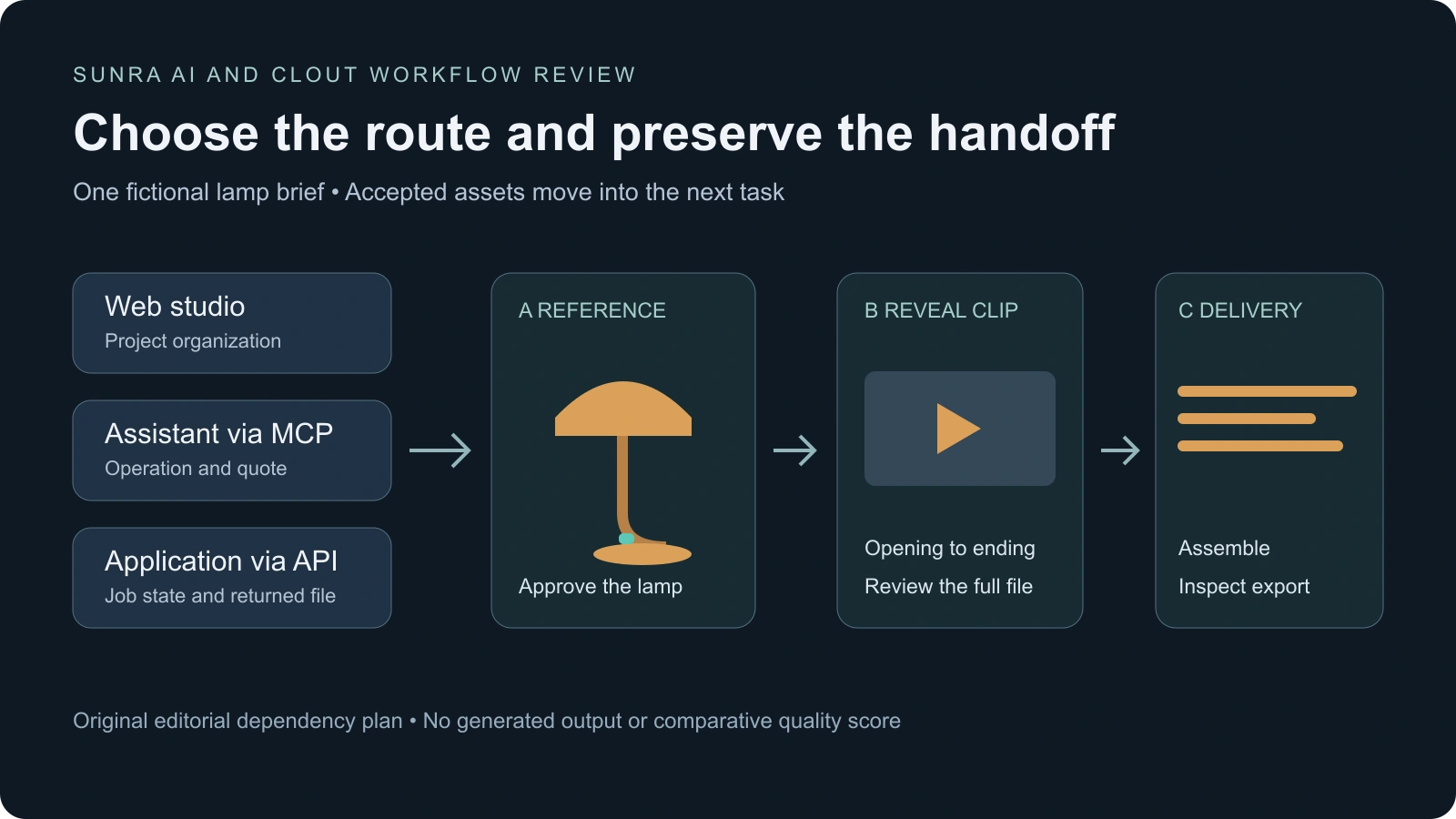
Our original pilot uses a fictional amber desk lamp with a teal switch and a curved stand. It has three deliverables: a product reference image, a short reveal clip based on the approved reference and an assembled delivery with a readable ending. The materials are a written planning exercise, not Sunra or Clout generation results.
Download the pilot brief and illustrative handoff manifest. The manifest records dependencies between planned assets. It is not an executable Sunra API payload and contains no completed job IDs or output URLs.
- Choose one route — Run the pilot through the browser, assistant or your application. Record that choice so the result has a clear scope.
- Approve the reference first — Check the lamp, stand, switch and framing before using the image in another task.
- Carry accepted assets forward — Use the approved image as a reference where the selected operation supports it. Record any input substitution.
- Inspect the complete clip — Check the opening, reveal, ending and actual picture and sound tracks. The requested duration is not proof of the returned duration.
- Review the delivery separately — Check assembly, export settings and whether the viewer can understand the final reveal.
The blank pilot ledger keeps attempts, quotes, actual usage, asset dependencies and rejection reasons separate. Leave acceptance empty until you inspect an output. For a drama pilot, adapt the short drama plan; for a camera reveal, use the continuous-scene planning guide.
Measure accepted work and the cost of iteration
Keep generation spend, assistant work and editing time in separate columns. A successful API response, an attractive first frame and a completed video are different milestones. Count the deliverables that meet the brief after reviewing the actual files.
For an illustrative pilot with three generated clips and one accepted clip, retain all three attempts in the record. If the accepted clip still needs manual editing, record that time too. Those hypothetical counts are not a measured Sunra or Clout acceptance rate.
Compare monetary costs only with an explicit billing basis. If you allocate part of a subscription to the pilot, state that allocation and the unused allowance. If nothing passes, report the spend and zero accepted deliverables rather than inventing a cost per accepted result.
Which Sunra AI alternative should you choose
Choose the workflow that makes the next deliverable inspectable. For an original character-led series, begin with Clout's creator workflow. For product imagery or creator-style ads, explore Marketing Studio. For a film, build a storyboard in AI Cinema and review the sequence scene by scene.
Keep a small accepted pilot before committing a full campaign. If you are evaluating another creative platform as well, the TryDare comparison offers a separate source-backed buying guide. Neither article establishes a universal cheapest, fastest or highest-quality platform.


