Lakai AI, also searched as Lakai, is the creative studio at lakai.pro. Its public site combines video and image generation, Shorts, voiceovers and tools for changing an existing video. This page covers that AI service and helps you choose a workflow for an actual short, creator campaign or cinematic scene.
Clout publishes this review as a competing platform. We checked the public product and billing interface on October 24, 2026, including both pricing selectors. We did not buy a plan or generate a Lakai output. The original story exercise below is a planning resource, not a Lakai lesson, copied community example or model result.
What is Lakai AI
Lakai presents a multi-model studio with separate routes for creating a new video, building a Short and transforming existing footage with LAKAI Ryujin. Its homepage also advertises Mystic for requesting media and an MCP connection for assistant-led creation.
Choose the production job before comparing model catalogues. A narrated story from a script, a performance transformed from a source clip and a product advertisement have different inputs and acceptance checks. A model name alone does not tell you which settings, references or export conditions your chosen operation supports.
Lakai AI pricing with Monthly and Annual selected
The live Lakai pricing page displayed the following dollar amounts after we selected each billing mode. The Annual column is the displayed monthly equivalent, not a verified checkout total.
| Plan | Monthly selected | Annual selected per month | Credits per month |
|---|---|---|---|
| Starter | $19.99 | $13.99 | 150 |
| Creator | $29.99 | $20.99 | 250 |
| Pro | $49.99 | $34.99 | 700 |
Promotional labels accompany some prices. Confirm the full amount charged, renewal terms, billing period and taxes in the current checkout. We did not inspect checkout or verify the total annual charge.
The same page displayed a separate $1 trial with five credits, followed by $29.99 per month after three days unless canceled. That trial balance is distinct from the plan allowances above.
A credit balance is not a count of accepted videos. Lakai’s Help page says tool costs vary and plan credits reset at renewal without rollover. Record the quote for the actual operation and the charge for every attempt. Compare Clout plans and the quote for your selected Clout workflow separately; the two platforms’ credit units are not interchangeable.
Lakai Shorts Generator and Ryujin serve different jobs
The homepage presents Shorts Generator as an idea-to-short workflow. Its public tool entry point displayed sign-in during this review. We did not test its authenticated controls, timing options or rendered output.
Lakai Ryujin’s public form asks for a source video and reference images, with fields describing what to change. It displayed a four-to-thirty-second source range and up to eight images. Those are observed form labels rather than a tested guarantee about every mode or export.
For a new narrated story, start with the script and scene plan. For a transformation, start with a source clip you can use and name the visible change you want. Keep the original motion reference separate from a new character or setting reference so the review can identify which part drifted.
Lakai’s homepage also advertises MCP for Claude. We did not connect an assistant or inspect an authenticated tool catalogue. For a Clout assistant route, inspect Clout MCP and Plugin and the supported operation rather than assuming two connectors expose identical tools.
Lakai AI vs Clout for a real production brief
| Your job | Lakai route to evaluate | Clout route to evaluate | First acceptance check |
|---|---|---|---|
| A narrated vertical story | Shorts Generator and the supported story format | Faceless Studio | The spoken story matches the visible action and reaches an ending |
| A recurring original creator | The selected image and video tools with suitable references | AI Influencer | Identity stays coherent across the accepted images and clips |
| A product campaign | Image and video tools or Ryujin for an existing source | Marketing Studio | Product shape markings and demonstrated action remain correct |
| A connected dramatic scene | The selected video workflow and finishing process | AI Cinema | Shot order screen direction props and dialogue remain consistent |
This comparison maps production routes rather than declaring a quality winner. Evaluate the current operation, actual input requirements and complete returned file. Check how much editing remains before calling a clip a finished deliverable.
Clout is worth evaluating when your work centers on an original creator, a product campaign, a narrated faceless format or connected scenes. Start with one narrow job in Image and Video or the relevant studio, inspect the result, and expand only after the pilot meets the brief.
Try the original fifteen second short brief
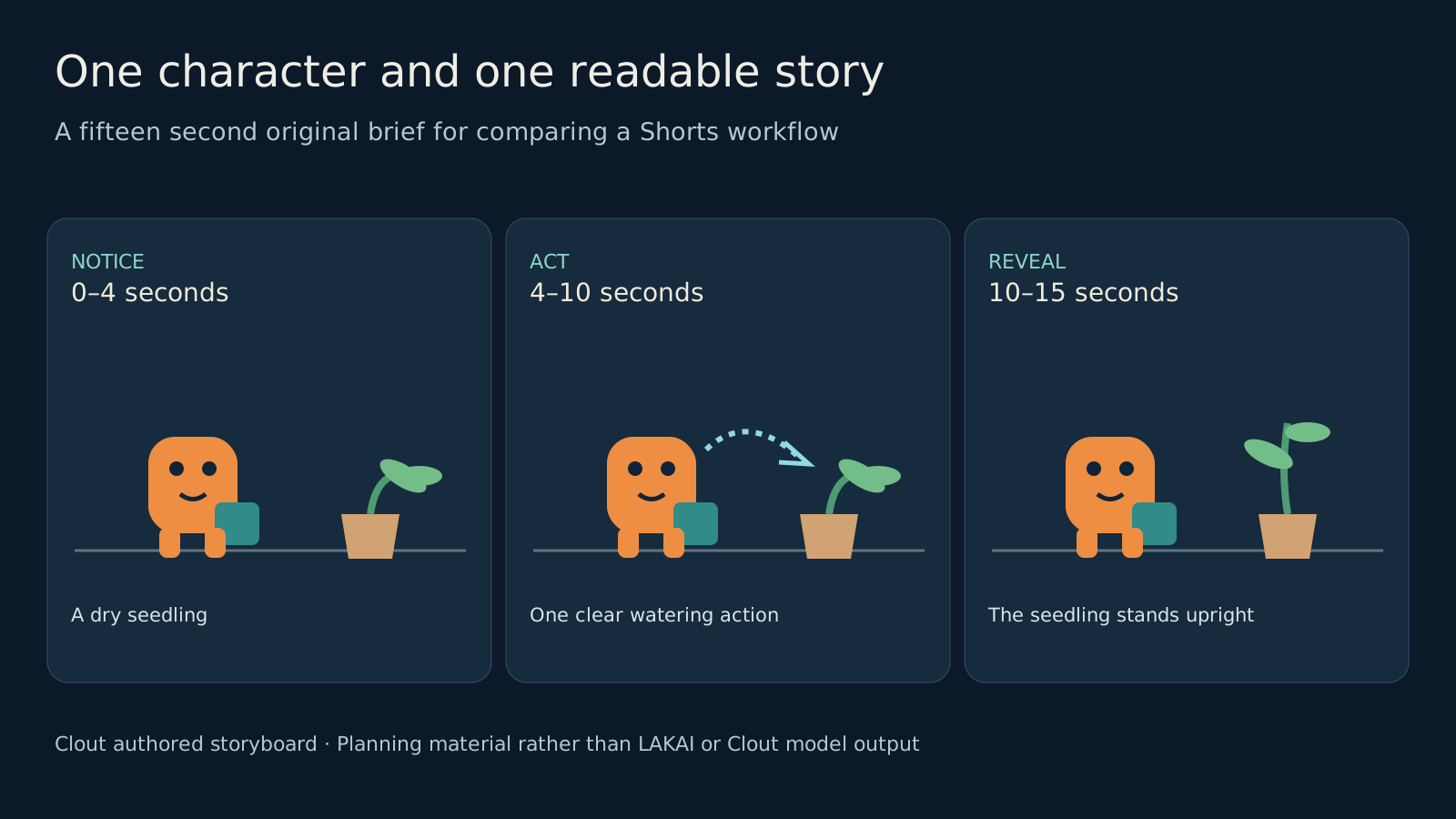
The Small Delivery is an original microstory: an orange toy courier notices a drooping seedling, helps water it, and reacts when it stands upright. Preserve the orange body, two dark eyes, teal shoulder bag and tan plant pot across the sequence. These concrete details make a later review more useful than a vague instruction to make the video engaging.
- Zero to four seconds: Establish the courier and drooping plant in a readable composition. The viewer should understand what needs to change.
- Four to ten seconds: Show one clear watering action with the same character and pot. Avoid changing the camera direction and character design at the same time.
- Ten to fifteen seconds: Reveal the upright seedling and the courier’s response. Leave time for the ending to register.
These are proposed edit beats, not verified duration controls in either platform. Use the selected tool’s supported inputs, generate or assemble the required material, then inspect the exported timing. The story can be understood visually before adding narration.
Download the complete original short brief, editable storyboard SVG and blank shot review CSV. The quote, charge, export and decision fields are intentionally empty because no generation was performed for this article.
Review the saved video before judging the workflow
Watch the full file at normal speed, then inspect the transitions and the moments when the watering action makes contact with the plant. Check the courier’s eyes, bag, silhouette and relative size. A strong opening frame does not prove the character remains consistent through the action.
Listen to the complete audio and check captions against the spoken words. View the vertical crop on a phone and check that important action is not hidden under platform controls. Keep the accepted reference, prompt version, model, quote, charge and export filename with the review record.
Measure cost per accepted short using actual production spend and a positive count of accepted deliverables. When nothing passes review, record the spend and zero accepted files rather than dividing by zero. Track manual finishing time separately from generation charges.
For stronger scene planning, use the AI short drama workflow and multi-shot video guide. They help turn a broad idea into coverage and continuity checks that remain useful regardless of which model or platform supplies the clips.
Separate predictions from published results
Lakai markets Shorts Audit as a guide to audience response. Its published terms state that views, growth, revenue and monetization approval are not guaranteed. Treat a predicted score as a planning signal and retain actual audience measurements separately.
Its Help page also describes a cancellation flow with a final request and processing within 48 hours. Review the current instructions and renewal date if testing a paid offer. This review did not purchase or cancel a subscription.
For related buying decisions, compare our Zirva AI review and Sunra AI review. Choose around the job you need to finish, the current quote and the quality of the file you can actually publish.