WeVisOne-VL is a visual perception model from Tencent’s WeChat Vision team. For creators, its practical question is how to locate an object or prepare a usable foreground reference before compositing, a product campaign or image-to-video generation. It is not itself an image or video generation studio.
This guide separates model capabilities from a local coordinate review exercise. We reviewed public source and documentation on October 25, 2026. We did not run model inference or measure its output quality. The landscape and sun annotation below are original authored materials, not predictions.
What is WeVisOne-VL
The official project describes a model supporting object detection, localization, counting, pointing, OCR, segmentation and alpha matting. The released repository lists 2B and 4B variants and task-specific examples. Confirm the current installation requirements and checkpoint license before choosing a deployment.
For creative work, choose the required output first. A location is enough to mark where an item appears. A cutout needs pixel-level information. Neither one establishes whether a product is the correct model, whether text is legally approved or whether a generated video preserves its shape through motion.
Choose a task around the deliverable
| Production job | Output to inspect | Acceptance check |
|---|---|---|
| Mark a product in a scene | A referring box or point | The mark refers to the requested object in the original image |
| Prepare a product cutout | A saved mask or alpha matte | The silhouette reflections and translucent areas remain usable |
| Review a label region | Text and its localization | Read the actual label independently before publishing |
| Check an absent requested prop | The raw response and visual review | Distinguish reported absence from a failed or malformed run |
These are proposed creator workflows rather than measured model results. Start with one image and one specific target. Avoid combining a crop change, a new prompt and a new checkpoint in the same comparison, because that makes a changed result harder to explain.
Inspect boxes and points before using them
The project uses normalized coordinate tokens from zero to 1000. Our strict local inspector supports a subset of saved box and point responses. Enter the dimensions of the exact source image used for inference. It maps coordinates into continuous image geometry and exports a report and transparent SVG overlay.
In the authored example, the sun center tokens 750 and 250 map to x 288 and y 64 in a 384 by 256 image. The box tokens 667, 125, 833 and 375 map approximately to x 256.128 through 319.872 and y 32 through 96. The sun’s authored geometric bounds are x 256 through 320 and y 32 through 96; token rounding explains the small horizontal difference.
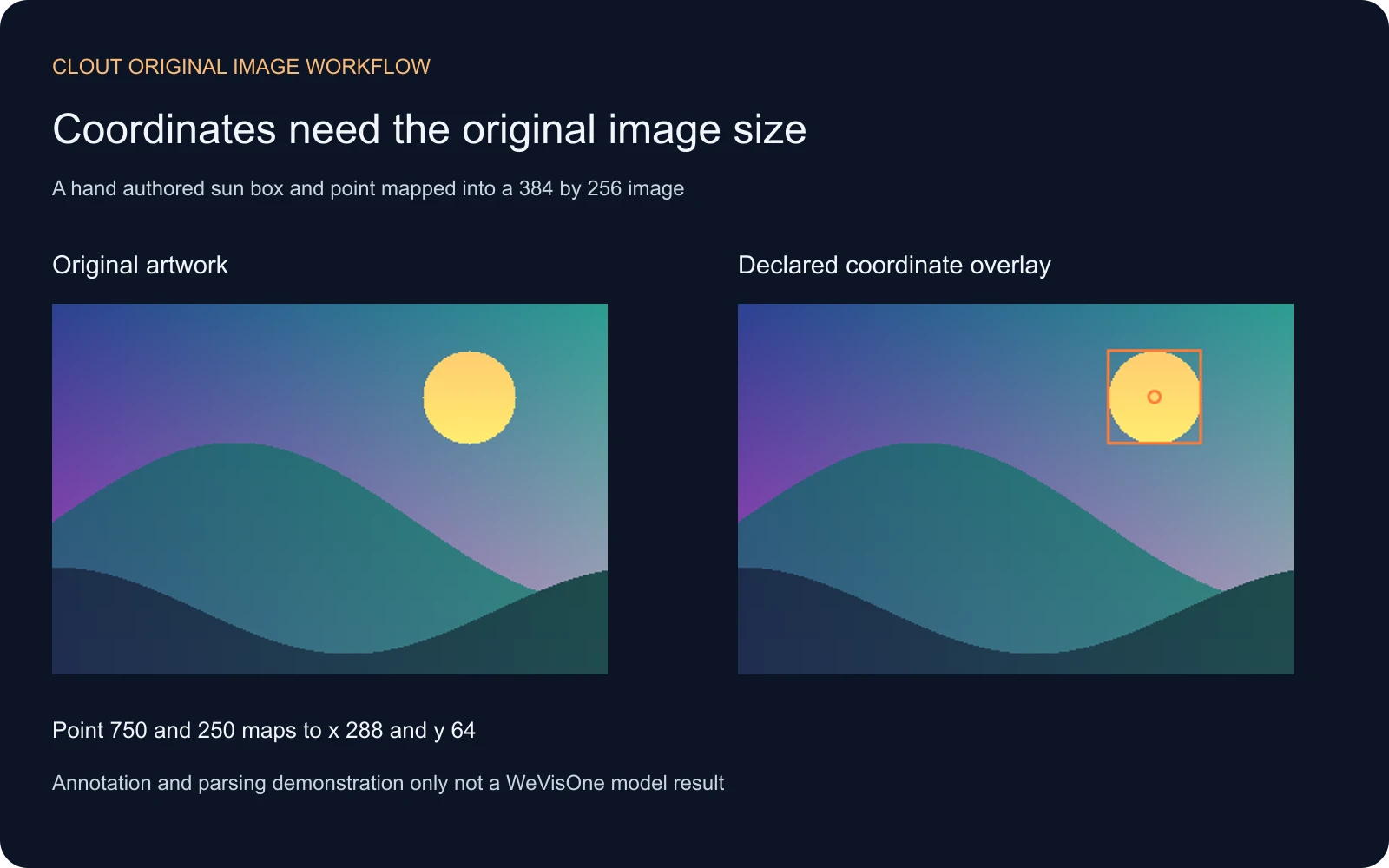
Download the source image, authored token response, coordinate report, transparent overlay and composited annotation image. The independent reader helper declares the accepted syntax.
A box token is not a cutout
The official architecture connects the special OBJ token to a pixel decoder. A pasted text response does not contain the resulting mask or alpha pixels. Our inspector therefore does not reconstruct a foreground, remove a background or generate a matte. Obtain the actual saved pixel output from a successful model run when that is your deliverable.
For a product campaign, examine the matte on both a light and dark background. Look at thin handles, soft shadows, transparent packaging and reflective boundaries. A plausible bounding rectangle can coexist with an unusable edge. Keep the raw image and saved matte separately so you can compare the composited result later.
Keep None distinct from a parser failure
An exact None response is recorded here as reported absence. It is not independent proof that an object is absent. An empty or malformed response is an error, not a successful negative result. Preserve the raw response, task, query, checkpoint, dimensions and run status together.
We inspected the pinned upstream visualization parser. Our inspector intentionally applies a narrower contract: boxes and points only, valid zero-to-1000 tokens, positive box dimensions and at most fifty shapes. It rejects unsupported polygons and unexpected text rather than silently interpreting them as valid boxes. It is not a replacement for the native inference package.
Preserve coordinate space through crops and resizing
If the input was cropped before inference, its coordinates belong to that crop. Mapping the same normalized numbers onto the uncropped original can place the mark on a different object. Record the crop origin and dimensions if you need to transform geometry back to the full image.
The value 1000 maps to the continuous right or bottom edge: width or height. It does not map to the final zero-based pixel index. A downstream raster crop may need integer bounds and clipping under its own documented convention. Do not turn an edge coordinate into an array index without that separate step.
Build a repeatable creator pilot
- Choose one owned product reference and save its original dimensions.
- Choose the task and a specific target description.
- Run the official implementation or demo under its current access requirements and save the actual raw and pixel outputs.
- Inspect geometry against the unchanged source and review any matte independently.
- Record failures and reported absence separately from accepted assets.
- Use only the accepted reference in the next creative step and review the resulting image or complete video.
A useful comparison contains the same input and query across runs, actual returned files and a clear acceptance decision. It does not substitute published benchmark numbers for your own product edge review. We have not measured inference speed, hardware requirements or output accuracy in this article.
Continue from preparation to creation
Use Clout Marketing Studio to evaluate a product campaign or Image and Video for a focused creative shot. Clout does not claim to host WeVisOne-VL here. This page describes preparation and review that can precede a supported creative workflow.
For the next finishing step, compare image compositing, layered image review and the posterize image tool. Keep source preparation, generation and final acceptance as separate saved stages so an attractive finish does not hide a wrong subject or missing prop.