When coordinating generated files across a workflow, the Runway workflow API response reviewer separates listed outputs from missing required shots and manual acceptance.
SeFi Image is a text-to-image model family built around Semantic-First Diffusion. Before loading a Turbo checkpoint, check the actual wrapper’s accepted steps, guidance and image dimensions. The free preflight above exports a command and review data while a separate coordinate study explains the semantic and texture scheduling idea.
This is a public-source workflow guide. The official two-billion-parameter Turbo model metadata was accessible and marked gated; an unauthenticated request for its configuration returned HTTP 401. We did not accept model-access terms, download weights or run inference. The original courier scene below is an authored Blender composition reference, not a SeFi result or an image-editing input.
Start with the actual Turbo wrapper rules
The pinned pipeline wrapper accepts 4, 8 or 10 inference steps for a distilled Turbo model and requires guidance exactly 1. Those are validation rules in this source revision. They do not imply that every accepted combination has the same quality, cost or runtime.
The separate resolution helper requires positive dimensions divisible by 16. The planner deliberately limits each side to 16 through 2048. That local range is not a tested GPU capability or a recommended minimum image size for publishing.
| Recipe check | Pinned source behavior | Practical meaning |
|---|---|---|
| Turbo steps | 4, 8 or 10 accepted by the wrapper | Do not assume an arbitrary step count is valid |
| Turbo guidance | Must equal 1 | A copied Base recipe may be rejected |
| Output dimensions | Positive multiples of 16 | Use 1536 by 1024 rather than an unaligned arbitrary frame |
| Checkpoint access | The inspected model metadata marks access gated | Confirm authorized access and complete configuration before a run |
Use the free recipe preflight
- Set Output width and Output height for the intended image. The starting landscape frame is 1536 by 1024.
- Choose one of the accepted Turbo step counts and leave Guidance scale at one.
- Read any validation message before exporting. Invalid dimensions, guidance or steps disable the downloads.
- Download the preflight JSON, normalized-coordinate CSV and command TXT. They are preparation records rather than completed generation results.
- Keep the prompt file, authorized checkpoint revision, complete configuration and actual output together when you run your own pilot.
The exported command selects the documented CLI checkpoint, prompt file, output folder, dimensions, steps and guidance. It omits semantic-lead and timestep-shift overrides so the checkpoint’s configuration defaults remain intact. The diagram controls are an educational study and are not silently passed into that command.
Use the starting command TXT with the original courier prompt file only after your environment and authorized model access are ready. The tool does not install dependencies, log in, execute a shell command, contact a generation API or spend credits.
Understand the semantic and texture coordinate study
The official SeFi README describes separate semantic and texture latent streams. Its runner gives the normalized preparation formulas. The study shows those coordinates across update boundaries rather than an image being generated.
For a base coordinate u and positive shift alpha, the study uses shifted u = alpha times u divided by one plus (alpha minus one) times u. It then expands that shifted coordinate by one plus the selected lead. The semantic coordinate is capped at one; the texture coordinate subtracts the lead and is clamped between zero and one.
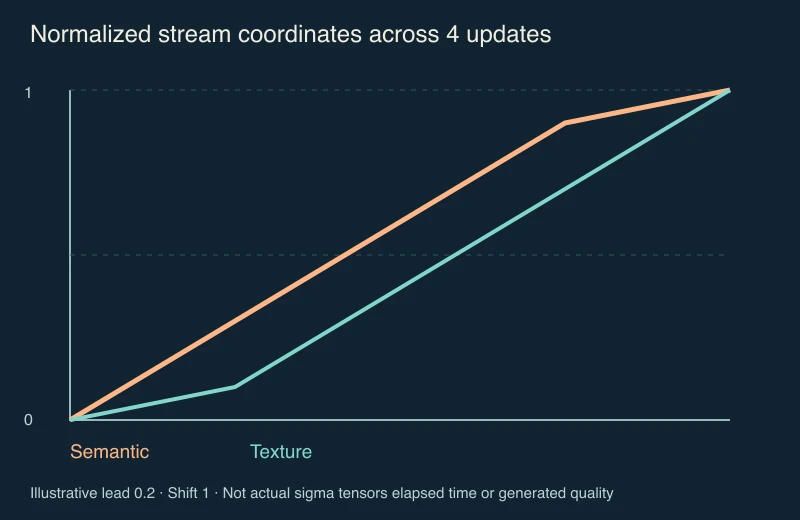
At four updates, an illustrative lead of 0.2 and shift one, the first internal boundary has semantic coordinate 0.3 and texture coordinate 0.1. Both streams begin at zero and end at one. These values are normalized coordinates, not elapsed seconds, output sharpness, actual sigma tensors or evidence that a generated picture becomes semantically correct at a particular instant.
The checkpoint configuration’s actual training range and defaults were not available to this unauthenticated audit. Do not copy the diagram’s lead into a production recipe as though it were a verified model default. The runner can warn when a manually supplied lead is outside its configured training range.
Compare four and eight updates without inventing a speed result
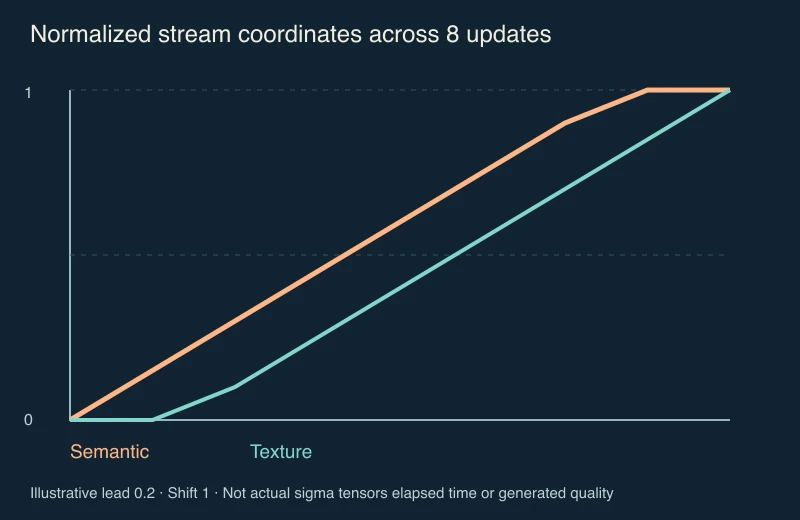
Download the four-update CSV, eight-update CSV and starting JSON. Selecting eight updates changes the number of intervals, not the meaning of the plotted axes. It does not establish that a run takes exactly twice as long or that the output improves.
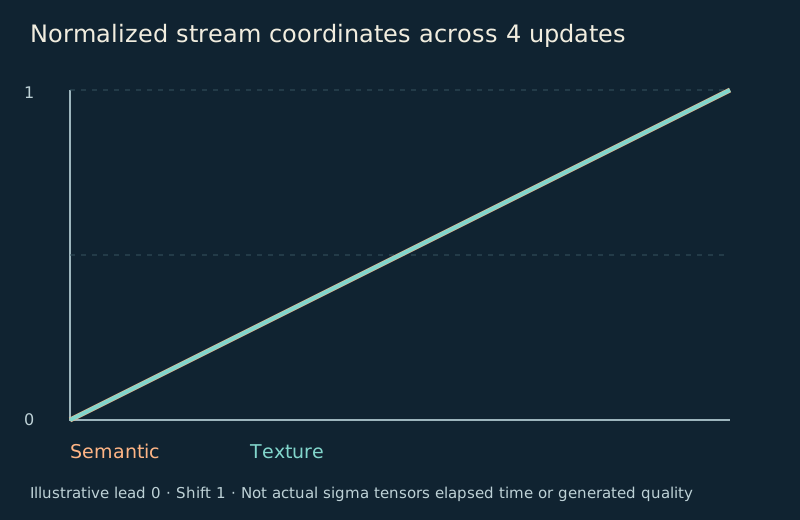
The zero-lead diagram makes the two coordinate curves coincide. That is a property of this formula. It is not an experiment showing equivalent model quality when the scheduling mechanism is disabled.
Give the first image a specific composition brief

The supplied original prompt asks for one teal courier robot on the left, one coral parcel and one circular display on the right, with a cream rectangular head and two dark square eyes. The native scene is a visual planning aid for that idea. SeFi’s text-to-image command receives the text prompt, not this reference image.
For your own pilot, choose a subject count, a readable silhouette and a small number of material constraints. Keep the first request narrow enough that a reviewer can state why an output passed or failed. A broad instruction such as “best cinematic image” makes it harder to compare attempts consistently.
Use the blank courier review CSV to record the actual checkpoint, revision, prompt file, seed, dimensions, steps, guidance and saved output. Count the robot and parcel, inspect the circle and note extra objects before accepting the file. The record contains no invented generation results.
Review the complete exported image
Inspect the output at a useful zoom and at the intended display size. Look for merged limbs, changed parcel stripes, repeated eyes, additional circles, illegible text or edges lost in a crop. A visually attractive image can still miss the subject count or intended composition.
Keep the raw result separate from manual finishing. If you crop, paint out an object or add approved lettering, record that work with the accepted export. Compare actual accepted deliverables and actual production spend; a valid preflight is not a successful image and a step count is not a cost estimate.
For a wide delivery, the anamorphic still-frame guide explains when a known horizontal squeeze should be restored before cropping. Do not stretch a normal square-pixel SeFi output merely because you want a cinematic aspect ratio. Compose or crop it deliberately unless you have a genuinely squeezed source.
Check the full environment and component terms
The repository’s CLI entry point and model registry distinguish Base, RL and Turbo recipes. Registry fallbacks are 50 steps and guidance four for Base or RL, and four steps with guidance one for Turbo; a complete checkpoint configuration can supply defaults.
Review the current official Turbo checkpoint page for access and component terms. Public source and public metadata do not mean every model file is anonymously downloadable. This research did not complete a gated access flow, verify a full installation, benchmark hardware or generate a result.
For currently supported hosted original imagery, explore Clout Image and Video. For a product campaign, use Marketing Studio and inspect the selected workflow’s actual inputs and returned file. This guide does not claim that Clout hosts SeFi checkpoints. For a distinct editing preparation path, compare the Mage Flow Edit input map.
Inspect the source audit and reproduce the study
The source audit records seven small pinned repository files. The read-only auditor rechecks their hashes without gated model files. We compared 24 preflight cases with isolated resolution and Turbo validation code, and 27 coordinate studies with the inspected arithmetic using float32 array calculations. Agreement was within 0.000001 for the coordinate study; it does not prove full Torch or GPU-runtime equivalence.
The planning helper and asset builder reproduce the graphs and ledgers with Bun and Sharp. The native courier project, scene builder and native record preserve the authored visual exercise. Keep companion files together and use new output directories.