

A Runway workflow API integration needs two decisions: whether the provider run has reached a terminal state, and whether your required deliverables are ready for editorial review. Keep those decisions separate. A successful parent status does not establish that every planned shot exists or that any returned file is acceptable.
The local reviewer above turns a retrieval response into an output inventory. Paste response JSON, enter your expected node IDs and export a JSON or CSV review. It does not call Runway, retrieve output URLs, submit a retry or evaluate video quality. The initial example is authored, with fictional IDs and deliberately unusable example.invalid URLs.
Why SUCCEEDED can still require manual review
The pinned Runway SDK retrieval contract says a succeeded workflow can still contain node errors. It maps node IDs to arrays of output URLs. A running response can already list partial outputs. Cost is optional and omitted until all descendant tasks are terminal. The SDK also says retrieval updates are not expected more often than every five seconds and output URLs expire within 24 to 48 hours.
These fields serve different purposes in an application. Status drives the run lifecycle. Expected node IDs come from your own delivery brief. Returned references identify candidate files. A manual acceptance record captures whether those files meet the actual brief. Combining them into one green success badge hides useful information.
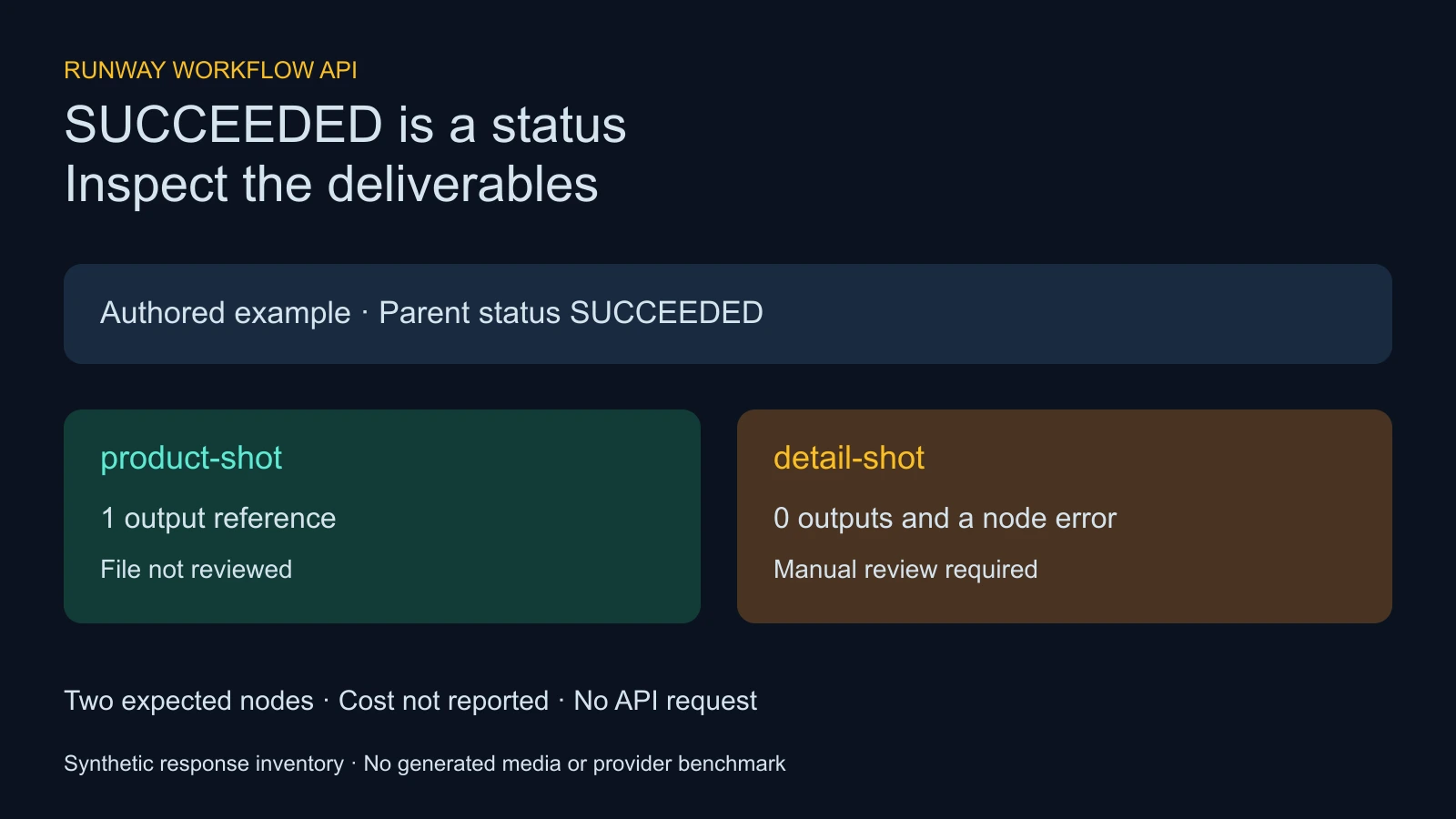
Define the two shot delivery before invoking a workflow
Imagine an original product launch video with a wide product shot followed by a close detail. Name the required outputs product-shot and detail-shot in your planning record, then map those requirements to the actual node IDs in your configured workflow. These names are our exercise identifiers, not guaranteed IDs supplied by Runway.
| Required output | Creative requirement | Acceptance evidence |
|---|---|---|
| product-shot | Show the approved item and a readable silhouette | Saved full file and a framing review |
| detail-shot | Show the same item with the important feature visible | Saved full file and a continuity review |
Decide the actual duration, crop, audio needs and permitted edits before generating. If a single node can return several candidate files, a nonempty array is only an inventory signal. You still need to choose and inspect the file you intend to use. Two references to the same URL are two listed references but one unique string; neither count proves two distinct deliverables.
Load the partial example and inspect what is missing
Choose Load partial example. Its parent status is SUCCEEDED, the product node lists one reference and the detail node lists none. It also includes a detail node error. With both expected IDs entered, the reviewer returns Manual review required, one missing expected node and one node error. Credits remain not reported because the example omits cost.
Download the partial example JSON, inventory JSON and node CSV. They reproduce this exercise and contain no working media links. The chosen failure code demonstrates an error field; it is not evidence of a real failed request.
Now choose Load listed outputs. Both expected nodes contain a reference, so the decision becomes Required outputs listed inspect the files. Media acceptance remains not evaluated. This language is deliberate: the tool has no file to watch, no delivery brief to judge and no authority to approve your production asset.
Handle a running response without calling it a delivery
Load running example to inspect a nonterminal state. It has progress 0.5 and one listed product reference. The reviewer says to wait for the provider terminal state. Your application can display partial progress while retaining the planned delivery requirements.
The reviewer recognizes PENDING, THROTTLED and RUNNING as nonterminal, and SUCCEEDED, FAILED and CANCELLED as terminal. Failed or cancelled runs get a separate decision directing review of the records. Removing all expected IDs also forces manual review for a succeeded response, because an empty delivery requirement is not proof that the intended work exists.
For a production integration, use authenticated server-side requests and the current official API reference. Keep provider credentials out of this browser form. This article does not create a workflow, choose a provider model or submit billable work.
Treat missing cost as unknown rather than zero
The reviewer distinguishes an omitted cost field from a reported numeric zero. It accepts a finite nonnegative credit value when present, preserves zero and exports null when cost is absent. Do not fill that gap with a guess based on a model label or your account’s starting balance.
Track actual production charges separately from finishing time and editorial decisions. Cost per accepted delivery only makes sense when you have both actual spend and a positive number of accepted deliverables. A node inventory, successful status or URL count cannot supply that denominator. If nothing passes, retain the spend and zero accepted deliveries without dividing by zero.
Choose error handling by the failure evidence
Runway’s task failure guidance distinguishes safety, invalid asset, internal and third-party failures. It advises against unchanged retries for moderation failures, calls for correcting incompatible assets and recommends delay for internal failures. Third-party unavailability should not trigger an immediate retry.
A missing shot also needs a creative decision. If the required close-up is unavailable, decide whether to repair the input, revise the brief or stop the delivery. Do not silently substitute an unrelated wide shot just to clear a dashboard. Recheck the full result after any deliberate retry because the replacement can introduce a different continuity problem.
This tool exports node IDs and optional failure codes but leaves provider messages out of its exports. Your private operational log may need the original response for diagnosis; store it under your own access controls and retention rules. A CSV intended for an editor usually needs the shot requirement and next action more than a raw provider message.
Save and inspect candidate media in your own delivery process
The SDK recommends storing accepted assets yourself and retrieving the invocation again when fresh URLs are needed. Build that step into your backend lifecycle instead of relying on an old copied link as permanent storage. This reviewer intentionally does not fetch links or download candidate media.
For the two-shot exercise, watch each full saved video, confirm the item’s shape and design, inspect the cut between shots and check any audio. Review the intended vertical or landscape crop at its actual display size. Then record a concrete decision such as accepted, needs repair or rejected with the saved filename.
Use the blank shot acceptance ledger to keep that decision separate from the provider inventory. Duration, downloaded filename, audio, framing, continuity, charges and finishing time are blank because this article did not generate or download any video.
Understand the local reviewer limits
This is a bounded response inventory, not a complete SDK schema validator. It checks the fields needed for its inventory and can ignore other fields. For example, it does not validate the whole RUNNING or FAILED branch contract, authenticate the response, validate media URL destinations or prove that an output reference resolves to a video.
Inputs are limited to 100000 characters, up to 50 expected IDs, 100 output nodes and 1000 total references. Each output node can list up to 100 nonempty strings. Malformed JSON and invalid reviewed fields block export. CSV text cells that could begin a spreadsheet formula receive a leading apostrophe; the JSON retains the reviewed ID text.
The form processes the response locally and does not send it to Runway. Avoid pasting credentials or unnecessary personal data. Exports omit the output URLs and provider error messages, but retain the invocation ID, node IDs, status, counts and reported cost. Those identifiers can still be operational information, so share the export deliberately.
Inspect the pinned sources and reproduce the exercise
The source audit records hashes for six small SDK documents at revision d21a613791516edfd734914fc3e638e3f54f9f0c. The read-only auditor can recheck them without provider credentials or generation. The three authored example responses were typechecked against the isolated retrieval response type from that revision.
The local helper and asset builder reproduce the synthetic inventories and original response diagram. Read the asset hash manifest for the published exercise files. Source checks and fixture typechecking are not end-to-end API execution or a paid model benchmark.
For the creative side, use the multi-shot video workflow to define coverage and the AI short drama guide to plan story continuity. To create supported original imagery in Clout, explore Image and Video or Marketing Studio and review the actual operation quote and returned file. This article does not claim that Clout exposes Runway workflow invocation endpoints.


