

Melted chrome works because the viewer can recognize a shape before it becomes liquid. A clear silhouette, a few broad highlights and a restrained pool communicate the transformation better than a frame full of unrelated droplets. Start with one object and make the surface behavior the subject of the shot.
The examples below use an original pear-shaped sculpture. The artwork is a finished generated still. The motion directions are briefs to produce and inspect, rather than a claim that a particular video model has passed a material-simulation benchmark.
Download the original liquid-chrome concept
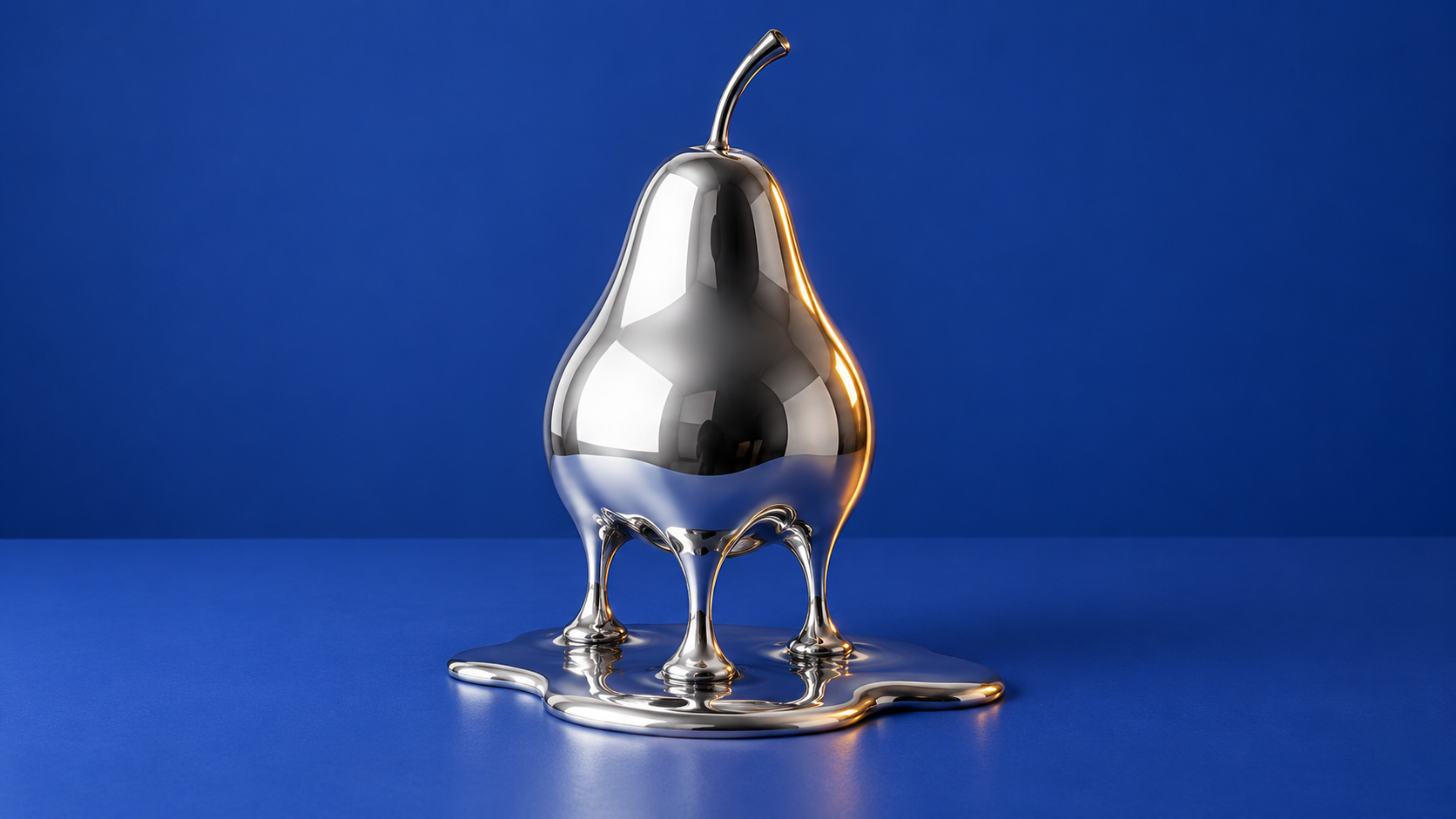
Original AI-generated surreal material concept. The recognizable upper silhouette and small metallic pool give the transformation a clear visual starting point.
Download reflective pear sculpture liquefying onto a cobalt tabletopThe cobalt table gives the silver surface a readable color contrast. Reflections should describe the object rather than cover it in tiny glitter. Keep the metallic pool modest enough that its boundary and contact with the table remain visible.
Choose a material treatment before the prompt
| Treatment | Visual character | Useful brief |
|---|---|---|
| Polished liquid chrome | Broad high-contrast reflections and smooth flowing shapes | A surreal object reveal |
| Brushed metal becoming liquid | Directional surface marks giving way to glossy flow | A clear before-and-after material change |
| Dark reflective alloy | Subdued highlights and a heavier silhouette | A restrained cinematic transformation |
Do not combine chrome, mercury, molten lava, glass and smoke in one short brief unless their mixture is the actual idea. Each word implies a different surface or motion. A cool silver pool on a studio table is a different creative treatment from glowing liquid in a furnace. Choose the look you need, then keep its lighting coherent.
Three prompts for different reflective scenes
Studio sculpture: An original pear-shaped chrome sculpture on a matte cobalt tabletop, recognizable upper silhouette, three smooth silver drips descending into a small reflective pool, broad rectangular studio-light reflections, crisp surface edges and a warm rim light. Entire object visible, quiet cream background, no text, no logo and no flames.
Brushed-to-liquid transition frame: A simple cylindrical brushed-metal object with its lower edge turning into polished silver liquid. Preserve a clean cylinder at the top and clearly separate the brushed upper texture from the smooth lower flow. Soft side light, neutral studio background, controlled reflective highlights, no sparks and no additional objects.
Dark alloy concept: A charcoal reflective sphere slowly sagging into a dark metallic pool on pale limestone, a stable upper curve and smooth heavy-looking lower drips. One broad cool reflection and a subtle warm edge light, sculptural composition, no glowing lava, no cracks and no typography.
Generate a still first and inspect the silhouette at full resolution. If the object reads as wet plastic, refine the lighting and reflection scale before requesting motion. If it disappears against the background, change the backdrop or introduce a clear rim rather than adding random bright specks. Keep a saved version of the accepted frame so the video has an intentional visual anchor.
Plan the motion as three visible beats
Begin with a brief hold on the stable object. Let only the lower portion soften and flow while the upper outline remains recognizable. End with a settled pool and a short pause. Those beats give the viewer enough information to notice the material change. Asking for a full collapse, an orbiting camera and an explosion at once makes continuity much harder to judge.
Motion brief: Use the approved pear sculpture frame. Hold the camera still. The lower third of the reflective sculpture softens gradually, three established drips lengthen toward the tabletop and join a small silver pool. Preserve the upper silhouette, background and light sources. End with a calm settled state, no new objects and no sudden camera move.
Higgsfield's Turning Metal x Melting effect describes a subject becoming reflective liquid metal. It is relevant to this visual intent. A named preset and a free-form material prompt are different controls, so use the actual available workflow rather than assuming every video model exposes that preset.
Review reflections through the whole shot
A static image can hide a continuity problem. Play the finished clip and watch whether the highlight moves logically with the changing surface. Check that the table remains flat, the pool stays in contact with it and the upper silhouette does not change into a different object. Inspect the beginning, middle and end, then look through the transition at normal speed.
Common failures include highlights blinking on and off, a drip growing upward, a pool becoming transparent water and the sculpture hovering above its shadow. If the lower edge is the only failed region, simplify the action or regenerate that shorter beat. Adding more motion to a broken material transition usually introduces more competing details.
Use the effect in a campaign or character story
A material change can be a short transition between two accepted visuals. Keep the opening and closing frames relevant to the story: a sculpture can introduce a design idea, while an accessory concept can lead into a fashion scene. The effect should have a reason to appear rather than interrupting the message solely because it looks unusual.
For a real product, distinguish a stylized visual from a claim about its physical composition. A reflective generated finish should not imply that a bag, bottle or device is made of chrome when it is not. Use accurate product references for customer-facing exterior details and describe the effect as creative treatment where that distinction matters.
Create an original campaign character in Clout and develop coordinated photos and videos around a consistent visual identity. Treat the liquid-chrome scene as one deliberate beat in that broader content set.


