A rough-looking material does not prove that the surface has depth. A displacement map workflow must define which values move the surface, how far they move it and which geometry supports the change. This matters for close product shots, rocky environments and AI-assisted scenes that need consistent contact or silhouettes.
What a displacement map changes
A scalar height map describes one value at each surface location. A displacement operation can use that value to move vertices along a direction, commonly the surface normal. Midpoint defines the value treated as no movement, and scale controls the magnitude. A vector displacement workflow encodes more than a single height and needs its own coordinate convention.
Blender's displacement documentation distinguishes bump shading from true displacement and describes the geometry and memory tradeoff. The shader and renderer settings matter: connecting a height image does not prove that a particular render mode is changing geometry.
Compare bump shading with displaced geometry
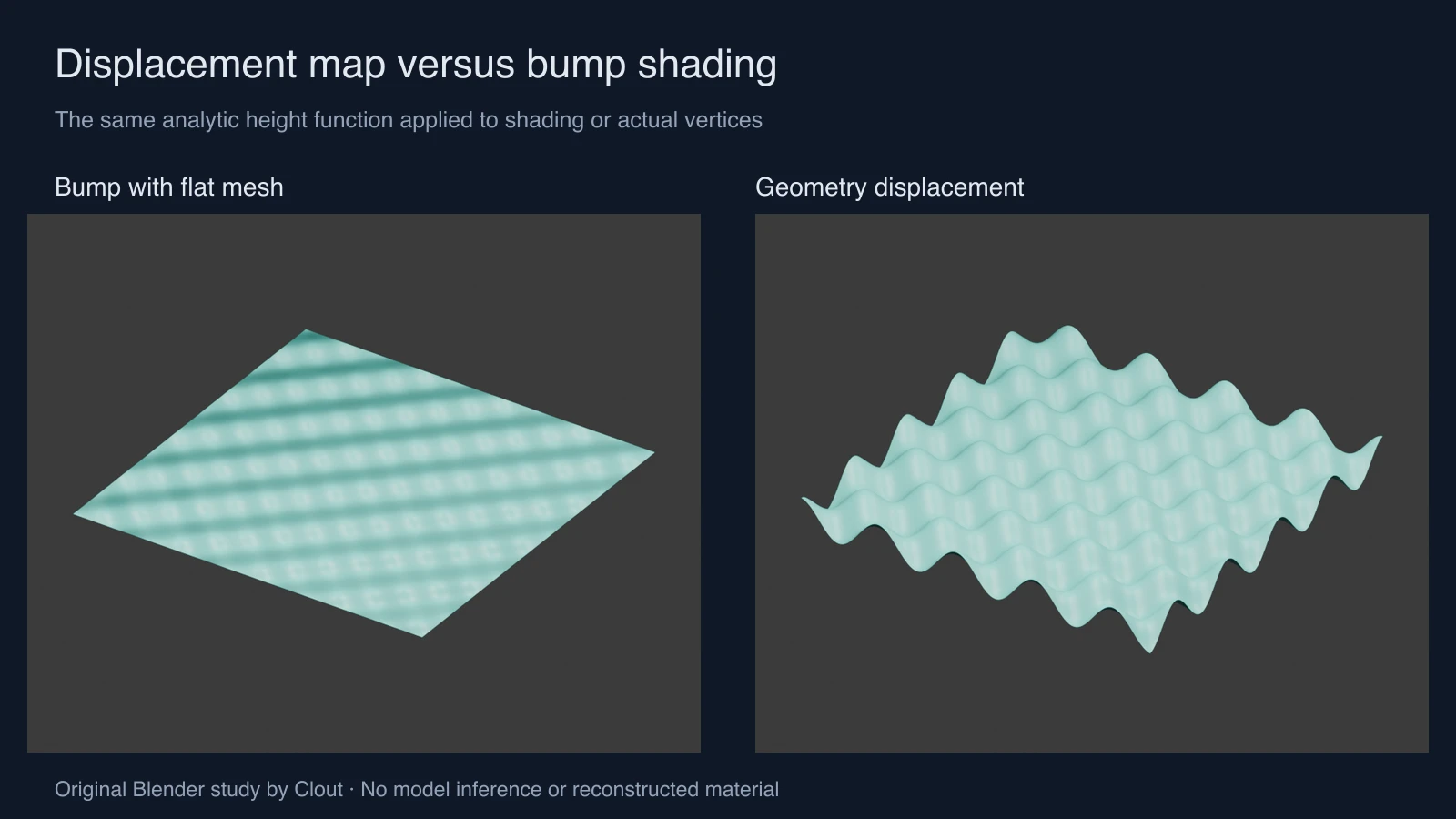
Our study uses a 160 by 160 quad grid with 25,921 vertices. Both cases use the analytic height function 0.13 × sin(10x) × sin(10y) across x and y from −1.4 to 1.4 Blender units. The bump case keeps every vertex at z = 0 and feeds the function into a Bump node. The geometry case sets each vertex's z coordinate from that same function.
The measured geometry ranges from approximately −0.129998 to +0.129998 units. The flat mesh has a zero height range despite its shaded relief. Look at the outer edge as well as the highlights. The two shading results are not expected to match pixel for pixel: this is a geometry-versus-shading demonstration, not a renderer equivalence benchmark.
Download the flat bump project, displaced geometry project, measurements and reproduction script. These files were created in Blender 5 with Eevee. The mesh is displaced directly by the script rather than by a production image-map import or a shader displacement mode.
Choose displacement, bump or a normal map
| Technique | What changes | Useful inspection |
|---|---|---|
| Geometry displacement | Vertex positions | Silhouette, intersections and actual mesh density |
| Bump mapping | Shading normals derived from a height signal | Highlights and apparent fine relief with the mesh held flat |
| Normal mapping | Shading normals supplied by a direction map | Normal convention, tangent basis and lighting response |
Large changes to an outline need supporting geometry. Fine pores or grain may be more efficient as shading detail at the final viewing distance. More geometry also costs memory and render time. Test a small crop at final resolution before subdividing an entire scene.
Interpret a height image before importing it
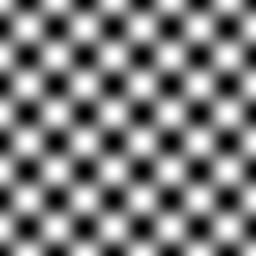
The original grayscale preview samples our same analytic function into a 256 by 256 eight-bit PNG. Dark and light values represent low and high samples in this example. The preview is a quantized visualization; the native geometry uses the analytic values directly. It is not a recovered material or a high-precision production map.
Document the coordinate span, scale, midpoint and image orientation. In a normalized grayscale convention, a midpoint near one-half often represents zero displacement, but the correct setting depends on the source and application. Treat height as data using the relevant application's non-color handling. Do not assume that a color-managed beauty image supplies calibrated heights.
For precision work, inspect the native application's support for higher-bit-depth maps and the source's actual precision. An eight-bit file has limited levels and can show steps when amplified. Converting an eight-bit image into a larger container does not reconstruct missing height detail.
Build a repeatable surface workflow
- Write the physical feature you need to show, such as a raised seam or chipped edge. Choose a camera distance that can reveal it.
- Check the UV layout and scale before judging the material. Stretched mapping can distort a correct height pattern.
- Inspect the texture repeat if the map wraps. A height discontinuity can become a geometric step.
- Set midpoint and displacement scale in a small test. Verify vertex movement in the mesh as well as the render.
- Review grazing angles, silhouette and contact with neighboring objects. Reduce scale or improve sampling if thin features tear or intersect.
Where AI images fit in the process
Use Clout Image and Video to explore an approved surface appearance or scene reference. A reference can establish color, pattern and mood, but its painted light and shadows are not physical height measurements. Keep concept generation separate from constructing and validating the native material.
For a cinematic shot in AI Cinema, first decide whether you need a finished generated shot or a native 3D asset for later control. The downloadable studies here serve the latter learning workflow. No automatic Clout displacement-map extraction or Blender integration is implied.