Preparing character art for a playable story? The visual-novel sprite guide includes three original transparent expression assets with equal canvases and a shared baseline.
What a character turnaround sheet shows
A character turnaround records one design from multiple directions so that its proportions, clothing and distinctive details remain understandable when the viewpoint changes. A front drawing alone cannot establish what the back of a coat looks like or how far a nose projects. Those are design decisions that need an approved reference, rather than a new guess in every shot.
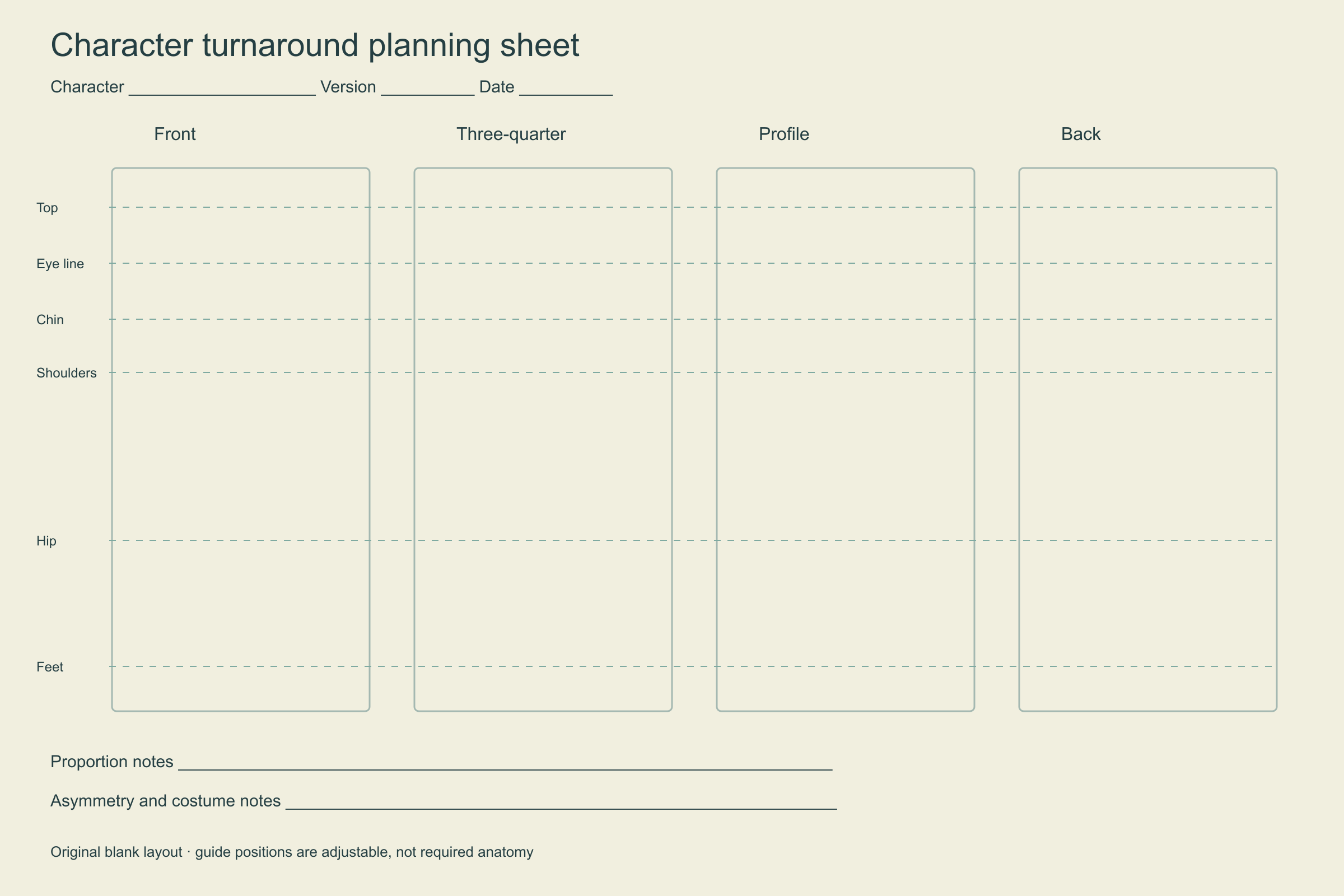
Celsys’s model-sheet tutorial by Julio Robledo describes front, profile, three-quarter and back views with shared alignment guides. The template below applies that basic organization to an original invented mascot. The drawings and worksheet are authored planning aids, not AI outputs or a reconstruction from photographs.
Get the free four-view template
Download the 2400 × 1600 PNG turnaround template or the editable SVG turnaround template. Both contain four labeled view panels, alignment guides, version fields and notes. Use the PNG as a reference layer in an image editor that supports PNG; use an SVG-capable editor to adjust the vector layout. These are ordinary image files, not a native animation project, rig or 3D model.
Make a copy before drawing. Enter the character name and version, then move the guides to suit your own design. The eye, chin, shoulder, hip and foot lines are checkpoints, not a rule that every character needs human anatomy. A round creature, long-necked robot or stylized mascot can use a different set of landmarks.
Read the original worked example
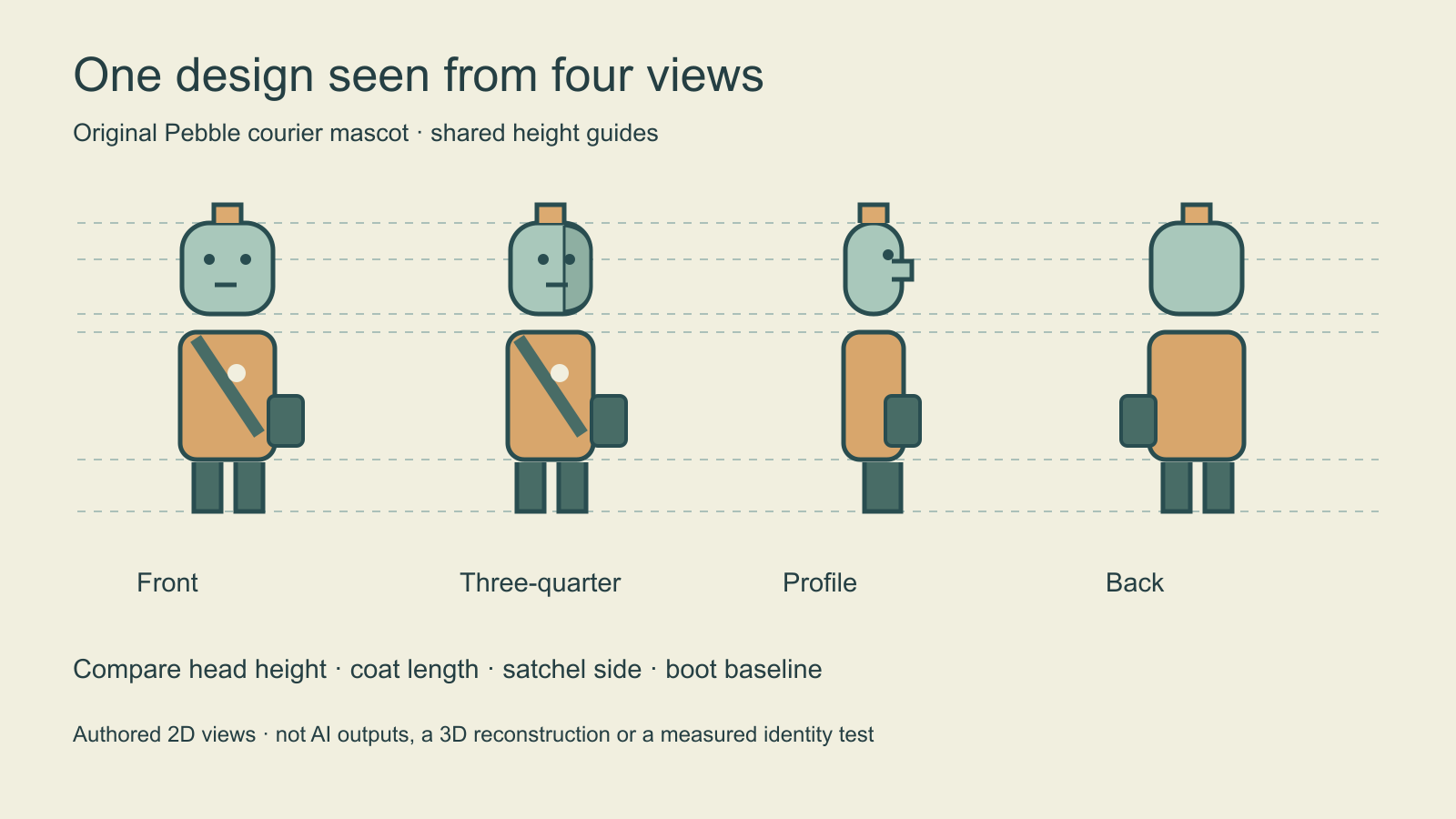
Pebble courier has a mint head, ochre coat, small antenna and dark green satchel. Compare the coat length and boot baseline before examining small details. The profile makes the projecting face visible; the back removes the face and front badge. The satchel stays on the same side of the character, which appears on the opposite side of the page when the character turns around.
That last check catches a common reference mistake: keeping an accessory on the same side of every panel can move it from the character’s left side to the right. Label asymmetric marks in character-relative terms. A scar, hair part or bag deserves a short note if a collaborator could reasonably interpret it two ways.
Build the sheet in five deliberate passes
- Choose an approved neutral pose and a clear front view as your starting design.
- Set shared height landmarks and keep every panel at the same display scale.
- Work out the profile, including depth that the front view does not reveal.
- Resolve the three-quarter view and the back using the same clothing and construction decisions.
- Review the complete sheet, record unresolved details and approve a named version.
Keep dramatic acting poses and strong perspective for a separate pose sheet. A turnaround is easier to compare when the character stands neutrally and the crop is consistent. If an arm hides a seam or bag attachment, add a small detail note rather than pretending that the hidden region has been established.
Use AI references with an explicit design contract
If you explore views with an AI image workflow, select the model actually available and inspect its supported reference inputs. A prompt asking for the same character does not guarantee that hidden regions will be reconstructed correctly. Starting from one photograph establishes only what is visible; unseen clothing, hair and accessories remain proposed designs until you review them.
Use the approved Pebble courier reference as the design anchor. Plan front, three-quarter, right profile and back views in the same neutral pose and scale. Preserve the mint head, antenna height, coat length and character-left satchel. Keep the plain background. Treat unseen construction as a proposal for review rather than an established fact.
This is an original untested brief. Compare each accepted result with the approved master before saving it into the reference set. Do not promote an attractive but changed face, outfit or accessory into the next master without a deliberate version decision. Read the face consistency guide for a manual inspection method; its checkpoint-specific advice belongs to Qwen.
Hand off one approved reference set
Use the complete character reference-pack guide to organize the approved anchor, palette, costume notes and linked detail sheets in one handoff.
Record the view, landmark mismatch, asymmetric detail and revision decision in the blank turnaround review CSV. Review silhouette and proportions first, then inspect face placement, costume seams, accessory side and palette. A clean sheet should make the next artist’s decisions easier, not hide uncertainty behind polished shading.
Use a character expression sheet when the next problem is facial acting from a consistent view. For reusable original creators, explore Clout’s saved-character workflow and keep approved references with the character. Clout Image and Video Studio offers its listed generation workflows; this template does not add automatic turnaround generation or identity scoring.