What a visual novel sprite pack needs
A visual novel sprite is a character image displayed as part of a scene. A useful pack supplies the expressions and poses the script actually uses, with consistent design and predictable placement. An AI visual novel sprite generator may help produce candidates, but each accepted file still needs review and preparation for the chosen engine.
Separate this asset task from writing branches or shipping a playable game. The AI visual-novel workflow guide contains an original scene that uses the files on this page. Here the job is narrower: preserve Ori’s identity and alignment across three expressions.
Inspect the original aligned expression pack
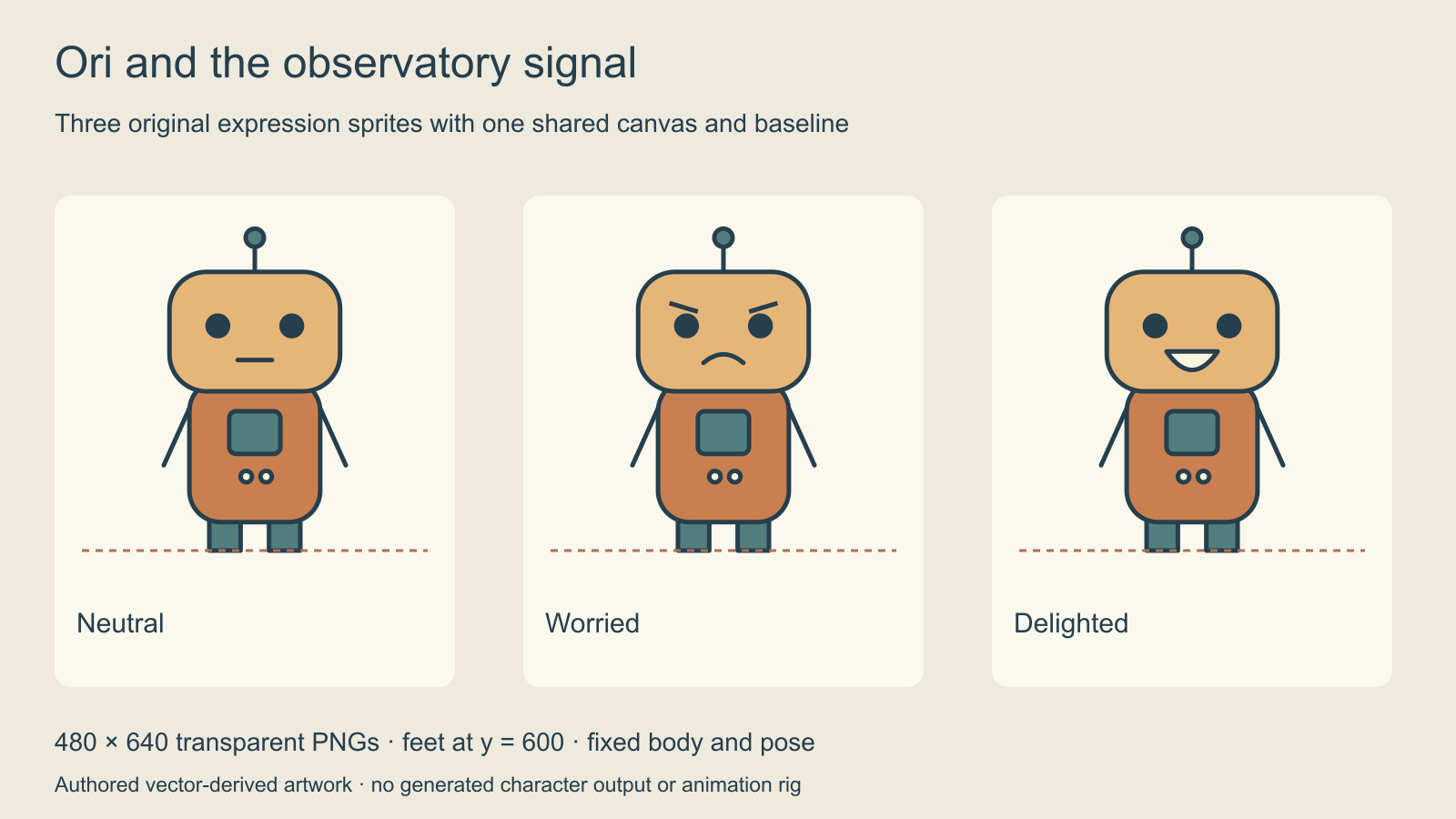
Ori is an original copper robot with a teal chest panel, antenna and two dark eyes. Each sprite is 480 × 640 pixels, has transparency and places the feet at y = 600. Keeping the canvas and baseline fixed lets the scene switch expressions without moving the body. The robot has no independently animated limbs or mouth shapes.
Inspect the neutral sprite, worried sprite and delighted sprite. The asset manifest records dimensions, baseline, role and origin. The observatory background is a separate authored image.
Lock identity before requesting emotion variants
Choose one accepted character design and record its visible anchors. For Ori these are the copper silhouette, rounded head, antenna, chest-panel proportions and eye placement. The example changes facial marks while keeping the rest fixed. A later costume or camera-angle change would be a separate asset decision.
For a generation workflow, supply references only in the form supported by the selected tool. Write which image defines identity and what may change. A compact optional brief is: Preserve the approved character design, pose, framing and costume. Change only the facial expression to worried. Keep the complete head, antenna and feet within the agreed canvas. This is a planning instruction, not a preservation guarantee or an executed generation.
Compare every candidate to the approved base before accepting it. Look at silhouette and costume before focusing on the face. A convincing emotion is still unsuitable if the character’s hand changes shape or its head becomes larger than in the neighboring sprite. The character-reference guide helps record the underlying identity.
Check canvas baseline and transparent edges
| Check | Why it matters | Original pack convention |
|---|---|---|
| Equal canvas dimensions | Expression replacement has predictable placement | 480 × 640 for all three states |
| Common foot baseline | Character does not jump vertically | Feet end at y = 600 |
| Complete silhouette | Important parts are not cropped | Antenna arms and feet fit inside |
| Actual alpha channel | Background shows around the character | Transparent PNG files |
| Clear filenames | Script maps to the intended expression | One filename per expression |
A checkerboard painted into an image is not transparency. Inspect the actual alpha channel and review edges against both light and dark backgrounds. If a cutout has a halo, repair the edge before assembling the scene. This article’s pack was authored with transparency from the start; it is not evidence that another service removes backgrounds correctly.
Do not crop every expression independently to the tightest visible bounds and then expect identical placement. Preserve the agreed canvas or record the offsets your engine needs. The correct dimensions depend on the project; 480 × 640 is this example’s convention, not a universal visual-novel standard.
Map expressions to actual story beats
The initial investigation uses neutral. Finding the clue uses worried. The successful receiver ending uses delighted. That small set covers the authored scene without adding expressions that never appear. Keep the mapping in an asset manifest and update it when the script changes.
For an engine example, the RenPy quickstart explains that showing an image with the same character tag replaces the prior image. Its image naming and positioning rules matter when assembling a sprite pack. Check the engine’s actual documentation and test the imported files rather than assuming a PNG collection is already a runnable project.
The browser demo keeps one fixed layout and changes the sprite file as the story state advances. Play both paths and look for a jump in the body when the expression changes. A still comparison is helpful, but the runtime transition is what the reader experiences.
Keep expression sheets and animation rigs separate
A static expression pack does not provide lip-sync timing, mouth phonemes, skeletal deformation or a full turnaround. If a later scene needs speech animation or a side view, scope and review those outputs separately. Reusing the same identity does not make every format interchangeable.
Use the expression-sheet guide to plan additional facial states and the turnaround guide when a new viewing angle is required. Keep the accepted identity reference available through each handoff.
Create candidates and approve a usable pack
Explore Clout AI Influencer for original character development and connected creative assets. Verify the actual operation and output before budgeting a generation. This guide does not promise transparent sprites, engine-ready exports or automatic expression consistency from Clout.
Approve a small set that works in one scene, then expand only when the script calls for it. Count usable imported assets rather than raw generations, preserve the original references and record the final filenames. That makes later revisions easier to compare and keeps a character update from silently breaking existing scenes.