An AI caricature generator turns a reference into a deliberately exaggerated character illustration. Start with recognizable cues, choose the tone and specify which proportions you want to push. Review the result as a new drawing rather than expecting a pixel-preserving photo edit.
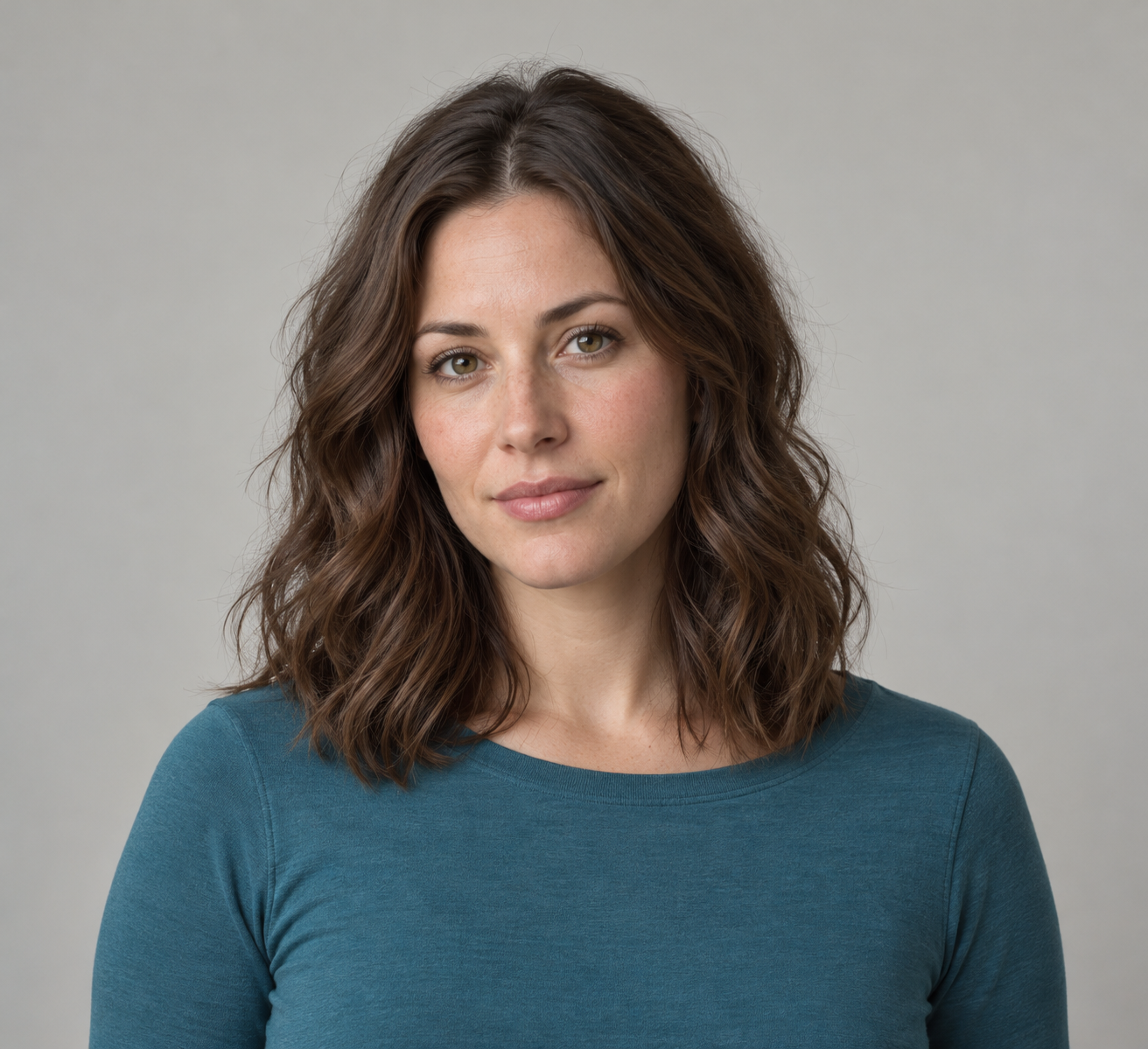
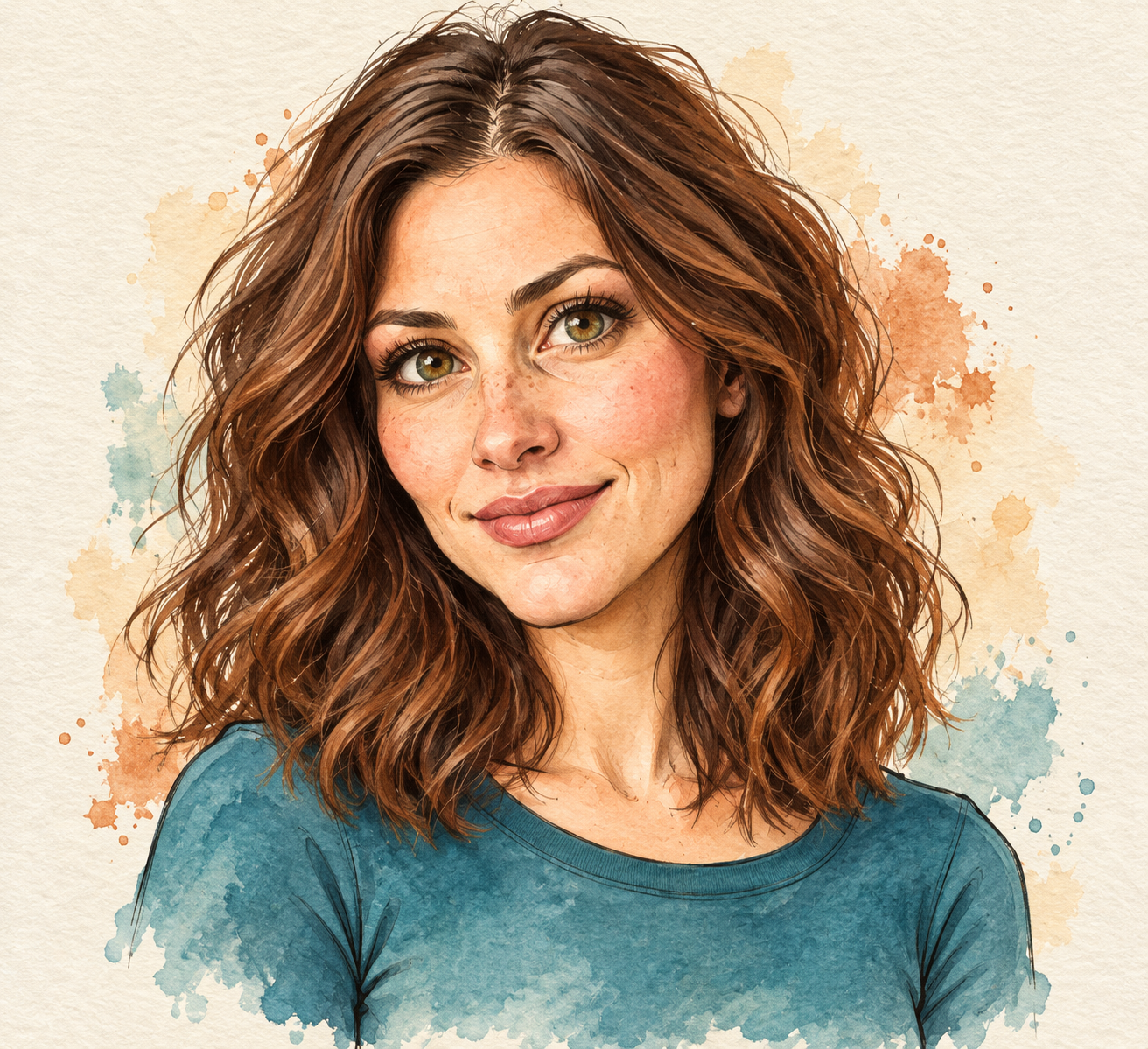
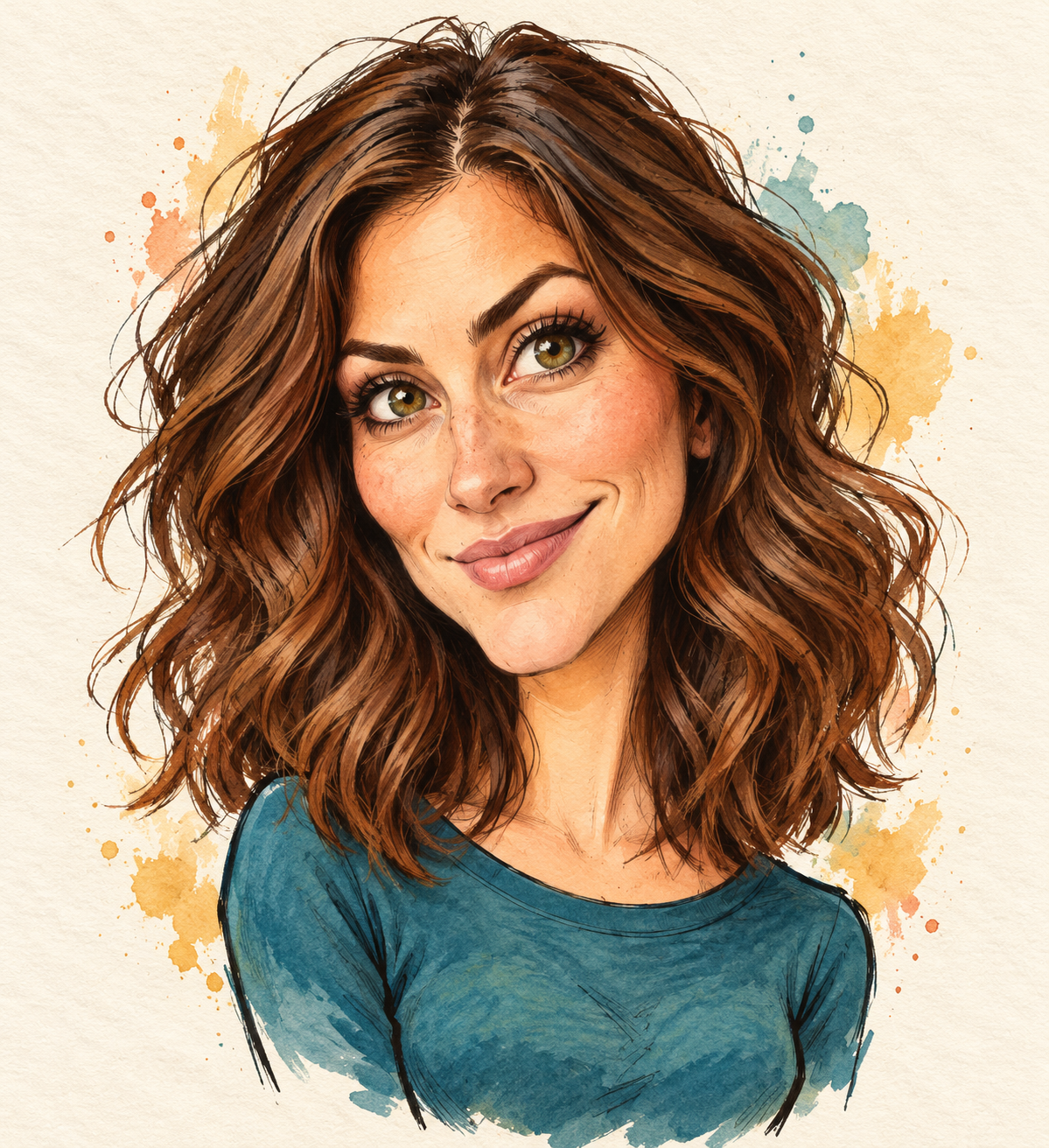
Our original example uses one fictional adult portrait and two actual reference transformations. The gentle brief asks for a warm ink-and-watercolor treatment. The bold brief asks for a very large head on a smaller upper torso and more expressive features. Both outputs, the source and a downloadable comparison are available below.
What makes an AI caricature different from a cartoon filter
A cartoon treatment may change shading and line work while leaving the broad portrait proportions familiar. A caricature brief also chooses what to exaggerate. Adobe’s drawing guide discusses distinctive features, their spacing and the audience for the finished illustration. Those are useful creative decisions before you write a generation prompt.
Decide whether the image is for a small profile avatar, an editorial character or a gift illustration. A subtle result may suit one use while a deliberately oversized head suits another. The useful question is whether the chosen exaggeration serves that placement, not whether one style is universally better.
Choose a reference with readable character cues
The original fictional reference portrait has shoulder-length wavy brunette hair, hazel-green eyes and a teal crew-neck shirt. It measures 1312 by 1199 pixels. The same source was supplied independently to both requests; the second result was not made by editing the first illustration.
The source was generated for an earlier hair-color exercise. It does not depict a customer or establish a real person’s identity. For your own project, choose a source you are entitled to use and identify a small set of details that make the intended subject recognizable.
A hairstyle, brow relationship, characteristic smile or familiar garment can be useful cues. Do not ask every feature to change equally. Keep the source and the agreed tone together so you can explain why a candidate succeeds or feels like a different character.
Compare the two actual caricature results
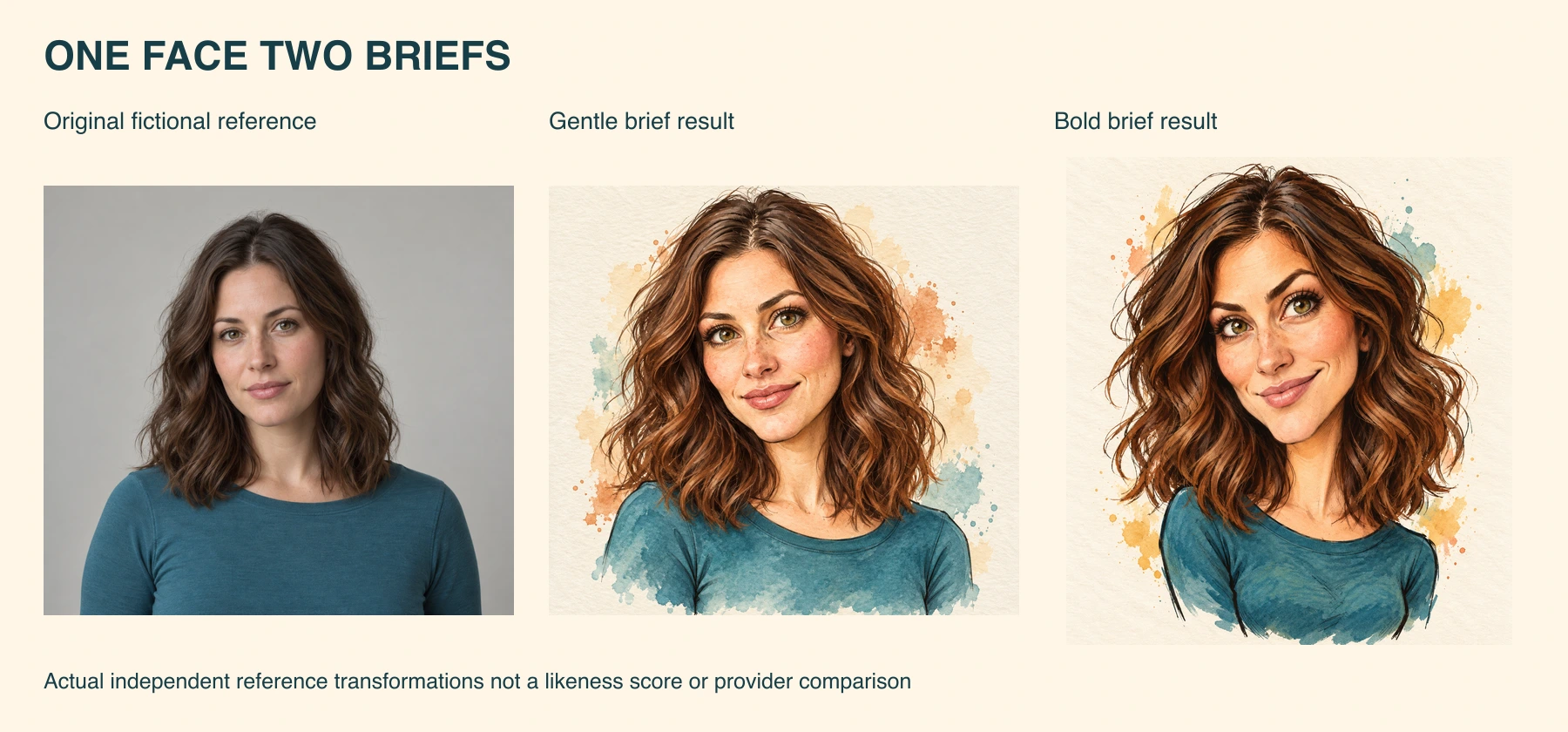
Download the native gentle-brief result and native bold-brief result. The first measures 1312 by 1199 pixels; the second measures 1199 by 1312. Both are opaque raster PNG files, not transparent cutouts, vector paths or animated characters.
We made these images with the built-in image tool, not Adobe Firefly or a tested third-party caricature app. Gentle and Bold are our brief labels. They are not names of provider settings, calibrated exaggeration levels or evidence of repeatable behavior across models.
Both illustrations retain wavy brunette hair and the teal shirt as visible cues while enlarging the eyes and changing the expression. The bold result has a larger head relative to its smaller upper torso and a visible head tilt. The pose and facial geometry are not preserved exactly. These are visual observations, not an identity score.
Write a gentle caricature brief
Transform this reference into a friendly editorial caricature. Keep the wavy brunette hair, hazel-green eyes, teal crew-neck shirt and near-front-facing presentation. Use a larger head, expressive eyes and subtly exaggerated brows and nose shapes. Draw with confident ink contours and watercolor washes on warm ivory paper. Add no text or accessories.
This is a copyable adaptation of the first creative brief. The downloadable brief summaries identify the requested treatment and retained cues for both runs. They are summaries rather than exact model parameters or a reproducible provider request schema.
Keep the first request focused on one visual language. Ink contours and watercolor washes describe a coherent finish. Asking for several unrelated rendering styles at once makes it harder to tell which decision needs revision when a candidate misses the intended tone.
Ask for a bolder treatment deliberately
Use the same reference cues, but make the head very large relative to a small upper torso. Push the eye size, arched brows and asymmetric smile while retaining the wavy brunette hair and teal shirt. Keep the illustration warm and playful, with clear ink contours and teal, rust and ochre watercolor washes.
Our second output changes more than one facial relationship, so it is not a controlled measurement of a single feature. It is a separate creative candidate. Compare the overall character, expression and silhouette, and record what you would keep or revise.
If the exaggeration feels too strong, name the feature to reduce rather than merely asking for better likeness. For example, keep the hair and watercolor finish while bringing the eye size closer to the source. That proposed revision has not been run for this study.
Review the character before polishing the presentation
The filled observation sheet records what changed in these two files. The blank review sheet gives your own candidates fields for hair, eye and brow relationships, nose and mouth, shirt color, exaggeration, unwanted accessories and final crop.
| Review decision | Look for | Possible next instruction |
|---|---|---|
| Recognizable cues | Hair silhouette expression and retained clothing | Restore the named cue from the reference |
| Exaggeration | Head to torso relationship and facial proportions | Reduce or increase one feature |
| Drawing finish | Coherent contours and color treatment | Simplify the line work or palette |
| Delivery crop | Complete hair head and intended shoulders | Add space around the silhouette |
These are editorial choices, not automatic pass thresholds. A result can have attractive watercolor texture and still miss the subject cues. Inspect the full native image and a small delivery preview before accepting the illustration.
Choose a generator by the reference workflow
A reference-supported image workflow is useful when the source needs to guide the character. Adobe’s Firefly caricature page describes uploading a photo with a prompt to influence style and exaggeration. We did not test that application, its allowance or its account export.
Check the actual operation and available reference controls in the tool you choose. A general text-to-image prompt without the source answers a different question from a transformation of an existing portrait. Keep the selected reference attached to the request and inspect the returned file rather than relying on a generated description of it.
For focused photo changes that should leave the rest visually similar, use our ChatGPT photo editor guide and actual collar edit. Caricature deliberately changes proportions, so its acceptance criteria differ from a product-color revision.
Prepare the final avatar or illustration file
Keep the native image before making an avatar crop. Leave room around hair and outer contours so a circular placement does not remove a distinctive feature. A portrait that works on a full page may lose its expression when reduced to a tiny profile image.
The supplied PNG files include their paper backgrounds. Changing the filename does not create transparency or vector artwork. If you need separate paths or a specific production format, plan a separate finishing step and inspect that exported file. This guide has not tested printing, a merchandise template or an animation rig.
Rebuild the comparison and keep the accepted version
Download the comparison layout source and reproduction notes to rebuild the three-panel study with Bun and Sharp 0.34.5. The layout contains the images without cropping. It reproduces the comparison, not the two generative transformations.
The provenance record identifies the original, results and review resources by hash. Save the source, selected candidate and review decision together so a later revision starts from the intended character.
Explore Clout Image and Video for supported creative operations, or use the AI Influencer workflow when the next goal is a recurring original character. Approve the still before moving to other scenes or video, and review each new deliverable on its own requirements.