Verus-Insight is a research release for inspecting artifacts in AI-generated video and producing structured predictions. A useful workflow keeps the supplied frames, inspection criteria, predicted findings and human review separate. A plausible explanation or a valid JSON object is not proof that the claimed defect exists or that the video has a particular origin.
This guide follows a pinned public code revision and includes a free local saved-prediction reviewer. Its default record and diagram are original authored numeric examples. We tested selected source JSON-handling functions on CPU; we did not download model weights, run GPU inference or establish detection accuracy.
Check what is actually available
The pinned release repository contains inference setup, input preparation, single and batch routes, documentation and saved examples. It describes an eight-billion-parameter model based on Qwen3-VL-8B-Instruct. This is an inference release rather than a published training recipe.
Our unauthenticated checks of the linked model and dataset APIs returned HTTP 401. That establishes the access boundary of this check, not permanent unavailability for every account. Confirm access to the exact model snapshot and dataset before planning a full run. Search volume, keyword difficulty and virality for Verus-Insight remain unverified.
The repository distinguishes Apache-2.0 code from model and Verus-owned dataset terms in their own repositories. It also records separate attribution for third-party example media. Review the applicable materials rather than assuming the code license covers weights, datasets and every video.
Choose frames around the production question
Start with one question that matters to the scene: does the product edge remain coherent, does the grip stay attached, or does the background geometry change unexpectedly? Keep an untouched source and identify the region and time range a human reviewer should inspect. Do not turn a broad predicted verdict into a substitute for looking at that evidence.
The input and output documentation describes explicit frame manifests with image order and timestamps. It also supports a local video route with a selected interval. A single still cannot show temporal continuity, and sparse frames do not cover every moment between samples.
For a manual production review, choose a short section containing the actual action and include the moments before and after the suspected change. Preserve the original frame sequence and timestamps with the saved prediction. A screenshot of a summary loses the information needed to revisit the precise finding later.
Keep input time separate from source time
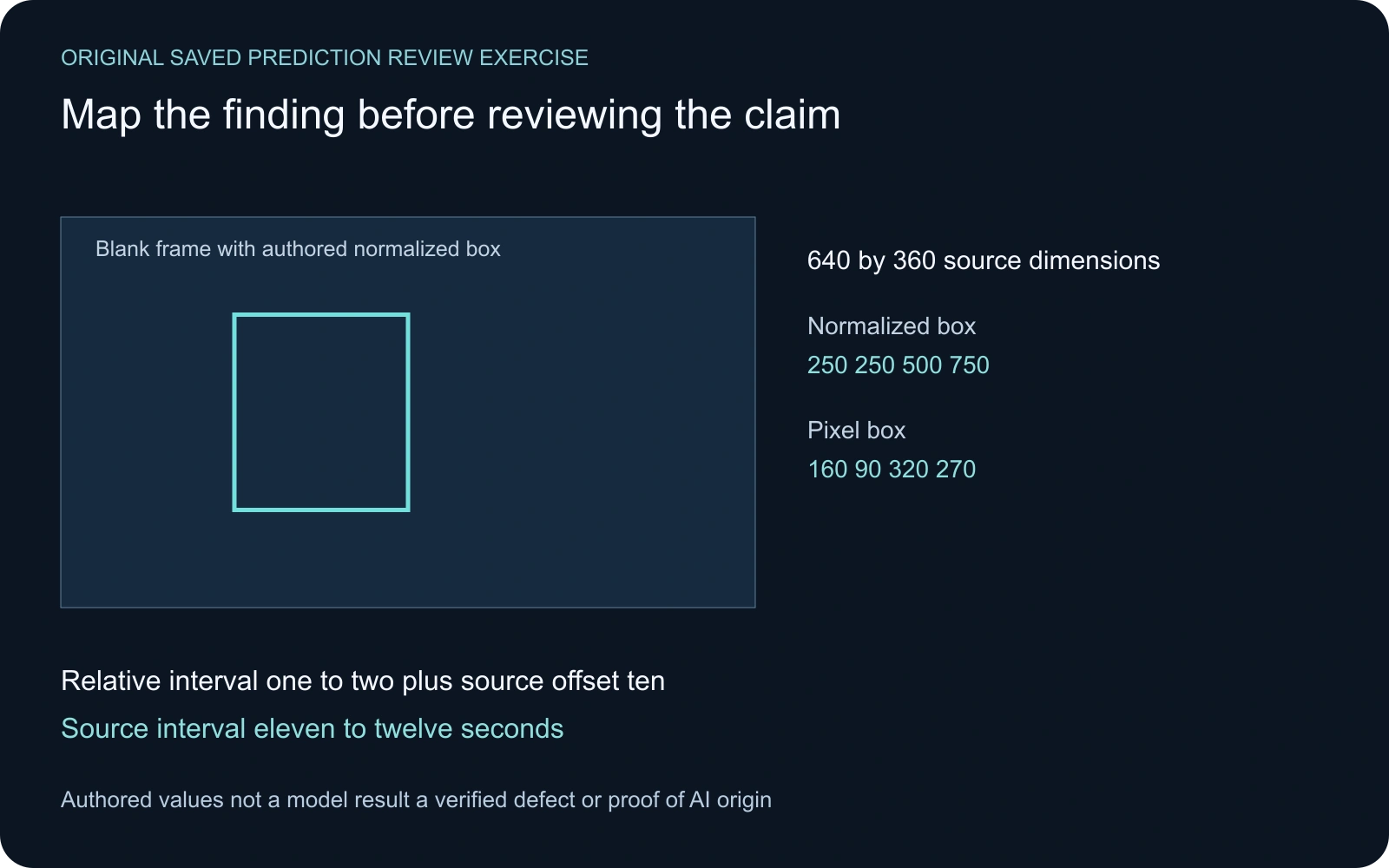
For a selected video interval, the release describes finding times relative to the interval start. If the interval starts at ten seconds and a finding spans relative times one to two, its corresponding source interval is eleven to twelve seconds. Keep both forms in the review record rather than silently treating the relative time as a time in the full source.
Explicit frame manifests retain their supplied timeline. Do not add a video offset merely because a filename resembles a video. The local reviewer applies a start offset when its saved input identifies a video; otherwise it treats the supplied frame timestamps as their own timeline.
The reviewer checks finding times against the first and last supplied sample timestamps. This does not verify the media duration, synchronization or a claim about an unsampled moment. A numerically valid interval can still contain an incorrect interpretation of the footage.
Map normalized boxes with the correct dimensions
The release documents boxes on a zero-to-1,000 coordinate scale. The authored box 250, 250, 500, 750 maps onto pixel corners 160, 90, 320, 270 for a 640 by 360 source frame. A wrong width or height produces a wrong pixel location even when the normalized values look reasonable.
The tool asks you for those dimensions. It does not read a video, inspect a file header or correct a crop applied elsewhere. Its SVG overlays supplied boxes from all finding times onto one blank frame. It is a geometry aid rather than a verified annotation over the actual video.
A null main box or an empty frame-box list means no localization was supplied there. It does not mean the entire frame is defective or that the model checked every pixel. Preserve missing fields honestly and return to the actual source for a human inspection.
Use the saved prediction reviewer
- Paste one completed saved JSON object, retaining raw_text, parsed_output, input timestamps, parse_error and finish_reason.
- Enter the dimensions of the frame to which the coordinates refer.
- Read the mapped intervals and pixel boxes alongside the actual source.
- Download the review JSON, finding CSV and blank-frame SVG for a review record.
The checker compares the raw JSON response with its parsed object and requires a completed response. It blocks malformed JSON, mismatched objects, unsupported dimensions, inconsistent frame counts, out-of-range finding times and invalid boxes. It reconstructs selected fields rather than copying an entire supplied record into the exported review.
The authored example contains one normal prediction and one row labeled needs_review. Neither is a model observation. The interface keeps the predicted verdict explicitly unverified. A normal row is not counted as a positive artifact, and another result string does not automatically become a proven defect.
Try the invalid-box and incomplete-response examples. Their exports are blocked. Download the authored input record, mapped review, review CSV and blank-frame box SVG to inspect the same exercise outside the page.
Separate parsing from factual verification
We imported the hash-checked source JSON helper and tested six authored strings. Objects with an unfamiliar nested verdict or an out-of-range nested box still passed its object parsing. Arrays, a non-finite constant and trailing text failed. These tests inspect software behavior rather than detector performance.
A completed object parse does not enforce the entire nested response contract. The selected source make_result function also preserves a length-limited response that can parse, while the source write_result function saves it and then raises for incomplete completion. A retained raw response is useful failure evidence rather than a reason to silently accept it as finished.
The CPU validation record, hash-checking harness and source audit preserve the boundary of what we tested. No model weights, video generation, factual detection benchmark or GPU throughput measurement was involved.
Review the first real run before scaling it
Use the release’s documented environment once model access is available. Keep the exact snapshot, input and settings with the result. Its documented H100 examples are observed configurations, not established minimum memory requirements. Native and server-backed timings cover different stages, so a pair of saved elapsed values is not a fair backend speed comparison.
For each predicted finding, inspect the selected source region at the stated time and nearby moments. Record what you can see, what contradicts the prediction and what remains uncertain. Keep a human production decision separate from the detector’s verdict. A useful review explains whether the specific file meets the scene brief.
The batch route retains attempt history. The pinned batch source uses the last row per sample as its current result and checks the run signature before resuming. Preserve the sidecar and original history. Counting every successful-looking historical row can misstate the current run.
Separate generated defects from delivery changes
In an original Clout Cinema workflow, review the earliest returned clip against the approved scene before editing. Then compare the final delivery with that accepted source. A character continuity change and an export’s texture loss require different decisions, even if both are called artifacts in conversation.
Use the compression artifacts experiment to inspect actual codec changes and the color banding lab for gradient precision. Neither those measurements nor this saved-report checker determine whether a video is authentic. Their purpose is to make a specific production observation reproducible.
Reproduce the local mapping with the original review helper and instructions. The asset manifest preserves the published files. Keep your final decision with the actual source and review notes rather than replacing it with a single score.