

A painted mark can become broad or angular because of the geometry beneath it. Before increasing an image's resolution, check whether the workflow stores paint in an image at all. Vertex painting and texture painting place the color data in different parts of the asset.
What vertex painting stores
The Blender Vertex Paint introduction describes color stored in a Color Attribute and used by the material. Painting changes the attribute values, while the displayed surface interpolates between the mesh samples. A material that ignores the intended attribute will not show the same result as a material that reads it.
Our example uses a named floating-point color attribute called OriginalPaint on the POINT domain. Each vertex has one stored RGBA value. It contains no UV layer and no image texture. That is a specific native study, not a claim that every color-attribute workflow uses the same storage domain.
Inspect coarse and dense versions of the same field
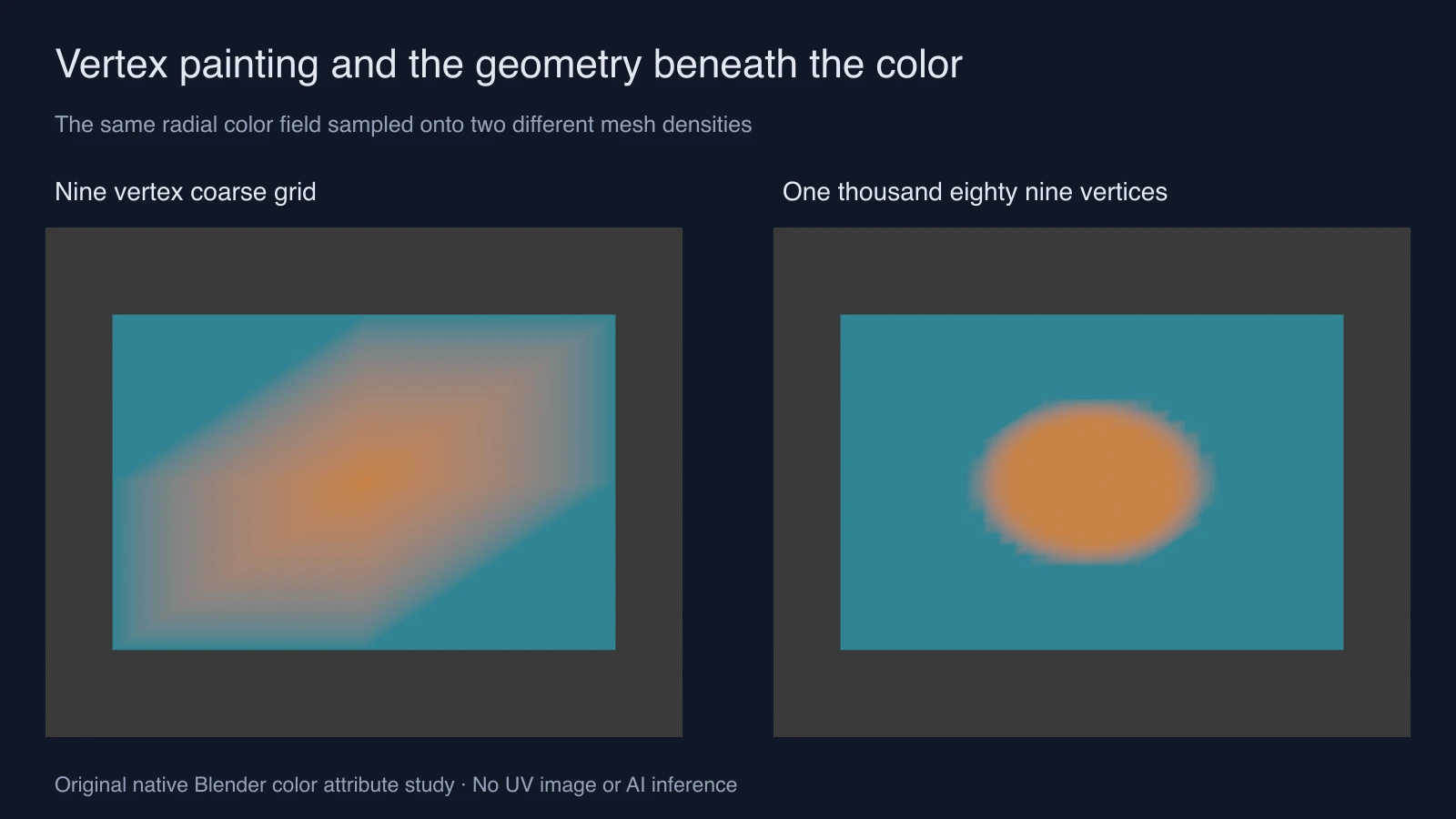
Both surfaces occupy the same three-by-two-unit plane. The coarse version has nine vertices and four quad faces. The denser version has 1,089 vertices and 1,024 quad faces. The script samples the same normalized elliptical field at each vertex and blends teal toward orange near its center.
The coarse grid cannot place samples along the requested boundary in the same way as the dense grid. Its displayed transition spreads across large faces and follows their interpolation. The dense grid samples the field more closely. This is not an automatic claim that more vertices are always the best production choice; it shows a specific representation limit.
Both use an emission material reading OriginalPaint, so a changing light does not explain the color difference. The samples are authored numerically, not captured from an interactive brush session and not generated by a model. The measurements record the native vertex counts, attribute domain and color hashes.
Download the actual native assets
Open the coarse-grid project and dense-grid project. Inspect the mesh's color attribute and the material node that reads it. The original Blender script rebuilds the grids and the separate proxy study into a new output directory.
These files were created in Blender 5 using Eevee. No downloaded photograph or external texture is required for the color-grid projects. The native data and render are available to inspect together, so a color claim does not depend on a flattened illustration alone.
Choose vertex painting or texture painting
| Question | Vertex color study | Image texture workflow |
|---|---|---|
| Where is this example's color stored | On mesh vertices as an attribute | In the image read by a material |
| What sampling needs inspection | Geometry, attribute domain and surface interpolation | Image resolution and UV mapping |
| What should be saved | Native mesh and material using the attribute | Native project and the actual edited image |
| Useful first check | Does the shader read the correct attribute | Does the shader read the intended image |
The separate texture-painting study keeps the mesh and UVs fixed while changing a packed color image. It demonstrates the other storage route. Choose the representation from the asset and destination requirements rather than expecting one paint mode to replace every material input.
Diagnose a missing or distorted color mark
- Confirm the selected object and intended color attribute. A similarly named attribute on another object is not the same data.
- Inspect the material input that reads the attribute. Keep the name consistent with the stored layer.
- Test one obvious color change on a small known region. Check the data and render before painting the whole prop.
- Inspect the local mesh density and face layout where the mark spreads or changes shape.
- Save and reopen the native project. If transferring the asset to another application, verify the actual imported color data and material there.
Our emission material is a deliberate diagnostic. A production material can add lighting and other inputs that alter the final appearance. Reproduce the simplest visible attribute read first, then add the intended shading and inspect the difference.
Use color regions in a generated-scene brief
A colored proxy can communicate which region or object a brief concerns. It does not automatically become a semantic conditioning input for every image or video model. Use only the reference types supported by the selected workflow, and preserve a written legend when color has an assigned meaning.
The Mundo research and proxy guide discusses a recent system that connects explicit scene state with rendered guidance. Our color-grid study does not run that system or create an accepted Mundo input file. It simply makes the underlying mesh color representation inspectable.
For approved visual references, explore Clout Image and Video or plan a product scene in Marketing Studio. Keep the native asset where exact color placement matters and review the actual generated result separately.


