


Prompt2Rig connects a text-to-video motion idea to pose recovery and animation on a compatible character rig. The public project separates a browser preview from a GPU-backed motion route, then exports a character take. A practical workflow needs checks at each handoff: source clip, recovered pose, rig mapping and the exported animation.
This guide follows revision fe3d3eec992772b538992374ca933020ed517938 of the official repository. We executed its Track and trackToClip helpers with original numeric fixtures and Three.js 0.169.0. We did not run paid video generation, MediaPipe tracking, the full rig retargeter, GVHMR, WiLoR or a GPU worker. The checker above inspects one useful export issue: world-space root positions and the parent coordinate system.
Understand the Prompt2Rig handoffs
| Stage | What to retain | What to inspect |
|---|---|---|
| Motion brief and generated source | The exact brief and saved clip | Whole body visibility occlusion and camera movement |
| Recovered body and hand motion | The actual recovered take | Orientation contacts scale and missing observations |
| Character rig | The approved rig and its rest pose | Bone mapping parent transforms and joint behavior |
| Exported take | The file used by the destination application | Root path timing bone rotations and clip boundaries |
The pinned README describes fal video generation, a browser MediaPipe preview, a local GVHMR body pass, optional WiLoR hands and Mixamo-compatible character playback. Its documented HQ setup uses Windows, an NVIDIA GPU, uv and FFmpeg, with separately obtained body and optional hand models. Those requirements belong to that route; a browser preview is not proof that the HQ worker is ready.
Do not compare the preview and exported result as though every stage has the same inputs or accuracy. Keep a simple source motion first so changes in tracking can be separated from changes in the character or export.
Start with a motion that can be inspected
For an initial test, use one owned or authorized performer, a short action and a stable camera. Give the limbs room to remain visible and avoid hiding the hands behind the torso. Choose an action with a clear beginning and ending that a reviewer can describe without guessing.
One original character stands facing the camera, takes one measured step to the side, raises one hand and returns to a neutral stance. Keep both feet and both hands visible, preserve the same body proportions and use a plain background with a fixed camera.
This is an authored, untested motion brief. It does not promise that a video model will obey it or that a pose estimator will recover it correctly. Once you have a saved clip, inspect the feet, hands, silhouette and camera behavior before running further processing.
When using Clout Cinema for a separate creative sequence, first approve the scene and action through its supported workflow. This guide does not claim that Clout calls Prompt2Rig or exports a Prompt2Rig-ready rig. Keep the source and destination contracts explicit.
Prepare the documented local route
The repository starts its web server with node server.mjs. Its README documents an API credential on the server and a separate hq\setup.ps1 setup path for the HQ worker. Follow the pinned instructions in a separate checkout and verify the required model access before trying to reproduce the complete pipeline. This article’s helper checks do not establish installation success for those components.
Use the project’s saved take and export controls only after checking the actual result. The documented GLB export contains the character and animation. A receiving editor still needs an import and playback check; a file extension by itself does not prove that the intended clip, timing and root behavior survived.
Check parent space before changing root motion
A root position can be stored in world coordinates while a destination animation track expects the local coordinates of the hips bone’s parent. Translation, rotation and scale of that parent change how the same motion is represented. Subtracting the first world-space position is not a general inverse-parent transform.
In the pinned retarget source, trackToClip resets the rig, inverts the hips parent’s world matrix and applies that inverse to stored root positions. Separately, it subtracts the first timestamp from the sample times. Those operations handle different quantities: coordinate space and clip time.
The local inspector implements the position calculation for a deliberately limited parent: translation, rotation around Y and positive scale in X, Y and Z. It does not reconstruct a full scene hierarchy, support arbitrary shear or edit bone rotations. Use it to inspect numeric fixtures within that contract, not to certify every GLB or full application payload.
Inspect the original transformed root example
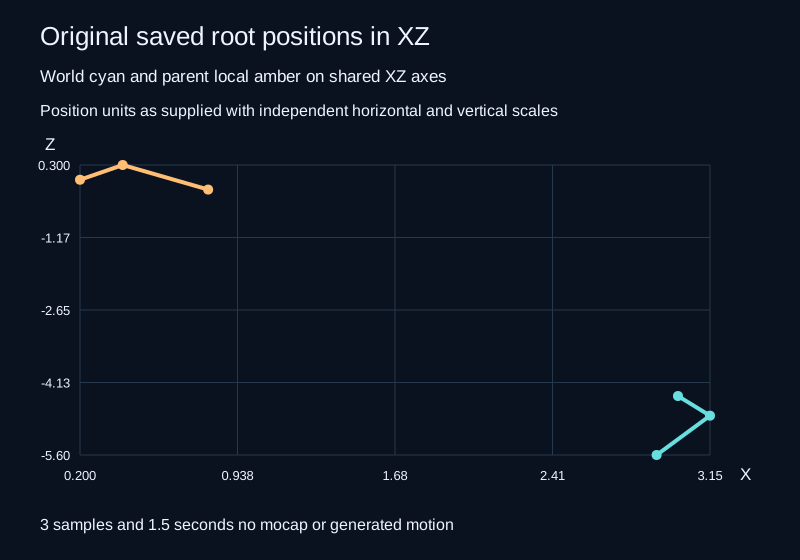
The example parent translates by 3, 2 and −4 units, rotates ninety degrees around Y and scales X by two, Y by one and Z by one half. The three saved world positions are expressed at seconds 7, 7.5 and 8.5. In the parent’s coordinates they become approximately 0.2, 1, 0; 0.4, 1, 0.3; and 0.8, 1, −0.2.
The output times are zero, one half and one and one half seconds. Rebasing time preserves the spacing between samples. It does not automatically pin the hips to the origin, remove travel or fix foot contact. The first local position still has a nonzero height and horizontal coordinate.
Download the original saved roots, review JSON, coordinate CSV and path SVG. The chart compares world and local XZ paths; it is not a rendered skeletal animation.
Use the root inspector on a saved numeric fixture
- Keep the original recording unchanged and extract only a fixture you understand.
- Supply a parent translation vector, yawDegrees and positive scale vector.
- Supply frames with strictly increasing seconds in t and a three-number world position vector.
- Compare the first local position, time spacing and total rebased span.
- Export the JSON, CSV and SVG for review alongside the original data.
The tool accepts one to two thousand samples and rejects malformed JSON, invalid vectors, nonfinite values, invalid scale and duplicate or decreasing times. It strips unrelated fields by reconstructing its numeric report. Its example format is original to this page, not a promise that a complete Prompt2Rig take can be pasted without adaptation.
Test the exported character in the destination
Import the actual exported take into the intended editor and compare the first, middle and last poses with the saved source. Then play the whole clip. Check whether the hips travel matches the intended action, feet remain plausible at contact, hand orientation remains coherent and a loop boundary jumps.
If timing is wrong, inspect sample times and the destination’s clip selection before changing pose recovery. If the path appears rotated or scaled, inspect the parent transform before subtracting arbitrary offsets. If a foot slides, a coordinate-space check alone cannot prove or repair contact quality. Diagnose the stage that actually changed the result.
Keep component licensing separate
The project’s NOTICE distinguishes its Apache-licensed application code from runtime components with their own terms. It lists research or noncommercial restrictions for GVHMR and SMPL-X, AGPL terms for YOLO and separate terms for character assets and generation providers. Do not treat the application license as blanket permission for every model, asset and commercial use.
Our examples use authored numeric positions and a minimal rig adapter with no borrowed character mesh. The source-helper check establishes only the selected math and time behavior. It does not measure generation quality, mocap speed, foot-contact accuracy or commercial eligibility of a complete deployment.
For a separate per hop adapter workflow inspect the MiniMax H3 PTD schedule guide.
Reproduce the source comparison
The source comparison record covers identity, translation, Y rotation, uniform scale, nonuniform scale and a combined parent transform. The executed pinned helper matched the independently authored expected local positions within the stated floating-point tolerance. The page’s position helper also matched those source outputs.
Use the hash-checking source harness, source audit, local numeric helper and reproduction notes. The manifest records the original study files. For a different camera-data workflow, the Hy-Nomas saved-camera guide handles stationary-tail review rather than skeletal animation export.


