


MiniMax H3 PTD is a release of per-hop acceleration adapters for the reference-image-to-video-and-audio route. The practical question is not just which checkpoint filename to choose. The base model, loader, hop schedule and output-head format have to agree before a generated result can be assessed.
This guide follows the pinned release revision and includes a local metadata-and-schedule inspector. We executed selected source helpers on CPU with tiny authored tensors. We did not load the full model weights, call apply_ptd_lora on a real transformer, queue a ComfyUI graph or generate a video.
Choose the released PTD profile
The model card lists four-hop and eight-hop Ref2VA adapters. It describes one low-rank adapter per inference hop, together with per-interval output heads. Our inspector covers the published 32-interval, rank-128, alpha-128 profiles. A matching metadata object is a starting point for review, not proof that an arbitrary checkpoint contains the required tensors.
| Profile | Planned transformer evaluations | Derived interval block | Diffusers step argument |
|---|---|---|---|
| Four hop release shape | 4 | 8 of 32 intervals | 5 |
| Eight hop release shape | 8 | 4 of 32 intervals | 9 |
The final column is easy to misread. The documented Diffusers route uses a step argument one greater than the returned hop count because of its terminal-sigma convention. That does not mean nine transformer evaluations were measured by this page. The local diagram represents the planned source schedule, not a running GPU trace.
Check the base and loader before sampling
The pinned ComfyUI instructions require the original unpruned Ref2VA transformer and a release-specific loader with ComfyUI-PTD installed. They exclude the listed Turbo, PDD, pruned and quantized base variants for these adapters. They also describe a dependency-installation step beyond simply cloning a custom-node folder.
Make a record of the actual base revision, adapter revision, loader and receiving workflow. Do not substitute a similarly named accelerated base because the file is smaller or already available. A pipeline can accept some configuration fields while still using a different tensor layout or output-head convention.
The Base route control above deliberately blocks schedule export for the unsupported routes. It cannot inspect an installed environment or prove that a selected label corresponds to the file on your disk. Keep that final check in the actual runtime.
Inspect metadata and the derived block size
- Choose the four-hop or eight-hop authored example.
- Review ptd_num_hops, pdd_num_steps, lora_rank, lora_alpha and the released target-module list.
- Read the derived block size rather than assuming a stored pdd_block_size field controls the schedule.
- Compare the planned evaluation count with the separate Diffusers argument.
- Download the JSON, hop CSV and normalized-time SVG beside your installation notes.
The metadata text is an editable example object, not a real checkpoint upload. Safetensors metadata uses string values; the examples preserve that convention. The tool reconstructs its report and omits unrelated fields. It rejects unsupported profiles, malformed JSON and invalid integer or target-module values.
Choose Use stale block example. Its stored block size is 999 while the profile still has eight hops across thirty-two intervals. In the pinned Python adapter, the block size is derived as interval count divided by hop count; the code notes that the metadata field may be stale. Our report warns about the difference and derives four. It does not silently rewrite the supplied metadata file.
Keep normalized time separate from wall clock time
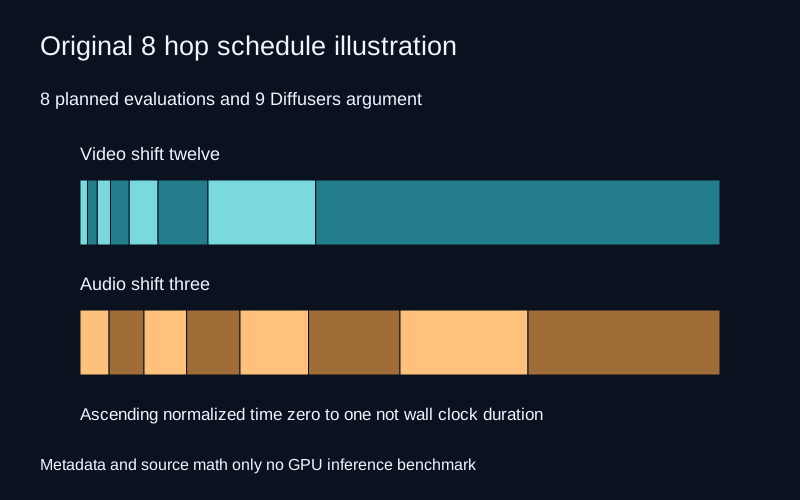
The source builds an ascending schedule from zero to one using a shifted sigma transform. The inspector fixes the video shift at twelve and the audio shift at three, matching the documented example values. It does not treat extra metadata fields as an instruction to replace those scheduler settings.
Each hop covers a block of the underlying interval grid. Within that block, the source sampling-plan helper normalizes the interval widths into weights. Video and audio therefore need their own schedule rows even when they share a hop count. The CSV exposes the boundaries and the JSON includes the full plans.
A long bar in this diagram is a longer normalized-time span, not a measured number of milliseconds. It does not demonstrate that one hop is slower, uses more memory or produces better motion. Those questions require a real workload and an observed runtime.
Download the four-hop record, eight-hop record, hop CSV, schedule SVG and stale-block review. The authored metadata fixture is not extracted from a model tensor file.
Why per hop adapters cannot be treated as one fixed update
The pinned PerHopLoRALinear source keeps separate down and up matrices for each hop. Its selected hop changes which low-rank update is applied to the base linear result. A single fixed merged update would generally discard that hop dependence.
We tested this with a tiny three-input, two-output linear layer and rank-one authored adapters. The base response to our input is 2.6 and 2.3. The first authored hop adds 2 and −2, while the next adds 4 and −4. The different outputs come from selected numeric matrices, not from generated motion or a model-quality comparison.
The unloaded source adapter was an exact no-op in the fixture because its up matrices start at zero. Four-hop and eight-hop cases then matched an independently calculated result for every authored hop. This test checks the selected helper’s behavior on tiny CPU tensors; it does not load or verify the published rank-128 weights.
Run a controlled first generation test
After following the actual installation instructions, start with one authorized reference, a short clear action and a saved configuration. Keep the input, seed, output file and logs together. Confirm that the intended adapter and base were loaded before comparing the resulting picture or sound.
Review image identity, object boundaries, camera motion and audio together. If the installed runtime fails before sampling, diagnose dependencies or tensor compatibility before changing the creative prompt. If it finishes but the scene drifts, a valid metadata record alone cannot explain or repair that result.
When comparing two routes, keep their settings and source files explicit. The pinned ComfyUI notes state that equal seeds do not imply identical outputs between its path and Diffusers because their initial-noise handling differs. Treat each actual output as evidence rather than expecting a byte-for-byte match from the seed alone.
Use the creative workflow without assuming an integration
For a separate original sequence, define the reference, action and camera brief in Clout Cinema. For a still concept, use a supported route in Clout Image and Video and inspect the returned image. This guide does not claim that Clout exposes these PTD checkpoints or uses the local inspector to configure a backend model.
An authored test brief could describe one original subject making one visible movement with a fixed camera and a plain background. That makes it easier to inspect continuity than a long sequence of hidden actions and changing viewpoints. It remains an untested brief until a model actually returns a saved result.
The model card identifies the MiniMax H3 community license agreement. Check the base model, adapter, reference and distribution terms for the intended workflow. The presence of Python source does not make every model or output subject to a generic permissive software license.
Reproduce the source helper checks
The CPU source record covers four schedule cases across the two hop counts and two shifts, plus twelve tiny per-hop linear cases. The grid and sampling plans matched the independent calculations within the recorded tolerance. The authored adapter outputs, zero-update initialization and hop clamping also passed.
Use the hash-checking source harness, pinned document audit, local schedule helper and reproduction instructions. The helper test used its recorded CPU libraries; it is not a recommendation to substitute those versions for the complete GPU workflow. The asset manifest preserves the study hashes. For a different source-data check, the Prompt2Rig guide examines parent-space root positions.


