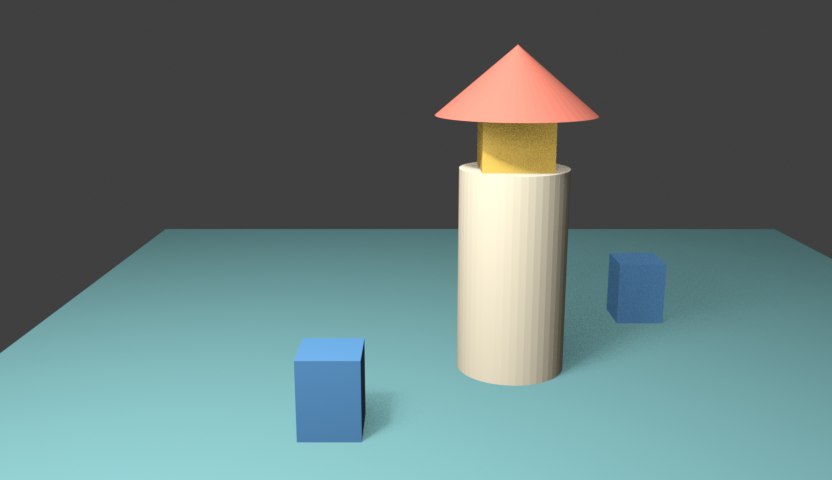
LingBot World V2, also called LingBot World Infinity, is a research world-model system for controllable video generation. This guide focuses on preparing camera-controlled inputs and understanding the pinned causal inference path. It supplies an original native Blender scene, camera arrays, an input inspector and a frame-count calculator. For re-filming an existing video, compare the World in World freeze and camera study.
We have not installed LingBot, downloaded model weights or run inference. The beacon scene and video are original native inputs, not LingBot-generated results. The source audit is pinned to 1895d300d8ac936401689b26389f51cbd36530eb. No independent model-quality, throughput or viral-adoption claim is made.
Start with the actual model variant and entry point
The pinned release README lists 14B causal-fast, causal-pretrained and bidirectional variants plus a smaller causal-fast variant. These are distinct routes. A headline streaming result does not establish that each variant, environment and entry point has the same behavior.
The README’s reference commands use multiple GPUs. Its smaller model package contains the DiT weights, while text encoder, VAE and tokenizer assets can be supplied from the larger release. The asset resolver checks both checkpoint and optional asset directories. A smaller transformer download does not mean the complete runtime has no other model dependencies.
The project also says its own deployment code is not planned for release. Do not confuse released inference code with a ready-to-run copy of the hosted interactive service. Review the actual route and its dependencies before estimating setup effort.
Inspect the original native camera study
Watch this clip and view its details
A perspective camera translates horizontally from x = −0.8 to x = +0.8 while holding its rotation. The miniature beacon and two blue depth markers remain stationary. Their apparent relative movement comes from the camera and scene depth, not from object animation or an AI-generated camera move.
The source contains 81 frames at 832 by 480 and 16 fps. Its container lasts 5.0625 seconds, while the final source timestamp is five seconds. Open the native camera watch page, inspect the first-frame image or download the original camera input bundle.
The bundle contains an opening PNG, camera poses, camera intrinsics, native preview and measurements. The preview is a reference for inspecting the authored camera movement; it is not a required video-conditioning file for this image-and-camera input route.
Keep camera coordinates and intrinsics explicit
The pinned camera loader reads poses.npy as camera-to-world matrices in OpenCV coordinates and loads intrinsics.npy. The camera utility handles intrinsics in the order fx, fy, cx, cy, not as a saved 3-by-3 matrix.
Our pose array has shape (81, 4, 4). Its camera axes are +X right, +Y down and +Z forward, expressed in the unchanged Blender world. The native script converts Blender’s camera matrix by right-multiplying a diagonal matrix with values (1, −1, −1, 1). This flips the local camera Y and Z axes without changing the world-coordinate system.
The intrinsics array has shape (1, 4) and values (832, 832, 416, 240). The camera has a 36 mm focal length, 36 mm horizontal sensor, unit pixel aspect and zero lens shift. Those choices produce the stated focal lengths in pixels for the 832-by-480 render. Different camera settings require different intrinsics.
For every frame, our script projects a known scene anchor using the exported pose and intrinsics and compares it with Blender’s native projection. The independent inspector found a maximum difference below 0.001 pixels. That establishes agreement for this authored camera setup; it does not prove that the model preserves the scene or accepts every possible input.
Check both stages of frame-count adjustment
The free calculator follows the pinned causal-fast arithmetic. First, requested frames and available poses are rounded down to a count of the form 4n + 1, and the smaller count is selected. With a temporal VAE stride of four, the selected count becomes a latent-frame count. That latent count is then rounded down to a multiple of the chosen latent chunk size.
The CLI parser defaults to a chunk size of four and passes that value to the pipeline. The pipeline function’s own default is three. That difference matters: 81 selected frames become 21 latent frames. The CLI default retains 20, producing a planned effective count of 77. An explicit chunk size of three retains all 21 and gives 81 effective frames.
For 361 selected frames, the same source arithmetic gives 349 effective frames with chunk size four and 357 with three. These are calculated frame counts, not measured model outputs. The calculator also flags windows too short to retain one latent chunk instead of presenting an invalid negative count as a usable result.
The camera-control path resamples across the selected pose span to the retained number of controls. It does not simply discard the last source poses when the effective video count changes. In our translation-only study, the inspector computes those control positions using independent linear interpolation. It does not import the upstream pose-interpolation or tensor code.
Validate the prepared inputs without loading a model
- Unpack the input bundle into a dedicated folder. Keep its local filenames together.
- Inspect the opening image, frame dimensions and native camera movement.
- Run the independent camera inspector with NumPy and local ffprobe against that folder.
- Check finite arrays, rotation orthogonality, camera handedness, projection agreement and the native clip timestamps.
- Choose the actual requested frame count and explicit chunk size, then save the calculator’s review JSON with your experiment notes.
Our inspector verified 81 source frames, the (81, 4, 4) pose array, the (1, 4) intrinsics row and 16 fps timestamps. Under the default CLI arithmetic it reports 20 retained latent frames and 77 effective frames; it separately reports the explicit three-latent-frame case. These checks do not allocate model tensors, test GPU kernels or establish successful inference.
Review a real returned clip against the intended camera move
| Property | Authored reference | Check after an actual model run |
|---|---|---|
| Camera | Fixed rotation with horizontal translation | No unexpected orbit zoom or tilt |
| Objects | One beacon and two depth markers | Objects remain stable or change only as intended |
| Parallax | Near and far markers shift differently | Depth relationships remain coherent |
| Opening | Image matches the first exported camera pose | The first generated view matches the intended reference |
| Timing | Explicit requested count and latent chunk size | Saved count fps and duration are measured |
A proposed visual direction for a pilot is an original miniature coastal beacon with a cream tower, coral roof and two blue depth markers, using the prepared fixed-rotation camera path. This is an untested prompt direction. A natural-looking output would still need review against the actual arrays and native reference.
The shared configuration sets sample fps to 16, and the pinned output path uses the selected configuration’s value. An upstream headline about display or inference throughput is a separate measurement. We have not benchmarked loading, generation, decoding or interactive latency.
Inspect the source project audit and component terms
The original Blender project, native rendering script and camera measurement record make this input exercise reproducible. It was rendered in Blender 5.2 LTS Release Candidate with Eevee. Reopening the saved project confirmed the first, middle and final camera matrices.
The source audit records eight small documents, including the model card at revision 7e36a5f919f86cb4255cc9bfc30adb44963fbde1. The read-only audit script compares their hashes without downloading weights or executing upstream code.
The pinned repository license and smaller model-card metadata specify CC BY-NC-SA 4.0. The project describes noncommercial use with attribution and share-alike requirements. Review the actual model and component terms for the route you intend to use; the availability of source files is not a blanket commercial-use grant.
For another prepared-reference workflow, compare the EdenLive study. For property animation without model execution, use the motion tween lab. For hosted original media and connected story coverage, inspect supported workflows in Clout Image and Video and AI Cinema. This guide does not claim that Clout hosts LingBot World.