Higgsfield Popcorn helps you plan connected storyboard images before generating a finished video. If you searched for Popcorn AI, the useful question is whether you need an illustrated sequence, a styled photo set or moving footage. A board can establish a joke and its shots; it cannot prove that the final motion works.
This independent tutorial uses official documentation checked October 3, 2026 and an original plant-shop comedy. You can download a native-resolution reference, four complete shot prompts and a blank review sheet. The artwork is independent editorial material, not a tested Popcorn output or a paid-generation benchmark.
Understand what Higgsfield Popcorn produces
The official Popcorn help page describes a native storyboard tool with Manual and Auto modes, sequences of up to eight frames and up to four numbered image references. Instadump is a separate photo-styling flow. A storyboard frame can become an input to a supported video operation.
The official storyboard tutorial describes Manual mode as per-frame direction and Auto mode as a sequence expanded from one brief. It advertises continuity across the set. Treat that as a requirement to inspect in your downloaded frames, rather than proof that every face, prop and background will match.
| Your intended deliverable | Start with | What still needs review |
|---|---|---|
| A joke with a precise reveal | A written four-shot plan and Manual direction | Whether each frame supplies the intended information |
| Several interpretations of one story | An Auto brief with a clear beginning and ending | The proposed order and any invented actions |
| A styled personal photo set | The separate Instadump flow | Identity and whether the chosen styling suits the project |
| A playable short video | An accepted board followed by video generation and editing | Full motion, audio, captions and delivery crop |
Choose the smallest complete story first. A broad request for an impressive film can produce attractive compositions without an understandable progression. For our example, the viewer needs to see a tiny plant, discover an enormous plant beside it and understand the creator's amused reaction.
Set up the plant-shop joke before opening the generator
The original story is simple: a shop creator presents a tiny sprout as a modest new hobby, glances toward a giant monstera and gives the camera a knowing smile. The visual contrast does the work. The plants stay in the same shop, and neither transforms magically between shots.
Our recurring character is a fictional adult woman with a short dark bob, cream T-shirt and blue denim apron. The location has an oak counter, muted sage wall and daylight from the left. The tiny terracotta pot and large terracotta planter provide the scale comparison. Keep these anchors fixed while the camera distance changes.
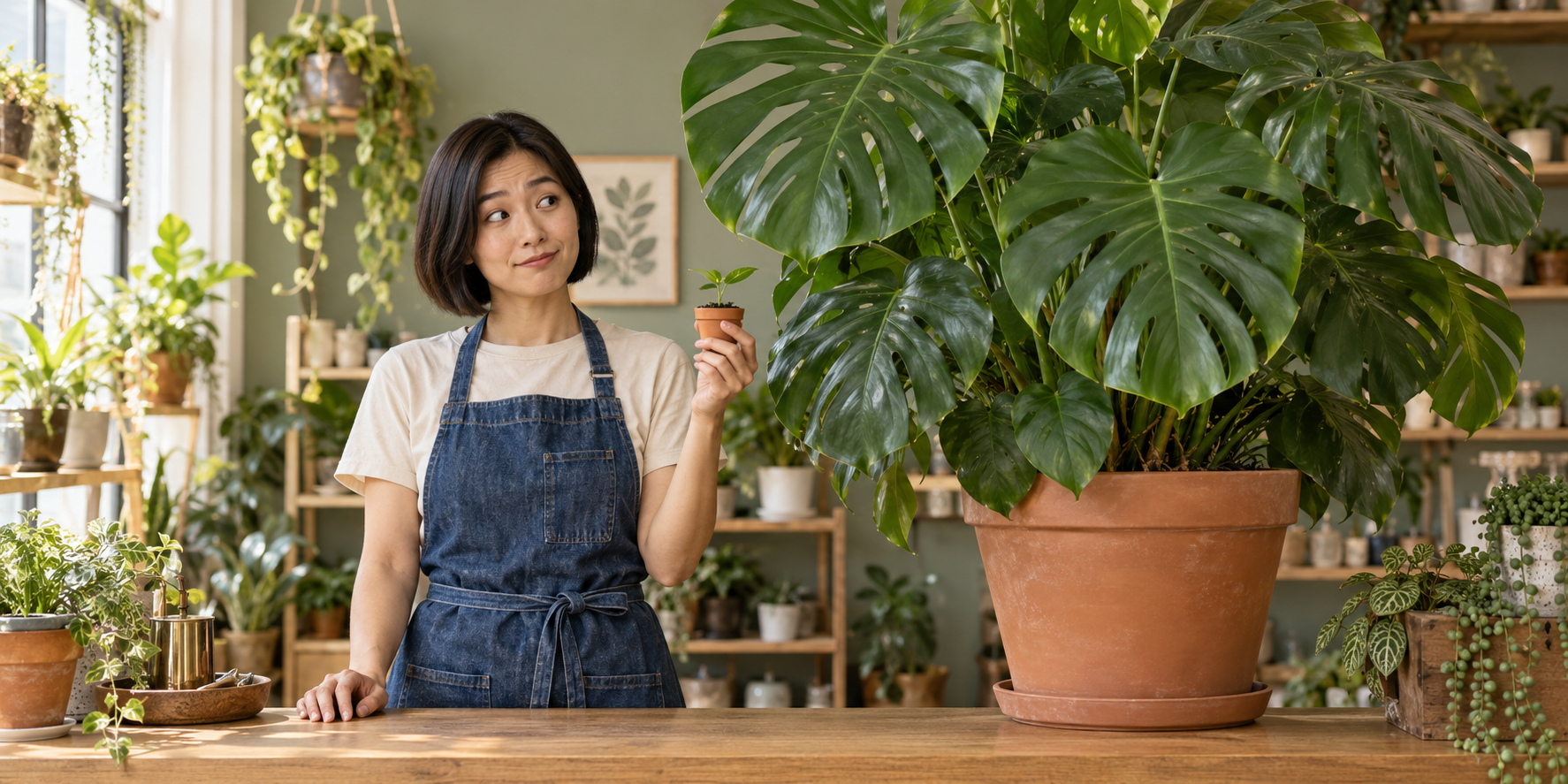
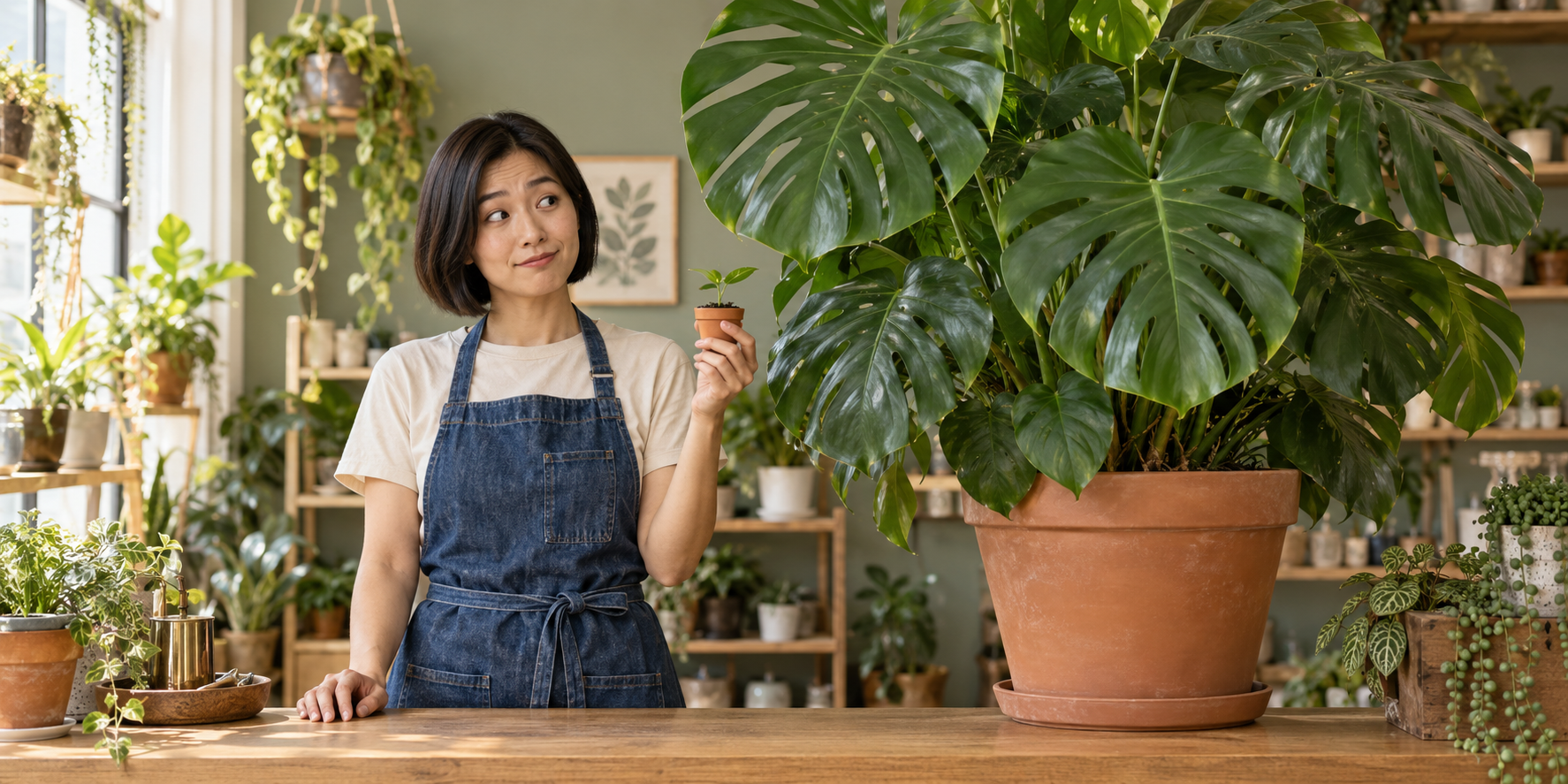
Download the original 1774 by 887 reference PNG. The page image uses a lossless WebP copy with the same native pixels. This is a combined cast, prop and location reference; it is not a clean isolated product photograph or an already trained character identity.
Use the picture to explain the intended scene, then make the final composition at your delivery ratio. A wide reference can help a vertical reel, but simply cropping it may remove the tiny pot or giant plant. Test a reframed composition before generating the entire sequence.
Assign each uploaded reference a clear role
Number inputs according to their actual upload order. For a project with separate source files, image one could supply the creator, image two the pots and image three the shop. State what each contributes. A location image should not accidentally replace the actor, and a portrait should not choose a different product.
With our single combined download, label it image one and describe its cast, wardrobe, prop shapes and set. Do not refer to images two or three unless you have actually uploaded them. More reference numbers in a prompt do not supply missing files.
| Reference role | Preserve | Keep separate from |
|---|---|---|
| Creator identity | Face, bob haircut and adult appearance | A new performer implied by a style image |
| Wardrobe | Cream shirt and blue denim apron | A wardrobe change invented for the reveal |
| Prop design | Tiny terracotta pot and large planter | A claim about a real product's specifications |
| Location | Oak counter, sage wall and light direction | A new shop for the close-up |
For a real brand, substitute permitted product photography and verified facts. The fictional plants illustrate a visual joke; they do not establish a growth rate, plant-care result or customer testimonial.
Direct four frames with one job each
Start with the setup, move to the creator's attention, reveal the comparison and finish with the reaction. The board should remain understandable without a voice track. If two frames repeat the same information, remove one or give it a new purpose.
| Frame | Story job | Composition | Continuity anchor |
|---|---|---|---|
| Tiny commitment | Introduce the modest hobby | Medium view with the small pot below the face | Same creator and apron |
| The glance | Direct attention toward the reveal | Medium reaction with gaze to the right | Pot remains in the left hand |
| The collection | Show the scale difference | Wide view with both plants readable | Large planter stays on the counter |
| Knowing smile | Resolve the joke | Medium view with both plant sizes still apparent | Same face, wardrobe and shop |
Establish the tiny commitment
Photographic still. Use the fictional adult creator, blue denim apron, cream T-shirt and plant shop from image one. Medium view behind the oak counter. The creator holds the tiny terracotta pot with one sprout in her left hand below her face and looks at it with a quietly pleased expression. Keep the large plant outside this tighter composition. Soft daylight from the left, complete face and visible fingers, no text, no collage.
The tighter opening withholds the large plant through framing. It does not delete the plant from the room. Keep that distinction in the scene notes so the later wide view feels like a reveal of the same space.
Send attention toward the next shot
Photographic still in the same approved shop. Preserve the creator's face, short dark bob, cream T-shirt and blue apron from image one. The tiny pot remains in her left hand at chest height. She glances toward the large plant on her right with a small skeptical eyebrow raise. Medium composition, natural head turn, no new prop or outfit, unchanged left-side daylight, no text or split panels.
Keep the expression small enough to preserve the face. The look establishes where the viewer should expect the large plant. Reversing the gaze while leaving the reveal on the opposite side makes the cut harder to follow.
Reveal both scales in one composition
Photographic wide still of the same creator behind the oak counter in image one. She holds the tiny terracotta sprout pot in her left hand. The enormous monstera in its large terracotta planter stands on the counter to her right. Show both pots clearly so their scale difference is immediately readable. Preserve the cream shirt, blue denim apron, sage wall and daylight. No plant transformation, no text, no collage.
The reference artwork previews this relationship. Check the actual storyboard frame: the tiny pot must remain visible and the large planter must have believable contact with the counter. A lush plant alone is not the comparison the joke needs.
Finish with a recognizable reaction
Photographic medium still of the approved creator and shop. She gives the camera a small knowing smile while holding the tiny sprout pot below her face. Keep the giant monstera and large planter visible beside her, maintaining their size and position. Preserve her bob, cream shirt, denim apron and left-side light. Natural face and hands, no exaggerated distortion, no lettering or new objects.
Download the full four-frame prompts and Auto brief. These are original production directions to adapt; they are not prompts recovered from a tested provider job.
Use Auto mode to explore the story without losing its ending
Give an exploratory brief a definite result. Ask for four ordered images that establish the small pot, show the glance, reveal the large plant and end on the smile. Keep the character and shop description consistent with the accepted reference.
Create a four-frame photographic storyboard using image one as the reference for the fictional adult creator, wardrobe, shop and pots. Tell a small plant-shop joke: a tiny sprout feels like a modest hobby until the wider view reveals an enormous monstera beside it. Order the frames as tiny-pot setup, sideways glance, wide scale reveal and knowing smile to camera. Keep the same plants and location throughout. No transformation, no new character and no generated text.
Review the proposed sequence before accepting it. An invented walk into another room or a second performer changes the production requirements. Remove the extra action if it does not help the joke. For an exact reveal order, return to the four individual directions.
Generate and review the stills before moving to video
- Open the official Popcorn workspace and select the storyboard mode you need.
- Upload your actual reference files and confirm their order.
- Enter the sequence brief or per-frame directions and choose a delivery composition.
- Inspect the displayed operation and credit cost before submitting.
- Download the completed frames, then compare them in order against your shot plan.
The help page says the Generate button displays the credit charge before confirmation. This guide does not establish a free allowance or a fixed per-board price. Use the Higgsfield pricing guide for broader budget planning.
Download the blank continuity worksheet. It contains four still-frame rows and one motion-handoff row. File identifiers, observations and decisions are empty so you can record what your exports actually show.
Compare the creator's face and apron, the tiny pot's silhouette, the large planter's position and the direction of the light. Then read the joke without sound. If the reveal is unclear, fix the composition before polishing an expression. If a hand merges with the pot, isolate that grip in the revision.
Turn accepted frames into moving shots
Give each accepted composition one action. The setup can hold the tiny pot steady; the glance can use a restrained head turn; the reveal can use a slow pullback; the payoff can end with a brief smile. These are motion directions to test, not footage supplied by the download.
Do not ask the reveal to grow the sprout into the giant plant unless a transformation is the new story you intend. For this joke, the large plant already exists beside the creator. State that the pullback reveals the room rather than altering the props.
Choose a video operation that supports your intended reference inputs. Watch the complete export for pot shape changes, hand contact, face drift and unplanned cuts. Review the boundary between clips too. A stable first frame cannot prove that the planter stays stable during camera movement.
Our provisional caption is “Just one little plant” for the setup and “A very little hobby” for the reveal. Add captions in the edit, centered in a safe area that avoids the face and tiny pot. Test the result on a phone. If speech is required, specify and review the exact line and sound separately.
For directed scenes, use the Cinema Studio guide. For turning an accepted composition into motion, use the image-to-video workflow.
Keep Instadump and recurring identity work separate
The help page describes Instadump as choosing a style pack, supplying your photo and producing a styled set. A custom pack can use up to fifteen reference photos. That separate flow does not provide the four-shot narrative decisions in this example.
If you need a face reused across independent projects, make identity approval its own stage. For the provider's trained identity workflow, read the Soul guide. For general planning, use the consistent creator workflow. A character that looks right in this board should still be reviewed in the next campaign.
Create the recurring character behind your comedy
Clout lets you build an original character and generate coordinated photos and video scenes around the stories you want to publish. Use the plant-shop format for a recurring creator: one recognizable person, an ordinary setting and one visual surprise.
Create your story character in Clout, then adapt the four-shot brief to your campaign. Review Clout pricing for the current offer. This independent guide does not claim that Clout provides Popcorn's interface or that the example has already been rendered as a finished film.
For an editable board rather than a named tool tutorial, use the general AI storyboard guide and templates. It explains script breakdown, provisional timing and panel review with a different worked story.