%22%3E%3Crect%20x%3D%22180%22%20y%3D%22172.22222222222223%22%20width%3D%22100%22%20height%3D%22155.55555555555557%22%20fill%3D%22%23ffc17b%22%2F%3E%3Crect%20x%3D%22520%22%20y%3D%22172.22222222222223%22%20width%3D%22100%22%20height%3D%22155.55555555555557%22%20fill%3D%22%2374dce7%22%2F%3E%3C%2Fg%3E%3Cg%20font-family%3D%22Arial%22%20fill%3D%22%23eef5ff%22%3E%3Ctext%20x%3D%2240%22%20y%3D%2245%22%20font-size%3D%2224%22%3EOriginal%20planar%20projected%20height%20diagram%3C%2Ftext%3E%3Ctext%20x%3D%2240%22%20y%3D%22535%22%20font-size%3D%2218%22%3ENear%20height%200.8%20m%20at%204%20m%3C%2Ftext%3E%3Ctext%20x%3D%2240%22%20y%3D%22565%22%20font-size%3D%2218%22%3EFar%20height%202.4%20m%20at%2012.0000%20m%3C%2Ftext%3E%3Ctext%20x%3D%2240%22%20y%3D%22600%22%20font-size%3D%2216%22%3EFixed%20camera%2035%20mm%20lens%20and%2036%20mm%20sensor%20width%20not%20a%20rendered%20photograph%3C%2Ftext%3E%3C%2Fg%3E%3C%2Fsvg%3E)

Forced perspective photography uses viewpoint, placement and familiar scale cues to make objects appear larger, smaller or differently connected than they are in the scene. Plan the illusion from one camera position first. A size relationship that works from that position can break as soon as the camera moves.
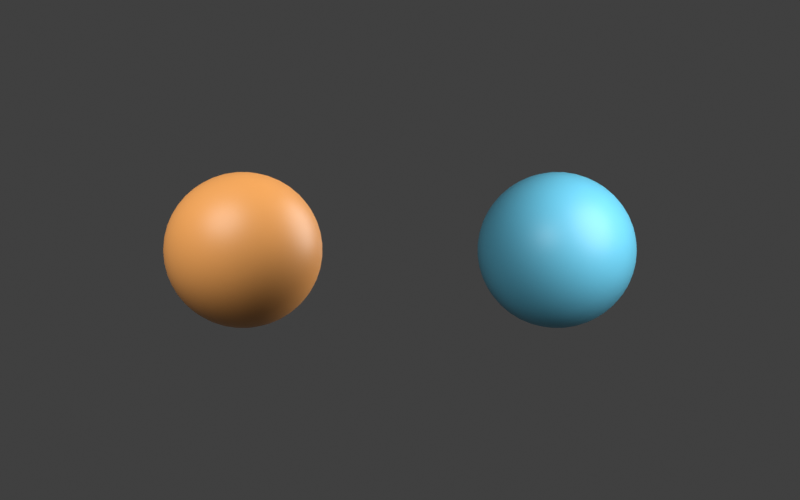
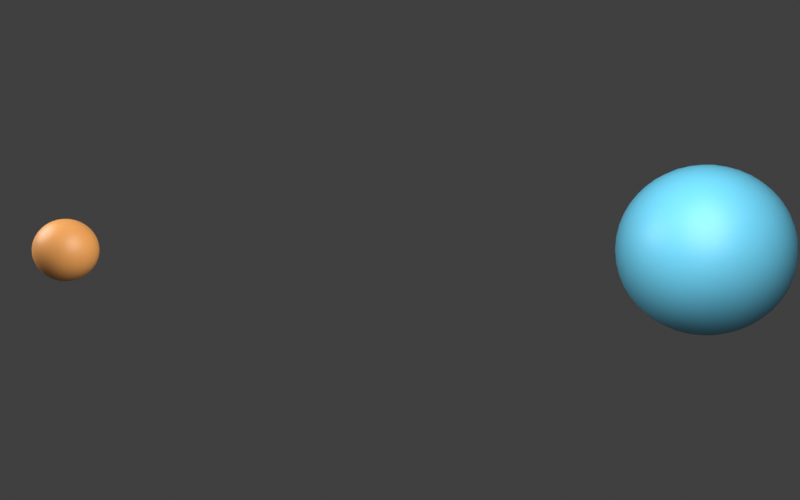
The free planner above estimates how far to place a second object for a desired image-height ratio. Our original Blender example makes two differently sized spheres appear equally tall from a locked camera, then reveals their different sizes from a side camera. These are native renders with inspectable geometry, not captured photographs or AI-generated results.
Start with the camera and a simple size relationship
Choose a fixed camera position, two subjects and one visual idea: a small foreground prop appearing large beside a distant object, two different sizes appearing equal, or a foreground shape aligning with a background detail. Keep the first test simple enough that you can identify which placement change breaks it.
Adobe’s forced perspective guide discusses manipulating perceived scale and framing. Here we concentrate on a measurable size-and-distance exercise before adding people, gestures or a complex background.
Do not judge the setup only from where the subjects stand. View the actual camera image. A foreground hand can look aligned with a distant object to an observer beside the camera while missing the alignment through the lens.
Plan apparent size with height over distance
For a frontoparallel planar reference in a pinhole camera, projected height is proportional to physical height divided by optical-axis distance. With square pixels, the focal length in pixels is image width multiplied by focal length in millimeters and divided by sensor width in millimeters.
Our planner fixes those camera values at 800 pixels wide, a 35 mm lens and a 36 mm sensor width. The two predicted heights are focalPixels × height ÷ distance. To make the far object a chosen ratio of the near object’s image height, the derived far distance is farHeight × nearDistance ÷ nearHeight ÷ desiredRatio.
This is a planning model. It does not include lens distortion, focus blur, subject tilt or the silhouette of a curved object with depth. The Blender camera reference describes the native perspective camera controls used by the downloadable example. Keep the actual sensor, crop and framing settings with your project.
Use the free forced perspective distance planner
- Enter the near object’s height and distance in meters.
- Enter the far object’s height in the same units.
- Use a far-to-near height ratio of one for an equal-height plan, two for a far object twice as tall in the image, or one half for half the image height.
- Read the derived distance and projected heights. If the plan exceeds the frame, revise framing before capturing the scene.
- Download the JSON, CSV and projected-height SVG to keep the assumptions beside the test image.
The default uses a near height of 0.8 m at 4 m and a far height of 2.4 m. An equal-height plan places the far reference at 12 m. Both planar estimates are approximately 155.56 pixels tall. Changing the desired ratio to two gives a far distance of 6 m under the same model.
The SVG is an original schematic of projected planar heights. It is not a photograph, a render of a person or proof that the chosen subjects will overlap convincingly. Treat it as a placement note, then inspect the real framing.
Inspect the locked camera and revealing side view
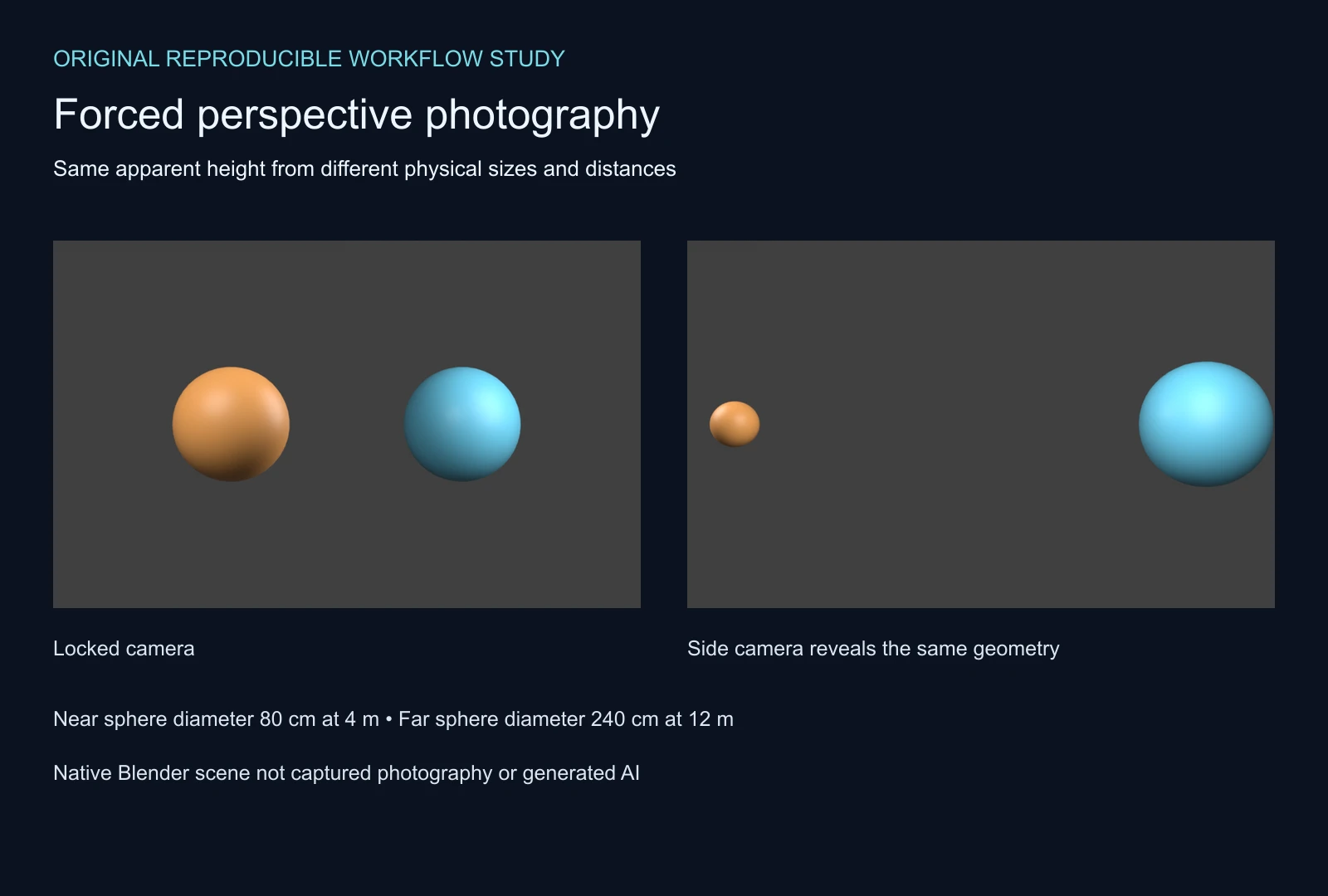
The near sphere has a nominal diameter of 0.8 m and a center four meters along the locked camera’s optical axis. The far sphere has a nominal diameter of 2.4 m and a center twelve meters along that axis. The far diameter and center depth are both three times the near values.
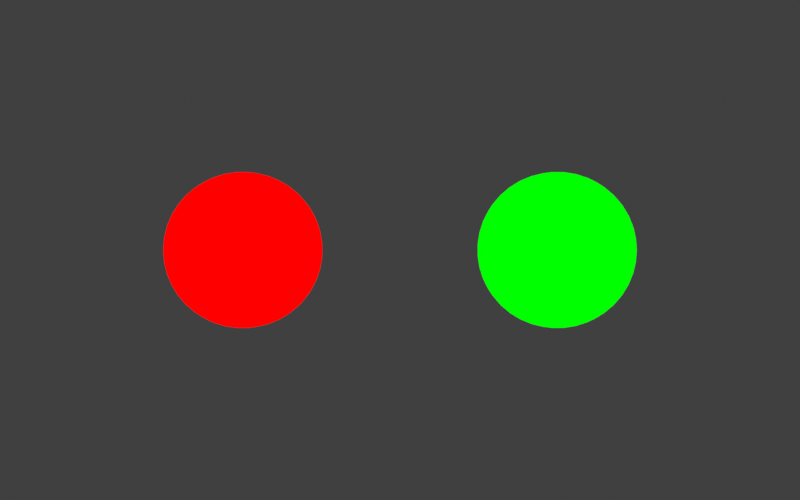
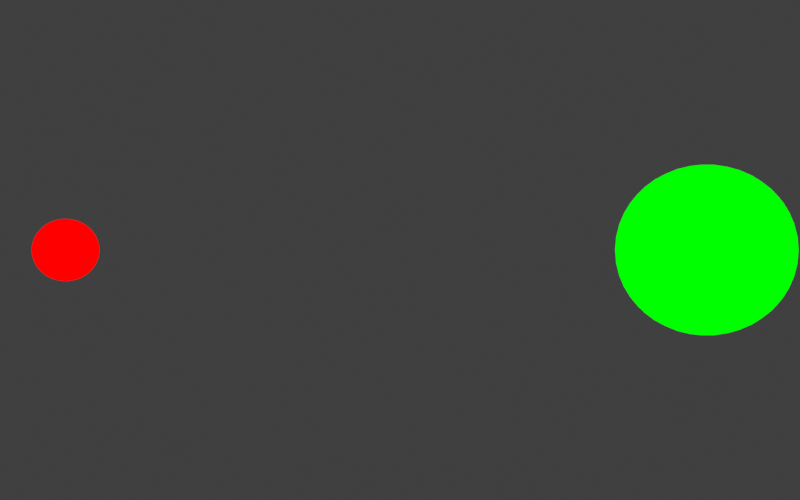
The locked view produces equal projected vertex heights to within a small floating-point difference. A separate emission-ID render lets us measure the actual saved silhouettes: both thresholded masks are 155 pixels high. From the side camera, the masks are 62 and 170 pixels high. The geometry is unchanged; the viewpoint reveals the size difference.
| Subject | Nominal diameter | Locked center depth | Locked mask height | Side mask height |
|---|---|---|---|---|
| Near amber sphere | 0.8 m | 4 m | 155 px | 62 px |
| Far cyan sphere | 2.4 m | 12 m | 155 px | 170 px |
Curved-surface vertex bounds differ slightly from the planner’s planar center-depth estimate. Raster thresholding and antialiasing also affect a measured mask edge. The record distinguishes those quantities instead of calling one a perfect prediction of the others.
Download the locked-camera PNG, side-camera PNG, locked ID mask and side ID mask. The original lighting is a viewing aid; the ID pass isolates each object for the saved pixel check.
Make foreground and background alignment believable
Begin with a still composition and mark the camera position. Then move one subject at a time while watching the captured image. If a hand appears to hold a distant prop, inspect the contact point and the silhouette around the fingers rather than accepting an approximate overlap.
Look for conflicting scale cues. A nearby object can betray its distance through its sharpness, lighting, texture or relationship to the background. A recognizable floor contact or shadow can also make the intended illusion harder to read. The two-sphere study deliberately isolates size projection; it does not reproduce all those perceptual cues.
For a practical photo, take a small test series and inspect the files at delivery size. If you change the camera position, repeat the alignment check. Cropping can change the composition but does not recreate the rays from another camera viewpoint.
Keep focus and camera movement in the plan
Both subjects may need to remain readable despite their different distances. Decide what must be sharp and test the actual capture settings. A mathematically equal height does not guarantee suitable depth of field. Our native study disables camera depth of field so the size exercise is easy to inspect; it is not a focus-distance recommendation.
Changing focal length while keeping the viewpoint fixed changes framing in the ideal pinhole model. Moving the camera changes the viewpoint relationship. Those should be separate tests. If you move the camera to compensate for a framing change, re-check the foreground and background alignment.
For video, test a saved move rather than assuming the still illusion will survive. A small lateral motion can reveal relative depth. For a separate discussion of motion across depth, the stereo-pair guide shows how two viewpoints contain different disparities. It does not turn a forced-perspective still into a valid stereo pair.
Use a forced perspective idea in an AI scene brief
For a generated concept, describe the desired visible relationship and keep an approved reference. A useful brief names the foreground subject, background subject, intended apparent size and whether the camera is locked. A prompt alone does not enforce exact camera geometry or preserve a contact point.
An original amber sphere in the near foreground and a larger cyan sphere farther away appear equally tall in a locked frontal composition. Keep their silhouettes separate, use a plain background and avoid text or recognizable brand marks.
This is an authored, untested concept brief. Explore an original image through Clout Image and Video, or plan a separate sequence in Clout Cinema. Compare the actual returned file with the intended size relationship. The Blender project here is a geometry study, not an automatically accepted input to every generation workflow.
Reproduce the original geometry and plan
The original Blender scene and native builder preserve the two objects, lighting and cameras. The builder checks projected bounds before rendering. The camera record and vertex-bounds CSV preserve the measurements.
The independent mask verifier checks the saved ID-image bounds against the native projections. Read the pixel record, default plan, local helper, reproduction notes and asset hashes. These checks establish the original example rather than a camera, lens or AI-model quality benchmark.