


Camera blocking plans how actor positions, movement and the camera work together through a scene. Start with the dramatic reason for a move, mark where it begins and ends, then check the view that tells the story. A useful plan records both the action and the shot decisions that still need rehearsal.
Use the free camera blocking planner above to build an overhead plan for one moving actor, one stationary actor and a fixed camera. Save the current diagram, sampled marks or editable JSON. The original key-table example below shows exactly what its coordinates mean, with downloadable files you can inspect and revise.
What camera blocking means in filmmaking
Camera blocking connects performance with the viewpoint that presents it. Sony Cine’s scene-blocking article describes positioning actors or objects and cameras with the eventual edit in mind. It also presents rehearsal as a collaboration between actors, director and cinematographer, with different approaches to when the wider crew participates.
Decide what the audience needs to notice. A character approaching another can change a relationship; a camera repositioning can reveal or withhold that approach. The two choices interact, but they need separate instructions. Keep the performance cue clear enough that someone can rehearse it without guessing which technical decision motivated it.
Separate actor blocking from camera staging
StudioBinder’s blocking and staging guide distinguishes actor movement through a scene from the placement and movement of the camera around that performance. Its examples show how body language, props and viewpoint contribute to the scene’s meaning.
| Decision | Question to answer | Record in the plan |
|---|---|---|
| Actor blocking | Why does A move and where does A stop | Cue, start mark and end mark |
| Camera staging | Which view makes that change readable | Camera mark and intended subject |
| Coverage | Which additional shot does the edit need | Separate setup and continuity notes |
| Timing | When does the move begin and settle | Proposed duration and actual rehearsal notes |
For a wider planning process, use our previsualization guide. This page concentrates on actor marks and a movement cue. The shot list maker can record accepted setups once you know what each view contributes.
Block a scene around one meaningful change
Our original fictional scene is small: B stands beside a table, A begins farther away, and a key motivates A to approach. The planned cue is “A approaches B when B places the key on the table.” B’s position stays fixed; the diagram does not animate B’s hand or the key.
- Read the beat in plain language before assigning coordinates.
- Choose A’s start and end marks and B’s stationary mark.
- Choose a camera mark separately from the actor marks.
- Record the moment that prompts A to move.
- Review the start, middle and end of the proposed path.
- Rehearse or render the actual view and record what it proves.
A movement cue should connect to the scene. “Walk to the other side” records a destination but leaves the intention vague. “Approach after the key is placed” identifies an observable trigger. If the performance suggests another move, revise the marks and keep the reason with the new version.
Inspect the original three-moment blocking plan
These are actual exports from the same local planning functions used by the tool. They are authored overhead diagrams, not generated film frames or a physical rehearsal. A moves linearly from (25,55) to (55,30). B stays at (75,30), and the camera stays at (45,85).
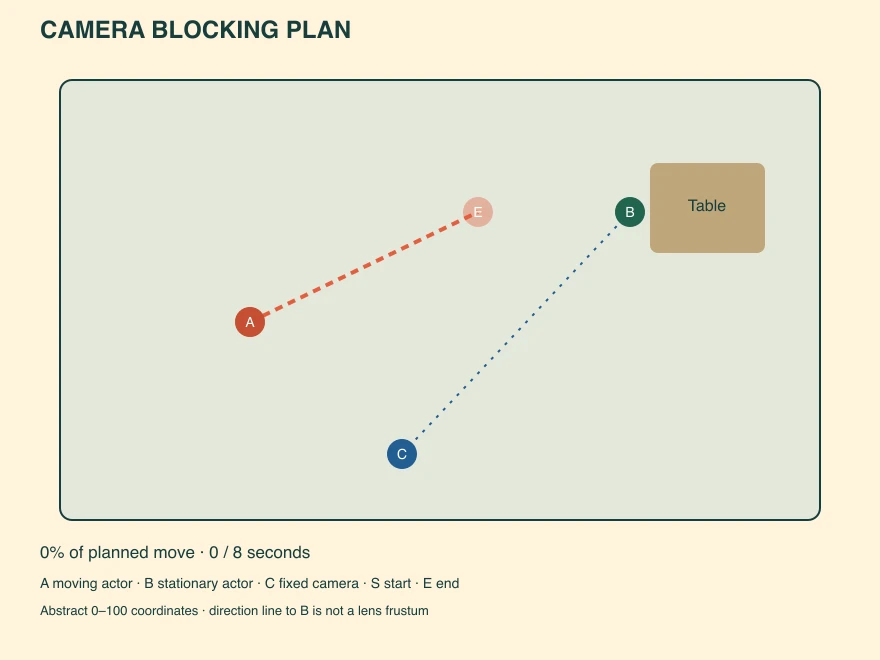
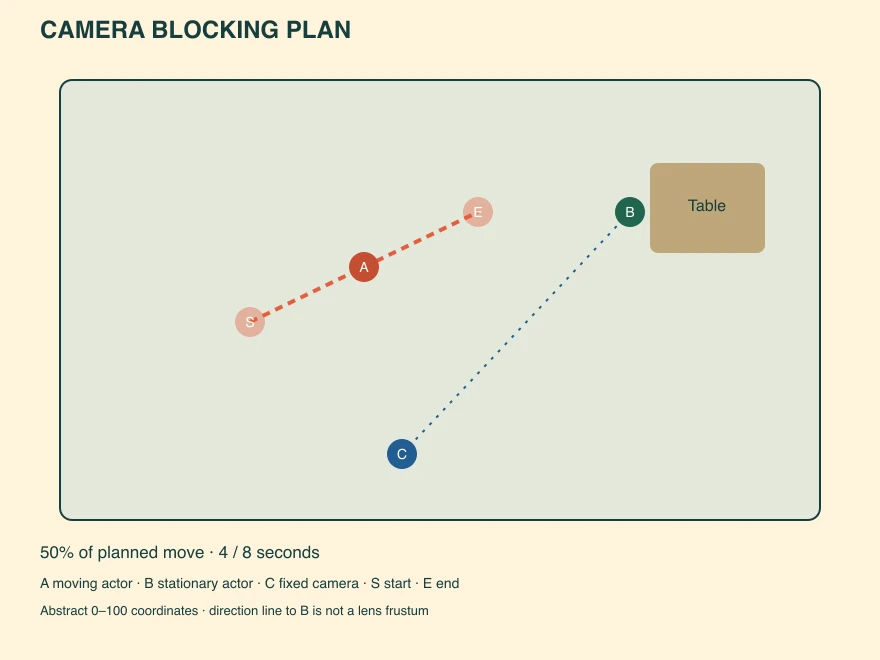
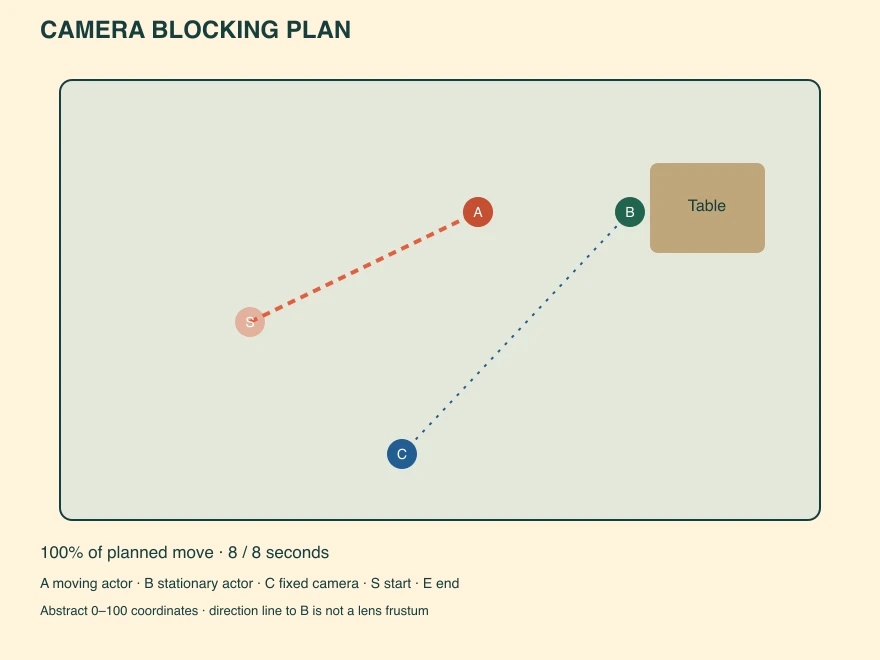
The filled A circle shows the current planning position. Faded S and E circles retain the start and end marks. The dashed coral segment is A’s proposed path. The dotted blue line connects camera C to B as a direction reference. It is not a measured field of view or a lens frustum.
The midpoint is (40,42.5), exactly halfway between the endpoints. That arithmetic checks the diagram, not the performance. Eight seconds is an authored timing proposal. It does not establish a natural walking speed, a physical distance or the time an actual actor needs.
Use the free camera blocking planner
Edit the x and y coordinates for A’s start, A’s end, B and the camera. Values run from 5 to 95 within an abstract 0–100 planning area. X increases to the right, and Y increases downward. These are plan coordinates rather than centimetres, feet or screen coordinates.
Move the review slider to inspect another point along A’s straight path. The diagram keeps B and camera C stationary for that plan. Changing C creates a new proposed camera setup; the slider does not animate the camera between positions.
Use Download SVG for the displayed moment. Use Download CSV for start, midpoint and end marks, including the proposed timing and cue. Use Download JSON to save the editable plan. Paste that JSON into the restore field to recover the marks and cue later. The slider returns to the beginning after restore.
All calculations and exports happen locally. There is no account requirement, upload or AI inference in this planner. Invalid coordinates or duration values block export until corrected. The tool does not calculate collisions, visibility, screen direction or lens coverage.
Check the camera view beyond the overhead diagram
An overhead path can look clear while the actual image hides the important action. A table may obscure a hand. One actor may cover another from the chosen viewpoint. The camera may lose the face that carries the reaction. Those questions need a camera view, a rehearsal or an appropriate scene preview.
Keep room coordinates and screen direction distinct. A move to the right on this floor plan does not necessarily appear as a move to the right in the image. The camera’s orientation and the view determine how the action projects. Our direction reference alone cannot establish that relationship.
For dialogue coverage, compare the shot reverse shot guide. Review eyelines and screen position in the actual paired shots. If a new setup changes how the relationship reads, make that a deliberate decision and record it.
Review the middle of the movement
Start and end marks can both be acceptable while the route between them fails. Scrub the plan to think through the transition, then inspect the complete rehearsal or output. Record the point at which a face disappears, a prop becomes unclear or the movement loses its reason.
The planner interpolates a straight segment at a uniform fraction of the proposed duration. An actor may accelerate, pause, turn or choose a curved route. Those changes need additional rehearsal notes or a richer scene representation. Do not read a smooth slider as proof of natural motion.
Use the blank blocking review sheet to record the actual view and unresolved questions. Its acceptance fields begin empty. The filled source record separately documents only our authored marks and interpolation checks.
Turn the accepted blocking into an AI scene brief
Keep the accepted actor identities, starting relationship, movement cue, end relationship and camera instruction together. Describe the visible result in plain language rather than assuming a video model understands the diagram’s coordinates. Check which references and controls the selected workflow actually accepts.
Fictional key-table scene. A begins separated from B. B remains beside the table. After B places the key, A approaches and stops beside B. Keep the camera fixed and preserve both characters and the table. Maintain readable separation during the approach. Do not add another character or a camera move.
This is an original proposed prompt, not a tested generation. The brief and review prompts keep that boundary explicit. A returned video can change the path, identity, prop action or viewpoint even when the request asks it to preserve them.
Explore Clout AI Cinema for current scene-production options. Keep the plan as your review reference, then inspect the complete returned take. Record any different movement or hidden key action before accepting it. No Clout generation or physical rehearsal was performed for this study.
Save the blocking plan with its coverage notes
The complete camera blocking source pack contains three SVG exports and viewing copies, editable starter JSON, sampled marks CSV, the blank review sheet, proposed AI brief and source code for the deterministic export functions. Its manifest records asset hashes.
Download the starter plan JSON or open the printable start-to-end comparison. The printable page embeds its images. Save the final accepted plan alongside the actual shot references and review notes so later changes remain traceable.


