

AI jewelry photography uses image generation or editing to create product scenes, clean backgrounds or on-model presentations. For a piece you actually sell, begin with the real item and judge every result against it. A pleasing reflection cannot compensate for a changed setting, extra stone or chain that belongs to another design.
Separate jewelry photography from jewelry design
Design ideation imagines a new piece. Product photography represents an existing one. A generated ring concept can help discuss art direction, but it does not establish what is in stock, which metal was used or whether the design can be manufactured. Use our AI jewelry design guide for the concept-development job.
Dedicated product-photo workflows exist in the category: Photoroom's jewelry page describes product and model imagery. That is its own feature description, not an independent preservation benchmark or a claim that Clout includes identical controls. For your Clout project, choose an available reference-based operation in Marketing Studio or Image and Video and review the actual inputs and credit quote.
Build a reference record for the actual piece
Photograph the front, side and clasp or setting details in clear light. Record the product variant, dimensions and visible features using approved product information. Keep a close detail image when small stones, prongs, links or engravings distinguish the design. A broad lifestyle view alone may not show enough detail for reliable comparison.
Separate appearance from material facts. An image can look yellow-metal without establishing gold content. A clear faceted stone does not identify a diamond. Keep metal, gemstone, carat and size statements tied to the real product record rather than inferring them from a generated picture.
Inspect an original fictional ring edit
We created a fictional ring image with the built-in image tool, then supplied it as the reference for a background edit. Both are generated visual concepts. They are not photographs of a retail SKU, a Clout rendering demonstration or a named-model benchmark.
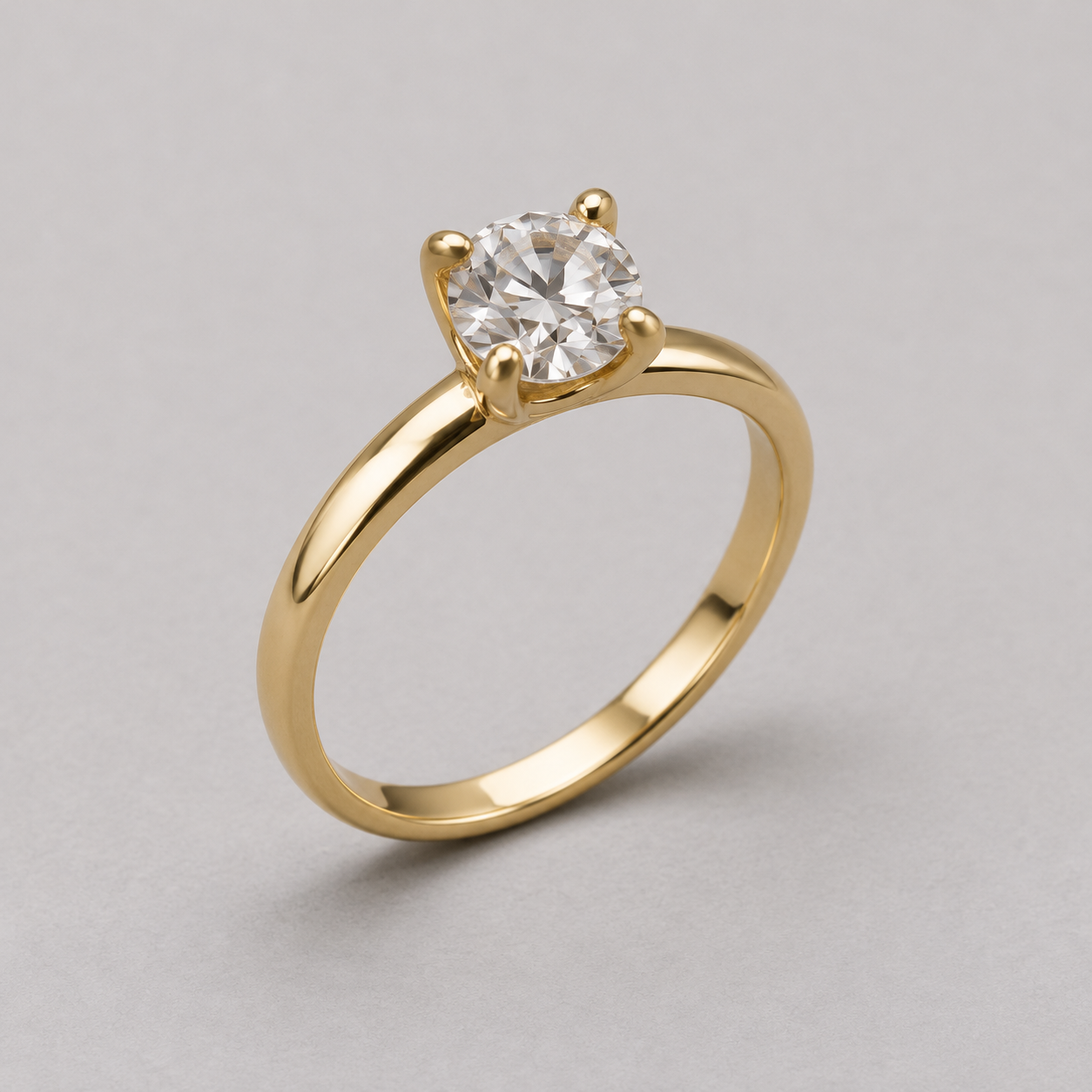
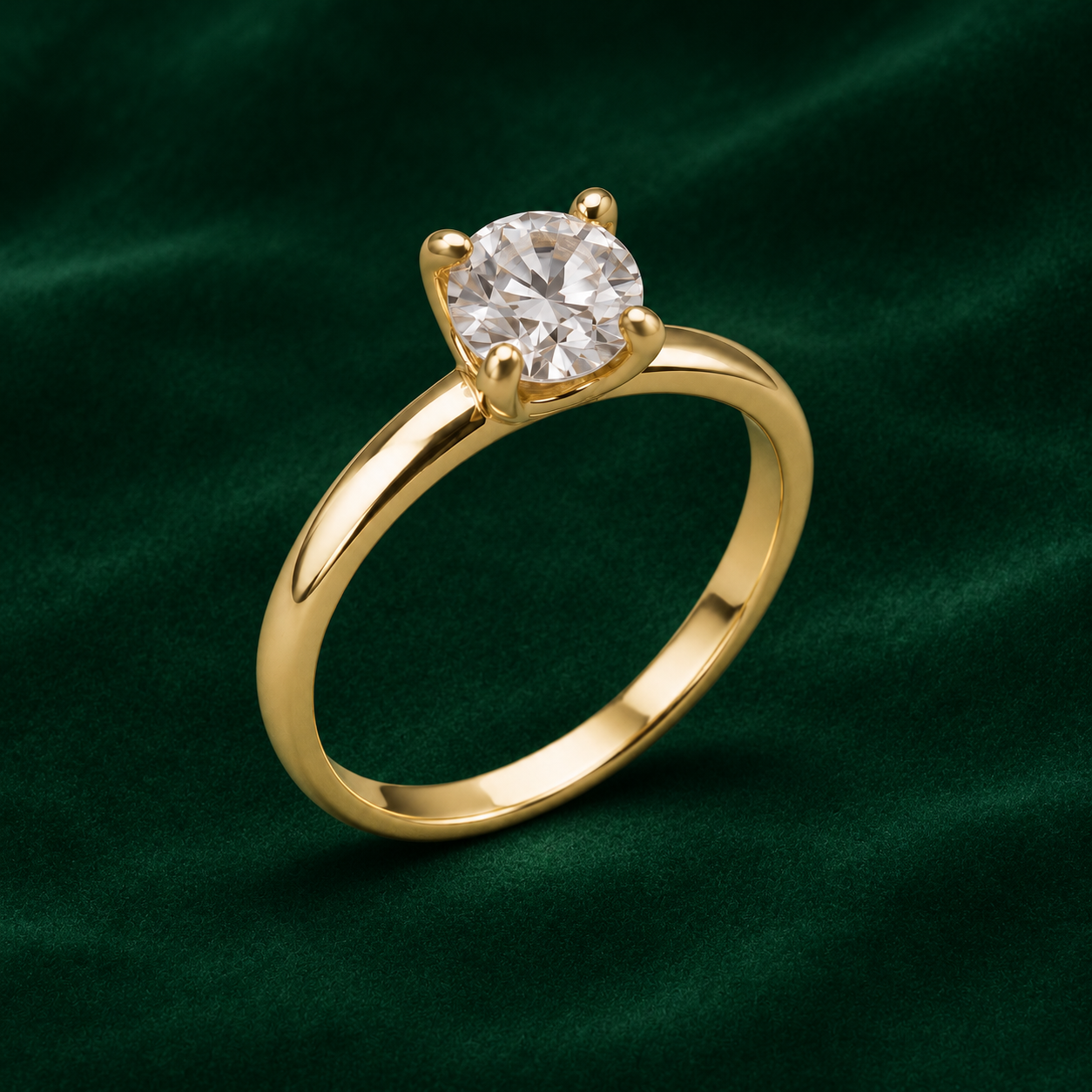
The source visibly contains one ring, one round faceted stone and four rounded prong tips. The edit still shows those broad counts and a similar three-quarter view, with the background changed from pale gray to emerald velvet. Metal highlights, shading and fine stone appearance differ. Those observations do not establish pixel identity, exact geometry or physical scale.
Download the filled visual review CSV and native-file provenance record. The linked native images preserve the actual source and edit so you can inspect the visible differences yourself.
Request one controlled scene change
Change only the pale gray paper background and supporting surface to deep emerald green velvet with gentle fabric texture and a believable contact shadow. Preserve the one ring, its one clear round stone, four visible prong tips, plain yellow-metal band, silhouette, camera viewpoint, position and relative size. Do not add stones, engravings, hands, text or other objects.
This records the background-change request used for the example. A preservation instruction is not proof of preservation. Inspect the returned image before treating it as an accepted product asset. For a real SKU whose fine details must remain exact, retain approved product pixels through a suitable compositing workflow or use another real photograph when generation changes the object.
Review small structures at full size
Count visible stones and compare the setting, band width, chain links, clasp and earring pair where those details appear. Look for a new prong, merged links, a broken hoop or an invented hallmark. Compare metal color under the intended viewing conditions and keep reflective highlights distinct from structural changes.
Review the final crop as well as the full image. A crop can hide the clasp or remove the second earring. A dramatic shadow may obscure a detail needed to understand the piece. Reject an attractive version if it silently changes what the buyer expects to receive.
Treat on-model scale as a separate review
Placing a necklace on a person adds anatomy, contact and scale decisions. Supply approved dimensions where the selected workflow supports them and compare the result against a real wearing reference. A necklace can look believable while hanging at the wrong length; an earring can be too large even when its design is recognizable.
Do not use an image alone to guarantee ring fit or comfort. For customer-specific presentation, use authorized photos and preserve the boundary between a visualization and a physical fitting. Our virtual try-on guide covers the broader workflow; this example does not test a specialized scale-aware jewelry system.
Prepare the catalog and campaign versions separately
Keep a clean product view for inspection and a styled scene for the campaign when both are needed. Add exact product names and offers as editable text. Confirm destination-specific image requirements before uploading; a dramatic velvet setting is not automatically suitable for every marketplace main image.
Log the source, operation, actual cost and acceptance reason for each attempt. Include rejected versions in the campaign cost. Save the accepted image with the correct product record so a later revision does not accidentally reuse another size or finish. Continue with the product photography workflow for a reusable shot-planning process.


