

Perfume photography has two jobs: make the bottle readable and give the campaign a visual mood. Start with a clear product reference, then decide which background, light and props help the image. With AI-assisted editing, inspect the label, cap, glass and liquid after every scene change.
This guide includes an original fictional bottle reference and an actual reference-led campaign edit. Both are generated concepts, not photographs of a retail fragrance. You can download the native files, executed brief and filled review to inspect what changed.
Plan a perfume product photography set
| Image | Job | Review first |
|---|---|---|
| Clean front view | Identify the bottle and its wording | Complete silhouette, cap and label |
| Styled campaign hero | Establish an art direction | Product fidelity and useful copy space |
| Label detail | Make approved wording inspectable | Legibility at delivery size |
| Cap and shoulder detail | Show the closure and glass edges | Shape, seams and visible construction |
| Short motion concept | Extend an accepted still into a campaign | Stable label and geometry throughout the clip |
Download the editable perfume shot plan. It distinguishes the supplied fictional example from additional planned views. A list of five shots is not evidence that five images or a video were generated.
Build an inspectable bottle reference
For a fragrance you sell, use owned photographs of the actual variant. Include a clean front view and details of the cap, label and any distinctive glass shape. Keep approved label artwork available separately. A text prompt cannot tell an editor which unseen details distinguish your product.
Our fictional TIDELINE reference has a rectangular clear-glass body with rounded shoulders, a thick base, pale amber liquid, a cobalt cylindrical cap and a cream label. Those are the visible anchors for this study. TIDELINE is example lettering, not a retail fragrance recommendation, a trademark-clearance claim or proof of a manufactured item.
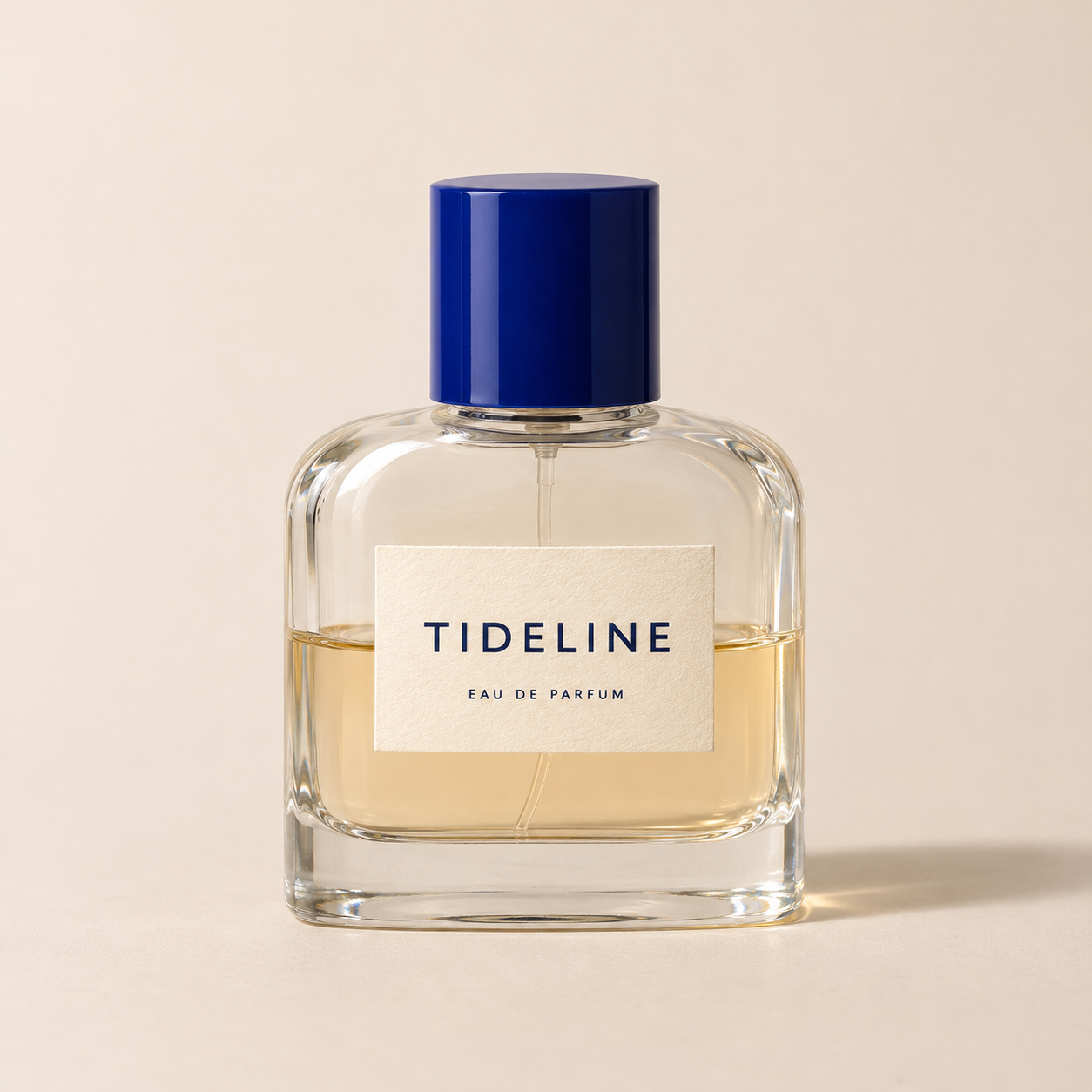
Download the native bottle reference. The label is readable in this image, but a generated reference is not a replacement for verified product information. We do not infer volume, scent notes, concentration testing or ingredient composition from its appearance.
Light the glass without losing the label
When photographing a real bottle, move the light or reflection-control surfaces while checking the camera view. Watch the bottle edge and the label together: a bright highlight can describe the glass while hiding essential wording. Keep a clean exposure in which the label can be inspected even if the final campaign uses a more dramatic treatment.
The public outline of Karl Taylor’s perfume-bottle class at Visual Education covers multiple studio lights, reflectors and flags, controlling glass reflections and compositing. We checked that outline, not the paid lesson. It is a practical photography route to explore alongside AI-assisted scene work.
For an AI scene brief, describe a direction and a visible goal: warm light from camera-left, a readable front label and a contact shadow that belongs to the ledge. Then inspect the result. A requested lighting direction does not prove physically correct refraction or an unchanged liquid color.
Request one campaign direction from the reference
Use the supplied bottle as the product reference. Place one upright bottle on a pale coral stone ledge against a deep cobalt background, with warm directional light from camera-left and restrained cream fabric in the distance. Preserve the bottle silhouette, cap, label wording, pale amber liquid and front-facing view. Keep the entire bottle visible. Do not add packaging, flowers, fruit, droplets, smoke or product claims.
This summarizes the executed scene-edit direction for the example below. Download the original scene brief. The supplied reference was used in the image edit; it was not a text-only attempt to recreate the bottle from memory.
For your own project in Clout Marketing Studio or Image and Video, choose an available operation that accepts the references you need and review its credit quote. This study uses the built-in image tool and does not claim a Clout model benchmark or an identical set of controls.
Compare the actual styled edit
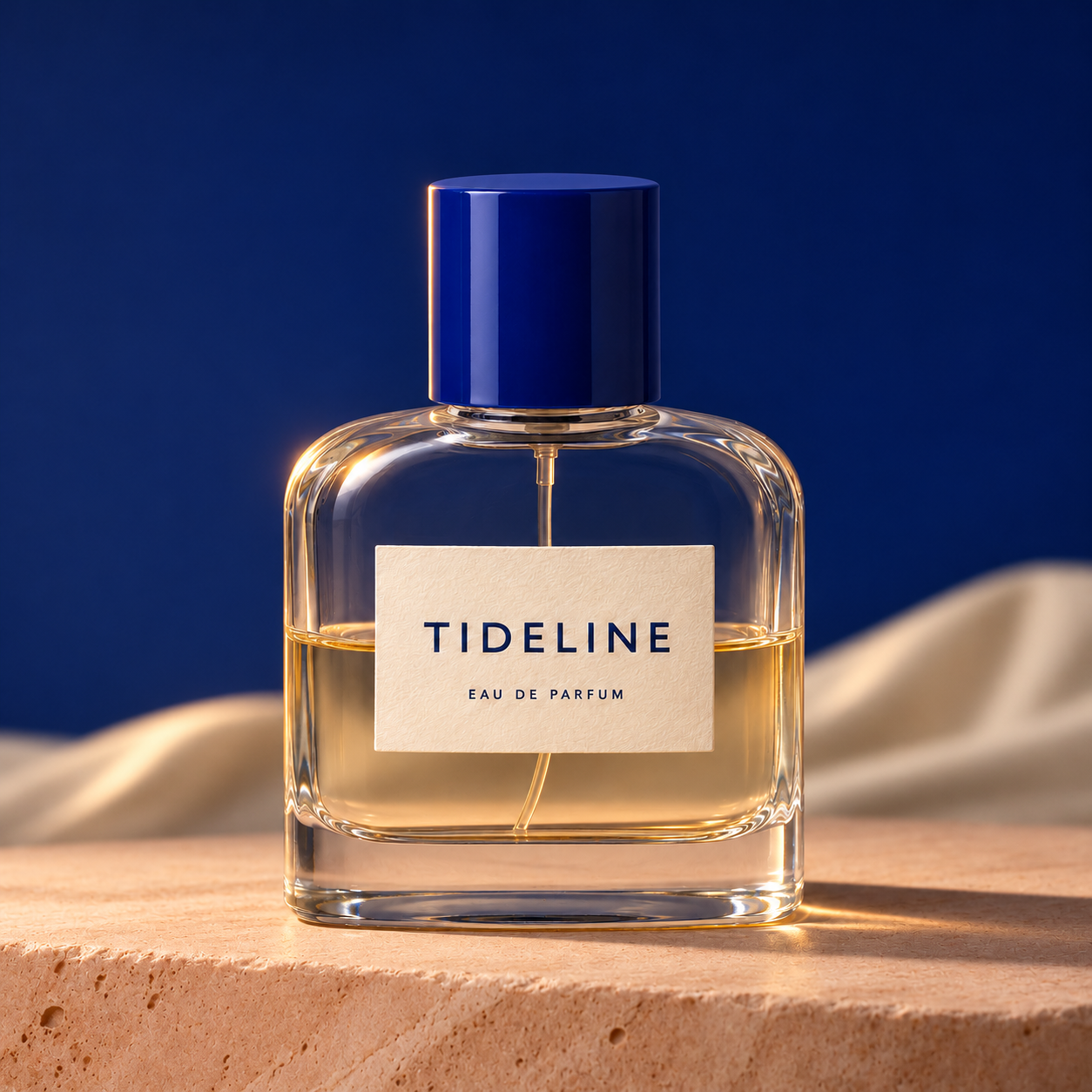
The returned edit keeps one upright bottle, the broad rectangular body, rounded shoulders, cobalt cap and both readable label lines. The coral ledge, deep blue background and cream fabric appear. Warm highlights run along the left cap and glass edge, and the cast shadow extends to the right. The liquid looks darker amber than in the neutral reference, while internal glass reflections and the neck or tube details change. Broad composition remains close, but this visual review does not establish pixel-identical geometry, calibrated color or physically correct refraction.
Download the native scene edit, filled visual review and file record. Review the two native images at equal size. The separate cover is editorial artwork, not a third product-preservation result.
Check transparent glass and liquid separately
Compare the shoulder curve, side walls, base thickness and visible neck. Look for a doubled edge, an altered corner or a cap that no longer fits the bottle. Distinguish the object’s outline from a bright reflection inside it.
Then compare the liquid boundary and visible color. A blue background or warm light can change the apparent appearance of the contents. That visual change is not evidence that the formulation changed, and a believable golden liquid does not establish a fragrance’s actual color or fill quantity. Use the real product record and approved photographs for those decisions.
Transparent products need more than a simple cutout check. The scene can be visible through the bottle, and a retained foreground can carry reflections from the old setting. Inspect that interaction in the final composite rather than assuming a clean edge guarantees a convincing result.
Keep exact branding under separate review
Read every visible word against the approved label artwork. Inspect spacing, letter shapes, line breaks and label proportions. A name can remain recognizable while its typography or position changes. If the wording must be exact, retain the approved product pixels or composite the approved label in an appropriate editor and review the glass interaction.
Do not add a certification, concentration claim, ingredient list or volume merely to make the image look complete. The fictional example deliberately has no quantity or ingredient declaration. A prop is also a communication choice: fruit, flowers or herbs may suggest a scent direction, so only use them when the campaign owner approves that association.
Choose backgrounds by the shot’s purpose
For a clean inspection view, keep the bottle separated from its background and leave the label readable. For a campaign hero, try one controlled palette or surface change. A stone ledge, fabric background or colored studio wall can establish a mood without requiring extra product variants.
Keep required copy space clear in the final crop. Review both the entire bottle and the intended mobile presentation. A beautiful wide scene can become a confusing detail crop when the cap or label is cut away. Add prices and offers as editable layout text after the image is accepted.
Move into video only after the still is accepted
For a short fragrance reveal, begin with an approved still and request restrained motion from an operation that supports it. Review the entire returned clip for changing letters, a moving liquid boundary, reshaped caps and unstable glass edges. A good opening frame does not establish a stable product throughout the video.
No video was generated for this study. Use the AI product video workflow to plan that separate stage. For the broader catalog process, continue with AI product photography; for apparent light changes, use the relighting guide.
Save the approved image with its reference
Keep the source, executed brief, actual output and reviewer decision together. Record which differences were accepted for a concept and which would need correction for a real product. The free shot plan and review files help with that handoff. They do not include free Clout generation or establish marketplace approval.
This example tests one fictional reference-led scene edit. It does not measure physical glass behavior, calibrated color, real product accuracy, advertising performance or a provider’s success rate across bottles. For an item you sell, final approval belongs to the actual product and its verified artwork.


