

A fashion video should make the outfit understandable while giving the viewer a reason to keep watching. For an AI fashion video generator workflow, begin with an approved garment image, request one simple movement and review the returned clip before assembling a campaign. The first attractive frame is only the starting point.
This guide includes an original Clout image-to-video study with a fictional adult model in a teal button-front shirt and cream trousers. Download the actual reference, native clip, executed brief and filled review. It is a small garment-continuity pilot, not a physical fitting, a clothing product test or a comparison of generators.
Watch the original Clout fashion video study
Watch this clip and view its details
Download the native fashion video. The native export is H.264 at 832 by 1114 pixels and 24 fps, lasting 6.041667 seconds with no audio stream. The requested operation is one six-second silent Seedance video from an owned image reference. The model name in the tool is recorded in the source note below; the result is not a validated simulation of cloth or fit.
The supplied clip makes a restrained pose adjustment: the head moves toward a more frontal view and the body shifts slightly while remaining full-body in the frame. The teal shirt, cream trousers and broad pocket placement remain recognizable. Collar opening, button appearance and fabric folds vary, so we would use it as a fictional campaign concept rather than proof of a retail garment’s construction.
Choose fashion motion rather than a fitting simulation
Campaign movement, an outfit transition, a product demonstration and a virtual fitting are different tasks. Our pilot asks for a subtle weight shift and head turn while keeping the shirt front visible. It does not ask the model to walk, rotate to the back or change clothes.
| Task | What to supply | What to review |
|---|---|---|
| Fashion campaign motion | Approved on-model reference and one action | Garment identity, framing and complete movement |
| Outfit transition | Authorized source and destination outfit references | Transition continuity and correct final outfit |
| Product construction detail | Actual garment closeup | Fastening, seam, pocket or material being described |
| Size or fitting decision | Actual measurements and appropriate fitting evidence | Whether the stated fit claim is supported |
For visual outfit switching, use the outfit-reel workflow. For a fitting-oriented visualization, use the virtual try-on guide and its separate limitations. Do not use generated drape as evidence that a real size will fit a customer.
Approve the actual reference before animating it
Our reference was created in Clout using its returned default image model. The prompt requested a fictional adult model, a teal short-sleeve shirt with five visible ivory buttons, one left chest patch pocket and cream trousers, framed from head to knees. The actual output is a full-body image with five lower placket buttons plus additional collar-area fasteners.
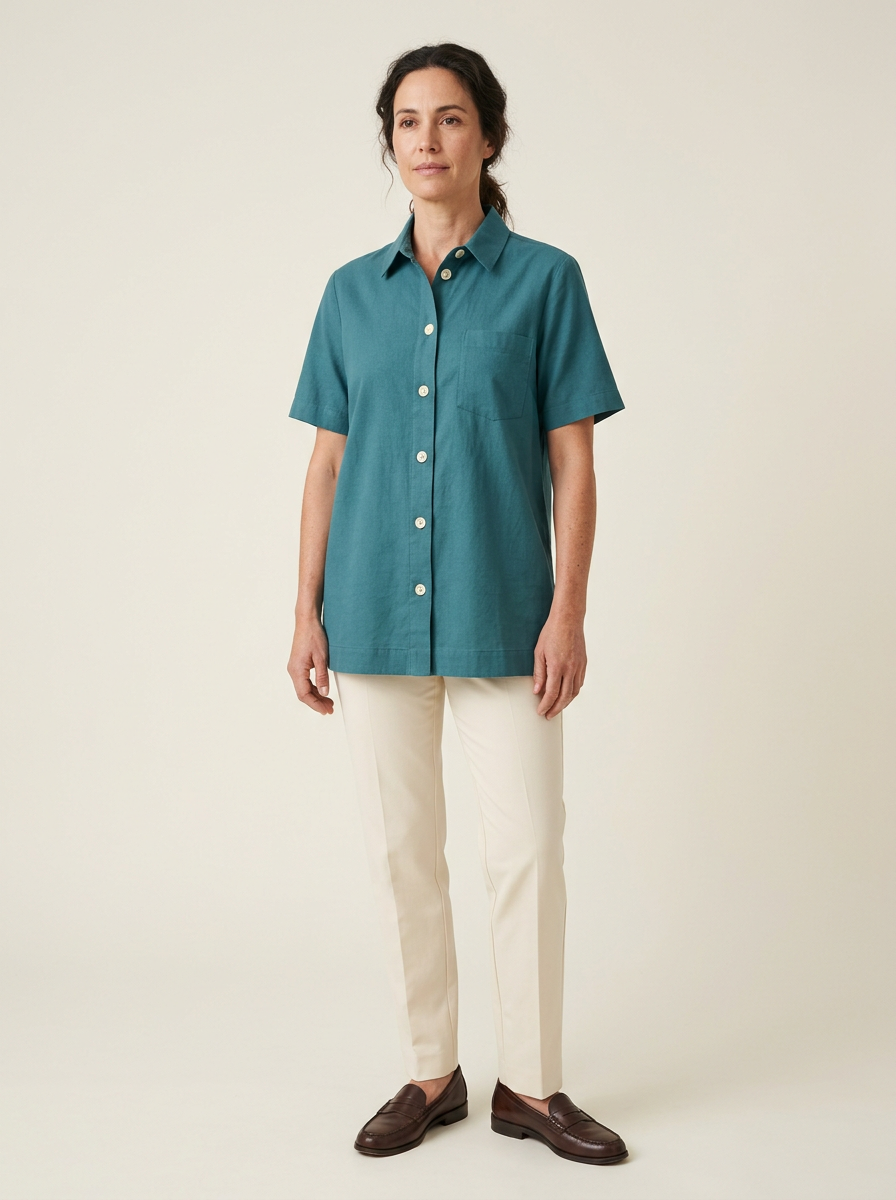
Download the actual starting reference. The mismatch between requested and delivered framing and fasteners is part of the review. We used the delivered design for the motion test rather than claiming the image exactly followed the text brief.
For an item you sell, compare the reference with the real product before animating it. Record the collar, sleeves, placket, pocket, hem, pattern and important marks. If the reference is already wrong, a consistent video of it still represents the wrong garment.
Prepare an owned image for the supported video operation
The completed image was prepared as a ready Clout asset before it could be supplied to the video model. The prepared file matched the original downloaded PNG byte for byte, and the verified asset dimensions were 896 by 1200. This distinguishes a saved image from a reference that is ready for the next operation.
The video request selected a returned available Seedance model, six seconds, a 3:4 frame, 720p and no generated audio. The operation quoted 280 workspace credits after the image cost 5 credits. That is a dated price observation for this pilot, not a permanent rate, a free-generation claim or a cost comparison.
Use the exact reference and supported settings shown by your operation. A signed download link is for delivery; it is not the owned-reference selection itself. In the Clout interface, use the prepared asset returned by the workflow instead of assuming a local file has already been imported.
Write one motion request that leaves the garment visible
Our executed request asks for one gentle weight shift and a slight head turn, with the arms relaxed beside the body and clear of the shirt front. It requests a locked camera, the whole person in frame and no new angle, walk, zoom, props or lettering. It asks the teal shirt, visible buttons, left chest pocket, straight hem, cream trousers and face to remain recognizable.
This gives the review a narrow task. A dramatic spin would invent or reveal areas not established by a front view. Hands crossing the placket would make the fasteners hard to inspect. More movement can be useful later, but it should serve a specific campaign idea rather than conceal continuity problems.
Download the actual image and video briefs. Watch the dedicated fashion motion study page for the native clip and technical record. Change the product details to match your own approved reference. Do not reuse our fictional styling description as if it documented merchandise you sell.
Review the middle as well as the first and final frames
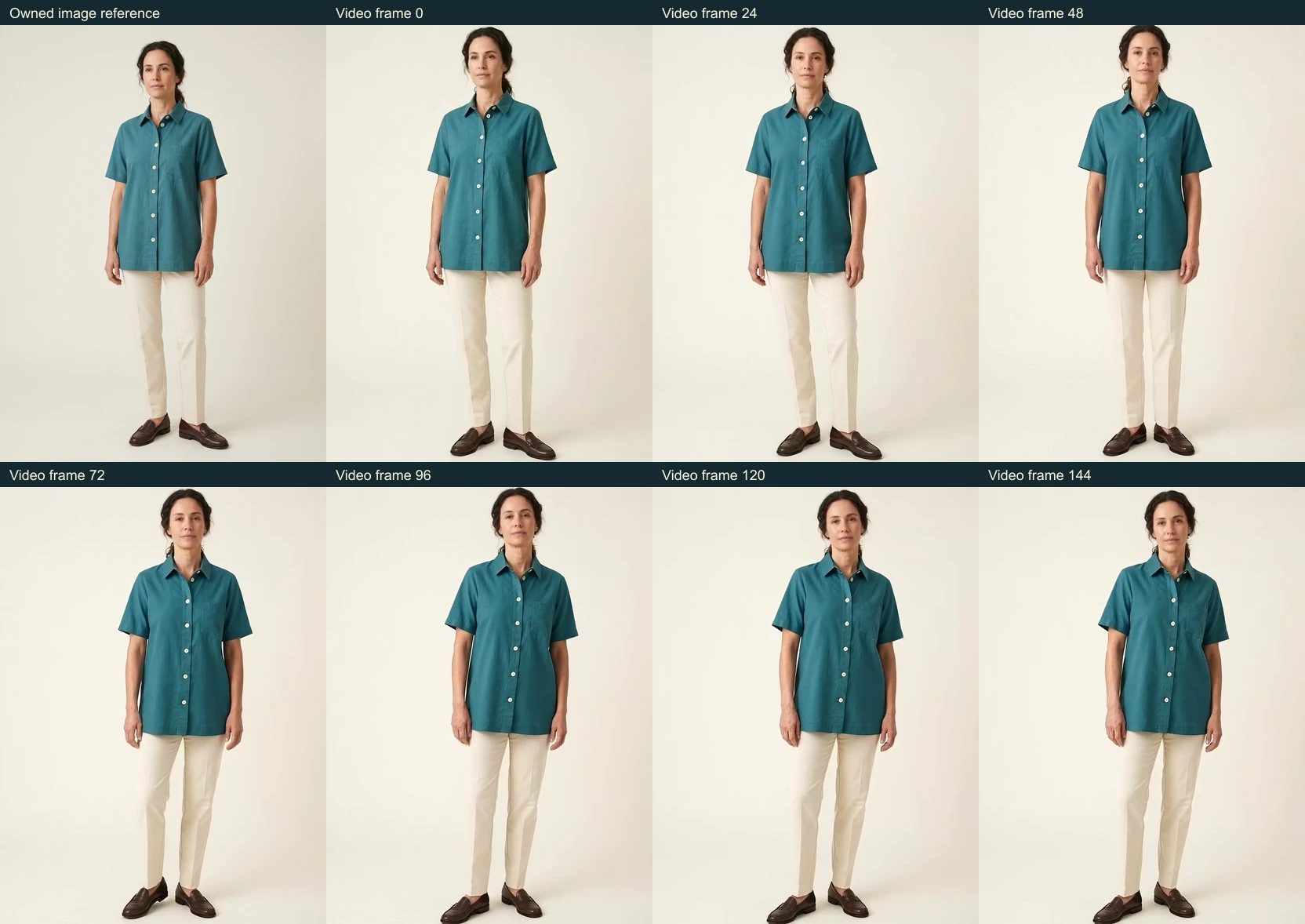
Start with the complete downloaded clip, then inspect intermediate frames around the most visible movement. Check the face and hands separately from the clothing. A matching opening image does not establish that the pocket, placket, sleeve or hem survives the rest of the shot.
| Check | Question | Our recorded result |
|---|---|---|
| Motion and framing | Does the requested action happen without a new view | Small pose and head changes with no walk or rear view in the reviewed clip; body remains in frame |
| Shirt identity | Do the collar, pocket, sleeves and hem remain recognizable | Teal short sleeves, broad silhouette and left chest pocket remain recognizable at sampled frames |
| Fine detail | Do buttons, seams and folds change during movement | Collar opening, fastener appearance and folds change; not accepted as evidence of exact garment construction |
| Technical delivery | What does the downloaded file actually contain | The native export is H.264 at 832 by 1114 pixels and 24 fps, lasting 6.041667 seconds with no audio stream |
Download the filled pilot review and source and export record. The frame observations are a bounded visual inspection, not an automated identity score, physical garment measurement or provider benchmark.
For your next shot, the existing blank garment review worksheet separates reference, start, middle, end and acceptance decision. Fill it with observations from the actual returned clip rather than copying a passing decision from another shot.
Build a clothing campaign from shots with different jobs
| Shot | Purpose | Source requirement | Study status |
|---|---|---|---|
| Hero | Introduce the outfit with restrained movement | Approved on-model reference | This actual pilot |
| Detail | Show a specific fastening, pocket or fabric detail | Actual closeup of the garment | Planned and not rendered |
| Finish | Give a truthful product or campaign next step | Approved offer and editable text | Planned and not rendered |
Download the three-shot campaign plan. Only the hero motion is supplied in this study. A real closeup is a better source for construction claims than magnifying an imagined seam from a full-body frame.
Keep headlines and offer text editable in the final composition. Check the actual variant, date, price and destination before publication. Our pilot has no offer, testimonial, measured fabric claim or sales result.
Choose templates or an authored motion brief
Some tools offer predefined fashion movements. Photoroom’s official fashion-video page, for example, describes a template workflow that starts with clothing or model images. Our Clout pilot uses an owned image and an authored motion prompt. This is a workflow distinction, not a hands-on quality ranking or a reason to assume identical controls.
Choose the route around the required action and the references you actually have. Check the supported inputs, format, current quote and returned file. An impressive example from one provider does not prove that your garment will remain accurate in another operation.
Finish the actual placement
The pilot uses a 3:4 request to stay close to the source image rather than forcing a new portrait or landscape composition. If the final placement needs another shape, review that crop separately. Keep the whole intended garment and any important motion inside the frame.
For social content, preview the complete edit at phone size and check that interface overlays do not cover the product or message. If speech or music is added, review the actual exported audio and its permissions. This silent pilot is not a tested platform upload or a finished paid campaign.
Start the next garment scene in Clout Image and Video. Use the fashion-model guide for character planning and the product-launch guide for a complete announcement structure. Keep the reference, generation brief, output and acceptance notes together.


