Searching for ClipCut can lead to a fashion-generation workflow rather than a conventional editor. Higgsfield describes it as an outfit reel from a selfie. The useful decision is whether you want a quick generated fashion sequence or a content set whose creator, garments and individual shots you approve before assembly.
This guide uses an original fictional fashion triptych to plan the second approach. It does not present a finished ClipCut video or claim a hands-on comparison of its rendering quality. The three looks are styling concepts, not verified replicas of retailer products.
What the named ClipCut page actually describes
The official ClipCut page describes animated fashion videos with outfit changes, music and effects. Its FAQ identifies MP4 video output and a vertical 9:16 format. The Higgsfield video-editing app directory also lists ClipCut as a selfie-to-outfit-reel tool.
Those descriptions identify the intended workflow. They do not prove that every garment will remain exact, that every source face will be stable or that a video will become viral. Check the current input controls and output choices before relying on a particular campaign requirement. Do not confuse the ClipCut name with another editor that has a similar name.
Choose quick generation or a controlled fashion set
| Need | Practical approach | Decision to make |
|---|---|---|
| A quick outfit-transition concept | Use the named outfit-reel workflow | Accept and review the generated sequence as a whole |
| The same creator across many posts | Build an identity-led image and video set | Approve the creator before producing looks |
| Accurate garments for a real shop | Provide product references and inspect each shot | Reject altered seams, fastenings and silhouettes |
| Exact music and edit timing | Assemble accepted clips in an editor | Choose the track and place each cut yourself |
Pick the approach from the campaign brief. Fast experimentation and controlled product presentation are both useful, but they need different review effort. If a shop's exact jacket is the point of the reel, an attractive jacket-like substitute is not a successful output.
Download the original three-look planning reference
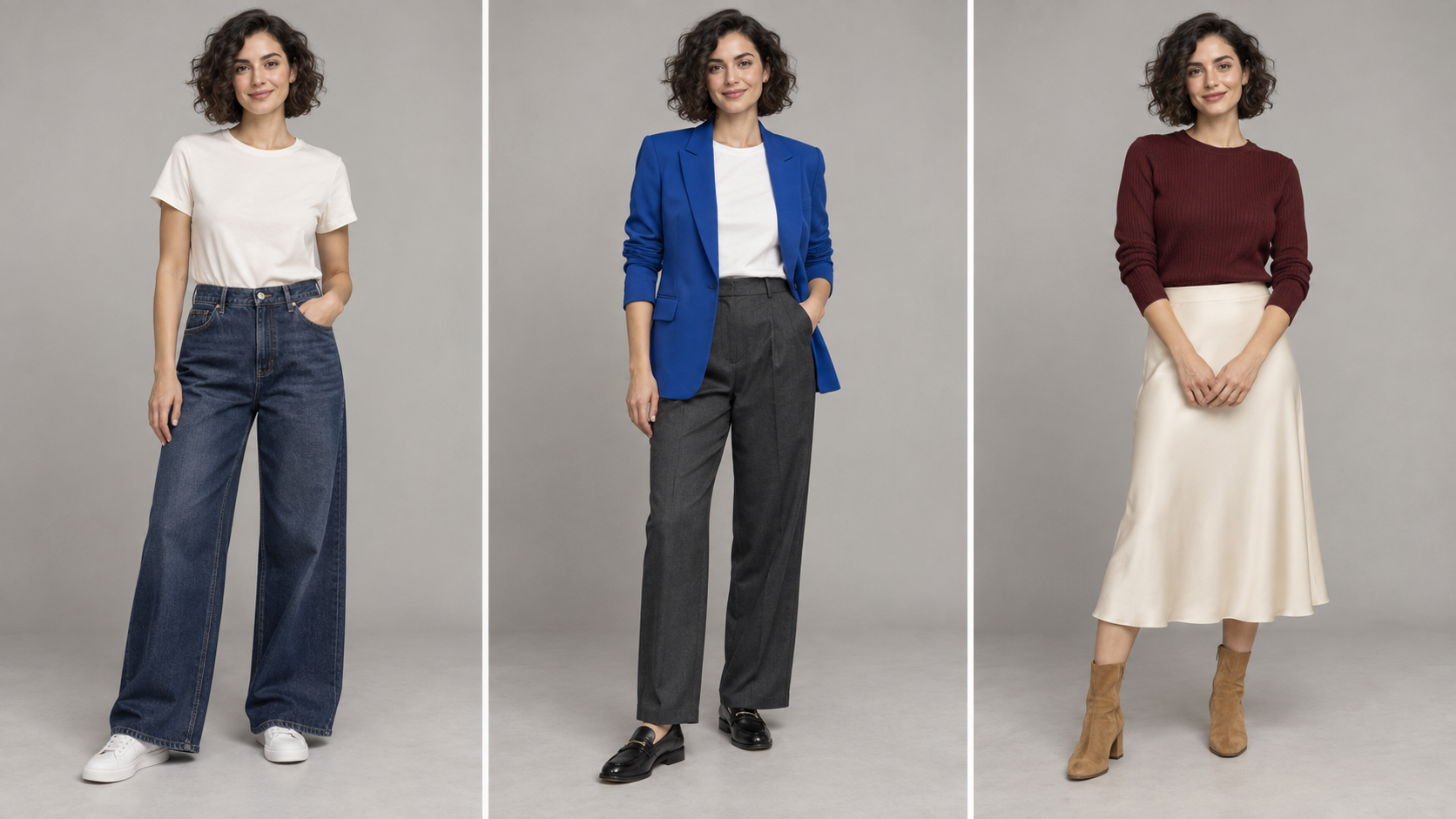
Original AI-generated styling triptych for planning a three-look reel. It is a still reference, not a completed outfit-transition video or proof of garment fit.
Download the original reference imageThe planned looks share a creator, neutral setting and consistent camera framing. Their silhouettes and colors provide the change: casual denim, a tailored cobalt layer and a burgundy evening look. Keeping the backdrop quiet makes the outfit difference easier to read on a phone.
Inspect face, hair and proportions across the panels before using the reference. Then generate or edit individual accepted shots for the actual output crop. A wide triptych should not be stretched into a vertical video; create a properly framed shot for each look.
Approve the creator before changing outfits
Choose one accepted identity reference with a clear face and enough of the body for the planned framing. Use a generated adult creator or a photo you have permission to use. Save that identity reference and keep its hair, face and proportion brief fixed across the looks.
Three-look image brief: The same approved adult fashion creator in a softly lit gray studio, full body and shoes visible, relaxed standing pose and stable camera height. Create a separate image for each look: ivory tee with indigo jeans, cobalt blazer with charcoal trousers, and burgundy knit with cream midi skirt. Preserve identity, hairstyle, background and light direction. No lettering or logos.
Compare each accepted look with the identity anchor, not only with the previous generation. Drift can accumulate gradually. For real garments, add clear front and detail references and check the collar, sleeve length, closure, hem and material texture independently of the face.
A nine-second edit plan with three readable looks
| Time | Shot | Edit instruction |
|---|---|---|
| 0 to 3 seconds | Casual look | Begin on a stable pose and one restrained movement |
| 3 to 6 seconds | Tailored look | Cut on the chosen beat with matching framing |
| 6 to 9 seconds | Evening look | Finish with a clean pose and a readable final hold |
This is an original planning example, not a duration promised by ClipCut. Adjust it to the actual track and message. A straight cut between coherent shots can look better than a complex morph that changes the face or tangles the garment. Give viewers time to recognize the look before introducing the next one.
Motion brief for each accepted look: Preserve the approved creator and outfit. One small weight shift and a relaxed turn of the shoulders, fixed camera and stable studio light. Keep the whole outfit in frame. No garment transformation within the shot, no new accessories and no sudden camera move.
Add captions and music in the edit
Use short captions that help a viewer understand the choice, such as Casual, Tailored and Evening. Add them as editable text after generating the footage. Center them in a readable safe area without covering the face or the garment feature you want to show. Check the actual platform preview because interface controls can cover the lower edge.
Choose music you are allowed to use for the intended publication and place cuts against its actual beats. Keep a clean master without baked-in platform interface graphics. Watch with the sound off to verify the looks still make sense, then with the sound on to check that the cut points feel deliberate.
Check continuity before publishing
Review the entire reel at normal speed. Look for a changing face, shoes sliding independently of the floor, sleeves merging with hands and an outfit that changes between the opening and closing frames. Pause only to investigate a problem, then judge it again in motion.
For a commercial fashion page, compare the final video with the actual product references. AI styling can communicate a creative concept, but it does not measure physical fit. Keep generated concept imagery distinct from claims about how a specific garment fits a customer.
Create your fashion creator in Clout and generate coordinated photos and videos around that identity. Use the AI lookbook workflow for the broader campaign set, then select accepted shots for the reel.