

What is a line sheet
A line sheet is a concise product document used to present an assortment to a buyer. It connects each image with the identifiers and buying information needed to discuss an order. A good sheet answers which item is shown, which options are offered, what they cost, when they can ship and how the buyer should respond. It makes the next commercial conversation easier.
NuORDER’s digital line sheet overview distinguishes buying information from a lookbook’s visual storytelling. That distinction matters when you create AI-assisted product content: an attractive campaign picture can introduce a collection, but it does not supply an accurate style code, real size run or delivery date. Those details come from your verified product and commercial records.
This guide covers the practical handoff from reviewed imagery to a static sheet. The AI lookbook workflow covers a coordinated visual story; the fashion moodboard study covers direction and reference review. Keep those assets connected, while giving the line sheet one job: helping a buyer identify and evaluate specific products.
What to include in a wholesale line sheet
| Section | Useful information | Check before sharing |
|---|---|---|
| Brand and collection | Brand, collection or season, revision | The version is clear and the intended buyer sees the correct assortment |
| Product identity | Style or SKU, product name and image | The image and identifier point to the same item |
| Variants | Actual colours and available sizes | Options exist in your product records rather than an AI-generated variation |
| Pricing | Currency, wholesale per unit and suggested retail if applicable | The price basis and buyer-specific information are correct |
| Buying conditions | MOQ, pack requirements and delivery notes | Minimums and availability are confirmed |
| Contact | Ordering instructions and appropriate terms | The buyer knows how to ask questions or place an order |
These are starting fields, not a universal checklist for every business. Your buyer may also need barcodes, dimensions, composition, regional pricing or a different ordering format. NuORDER’s brand documentation illustrates the broader product information that a wholesale catalog can carry. Our free maker is a lightweight static document tool; it does not reproduce that platform’s account management or commerce features.
Use the free line sheet template and maker
The maker above starts blank. Add your brand, collection, currency, revision, contact instructions and terms. Each product gets its own card with a style identifier, name, colours, sizes, prices, minimums, delivery and notes. You can include up to 12 items. Use separate documents for larger assortments or buyer-specific selections instead of squeezing every collection into an unreadable page.
- Enter the sheet-level information and version.
- Add an item and copy its verified product details.
- Upload a matching PNG, JPEG or WebP image.
- Review the image and choose its approval label.
- Review the missing-field list and resolve important omissions.
- Download CSV for editing or printable HTML for presentation.
- Open the HTML, inspect the layout and use your browser’s Print or Save as PDF.
Local uploads can be up to 5 MB and 16 megapixels each. The maker creates an export copy with a maximum edge of 1600 pixels; retain your original photography separately. Images are contained inside the exported cards so the layout does not intentionally crop away cuffs, handles or other identifying details. CSV records filenames and approval labels without embedding the image data.
The downloadable blank line sheet CSV template uses the same columns. It is a starting spreadsheet, not an import feature for the maker. The HTML is a standalone snapshot with embedded uploaded images. It can be opened without this page, but it is not an editable project file. Download your work before leaving: the maker does not save the tab’s draft after reload.
A line sheet example with honest missing information
Our original Cobalt Workday example uses the generated jacket concept from the fashion moodboard guide. The authored draft style code is CW-01-CONCEPT. The image depicts a cropped cobalt garment with three light front buttons and two lower patch pockets. It is a fictional design reference, not a photograph of an available product.
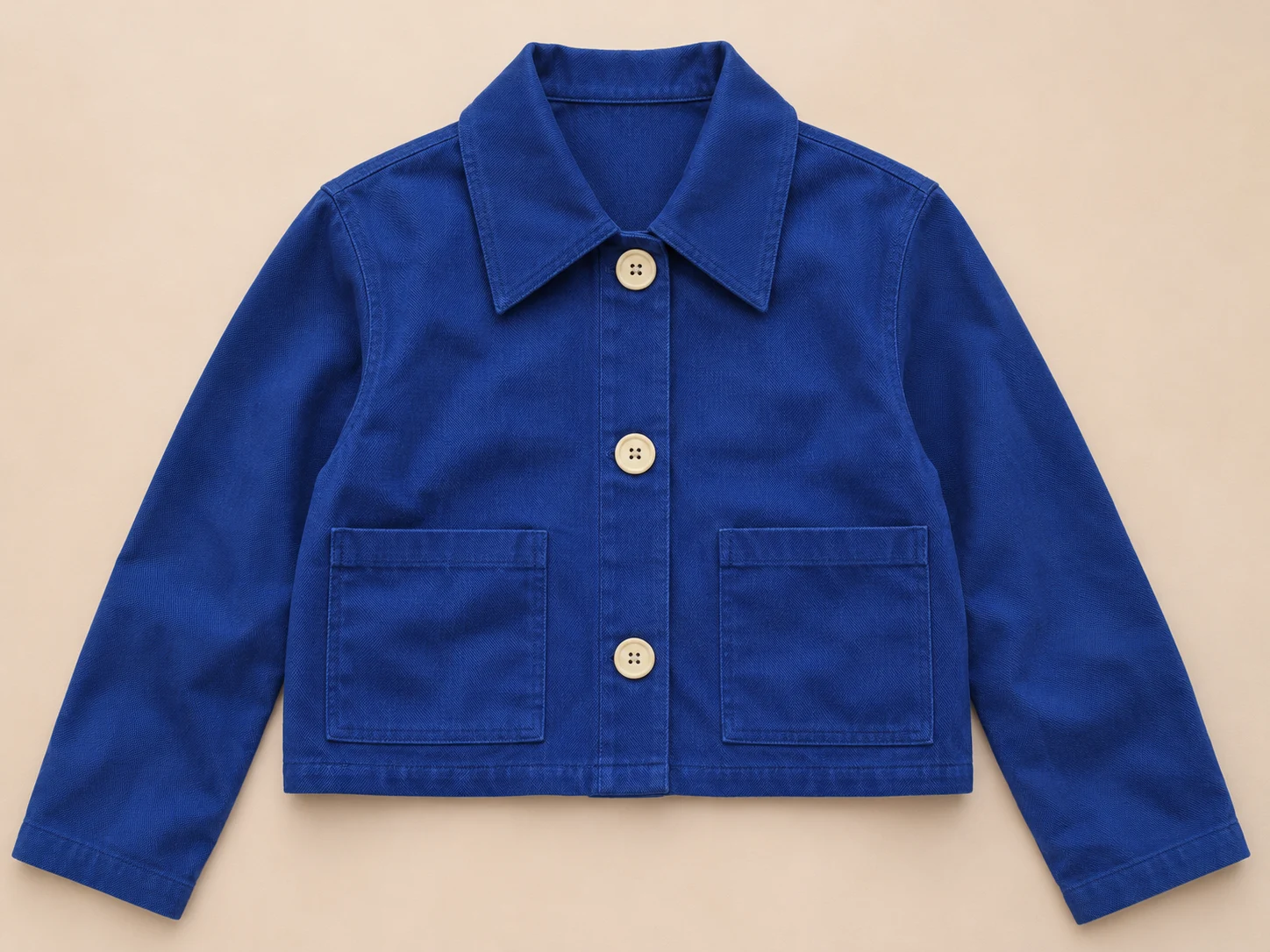
Choose Replace with fictional example to load the image and draft text. Wholesale price, suggested retail, sizes, MOQ and delivery remain empty. In the printable sheet these appear as Not set. That is intentional: inventing a plausible price would make the example look complete while hiding its most important unanswered questions. The sheet also states that the concept is not an offer to sell.
Compare the original printable example with the matching CSV. The image is embedded in the HTML, while the CSV preserves the same product text and filename. The example review notes explain which fields are missing and what evidence would be needed to fill them. No stock quantity, fabric certification, size measurement or sales result is implied.
Prepare product images without changing the product
A line sheet for clothing needs an image that identifies the garment clearly. Start from an approved product reference and retain visible construction details. Compare closure count, pocket shape, collar, hem and any actual branding. Check whether a generated candidate added a seam, changed a fastening or implied a different material. A convincing overall silhouette is only the first part of that review.
Use a clean product view for identification, then put lifestyle or campaign imagery in a separate supporting document when useful. If you use AI to explore backgrounds, styling or a product concept in Clout Image and Video, inspect the returned candidate against the real reference before approving it. This maker does not perform that review for you and does not generate, repair or verify product images.
The Image status control starts at Concept image, including after a new upload. Change it to Approved product image only after your own review. That label is printed with the item; it is an author-entered statement, not a certification from Clout. If a draft is still a concept, keep it visibly marked and avoid mixing it with confirmed products in a way that suggests it is ready to order.
Line sheet versus lookbook and catalog
| Document | Main decision | Typical content |
|---|---|---|
| Moodboard | What direction should we develop | References, palette, fixed details and open questions |
| Lookbook | How does the collection look together | Coordinated imagery and styling narrative |
| Line sheet | Which products can the buyer evaluate or order | Item-level identity, variants, prices and buying conditions |
| Connected wholesale catalog | What can this buyer access and transact now | Platform-dependent product data, permissions and commerce features |
Choose the format around the buyer’s task. You can send a lookbook alongside a line sheet, or link both from a conversation, without making either carry every piece of information. Our local HTML export cannot update documents already downloaded by a buyer. When prices or delivery change, create a new revision and send the replacement through your normal process.
Check the sheet before sending it to a buyer
Read the document as if you had never seen the product before. Can you match each image to one identifier? Are the currency and per-unit price basis explicit? Does a pack minimum describe units or packs? Do delivery notes distinguish a confirmed window from a proposed lead time? Check that the contact route belongs to the correct sales team and that the document is intended for this recipient.
The tool’s review list helps you spot blank fields and concept-image labels. It does not compare values with your database, detect outdated terms or determine what a particular buyer requires. An entry such as Ask us is present text and may still be inadequate. Review the actual exported document, including long notes and page breaks, before treating it as ready to share.
For a repeatable process, keep a verified product record, approved image set, buyer-specific draft and dated final export. When the product changes, update those sources first. Regenerating imagery or editing a caption does not automatically update a SKU, size run or commercial agreement. The useful outcome is a traceable presentation that makes the next buying conversation clear.
Download the line sheet resource pack
- Blank line sheet CSV template
- Fictional jacket example CSV
- Standalone printable example with embedded image
- Example review notes
- Source and export provenance
Use the lookbook workflow for the surrounding campaign set and the fashion moodboard workflow when the direction still needs approval. For the line sheet itself, prioritise the details a buyer can act on and preserve uncertainty wherever the product is still being developed.


