FASHN AI is a fashion e-commerce platform with an agent, an app and developer access. Its official site presents workflows for on-model imagery, product photos and short videos. The first production decision is which part of the image should change: the clothing, the person, the scene or the product presentation.
This independent guide compares the documented jobs and uses an original blue-coat exercise to make the reference choices concrete. The fictional person, garment and edited sample were generated independently, not in FASHN. You can download them with the task map and filled review to practice the brief without treating our example as a provider benchmark.
Choose the FASHN workflow by what stays fixed
| Your job | Workflow | Reference to preserve |
|---|---|---|
| Put a garment on a chosen person | Try-On | Existing person image plus product |
| Build an on-model image from a product | Product to Model | Product design |
| Change the person in an existing outfit image | Model Swap | Already pictured outfit and composition |
| Make a product-only catalog image | Packshot | Garment design without the person |
These are different reference relationships. If you need the exact person and pose from an approved campaign, starting with a product-only brief leaves a different decision to the model. If you need a product-only listing image, generating another person does not finish that job.
For broader shopping and merchant options, see our AI virtual try-on guide. Here the focus is choosing among FASHN’s named workflows, then reviewing one garment against the source files.
Prepare an existing person and the exact coat
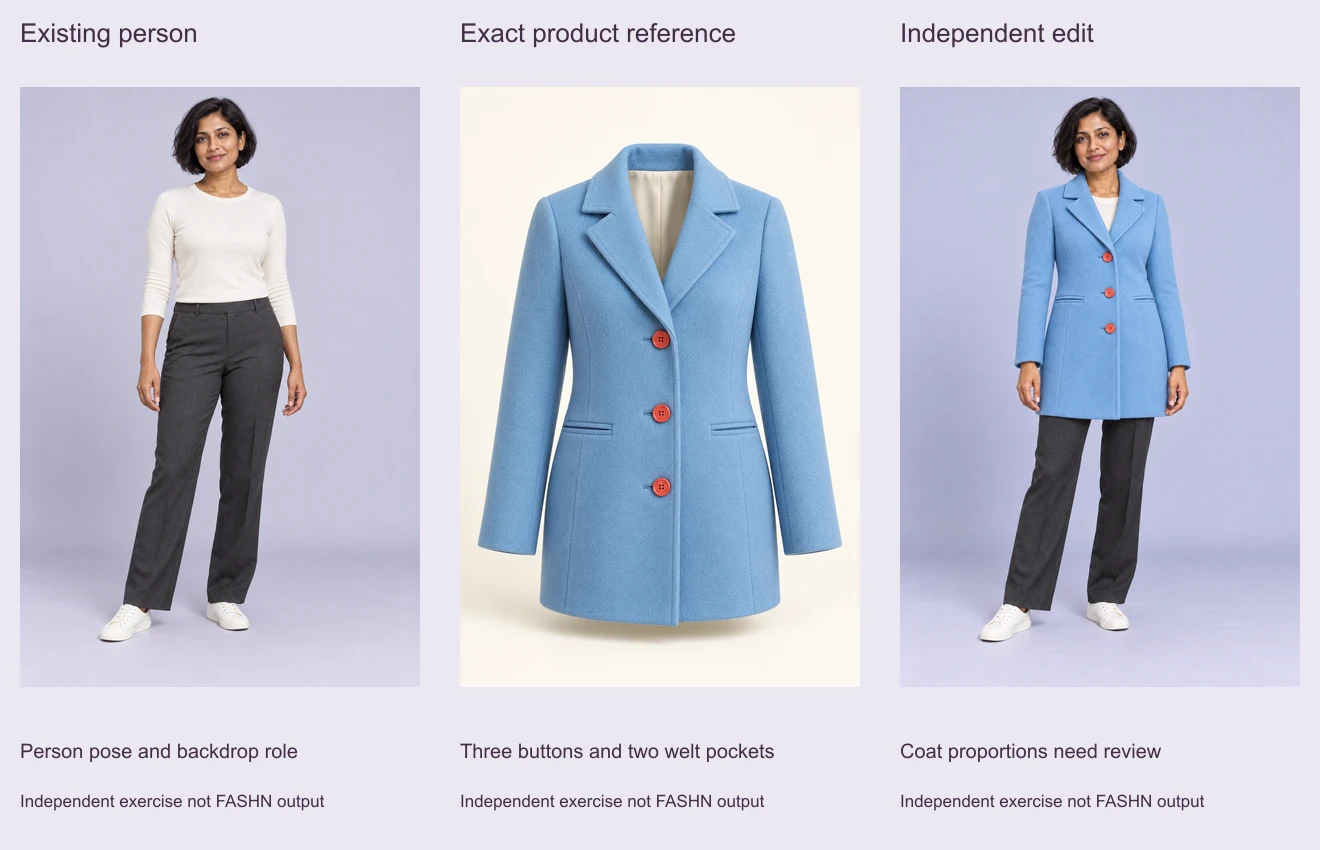
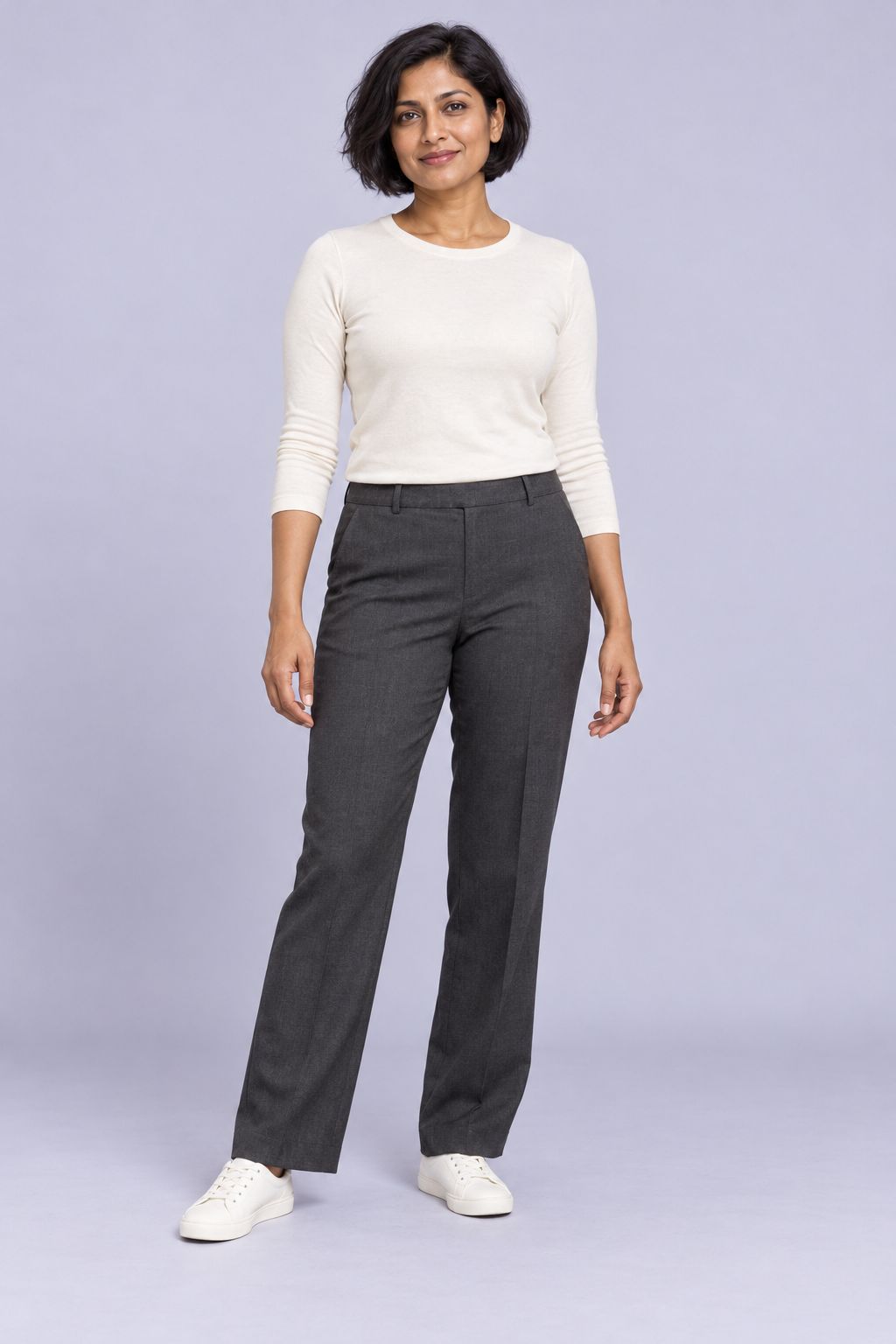
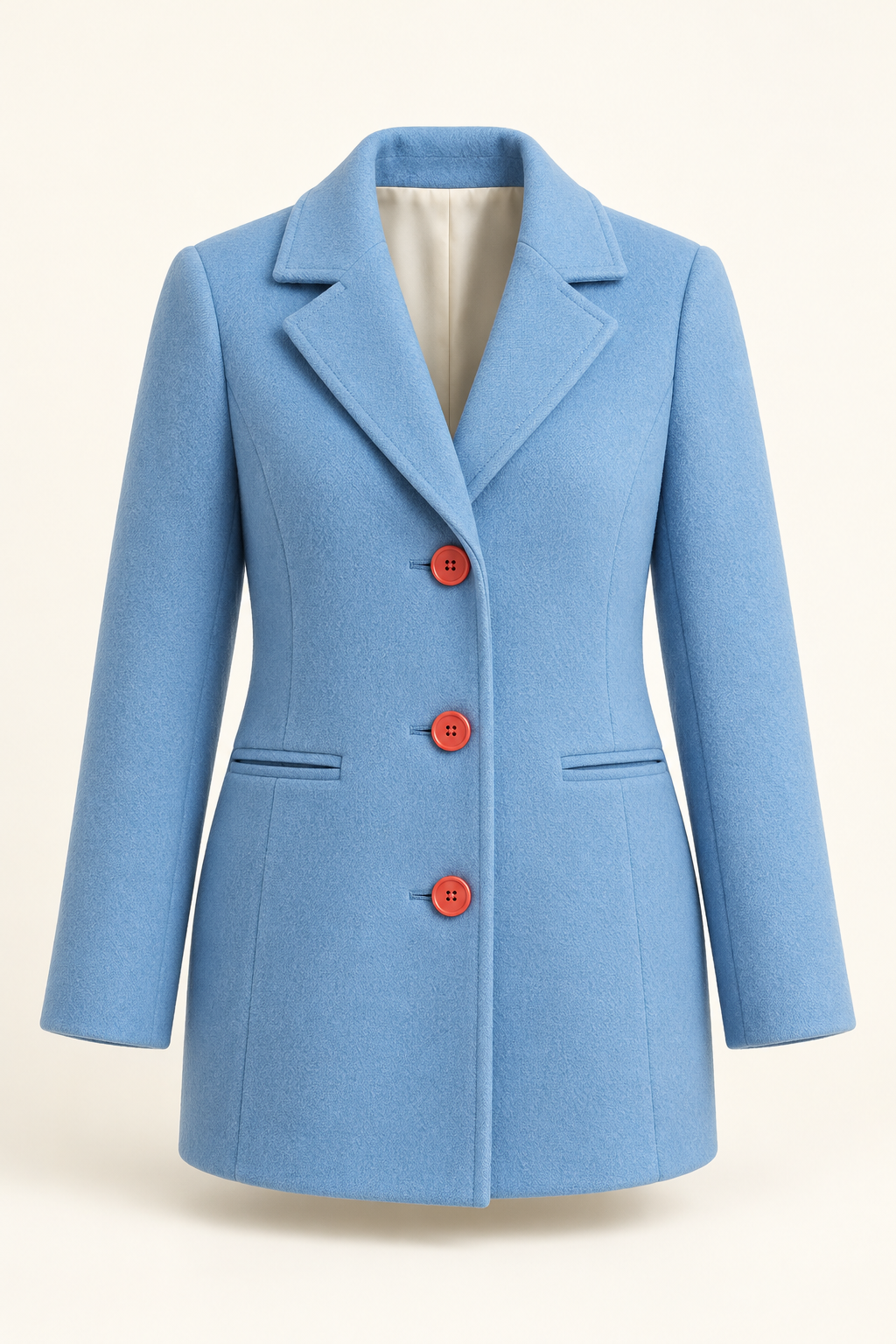
The person reference shows a fictional adult woman in an ivory top, charcoal trousers and ivory sneakers against a lavender-gray studio background. Her full body, hands and shoes are visible. The product reference shows a volumetric sky-blue coat with a notched collar, three coral buttons, two horizontal welt pockets and ivory neck lining.
The source brief asked for a short hip-length coat, while the generated reference appears longer. We use the actual pictured coat as the exercise authority and record that difference. For a real listing, use an approved photograph of the actual item rather than allowing an invented product image to redefine what customers will receive.
All three supplied study images are 1024 by 1536 pixels, an exact 2:3 ratio. That shared canvas helps compare the files without confusing a differently shaped export with a changed product. Matching dimensions do not establish matching garment proportions.
Use Try-On when the existing model photo matters
The Try-On documentation asks for a model image and product image. Its purpose is to apply the item while retaining the selected person, pose and setting. Optional instructions can guide styling, such as how a jacket is worn.
FASHN recommends clear three-quarter or full-body references with a natural pose and visible clothing. Its product guidance prefers on-model imagery, with ghost mannequin images as an alternative; flat lays may provide less depth for structured items. Our coat reference uses the ghost presentation so its collar, sleeves and body volume are visible.
Use the existing person image for identity, pose, trousers, shoes and backdrop. Apply the pictured blue coat worn closed over the ivory top. Keep its notched collar, three coral buttons, two horizontal welt pockets, long sleeves and straight hem. Preserve the complete figure and visible hands.
This is an original exercise brief, not an executed FASHN command. In your chosen account, review the actual available settings and quote, run one candidate, then compare the downloaded image with both references before expanding the set.
Use Product to Model when the product comes first
Product to Model starts with a standalone product photo and generates an on-model presentation. The current guide describes optional text, image, background and face guidance. That differs from supplying an existing full model photo as the thing to preserve.
In our task map, this branch starts from the coat reference. Write the desired person, pose and scene separately from the fixed garment details. Review those two parts separately too: an attractive new model does not settle whether the pockets, buttons and collar still describe the product.
Use this distinction when building a lookbook. If a campaign needs a recurring person across several outfits, record that requirement and the actual supported reference controls before generating all the looks. Do not assume that a shared descriptive prompt alone proves consistent identity.
Use Model Swap for an already pictured outfit
The Model Swap guide describes replacing a person’s appearance in an existing dressed image while aiming to retain the outfit, pose, lighting and background. Its starting point is an on-model image, not just an isolated garment.
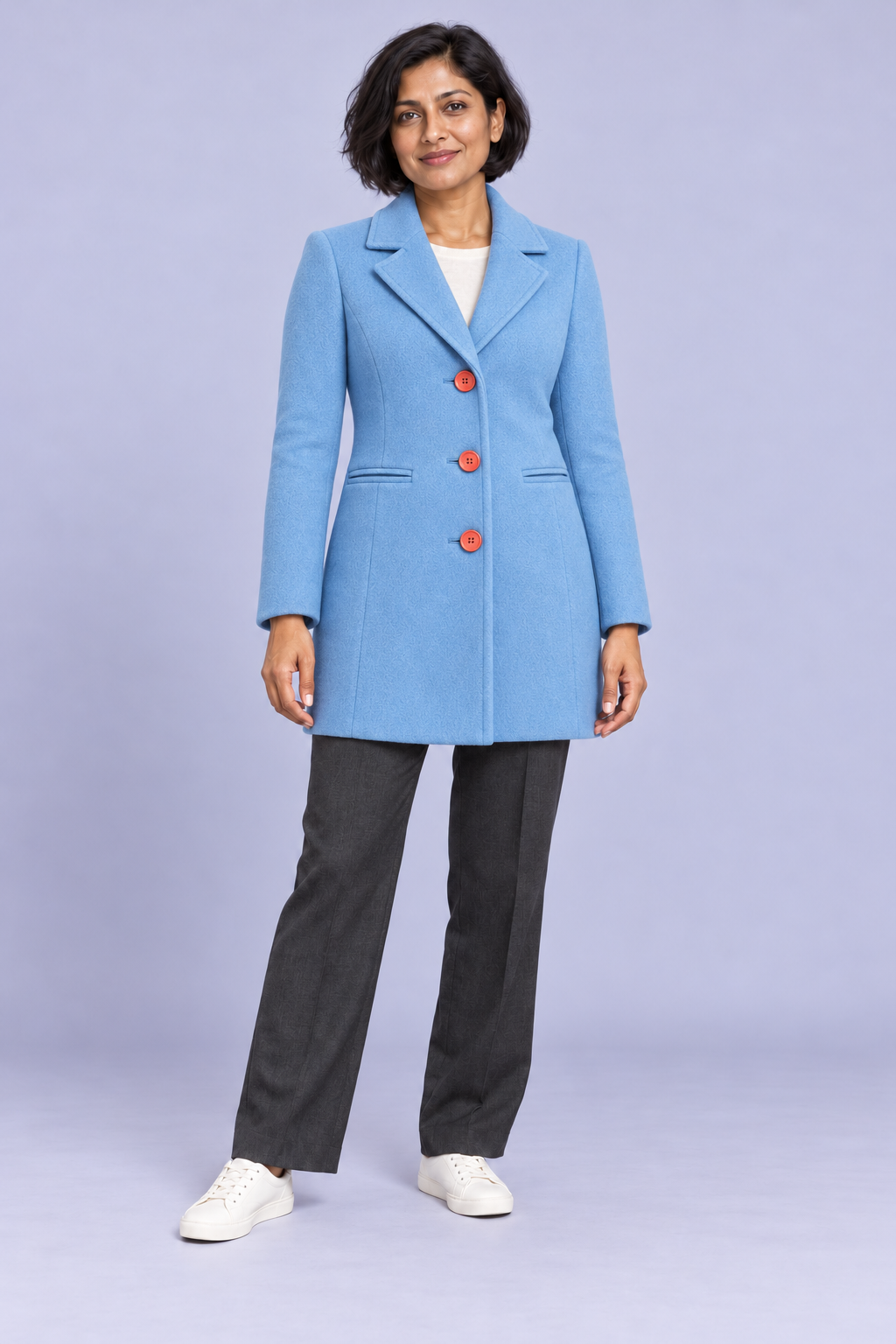
Our task map points this branch to the independent coat-on-person sample. That identifies a possible input role; no swap has been run. Keep the product-review list unchanged when evaluating any returned image. A new face should not quietly introduce a different fastening, sleeve or pocket.
When a brief also asks for a new location or pose, name those as additional changes rather than calling the whole result a simple identity swap. Separate passes make it easier to identify where an unwanted product revision entered the campaign.
Use Packshot for the product-only deliverable
The Packshot documentation describes turning product or on-model sources into a catalog-style product image. It supports presentation guidance, such as ghost mannequin or flat-lay styling. Select this branch when the deliverable should show the garment without the person.
Removing a person means reconstructing areas that were covered or shaped by the body. Inspect that reconstruction against the approved item. A clean symmetric result can still change a collar edge, pocket opening or garment contour. Retain the original product reference even when the on-model source is more visually polished.
Review the original sample detail by detail
The independent edited sample retains three visible coral buttons, two welt pockets and the blue coat’s main collar and sleeve cues. The person’s main face, pose, trousers and shoes remain recognizable. These are visual observations of this one independently generated file, not measured FASHN performance.
The coat contour and pocket proportions change between the ghost image and the worn view. The ivory top appears inside the collar, replacing the empty lining view. Fabric texture and seams also need inspection at full size. None of the images establishes actual clothing size, comfort or physical fit.
| Check | Observed in the exercise | Review decision |
|---|---|---|
| Buttons | Three coral closures remain visible | Compare count shape and spacing |
| Pockets | Two horizontal welts remain but proportions differ | Check placement and opening style |
| Collar | Notched blue collar remains with ivory top visible | Compare notch seam and neck treatment |
| Contour | Coat follows the person rather than the empty source shape | Do not infer physical measurements |
| Person | Main appearance and full-body pose cues remain | Inspect face hands and boundaries |
Download the filled review CSV and replace the observations with your own output review. Use a concrete reason for each acceptance decision. Keep product accuracy separate from whether you like the styling or backdrop.
Keep app and API choices separate
FASHN links to both its app and developer documentation. A named hosted model version, an API integration and the current agent interface are not interchangeable specifications. Record the actual surface, operation and available export controls in the campaign record.
Check current pricing and account terms at the selected service before a production batch. We have not measured authenticated access, charges, latency or output quality in FASHN. A marketing example or documented preservation goal should not replace reviewing your own returned file.
Download the editable coat workflow kit
The source kit includes the three original study images, four-task reference map, contact sheet, review records, exercise briefs and layout source. The task map is editorial planning data, not a FASHN import format.
Run bun install and bun fashn-task-source.ts . . in the extracted folder to rebuild the contact sheet and task map with pinned Sharp 0.34.5. The script reads the supplied images; it does not regenerate them, connect an account or run a FASHN operation.
For another named garment-input workflow, use the Leffa guide and original shirt review. For original creator imagery in a separate suite, explore Clout Image and Video and check its current catalog. Clout and FASHN are separate products and accounts; use the workflow that matches your own references and delivery requirements.