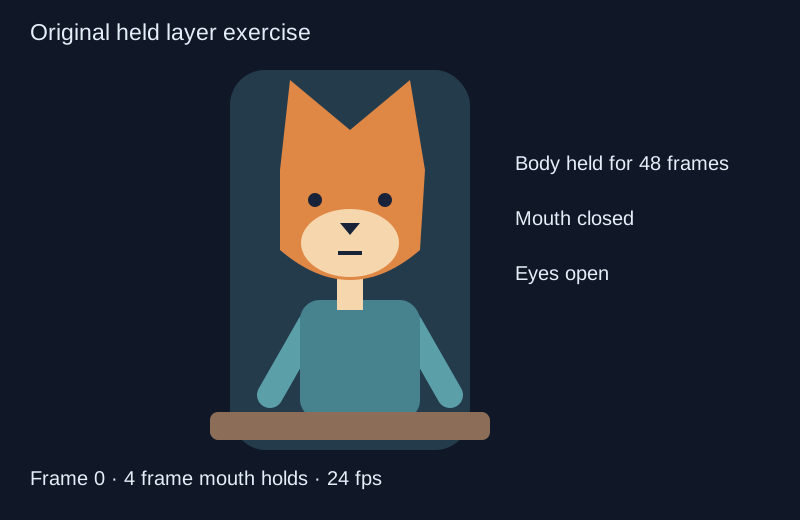
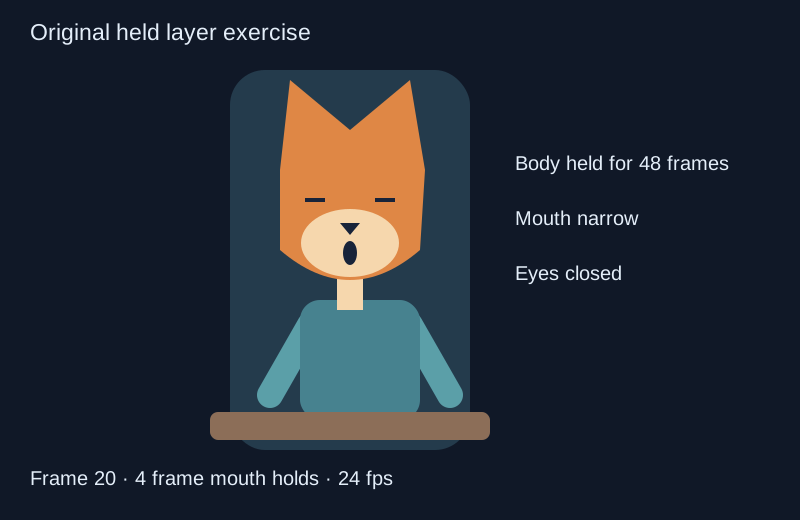
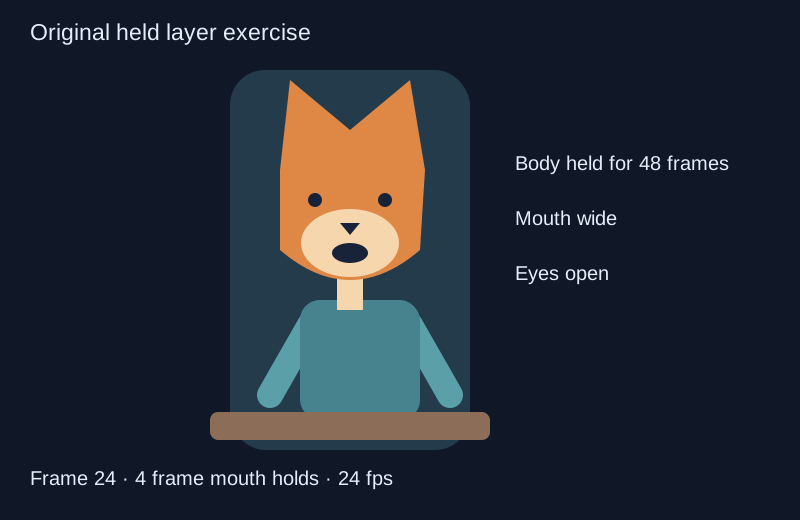
Limited animation concentrates movement in selected parts of a scene while reusing other drawings. A character can hold its body pose while the mouth changes, blink without redrawing the jacket or move across a held background. The result depends on which changes communicate the action, not simply on choosing a low frame rate. For a separate workflow, use the staging in animation lab.
The free exposure-sheet lab uses an original fox broadcaster with independent body, mouth and eye layers. It makes the reuse visible and exports a still SVG, a layer exposure CSV or a JSON plan with every frame. The mouth cycle is a graphic cadence rather than synchronized dialogue.
Plan a held layer animation in the free lab
- Choose a mouth hold of two, four, six or twelve frames. Each value controls how long a mouth drawing remains before the next drawing in the cycle.
- Choose 24 or 30 fps. The exercise always contains 48 frames, so its duration changes from two seconds to 1.6 seconds.
- Include or remove the blink. When enabled, the eye layer closes on frames 20 through 23 while the body remains unchanged.
- Play the preview or scrub to a particular frame. Moving the frame slider pauses playback so you can inspect the exact selected drawing combination.
- Pause to export. SVG contains the current composite, CSV lists the layer holds and JSON includes both the exposure runs and all 48 samples.
The body uses one drawing throughout. The mouth reuses three drawings in the sequence closed, narrow, wide, narrow. With blinking enabled, the eyes use two drawings. That makes six source drawings across the three layers, not 48 newly drawn full characters. Disabling the blink reduces the source drawing count to five.
Watch two mouth cadences over the same held body
Watch this clip and view its details
The left mouth holds each drawing for two frames; the right mouth holds for six. Both versions use the same body and the same four-frame blink. The difference is the mouth cadence. The lab defaults to four-frame holds, so changing its controls produces a different exposure sheet from either side of this reference clip.
At 24 fps, two-frame holds change the mouth drawing twelve times per second. Six-frame holds change it four times per second. Those are drawing-change rates, not the frame rate of the delivered video. Both comparison videos still display at 24 fps.
Open the dedicated limited animation exposure study, or inspect the two-frame exposure sheet and six-frame exposure sheet. They record holds with inclusive first and last frame numbers.
Read an exposure sheet without counting every hold as new artwork
A row identifies the layer, drawing, first frame, last frame and duration in frames. For example, a body row from 0 to 47 lasts 48 frames. A mouth row from 0 to 3 lasts four. The next mouth row begins at frame 4. Inclusive endpoints matter: subtracting the first frame from the last without adding one would make each run a frame too short.
Source drawings, exposure runs and composite states are different counts. Reusing the same mouth drawing later adds another exposure run but does not create new artwork. A composite state is the particular combination of body, mouth and eyes visible together. The lab calculates those counts from its actual samples instead of multiplying the number of possible layer drawings.
In the default four-frame version with a blink, six source drawings produce four observed composite states. A different hold can place the blink over different mouth drawings and change that composite count. This describes the exercise’s assets, not an estimate of how many minutes an artist would save on a production.
Use held drawings in an animation editor
Keep the body, eyes and mouth on separate layers in the destination project. Assign each drawing an unambiguous name and set the intended exposure range before adding transitions. Check layer order around the muzzle so a mouth does not appear behind the head.
Blender’s Grease Pencil architecture documentation describes layers with independent timelines that map drawings to scene frames and hold durations. The Grease Pencil Dope Sheet manual covers timing and frame manipulation. Our local lab illustrates held-layer logic with SVG; its JSON is not a native Blender import format.
Start by recreating a small number of exposure rows in your editor. Review the saved animation after import or reconstruction rather than assuming that an editable SVG automatically includes a rig or timeline. The original opening composite, blink composite and later composite retain named layer groups for inspection.
Choose the movement that carries the scene
Try an original story exercise: a kiosk broadcaster delivers a short announcement, notices a sound outside the frame and pauses. Hold the background and body during the first part. Choose the mouth shapes around the actual recorded words in your own project, then let the mouth close when the announcement stops.
The lab’s repeating mouth cycle does not perform that speech analysis. Its purpose is to separate exposure timing from drawing reuse. For a finished dialogue scene, match the mouth performance to the actual recording and review the complete result with sound. A plausible-looking loop over unrelated speech is not established lip sync.
Reserve a new body pose for a meaningful turn, reaction or change of attention. If every layer moves continuously, the viewer may struggle to identify the important action. If every layer holds through an event that needs a response, the scene may feel unresponsive. Use the story beat to decide what changes.
Use AI references without losing the held layer plan
Explore an original character or background through a supported Clout Image and Video workflow, inspect the returned design and prepare the required layers in your animation editor. Keep repeated features such as ear shape, jacket color and muzzle proportions consistent across the accepted drawings.
For connected scenes, plan coverage in AI Cinema. Generated motion can be useful to evaluate, but it does not automatically preserve the exact layer holds in this exposure sheet. Compare the saved clip with the intended action and timing rather than treating the prompt as proof that a hold was followed.
The puppet animation lab demonstrates a different reusable-character method based on rigid rotations. The onion skin guide helps compare neighboring poses. Limited animation is the broader choice about which drawings and layers need to change.
Download the original exposure source
The original layer and exposure source and asset builder reproduce the SVG composites, JSON plans, CSV sheets and PNG sequence. Use Bun with Sharp installed and choose a new output directory. The encoding note records the FFmpeg step for the silent reference MP4.
Before delivery, inspect the last frame, the loop boundary, drawing order and frame rate in the actual exported file. Keep the exposure sheet with the artwork so a later revision can identify whether the drawing or its timing changed.