FLUX 2 Flex is Black Forest Labs’ image model variant for typography-focused work with adjustable inference steps and guidance. The official model selector positions it for posters, advertisements and social graphics containing text. Start with the exact wording and delivery format, then test one control at a time.
A useful poster has two jobs: the scene should attract attention and the words should survive export. Our fictional Citrus Sunday exercise gives you an exact text contract, an unsubmitted Flex request matrix and editable square and vertical poster files. The poster exports use authored SVG text over an independently generated photograph. They demonstrate a finishing workflow rather than Flex text-rendering performance.
Choose Flex for a specific image task
Flex belongs to the FLUX 2 image family. It is separate from FLUX 3 video. Its adjustable steps and guidance make a controlled typography experiment possible, but a named capability does not guarantee every word in a generated poster will be correct. Review the downloaded output at its actual delivery size.
For multi-reference roles, use our separate FLUX 2 Pro guide. That workflow asks which input supplies a product, environment or palette. This one asks whether a short, exact headline and event details remain readable while you change a generation parameter. Avoid changing the model, prompt and layout at the same time when you want to understand a particular control.
Write the text contract before the image prompt
Our example is a fictional neighborhood market, not a real event announcement. The approved text is short enough to inspect manually:
| Role | Exact text | Review |
|---|---|---|
| Headline | CITRUS SUNDAY | Both words in order with no extra letters |
| Subtitle | A neighborhood market | Readable secondary line |
| Date | SUNDAY 15 NOVEMBER | Correct day and month wording |
| Time | 10 AM – 2 PM | Both times and separator visible |
| Location | RIVER COURT | No substituted or invented venue |
Download the editable text contract. For a real campaign, confirm the date, venue, offer and spelling before using them. A persuasive image cannot correct an inaccurate brief. Keep legal wording, prices and address details in a controlled text layer whenever the deliverable requires exact copy.
Try a focused poster prompt
Create an editorial citrus market poster on warm cream with cobalt typography and blood oranges. Exact headline “CITRUS SUNDAY”. Subtitle “A neighborhood market”. Date “SUNDAY 15 NOVEMBER”. Time “10 AM – 2 PM”. Location “RIVER COURT”. Keep all lettering readable and within margins. No extra lettering or logos.
This prompt is included in the planned requests, which have not been submitted to BFL. Quote each text string separately and describe its role. Keep the event information ahead of optional aesthetic language. If a result misses the time, record that defect rather than judging it only by how attractive the oranges look.
First inspect the words without relying on your memory of the brief. A familiar phrase can make a missing letter easy to overlook. Then inspect line breaks, contrast and margins. OCR can assist a review, but reading order, ambiguous characters and small-print legibility still need inspection of the actual export.
Change steps and guidance separately
The current direct BFL API schema for Flux2FlexInputs exposes steps from 1 to 50 and guidance from 1.5 to 10. It describes higher guidance as favoring prompt adherence at the cost of realism. That describes a control, not a guarantee that the highest setting produces your best poster.
The schema checked November 1, 2026 lists defaults of 50 steps, guidance 5 and prompt upsampling enabled. Set the values explicitly in an experiment. Different hosts may rename fields or choose different defaults, so these names apply to the direct /v1/flux-2-flex route.
| Planned candidate | Steps | Guidance | Comparison |
|---|---|---|---|
| steps-20 | 20 | 5 | Step variation |
| baseline | 35 | 5 | Shared comparison point |
| steps-50 | 50 | 5 | Step variation |
| guidance-3 | 35 | 3 | Guidance variation |
| guidance-7 | 35 | 7 | Guidance variation |
The planned request matrix fixes the prompt, 1024 by 1024 dimensions, seed 42 and prompt_upsampling: false. Turning prompt expansion off removes one explicit source of prompt variation. A fixed seed helps organize a comparison; it is not a promise of identical output across changing models, routes or service versions.
Start with one baseline after reviewing the selected service’s current charge. If it is usable, compare only the control relevant to its defect. You do not need to run all five planned candidates. Record actual processing time and charges if you run them; no speed, cost or quality result has been measured by this matrix.
Keep the image and exact lettering editable
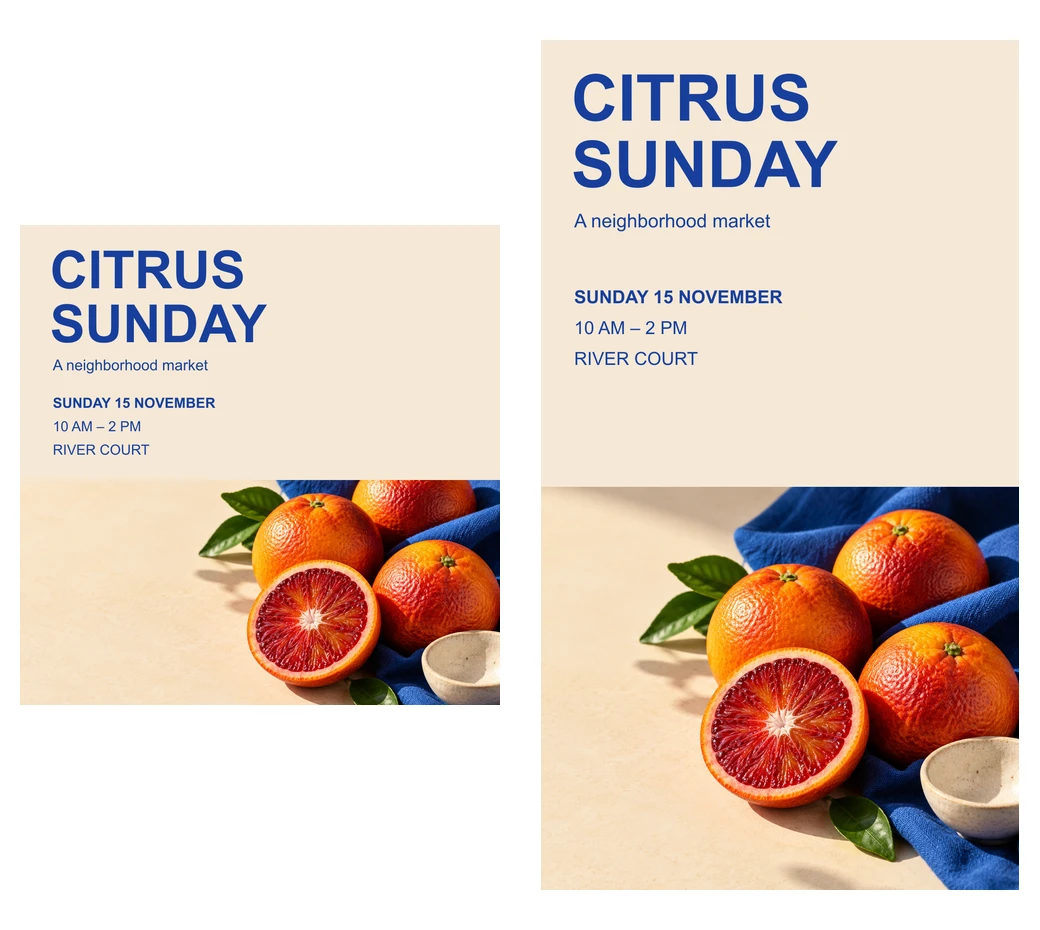
The example uses an original citrus photograph and native text layers. Open the square SVG or vertical SVG to change the wording and layout in compatible editing software. The letters remain text elements in those source files. The PNG exports flatten them for delivery.
This is useful when a generated image has the right scene but the wording needs a reliable revision. Retain the approved visual, then typeset the final headline, time and venue in your editor. Adding editable type is a separate finishing operation; it does not show that the model rendered those words correctly.
The two layouts deliberately reposition the photo below the information. They are not simple aspect-ratio crops of one flattened poster. Both preserve the same text contract while the vertical version adds spacing. The bowl is partly cropped in the photographic area; all required event information remains above it.
Review the poster at delivery size
Open the 1024 square PNG and the 1008 by 1792 vertical PNG. Check the headline first at thumbnail size, then inspect the secondary text at the intended display size. A source file containing the right string does not by itself prove the exported text is comfortably readable on a phone.
Keep text correctness separate from visual quality in the review CSV. Reject missing venue or time information even if the scene is beautiful. If exact letters are correct but contrast is weak, revise type color or placement rather than changing the photographic brief unnecessarily.
For generated candidates, record extra invented text, malformed characters, incorrect word order, unreadable small copy and margins that clip information. For the deterministic finishing example, inspect the text elements and exported layout. These are different evidence sources and should not share a fictional quality score.
Rebuild the poster exports and plan
The source archive includes the original photo, editable SVGs, PNGs, contact sheet, text contract, review CSV, unsubmitted matrix and TypeScript source. Run bun install and bun flux-flex-poster-source.ts . . to rebuild the native resources with pinned Sharp 0.34.5.
The script does not call BFL or regenerate the photograph. It prepares export files and a parameter plan you can adapt to your own account and approved budget. Retain the exact selected endpoint and inputs alongside any actual output so the next reviewer knows what was tested.
For another targeted image-edit workflow, use the Seedream Lite and Pro guide. For a separate creative suite, explore Clout Image and Video and check its current model catalog. BFL and Clout are separate services; this article does not add a Flex route to Clout or imply shared credits.